Automate Stripe Revenue Recognition for ASC 606 Compliance
Finlens connects Stripe and QuickBooks to automate revenue recognition, deferred revenue schedules, and payment reconciliation without spreadsheets.
Stripe Revenue Recognition Is Still Manual
Deferred Revenue Done Manually
Annual subscriptions hit your books as lump sums. Splitting them monthly means hours in spreadsheets every close cycle.
Stripe and QuickBooks Out of Sync
CSV exports, manual journal entries, and mismatched payouts create reconciliation errors that surface at the worst time.
ASC 606 Compliance Is Fragile
One missed refund or billing modification can break your recognition schedule and expose you to compliance risk.
Automated Stripe Revenue Recognition on Top of QuickBooks
Finlens connects Stripe and QuickBooks in real time, auto-splits subscription revenue into monthly recognized amounts, handles deferred revenue schedules, and reconciles fees and refunds without manual intervention.
Automated Stripe Revenue Recognition
Auto-calculates gross revenue, Stripe fees, refunds, and payouts. Breaks annual subscriptions into monthly recognized revenue and automates the Stripe to QuickBooks data flow that most teams still handle via CSV exports.
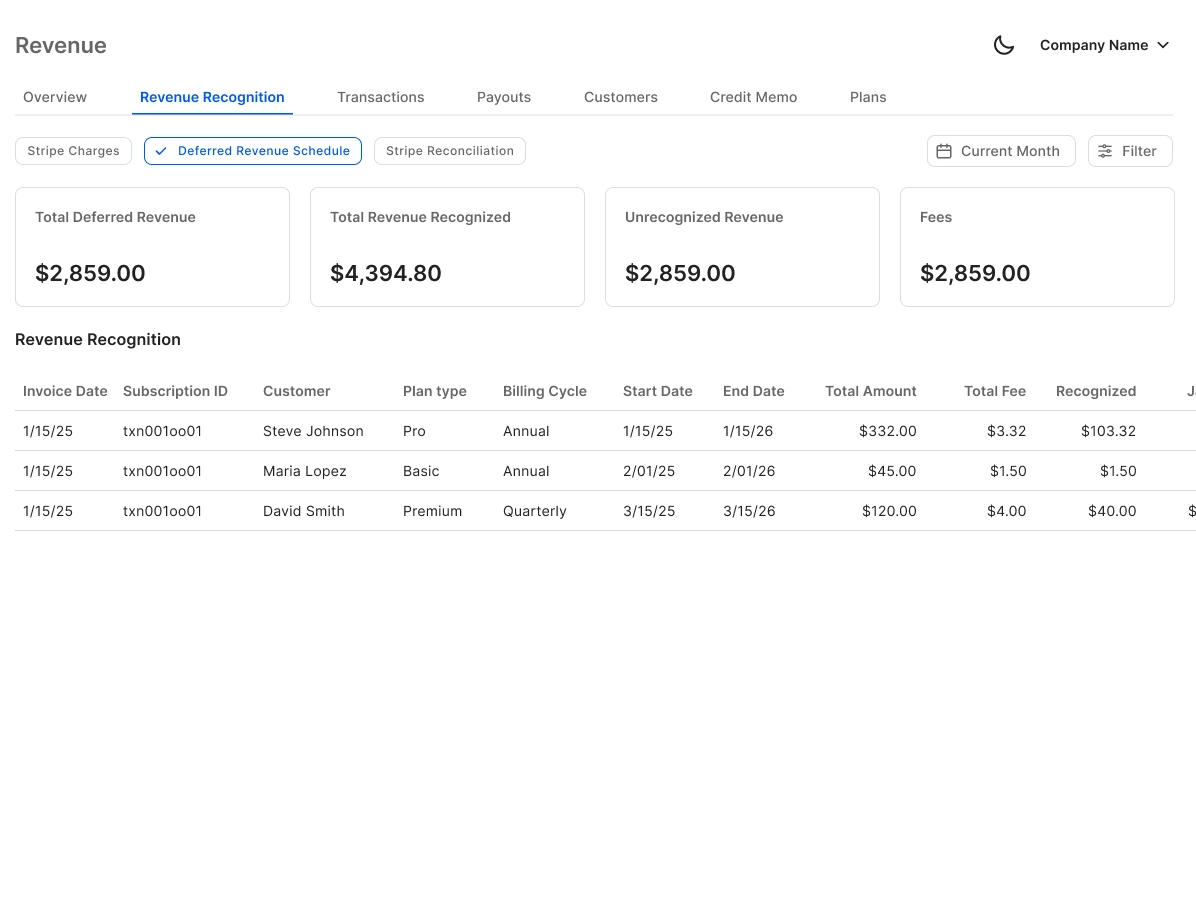
Deferred Revenue Schedule Automation
Generates accrual and deferred revenue journal entries automatically without spreadsheets. Keeps your recognition schedules GAAP-compliant and audit-ready across every billing period.
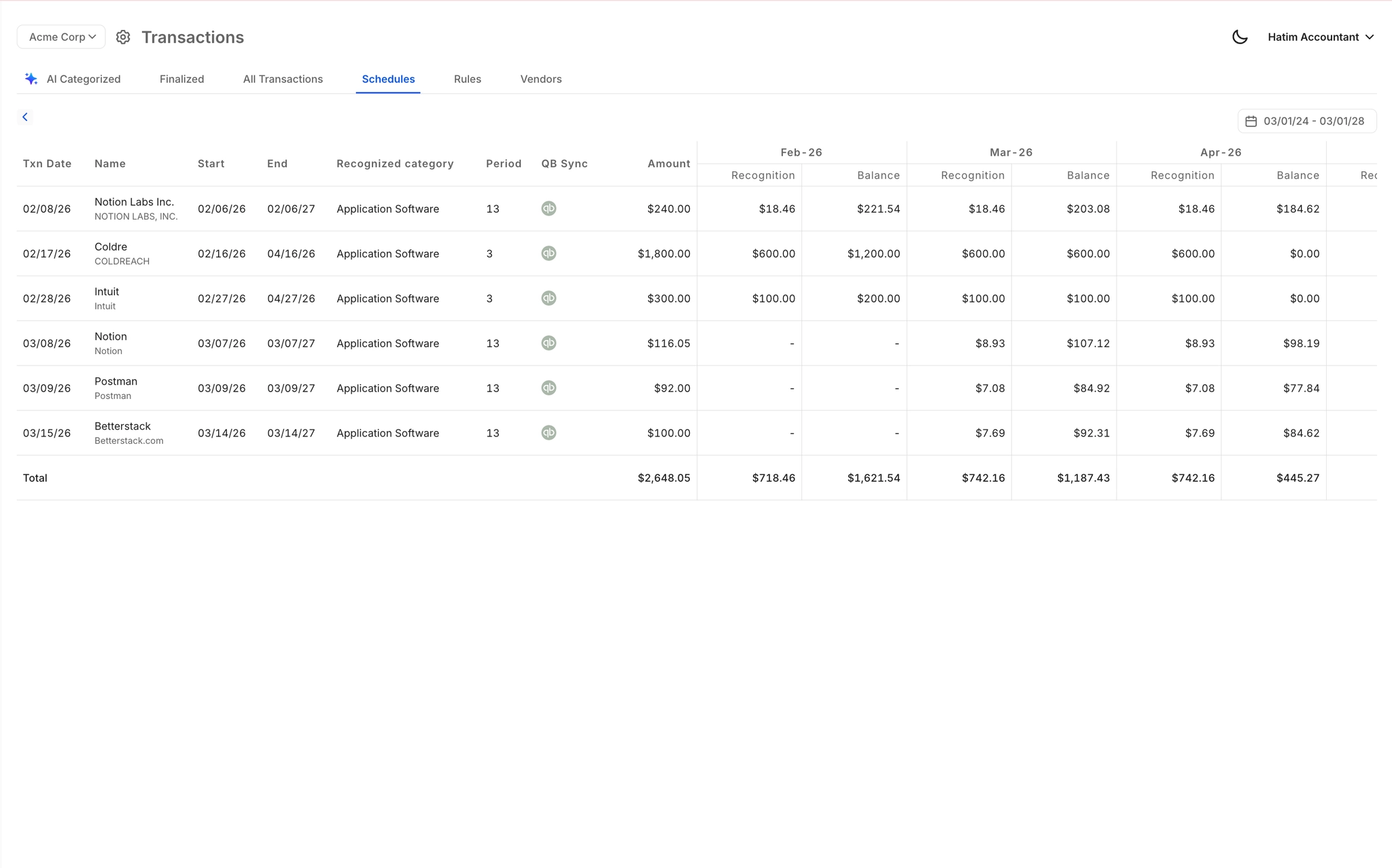
Real-Time QuickBooks Two-Way Sync
Recognized revenue, journal entries, and reconciled Stripe transactions flow back into QuickBooks in real time. No migration required. Your existing QBO setup stays intact.

Stripe Payment Reconciliation Automation
Automatically matches Stripe payouts against QuickBooks records and flags discrepancies. Eliminates the manual line-by-line reconciliation that delays your month-end close.

Faster Month-End Close Workflow
Coordinates the full close workflow across categorization, reconciliation, and revenue schedules. Finlens claims 40-70% faster close times by eliminating the manual handoffs that slow revenue-heavy teams down.

Ready to Transform Your Business?
How It Works
Get started in minutes, not months.
Connect QuickBooks
Finlens reads your GL and identifies accrual-eligible transactions
Review AI-Generated Schedules
Finlens auto-builds prepaid, deferred revenue, and amortization schedules; your team reviews and approves
Entries Post Automatically at Month-End
Journal entries sync to QuickBooks on schedule; close faster, audit trail preserved
Why Choose Finlens
Why teams choose Finlens.
Works on Top of QuickBooks
No migration. No new GL. Finlens augments the tools your team already uses — real-time two-way sync means your QuickBooks data is always current.
80%+ Less Manual Bookkeeping
AI categorization, automated reconciliation, and smart schedules replace the spreadsheet work that eats your team’s hours.
Backed by Y Combinator & Accel
Built in San Francisco by a team that understands accounting workflows. Trusted by firms and founders scaling fast.
12,000+ Bank Connections
Connect every bank account, credit card, and financial tool your clients use. Powered by Plaid.
Frequently Asked Questions
Does Finlens replace Stripe's native Revenue Recognition product?
No. Finlens is an automation layer that works alongside your existing tools. Rather than replacing Stripe's native features, Finlens automates the accounting workflow that Stripe leaves to you: generating GAAP-compliant deferred revenue schedules, splitting subscription payments into monthly recognized amounts, and syncing everything into QuickBooks in real time. It fills the gap between Stripe's payment data and your general ledger.
Does Finlens replace QuickBooks?
No. Finlens works on top of QuickBooks, not instead of it. Your existing chart of accounts, historical data, and QBO workflows remain exactly as they are. Finlens adds a real-time automation layer that pushes recognized revenue, journal entries, and reconciled Stripe transactions directly into QuickBooks without requiring any migration or setup overhaul.
How does Finlens handle deferred revenue from annual Stripe subscriptions?
When Stripe collects an annual subscription payment, Finlens automatically splits the recognized revenue into equal monthly amounts and generates the corresponding deferred revenue journal entries. Each period, the correct portion is recognized and posted to QuickBooks without manual spreadsheet intervention. This keeps your books ASC 606 compliant across every billing cycle.
How does Finlens handle Stripe refunds and fees in revenue recognition?
Finlens automatically accounts for Stripe processing fees, refunds, and disputes when calculating recognized revenue. Each payout is broken down into its components — gross revenue, fees, and refunds — and posted accurately to QuickBooks. This eliminates the manual reconciliation that typically causes discrepancies between your Stripe dashboard and your general ledger.
What types of Stripe billing arrangements does Finlens support?
Finlens is designed to handle the billing complexity that makes manual revenue recognition painful, including annual prepaid subscriptions, monthly recurring charges, and one-time payments. Deferred revenue schedules are generated automatically for multi-period arrangements. For complex multi-element contracts or professional services revenue, you can reach out to discuss your specific setup.