Automated Multi Currency Bookkeeping That Works With QuickBooks
Finlens layers AI automation on top of QuickBooks to handle multi-currency transactions, categorization, and reconciliation across all your clients.
Multi-Currency Books Are Still Manual
Hours Lost to Reconciliation
Multi-currency clients generate transaction volumes that make manual matching and reconciliation unsustainable across even a handful of accounts.
Currency Errors Compound Fast
One misapplied exchange rate or miscategorized foreign transaction cascades into reporting errors that take hours to unwind.
International Clients Strain Workflows
Onboarding a client with multi-currency bank accounts in QBO means manual COA setup and historical categorization that eats 10 to 15 hours.
Automated Multi Currency Bookkeeping on Top of QuickBooks
Finlens connects to multi-currency bank accounts, auto-categorizes every transaction using AI, and syncs journal entries back to QuickBooks in real time. No migration, no spreadsheets, no manual reconciliation.
Multi-Currency Bank Account Tracking
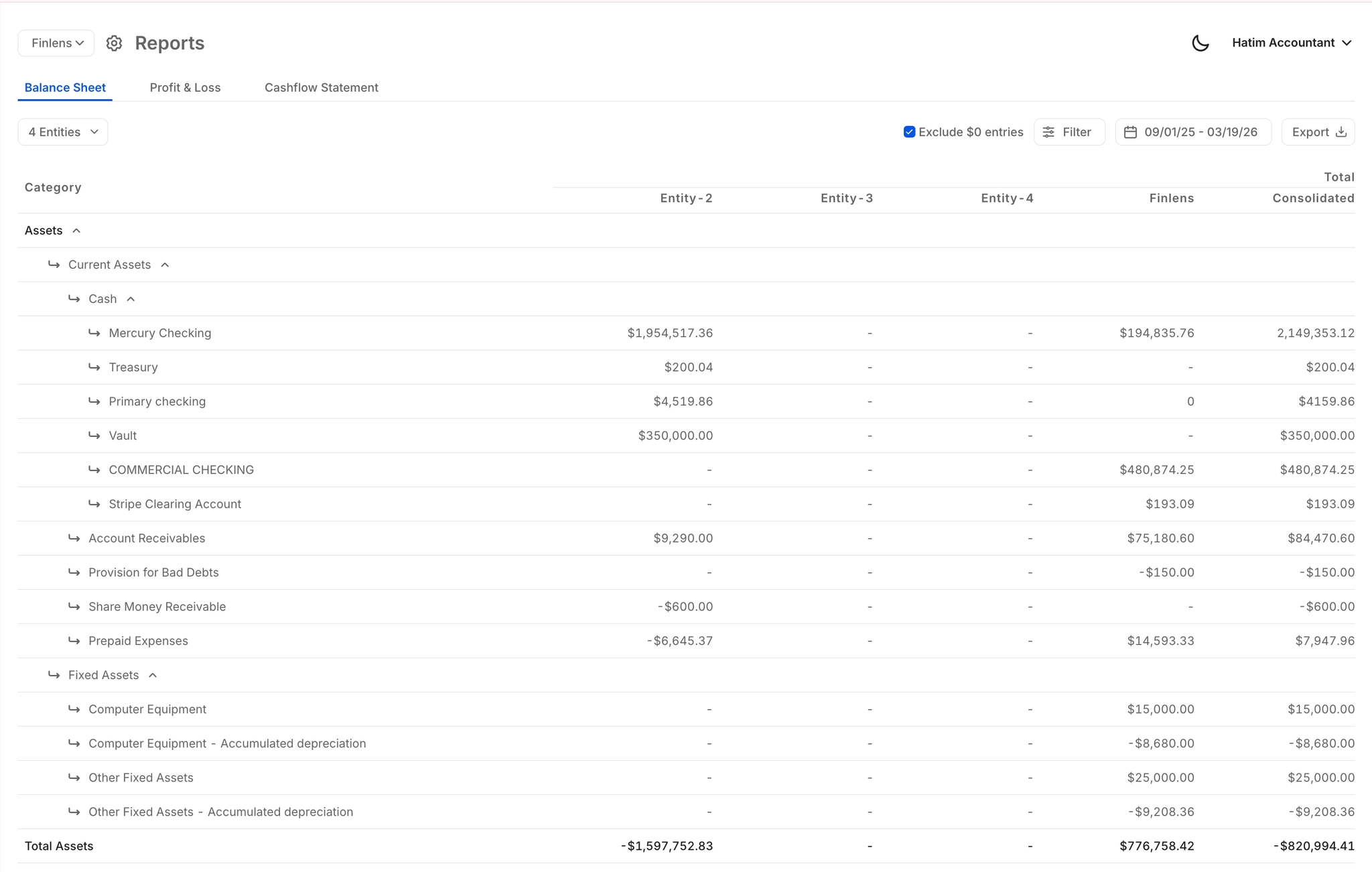
Aggregate financial data across multiple currencies and entities into a single consolidated view. Finlens tracks foreign bank accounts, applies correct accounting treatment, and keeps everything in sync with QuickBooks.
12000+ Global Bank Connections
Connect international bank accounts and credit cards across 12,000+ institutions via Plaid. Covers the breadth of financial institutions your international clients actually use, so no account goes untracked.

AI Categorization for Foreign Transactions
Every multi-currency transaction is auto-categorized at first pass using GL logic and learned patterns. Eliminates the manual tagging that bogs down high-volume international client books every month.

Automated Bank Reconciliation
Finlens automates the reconciliation workflow across all connected bank accounts, including multi-currency ones. Mismatches surface automatically so your team reviews exceptions instead of checking every line.
Real-Time QuickBooks Two-Way Sync
Categorized transactions, journal entries, and reconciled data flow back to QuickBooks in real time. International clients stay on your existing QBO setup with zero migration required.

Ready to Transform Your Business?
How It Works
Get started in minutes, not months.
Connect QuickBooks
Finlens reads your GL and identifies accrual-eligible transactions
Review AI-Generated Schedules
Finlens auto-builds prepaid, deferred revenue, and amortization schedules; your team reviews and approves
Entries Post Automatically at Month-End
Journal entries sync to QuickBooks on schedule; close faster, audit trail preserved
Why Choose Finlens
Why teams choose Finlens.
Works on Top of QuickBooks
No migration. No new GL. Finlens augments the tools your team already uses — real-time two-way sync means your QuickBooks data is always current.
80%+ Less Manual Bookkeeping
AI categorization, automated reconciliation, and smart schedules replace the spreadsheet work that eats your team’s hours.
Backed by Y Combinator & Accel
Built in San Francisco by a team that understands accounting workflows. Trusted by firms and founders scaling fast.
12,000+ Bank Connections
Connect every bank account, credit card, and financial tool your clients use. Powered by Plaid.
Frequently Asked Questions
Does Finlens replace QuickBooks for multi-currency clients?
No. Finlens works on top of QuickBooks, not instead of it. Your existing QBO setup stays intact. Finlens connects to your clients' QuickBooks accounts, automates transaction categorization and reconciliation, and posts journal entries back in real time. You get AI-powered automation without any migration or workflow disruption.
Which international bank accounts can Finlens connect to?
Finlens connects to 12,000+ financial institutions via Plaid, including international banks, credit cards, and financial tools. This covers the broad range of accounts your international clients are likely to use, making it practical for CPA firms managing clients with US LLCs and foreign bank accounts.
How does Finlens handle multi-currency transaction categorization?
Finlens uses AI trained on GL logic and historical patterns to auto-categorize transactions at first pass, including foreign currency transactions. Accountants review and approve AI suggestions with a single click before anything posts to QuickBooks, so accuracy stays in your hands while the manual work is eliminated.
How long does it take to onboard a multi-currency client?
Finlens automates the chart of accounts setup and historical transaction categorization that typically take 10 to 15 hours per new client. The automated onboarding workflow applies immediately on connection, reducing setup time significantly so your team can take on more international clients without adding headcount.
Can Finlens handle clients with multiple entities and currencies?
Yes. Finlens supports multi-entity and multi-currency setups, aggregating financial data across multiple legal entities and foreign bank accounts into a consolidated view. This is particularly useful for CPA firms managing clients with holding structures, multi-country operations, or US LLCs with international banking.