Bank Reconciliation Automation for QuickBooks Firms
Finlens automates transaction matching directly on top of QuickBooks so CPA firms can close books faster without manual reconciliation work.
Manual Reconciliation Is Killing Your Close
Hours Lost Every Month
Matching transactions manually across 50+ clients consumes dozens of hours your team could spend on higher-value work.
Errors Slip Through Undetected
Manual matching means discrepancies hide until the close is already late, creating rework, client friction, and liability exposure.
Close Gets Later Every Quarter
As client count grows, the same manual reconciliation steps compound into a month-end close that never finishes on time.
Automated Bank Reconciliation on Top of QuickBooks
Finlens layers AI-powered reconciliation directly over your existing QuickBooks setup. Transactions are auto-matched, discrepancies are flagged instantly, and nothing posts without your approval. No migration required.
Automated Bank Reconciliation
Finlens auto-matches every bank transaction against your QuickBooks records, flags discrepancies in real time, and clears matched items without manual line-by-line review. Runs continuously, not just at month-end.

AI Transaction Categorization
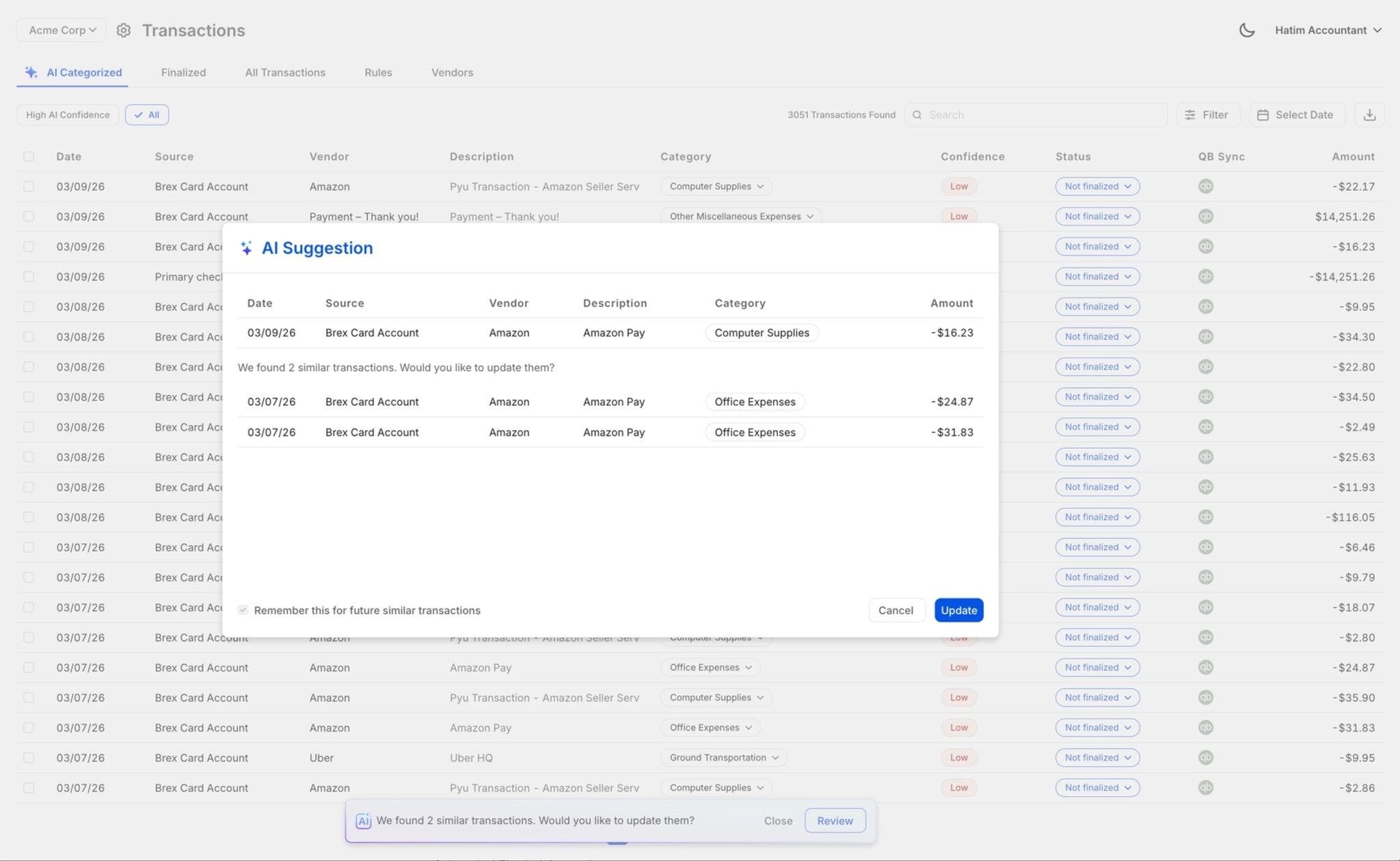
Every transaction is categorized at first pass using GL logic and patterns learned from your firm's history. Eliminates the manual tagging that precedes reconciliation and slows down close across high-volume clients.

One-Click Review and Approval
AI suggestions surface for accountant sign-off before anything posts to QuickBooks. Approve, correct, or override with one click. Your firm retains full control and liability stays where it belongs.
Month-End Close Automation
Bank reconciliation feeds directly into a coordinated close workflow. Tasks are assigned, progress is tracked, and the full close cycle runs up to 40-70% faster without spreadsheets or email threads.

Real-Time QuickBooks Two-Way Sync
Reconciled transactions, journal entries, and matched items sync back to QuickBooks in real time. No CSV exports, no duplicate entry, no risk of reconciliation results living outside your GL.

Ready to Transform Your Business?
How It Works
Get started in minutes, not months.
Connect QuickBooks
Finlens reads your GL and identifies accrual-eligible transactions
Review AI-Generated Schedules
Finlens auto-builds prepaid, deferred revenue, and amortization schedules; your team reviews and approves
Entries Post Automatically at Month-End
Journal entries sync to QuickBooks on schedule; close faster, audit trail preserved
Why Choose Finlens
Why teams choose Finlens.
Works on Top of QuickBooks
No migration. No new GL. Finlens augments the tools your team already uses — real-time two-way sync means your QuickBooks data is always current.
80%+ Less Manual Bookkeeping
AI categorization, automated reconciliation, and smart schedules replace the spreadsheet work that eats your team’s hours.
Backed by Y Combinator & Accel
Built in San Francisco by a team that understands accounting workflows. Trusted by firms and founders scaling fast.
12,000+ Bank Connections
Connect every bank account, credit card, and financial tool your clients use. Powered by Plaid.
Frequently Asked Questions
Does Finlens replace QuickBooks for bank reconciliation?
No. Finlens works on top of QuickBooks, not instead of it. Your existing QBO setup stays exactly as it is. Finlens adds an automation layer that handles transaction matching and discrepancy flagging, then syncs reconciled results back to QuickBooks in real time. There is no migration, no parallel ledger, and no disruption to your current workflows or client data.
How does automated bank reconciliation actually work in Finlens?
Finlens connects to your bank feeds and QuickBooks simultaneously. When a bank statement arrives, the system auto-matches transactions against QuickBooks records using AI-powered matching logic. Items that match cleanly are cleared automatically. Items with discrepancies are flagged for accountant review. Nothing finalizes until your team approves it, so you maintain full control over what posts to the books.
Can Finlens handle bank reconciliation across multiple clients at once?
Yes. Finlens is built specifically for CPA firms managing many clients from a single platform. You can run and monitor reconciliation across all clients from a centralized dashboard, track open items by client, and switch between accounts without logging into separate QuickBooks instances. One bookkeeper can manage workloads that previously required a larger team.
How long does it take to set up bank reconciliation automation?
Setup does not require migration or a lengthy onboarding process. Because Finlens works on top of your existing QuickBooks environment, connecting a client and activating reconciliation automation is a straightforward process. The automated chart of accounts feature also reduces new client setup time, saving firms over 3 hours per client compared to manual onboarding.
What happens when Finlens finds a reconciliation discrepancy?
Discrepancies are flagged immediately and surfaced to the responsible accountant for review. Finlens will not auto-clear an item it cannot match confidently. Your team reviews the flagged transaction, investigates the discrepancy, and resolves it directly within the platform. Every action is logged in a full audit trail so there is always a record of who reviewed what and when.