Botkeeper Alternative Built for Modern Accounting Firms
Finlens layers AI automation on top of QuickBooks so your firm can close faster, onboard clients in minutes, and scale without adding headcount.
Where Legacy Platforms Start to Strain
Month-End Close Still Manual
Coordinating close across spreadsheets, email, and QBO tabs costs your team days every month — and it doesn't scale.
Client Growth Stalls Onboarding
Setting up each new client's chart of accounts and historical transactions takes 10-15 hours your team can't get back.
No Real Multi-Client Visibility
Jumping between QuickBooks accounts to track open items and deadlines across 50 clients isn't a workflow — it's firefighting.
A Modern Accounting Co-Pilot on Top of QuickBooks
Finlens connects directly to your clients' QuickBooks, automates categorization, GAAP schedules, and month-end close, and surfaces every client in one dashboard. No migration. No ripping anything out.
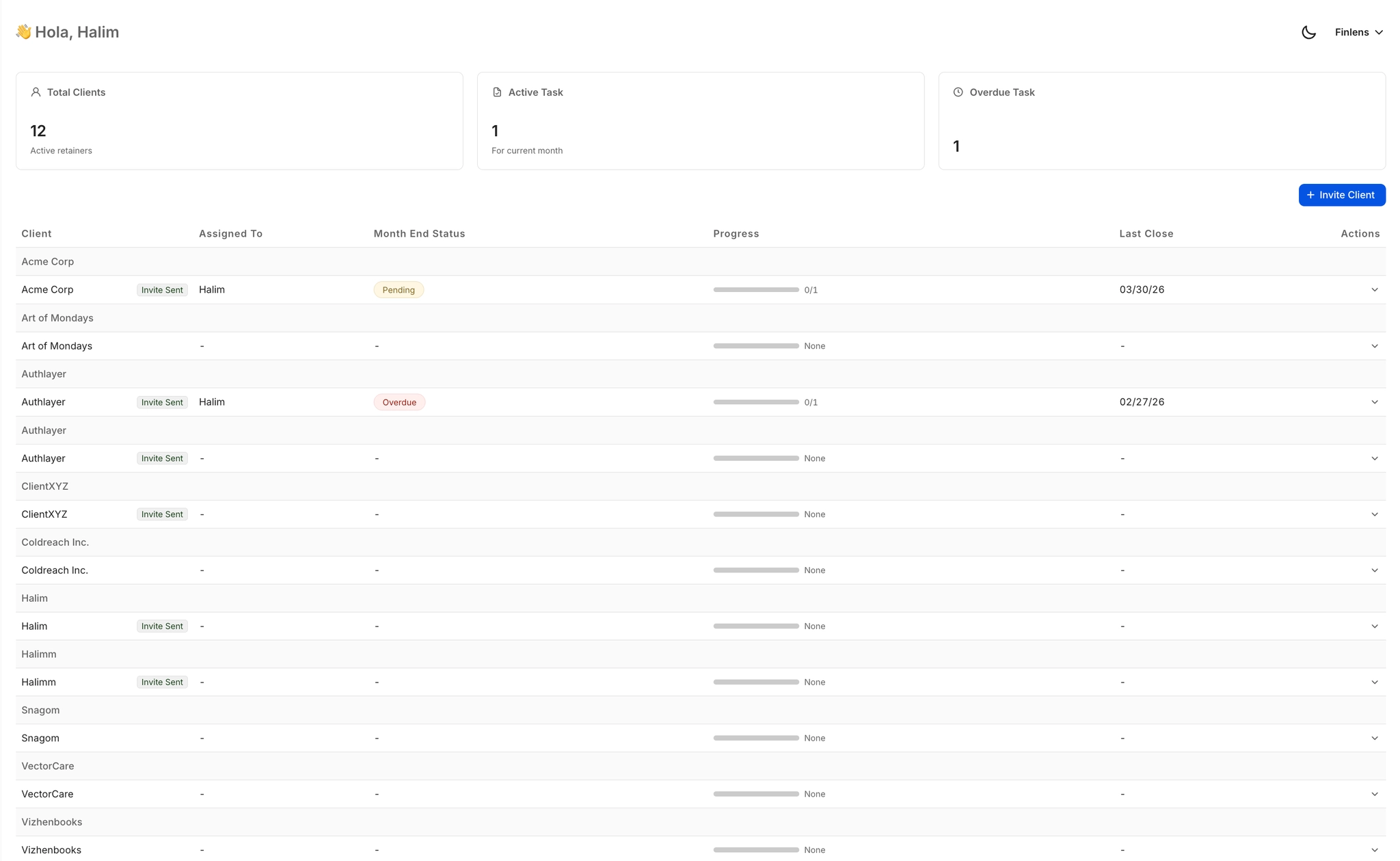
Multi-Client Dashboard for CPA Firms
See every client's open items, approval status, and close deadlines from one centralized view. Switch between clients instantly without logging into separate QuickBooks accounts — built for firms managing 50 or more clients.
Faster Month-End Close Workflow
Finlens orchestrates your entire close — task assignment, progress tracking, categorization, and reconciliation — cutting the time your team spends on monthly close by up to 70% compared to spreadsheet and email-driven workflows.

AI Categorization Across All Clients
Every transaction auto-categorized at first pass using GL logic and patterns learned from your firm's corrections. Works across all clients simultaneously so your team reviews exceptions rather than categorizing from scratch.

Real-Time QuickBooks Two-Way Sync
Finlens sits on top of your existing QuickBooks setup — no migration required. Categorized transactions, journal entries, bills, and invoices sync both ways in real time so your QBO is always current.

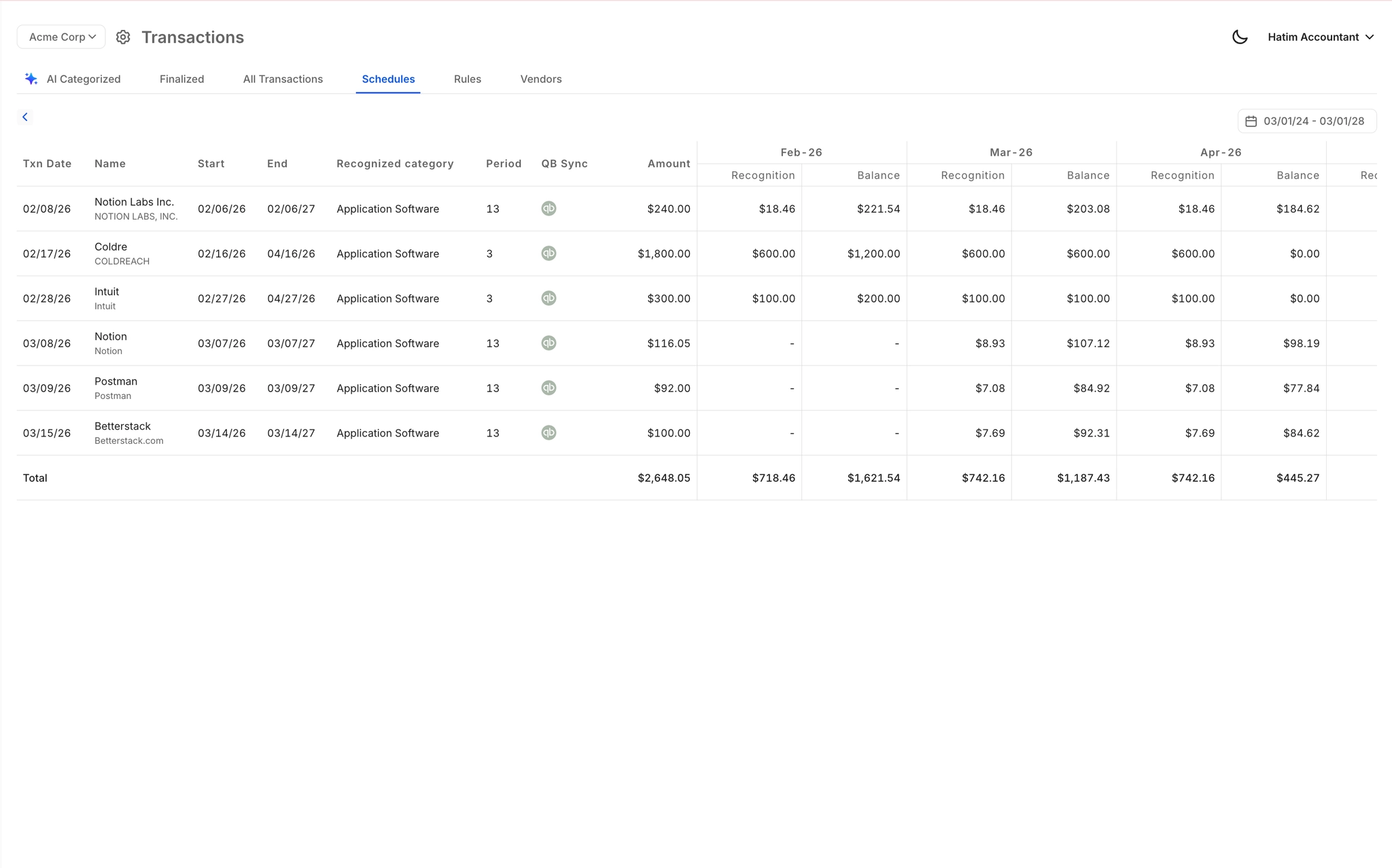
Automated Accruals and GAAP Schedules
Accruals, prepaids, and amortization schedules generated automatically — no spreadsheet maintenance. Journal entries post directly to QuickBooks so every client's books stay GAAP-compliant without your team building schedules by hand.
Ready to Transform Your Business?
How It Works
Get started in minutes, not months.
Connect QuickBooks
Finlens reads your GL and identifies accrual-eligible transactions
Review AI-Generated Schedules
Finlens auto-builds prepaid, deferred revenue, and amortization schedules; your team reviews and approves
Entries Post Automatically at Month-End
Journal entries sync to QuickBooks on schedule; close faster, audit trail preserved
Why Choose Finlens
Why teams choose Finlens.
Works on Top of QuickBooks
No migration. No new GL. Finlens augments the tools your team already uses — real-time two-way sync means your QuickBooks data is always current.
80%+ Less Manual Bookkeeping
AI categorization, automated reconciliation, and smart schedules replace the spreadsheet work that eats your team’s hours.
Backed by Y Combinator & Accel
Built in San Francisco by a team that understands accounting workflows. Trusted by firms and founders scaling fast.
12,000+ Bank Connections
Connect every bank account, credit card, and financial tool your clients use. Powered by Plaid.
Frequently Asked Questions
Does Finlens replace QuickBooks or require migration away from it?
No. Finlens works on top of QuickBooks — it augments it rather than replacing it. Your firm keeps its existing QBO setup, client history, and workflows. Finlens connects in real time, automates the manual layers on top, and syncs everything back. There is no data migration, no new GL to learn, and no disruption to your current stack.
How is Finlens different from Botkeeper as an alternative?
Finlens is built with a modern tech stack focused on QuickBooks augmentation rather than replacement. Where older platforms require adapting your workflow to fit their system, Finlens connects to your existing QuickBooks data and layers AI automation directly on top. The result is a multi-client dashboard, automated close workflows, and GAAP schedule automation that work alongside the tools your team already uses every day.
How long does it take to onboard a new client on Finlens?
Finlens automates the most time-consuming parts of client onboarding — including chart of accounts setup and historical transaction categorization. Tasks that typically take 10-15 hours per client are reduced dramatically, saving firms 3 or more hours per client on setup alone. Once connected to a client's QuickBooks, Finlens begins pulling and categorizing transactions in real time.
How much does Finlens cost for accounting firms?
For accounting firms and CPA practices, Finlens is priced at $30 per client per month with all features included. There are no tiered feature gates or add-on costs for core capabilities like the multi-client dashboard, month-end close automation, or GAAP schedule generation.
Can Finlens handle clients with Stripe or SaaS revenue models?
Yes. Finlens includes Stripe revenue recognition that automatically calculates gross revenue, fees, refunds, and payouts. Annual subscriptions are broken into monthly recognized revenue. The Stripe-to-QuickBooks data flow that most teams handle via manual CSV exports is fully automated, making Finlens well suited for firms serving SaaS or subscription-based clients.