Catch Up Bookkeeping Software That Shows Your Runway
Finlens connects to QuickBooks, auto-categorizes your backlog of transactions, and gives you a live dashboard of burn rate and runway.
Months Behind Is a Real Risk
Backlog Grows Every Day
Uncategorized transactions pile up month over month, making reconciliation harder and tax preparation a last-minute emergency.
No Visibility Into Runway
Without current books, you cannot answer basic questions about burn rate, cash flow, or how long your runway lasts.
Too Messy to Hand Off
Disorganized financials make it expensive and painful to bring in a CPA or fractional CFO to help clean things up.
AI Catch Up Bookkeeping Built on QuickBooks
Finlens layers AI transaction categorization on top of your existing QuickBooks setup, processes your historical backlog automatically, and surfaces real-time runway and burn so you are never flying blind again.
AI Categorization for Past Transactions
Finlens auto-categorizes every historical transaction at first pass using GL logic and learned patterns. Clear months of backlog without manually touching each line item in QuickBooks.

Automated Bank Reconciliation
Automatically matches bank statement records against QuickBooks entries, flags discrepancies, and clears matched items. Eliminates the most tedious step in catching up your books.

12000+ Bank and Card Connections
Connect every bank account, credit card, and financial tool through 1100+ integrations and 12,000+ institution connections via Plaid. All your transaction history pulls in automatically.
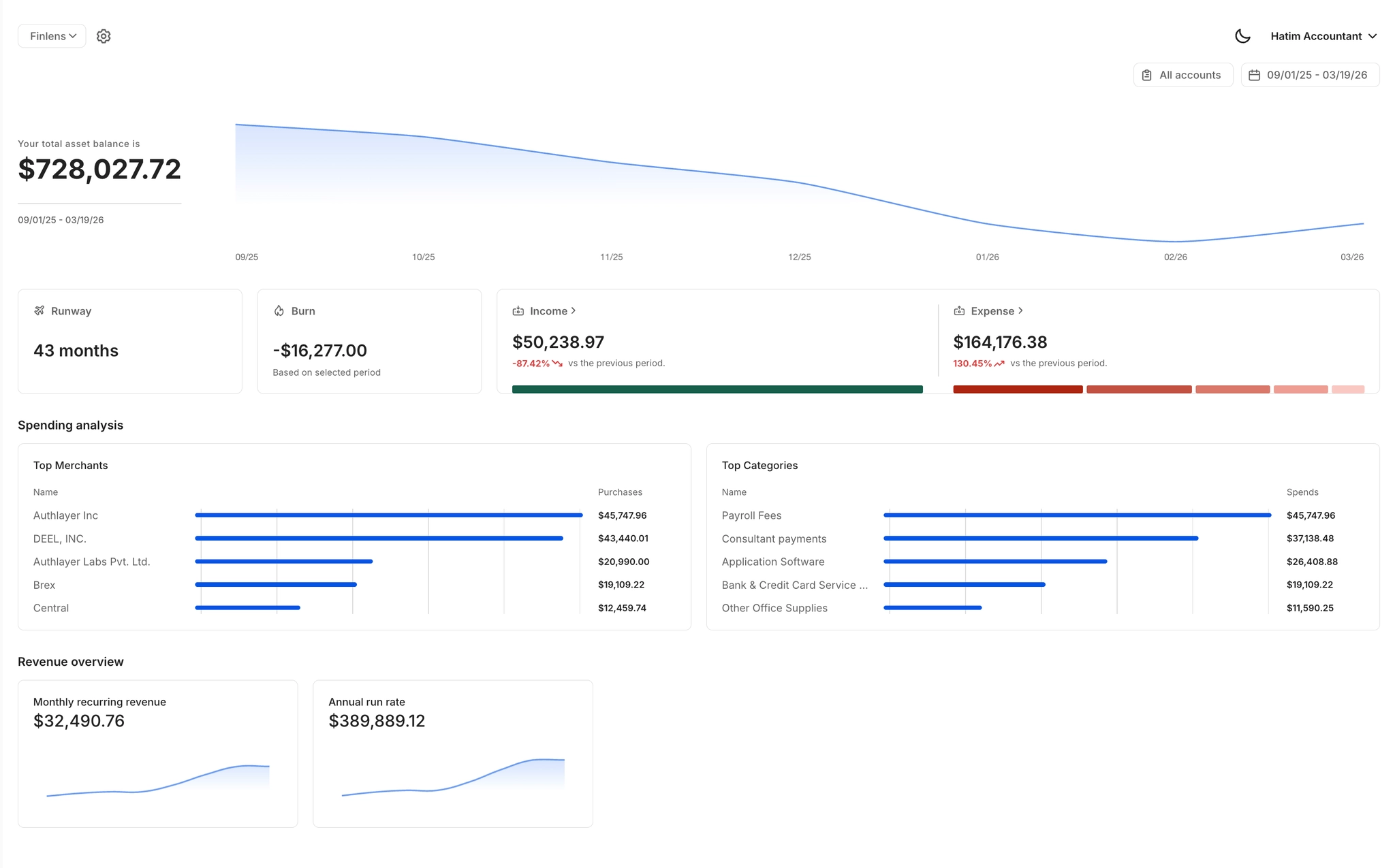
Real-Time Runway and Burn Dashboard
Once your books are current, Finlens gives you a live view of burn rate, runway, MRR, ARR, and cash flow — the numbers that matter most for a founder running a startup.
QuickBooks Two-Way Sync
Finlens works on top of QuickBooks with real-time bidirectional sync. No migration, no new ledger to learn. Your catch up work flows directly into the QuickBooks you already use.

Ready to Transform Your Business?
How It Works
Get started in minutes, not months.
Connect QuickBooks
Finlens reads your GL and identifies accrual-eligible transactions
Review AI-Generated Schedules
Finlens auto-builds prepaid, deferred revenue, and amortization schedules; your team reviews and approves
Entries Post Automatically at Month-End
Journal entries sync to QuickBooks on schedule; close faster, audit trail preserved
Why Choose Finlens
Why teams choose Finlens.
Works on Top of QuickBooks
No migration. No new GL. Finlens augments the tools your team already uses — real-time two-way sync means your QuickBooks data is always current.
80%+ Less Manual Bookkeeping
AI categorization, automated reconciliation, and smart schedules replace the spreadsheet work that eats your team’s hours.
Backed by Y Combinator & Accel
Built in San Francisco by a team that understands accounting workflows. Trusted by firms and founders scaling fast.
12,000+ Bank Connections
Connect every bank account, credit card, and financial tool your clients use. Powered by Plaid.
Frequently Asked Questions
Does Finlens replace QuickBooks?
No. Finlens works on top of QuickBooks, not instead of it. It syncs with your existing QuickBooks account in real time so all categorizations, journal entries, and reconciliations flow directly into the books you already maintain. There is no migration, no new ledger to set up, and no disruption to your current workflow. You keep QuickBooks and Finlens handles the automation layer on top of it.
How does Finlens categorize historical transactions automatically?
Finlens uses AI trained on GL logic and historical transaction patterns to auto-categorize every transaction at first pass. When you connect your bank accounts and QuickBooks, it processes your existing transaction history and applies categories based on payee names, amounts, and past behavior. You can review and override any categorization before it posts to QuickBooks, so the final books remain fully under your control.
What if my books are several months or more behind?
Finlens is built for exactly that scenario. Once you connect your bank accounts and QuickBooks, the AI processes your full transaction backlog regardless of how far back it goes. Transactions are categorized automatically, flagged discrepancies are surfaced for your review, and your books are brought current without requiring you to manually sort through each line item.
Do I need accounting knowledge to use Finlens?
No deep accounting background is required. Finlens presents your financials in plain-language dashboards showing burn rate, runway, and cash flow rather than raw accounting jargon. The AI handles categorization automatically, and any items needing review are presented with clear context. That said, Finlens also works natively with CPAs and fractional CFOs if you want professional oversight alongside the software.
What bank accounts and financial tools does Finlens connect to?
Finlens connects to 12,000+ financial institutions through Plaid, including major banks, credit cards, Ramp, Stripe, and other financial tools. It also offers 1100+ integrations. Most founders can connect all of their accounts in a single onboarding session, which means your full transaction history is available for catch up categorization immediately.