Historical Transaction Categorization Automated for QuickBooks
Finlens' AI learns your GL logic to retroactively categorize transaction backlogs on top of QuickBooks. No migration, no manual cleanup.
Backlogs Break Books and Deadlines
Backlog Cleanup Takes Forever
Sorting months of uncategorized transactions by hand eats 10 or more hours per client engagement.
Miscategorized History Taints Reports
One wrong GL assignment across historical data cascades into inaccurate P&L, cash flow, and audit exposure.
Investors Won't Wait for Clean Books
Founders facing fundraising cannot present messy historical records to VCs without losing credibility instantly.
AI That Cleans Historical Data Inside QuickBooks
Finlens layers AI categorization directly on top of QuickBooks, learning your GL logic and past patterns to retroactively clean and categorize historical transactions without spreadsheets or migration.
Historical Transaction Categorization at Scale
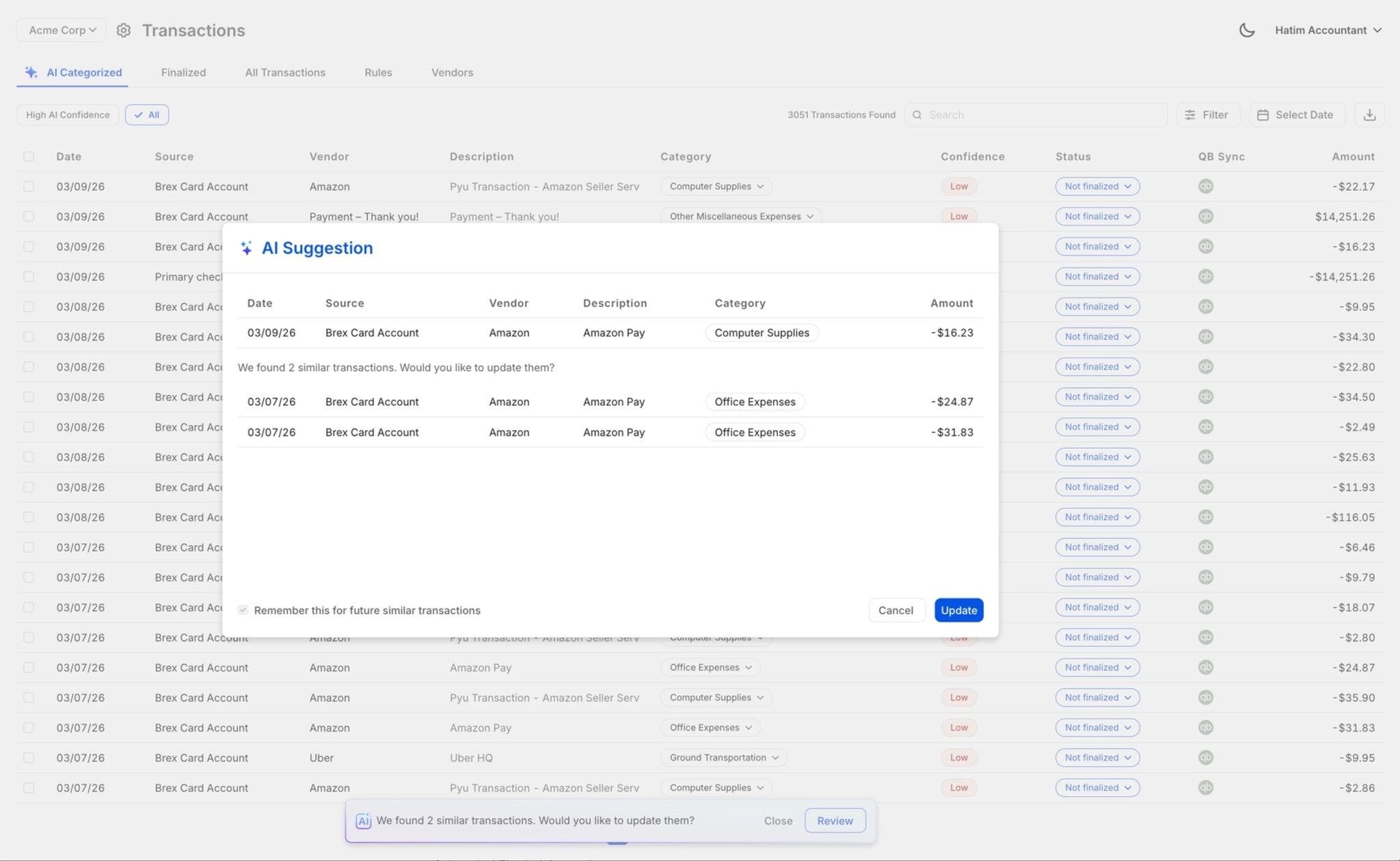
Finlens applies GL logic and learned patterns to retroactively categorize every transaction in your backlog at first pass. Handles high-volume historical data without manual line-by-line review.

Review and Approve Categorized History
Every AI-suggested historical category is surfaced for accountant review before posting to QuickBooks. One-click approve, correct, or override keeps CPAs in full control without sacrificing speed.
Historical Data Synced Back to QuickBooks
Categorized historical transactions sync directly back to QuickBooks in real time. No CSV exports, no manual imports, no disruption to existing workflows or client QBO setups.

Instant Chart of Accounts for Cleanup Clients
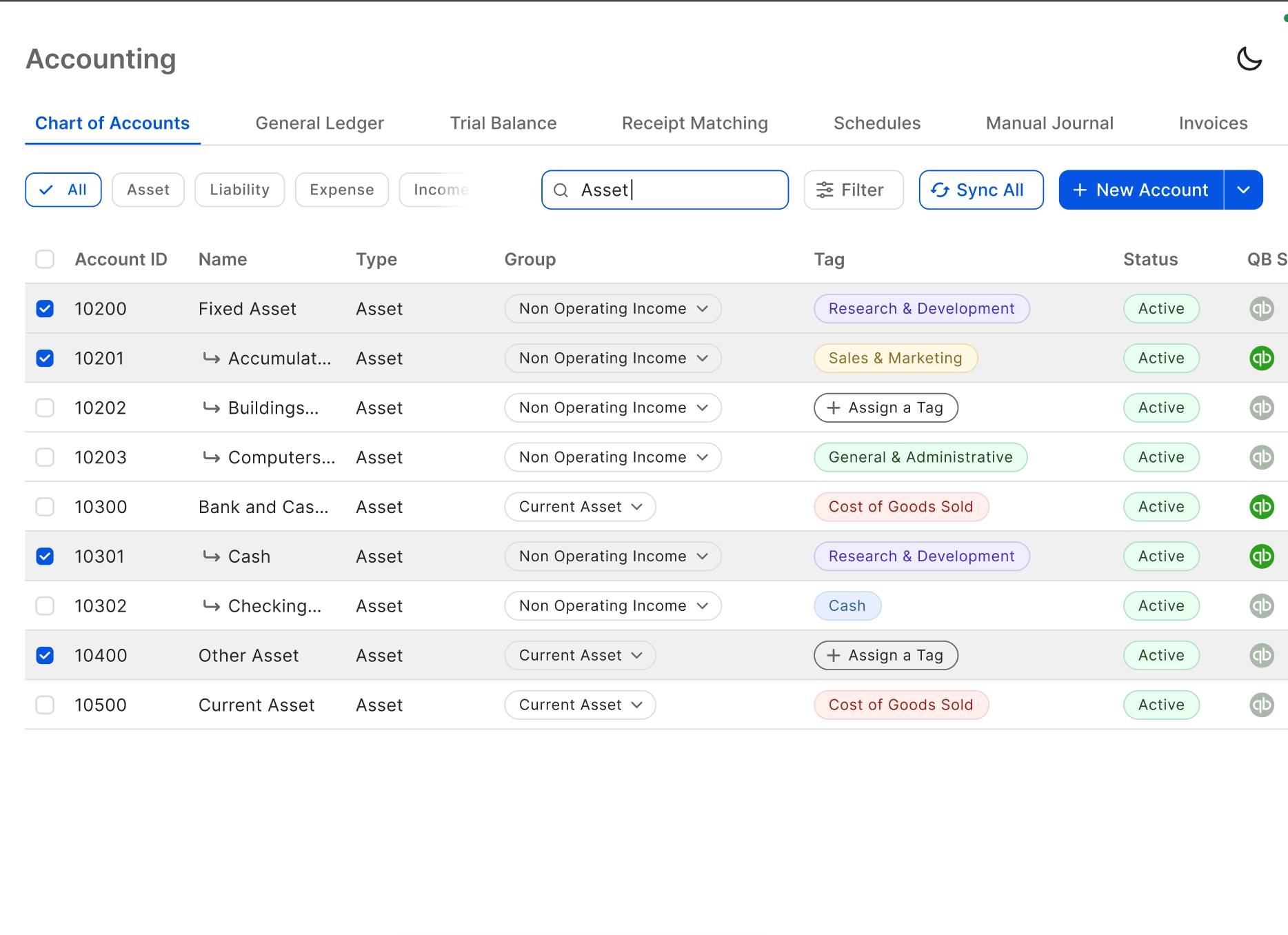
Apply a complete, structured chart of accounts to messy or incomplete client books instantly. Eliminates the 3-plus hours typically spent on manual COA setup before historical categorization can begin.
Reconcile Historical Records Automatically
Automatically match historical bank statement lines against QuickBooks records, flagging discrepancies across past periods. Surfaces gaps in the backlog that manual review would miss.

Ready to Transform Your Business?
How It Works
Get started in minutes, not months.
Connect QuickBooks
Finlens reads your GL and identifies accrual-eligible transactions
Review AI-Generated Schedules
Finlens auto-builds prepaid, deferred revenue, and amortization schedules; your team reviews and approves
Entries Post Automatically at Month-End
Journal entries sync to QuickBooks on schedule; close faster, audit trail preserved
Why Choose Finlens
Why teams choose Finlens.
Works on Top of QuickBooks
No migration. No new GL. Finlens augments the tools your team already uses — real-time two-way sync means your QuickBooks data is always current.
80%+ Less Manual Bookkeeping
AI categorization, automated reconciliation, and smart schedules replace the spreadsheet work that eats your team’s hours.
Backed by Y Combinator & Accel
Built in San Francisco by a team that understands accounting workflows. Trusted by firms and founders scaling fast.
12,000+ Bank Connections
Connect every bank account, credit card, and financial tool your clients use. Powered by Plaid.
Frequently Asked Questions
Does Finlens replace QuickBooks for historical transaction work?
No. Finlens works on top of QuickBooks, not instead of it. Your existing QuickBooks file, chart of accounts, and client data stay exactly where they are. Finlens adds an AI automation layer that categorizes historical transactions and syncs the results back to QBO in real time. There is no migration and no disruption to your current setup.
How does AI historical transaction categorization actually work?
Finlens analyzes your existing GL logic, past categorization patterns, and transaction attributes to automatically assign categories to uncategorized historical records. It flags low-confidence categorizations for human review before anything is posted to QuickBooks. The system learns from accountant corrections, improving accuracy the longer it is used on a given client's books.
Can Finlens handle large backlogs of historical transactions?
Yes. Finlens is built to process high-volume transaction backlogs across multiple past periods. Rather than forcing accountants to review every single line item manually, it categorizes the bulk of transactions at first pass and surfaces only the exceptions that need human judgment. This significantly reduces the time required to clean up historical records.
What happens if the AI miscategorizes a historical transaction?
Every AI-suggested categorization goes through a human-in-the-loop review step before it posts to QuickBooks. Accountants can approve, correct, or override any suggestion with one click. Nothing changes in your QuickBooks file without explicit sign-off. Corrections are also used to refine future categorization behavior for that client.
How long does it take to start categorizing historical transactions?
Finlens connects to your existing QuickBooks account and begins analyzing historical data without a lengthy onboarding process. The automated chart of accounts setup, which saves 3 or more hours of manual configuration per client, means categorization can begin quickly after connecting. You do not need to rebuild your COA or restructure your client files first.