Multi Currency Accounting Software Powered by AI
Finlens tracks multi-currency accounts in real time, layered on top of QuickBooks. No migration, no manual FX entry, no compliance guesswork.
Multi-Currency Books Are Still Manual
FX Errors Corrupt Your Books
Manual currency entries introduce errors that compound month over month, creating compliance risk and audit exposure.
QuickBooks Migration Is Not an Option
Switching GL systems to get multi-currency support means months of painful migration and disrupted workflows your team cannot afford.
Global Visibility Arrives Too Late
Stale reports mean founders and controllers can't answer investor or board questions about international cash positions in real time.
Multi-Currency Tracking That Augments QuickBooks
Finlens layers AI-powered multi-currency bank account tracking and automated categorization on top of your existing QuickBooks setup. Real-time sync, no migration, and GAAP-compliant reporting across every currency you operate in.
Multi-Currency Bank Account Tracking
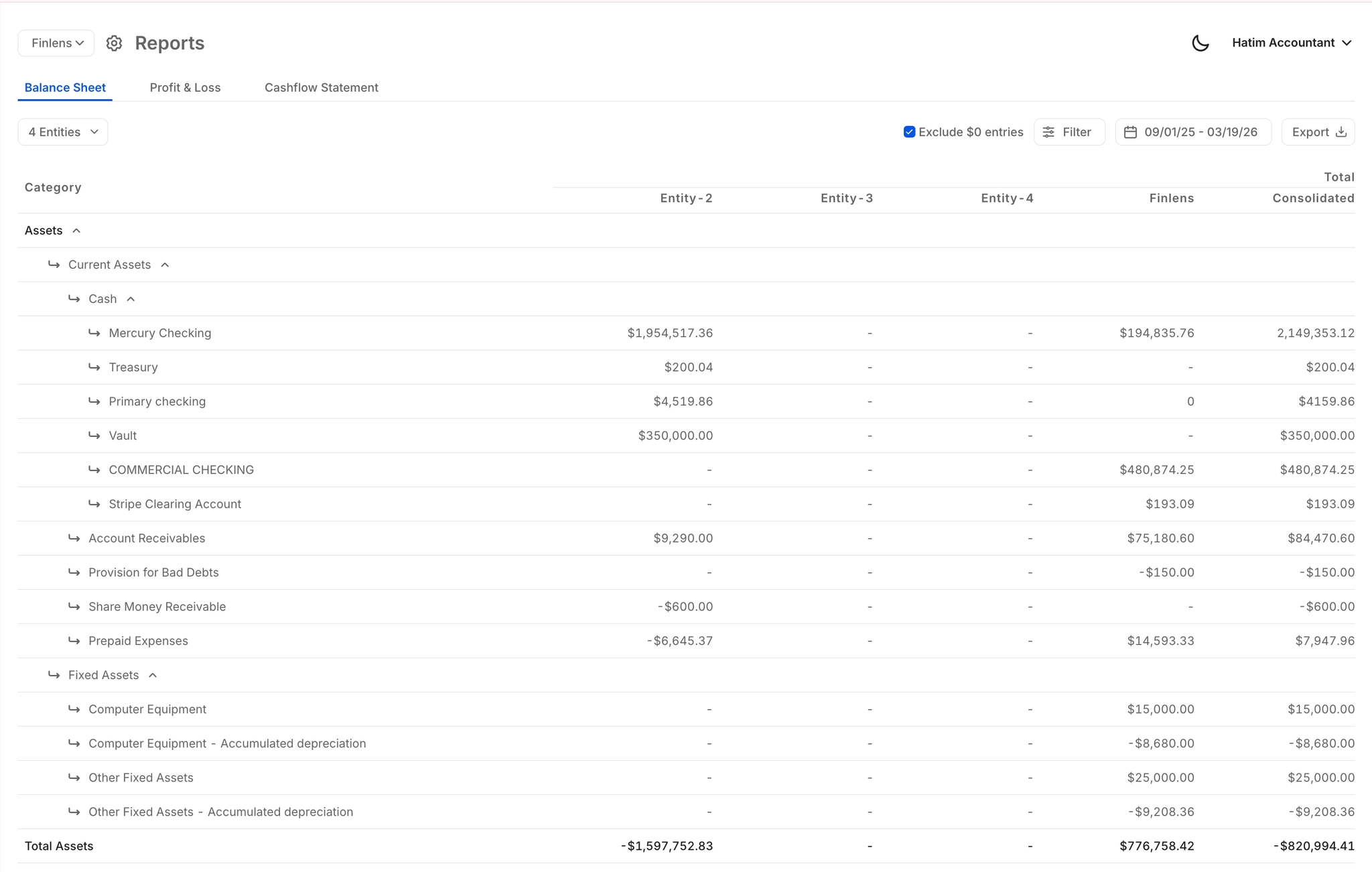
Aggregate financial data across multiple currencies and entities into one consolidated view. Built for companies with international bank accounts that need accurate, real-time balances without manual FX reconciliation.
Connect International Bank Accounts
Connect 12,000+ financial institutions including international banks, credit cards, and payment tools. Multi-currency bank feeds flow directly into your books, eliminating manual imports and CSV uploads.

AI Categorization Across Currencies
Every transaction across every currency is auto-categorized at first pass using GL logic and historical patterns. Foreign currency transactions are categorized with the same accuracy as domestic ones, no extra effort required.

Automated Multi-Currency Reconciliation
Auto-matches bank statement entries against QuickBooks records across all currency accounts. Flags discrepancies and clears matched items, removing one of the most tedious steps in international month-end close.
Real-Time GAAP-Compliant Reporting
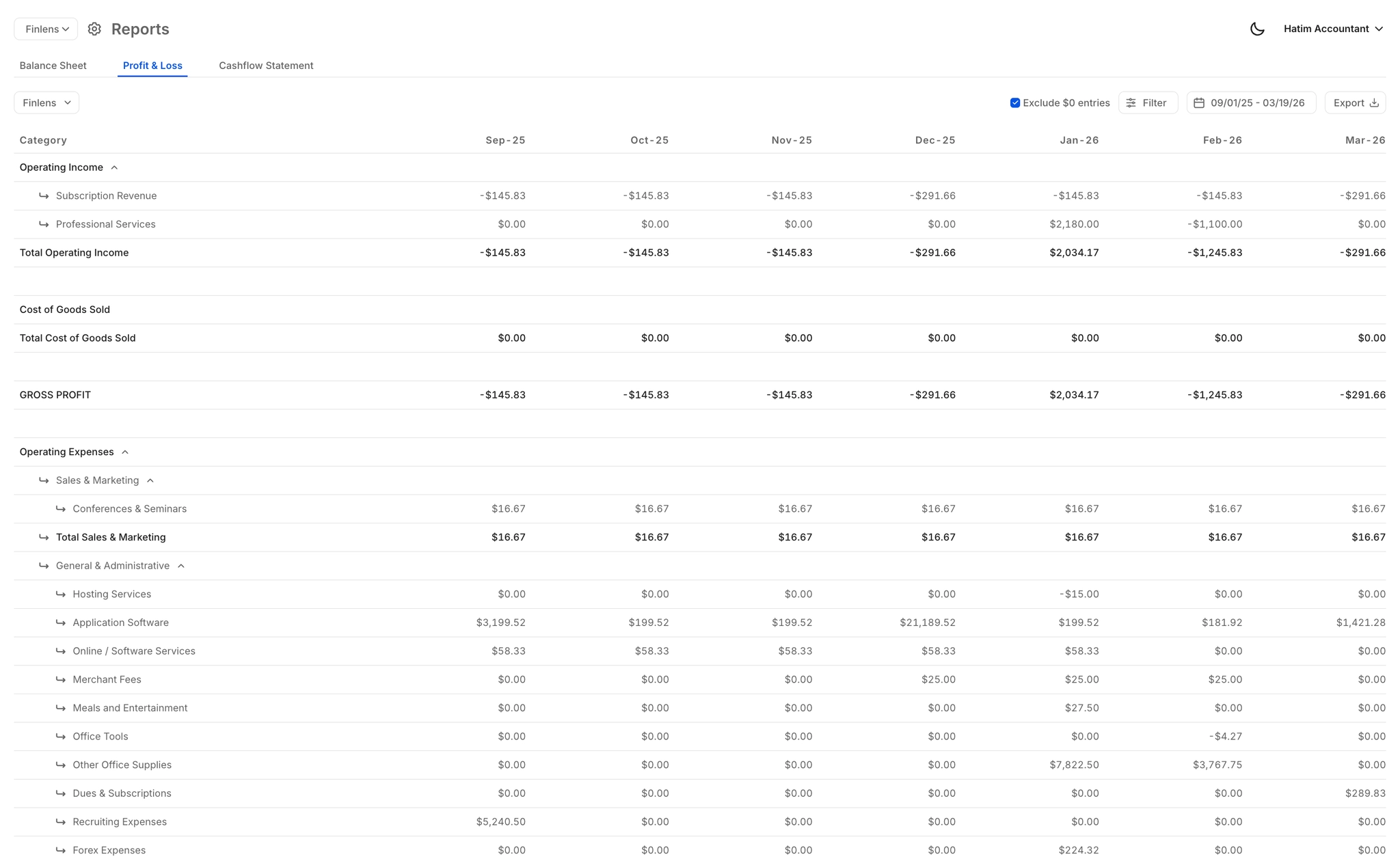
Auto-generated P&L, Balance Sheet, and Cash Flow updated in real time across all currencies. Gives controllers, CFOs, and founders accurate financial statements without waiting days for a manually assembled report.
Ready to Transform Your Business?
How It Works
Get started in minutes, not months.
Connect QuickBooks
Finlens reads your GL and identifies accrual-eligible transactions
Review AI-Generated Schedules
Finlens auto-builds prepaid, deferred revenue, and amortization schedules; your team reviews and approves
Entries Post Automatically at Month-End
Journal entries sync to QuickBooks on schedule; close faster, audit trail preserved
Why Choose Finlens
Why teams choose Finlens.
Works on Top of QuickBooks
No migration. No new GL. Finlens augments the tools your team already uses — real-time two-way sync means your QuickBooks data is always current.
80%+ Less Manual Bookkeeping
AI categorization, automated reconciliation, and smart schedules replace the spreadsheet work that eats your team’s hours.
Backed by Y Combinator & Accel
Built in San Francisco by a team that understands accounting workflows. Trusted by firms and founders scaling fast.
12,000+ Bank Connections
Connect every bank account, credit card, and financial tool your clients use. Powered by Plaid.
Frequently Asked Questions
Does Finlens replace QuickBooks for multi-currency accounting?
No. Finlens works on top of QuickBooks, not instead of it. You keep your existing QuickBooks setup and Finlens adds a real-time AI automation layer on top, including multi-currency bank account tracking and automated categorization. There is no migration required and your existing chart of accounts, history, and workflows stay intact.
Which currencies and bank accounts does Finlens support?
Finlens connects to 12,000+ financial institutions via bank feeds, including international banks and multi-currency accounts. Transactions from those accounts flow directly into your books and are auto-categorized, giving you a consolidated view across every currency you operate in without manual imports.
How does Finlens handle foreign currency transaction categorization?
Finlens uses AI trained on your GL logic and historical transaction patterns to auto-categorize every transaction at first pass, including those denominated in foreign currencies. The system learns from corrections over time, improving accuracy without requiring manual intervention on routine entries.
Is Finlens multi-currency accounting software GAAP compliant?
Yes. Finlens generates GAAP-compliant financial reports including P&L, Balance Sheet, and Cash Flow statements that reflect transactions across all your currency accounts. The platform is designed to support accurate financial reporting standards, which is critical for companies operating internationally and preparing for audits or investor due diligence.
How long does it take to connect my multi-currency accounts?
Setup is fast because Finlens works on top of your existing QuickBooks account. You connect your bank accounts and financial institutions through the platform, and transactions begin syncing in real time. There is no data migration, no re-mapping of your chart of accounts, and no interruption to your existing workflows.