Multi Currency Bank Account Tracking Made Effortless
Finlens connects to 1,100+ banks, automates FX reconciliation, and syncs with QuickBooks so you get a real-time view of every currency in one place.
Multi-Currency Finances Are a Mess
No Single Source of Truth
Logging into multiple bank portals and converting balances manually means your cash position is always stale.
FX Reconciliation Eats Hours
Matching foreign currency transactions to your base currency by hand is slow, error-prone, and doesn't scale.
QuickBooks Falls Short Here
QuickBooks alone lacks real-time multi-currency consolidation, leaving finance teams stitching spreadsheets together every month.
Real-Time Multi-Currency Tracking on Top of QuickBooks
Finlens layers AI-powered multi-currency bank account tracking directly over QuickBooks. Connect all your accounts, automate FX reconciliation, and see a consolidated live view without migrating a single record.
Multi-Currency Account Tracking
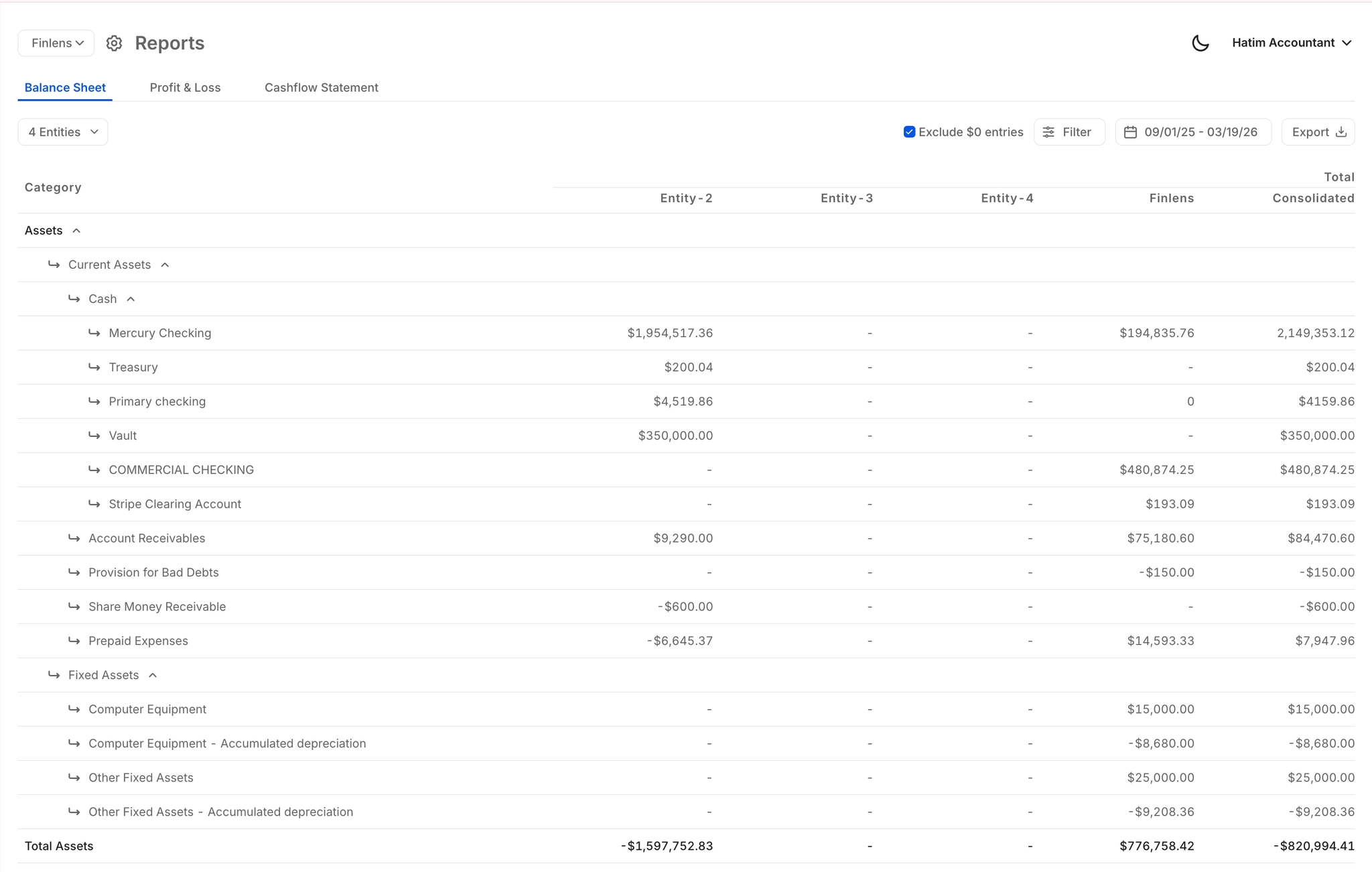
Aggregate balances across every foreign currency bank account into one consolidated view. Track FX exposure in real time without manual conversions or switching between platforms.
1100+ Bank Connections Worldwide
Connect banks, credit cards, and financial tools across countries through Finlens's broad integration network. If you hold accounts internationally, Finlens can see them.

Automated FX Bank Reconciliation
Automatically match foreign currency bank statement entries against your QuickBooks records. Flags discrepancies and clears matched items so month-end reconciliation stops being a manual slog.
Real-Time QuickBooks Two-Way Sync
Every multi-currency transaction, journal entry, and reconciled item flows bidirectionally between Finlens and QuickBooks in real time. No CSV exports, no migration, no duplicate data entry.

Real-Time Multi-Currency Financial Reports
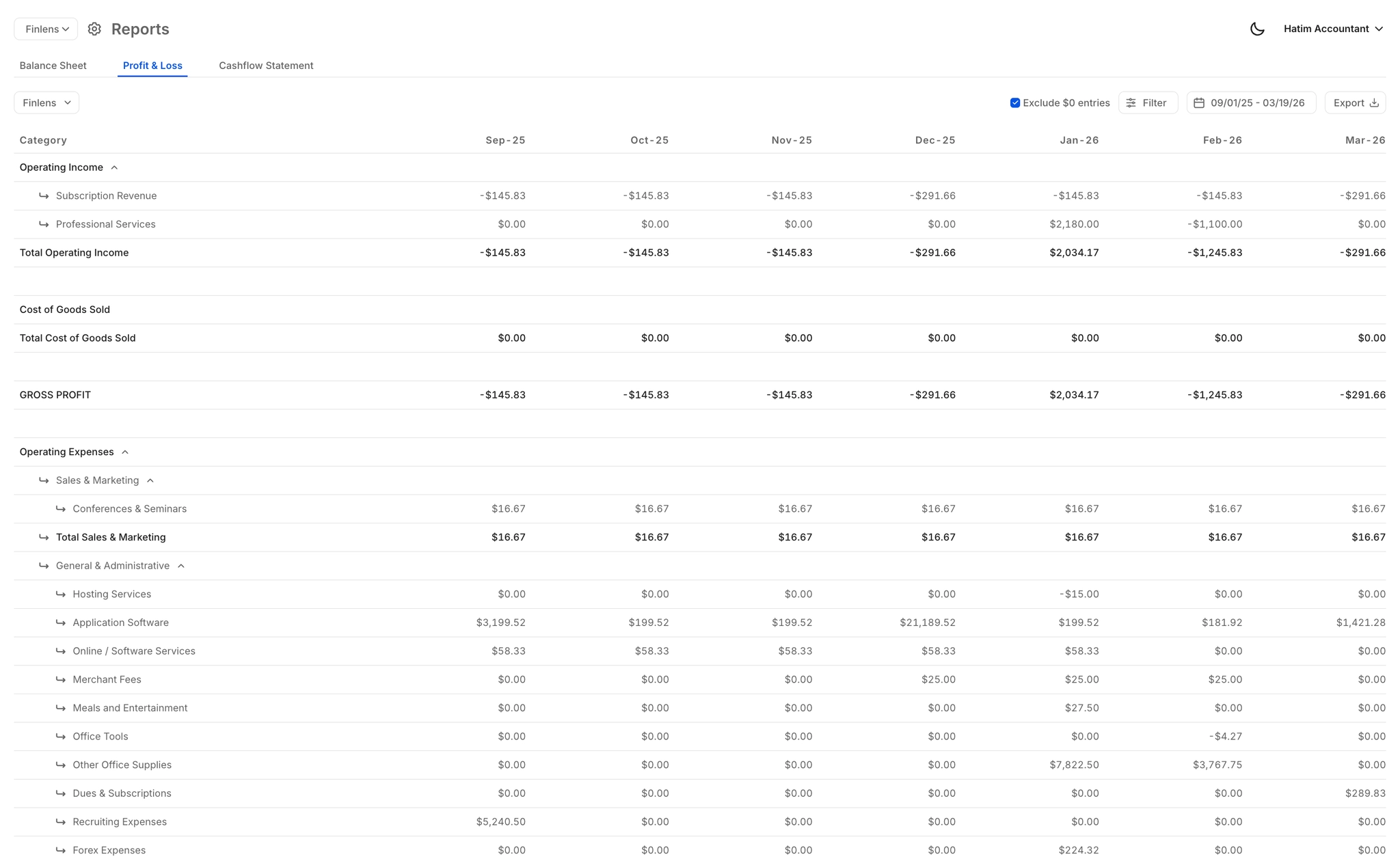
Auto-generated P&L, Balance Sheet, and Cash Flow statements that reflect all currency accounts live. No waiting for your accountant to consolidate and convert figures at month-end.
Ready to Transform Your Business?
How It Works
Get started in minutes, not months.
Connect QuickBooks
Finlens reads your GL and identifies accrual-eligible transactions
Review AI-Generated Schedules
Finlens auto-builds prepaid, deferred revenue, and amortization schedules; your team reviews and approves
Entries Post Automatically at Month-End
Journal entries sync to QuickBooks on schedule; close faster, audit trail preserved
Why Choose Finlens
Why teams choose Finlens.
Works on Top of QuickBooks
No migration. No new GL. Finlens augments the tools your team already uses — real-time two-way sync means your QuickBooks data is always current.
80%+ Less Manual Bookkeeping
AI categorization, automated reconciliation, and smart schedules replace the spreadsheet work that eats your team’s hours.
Backed by Y Combinator & Accel
Built in San Francisco by a team that understands accounting workflows. Trusted by firms and founders scaling fast.
12,000+ Bank Connections
Connect every bank account, credit card, and financial tool your clients use. Powered by Plaid.
Frequently Asked Questions
Does Finlens replace QuickBooks for multi-currency tracking?
No — Finlens works on top of QuickBooks, not instead of it. It adds a real-time multi-currency tracking layer that QuickBooks alone doesn't provide, including consolidated foreign currency balances, automated FX reconciliation, and live reporting. Your existing QuickBooks setup stays intact with zero migration required.
Which banks and countries are supported for multi-currency connections?
Finlens connects to 1,100+ financial institutions including banks, credit cards, and fintech accounts. Coverage spans international banks commonly used by businesses and founders with accounts in multiple countries. If you're unsure whether your specific bank is supported, you can verify during the free onboarding process.
How does Finlens handle foreign exchange reconciliation?
Finlens automatically matches foreign currency bank statement entries against your QuickBooks records, flags discrepancies, and clears matched transactions. This eliminates the manual step of exporting statements, converting currencies, and reconciling line by line in a spreadsheet at month-end.
Can I track multiple entities across different currencies?
Yes. Finlens supports multi-entity and multi-currency consolidation, letting you aggregate financial data across multiple legal entities and foreign bank accounts into a single dashboard. This is useful for holding structures, international operating entities, or startups with accounts in multiple countries.
Is this useful for founders with US LLCs and foreign bank accounts?
Yes. Finlens is specifically used by founders and digital nomads who hold US LLCs alongside international bank accounts. The multi-currency tracking feature consolidates all accounts into one real-time view, so you can monitor cash flow and spending without manually converting balances from each account.