Multi-Currency Bank Account Tracking at a Glance
Finlens connects to 1100+ banks and syncs with QuickBooks so founders and CPAs get a real-time view of global cash flow, burn rate, and runway across every currency.
Multi-Currency Tracking Is Still Manual
Accounts Scattered Across Platforms
Switching between bank apps and currency accounts burns hours and produces a financial picture that's always out of date.
No Consolidated Cash View
Burn rate and runway calculations break down when cash sits in multiple currencies across different institutions.
QuickBooks Sync Is Missing
Manual CSV exports and copy-paste reconciliation create errors that compound every month you let them slide.
One Real-Time View Across Every Currency
Finlens connects your multi-currency bank accounts to a consolidated dashboard and syncs everything back to QuickBooks automatically. No CSV exports, no spreadsheets, no stale numbers.
Multi-Currency Bank Account Tracking
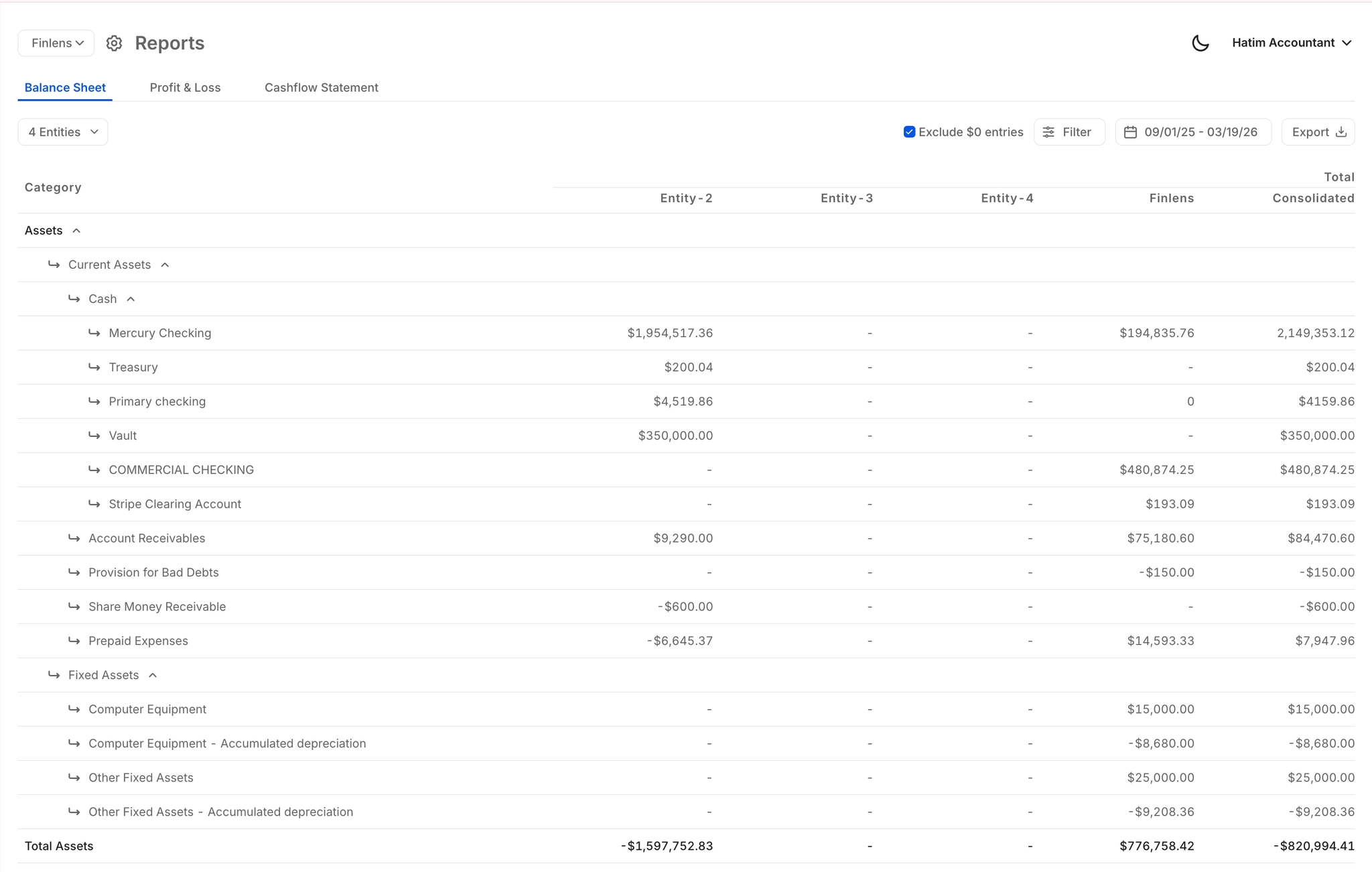
Aggregate balances and transactions across accounts in any currency into one consolidated view. Built for founders with US LLCs, international operations, or bank accounts across multiple countries.
1100+ Bank and Institution Connections
Connect banks, credit cards, and financial tools worldwide through Finlens. Broad institution coverage means your entire multi-currency account stack is visible in one place from day one.

Real-Time Burn and Runway Dashboard
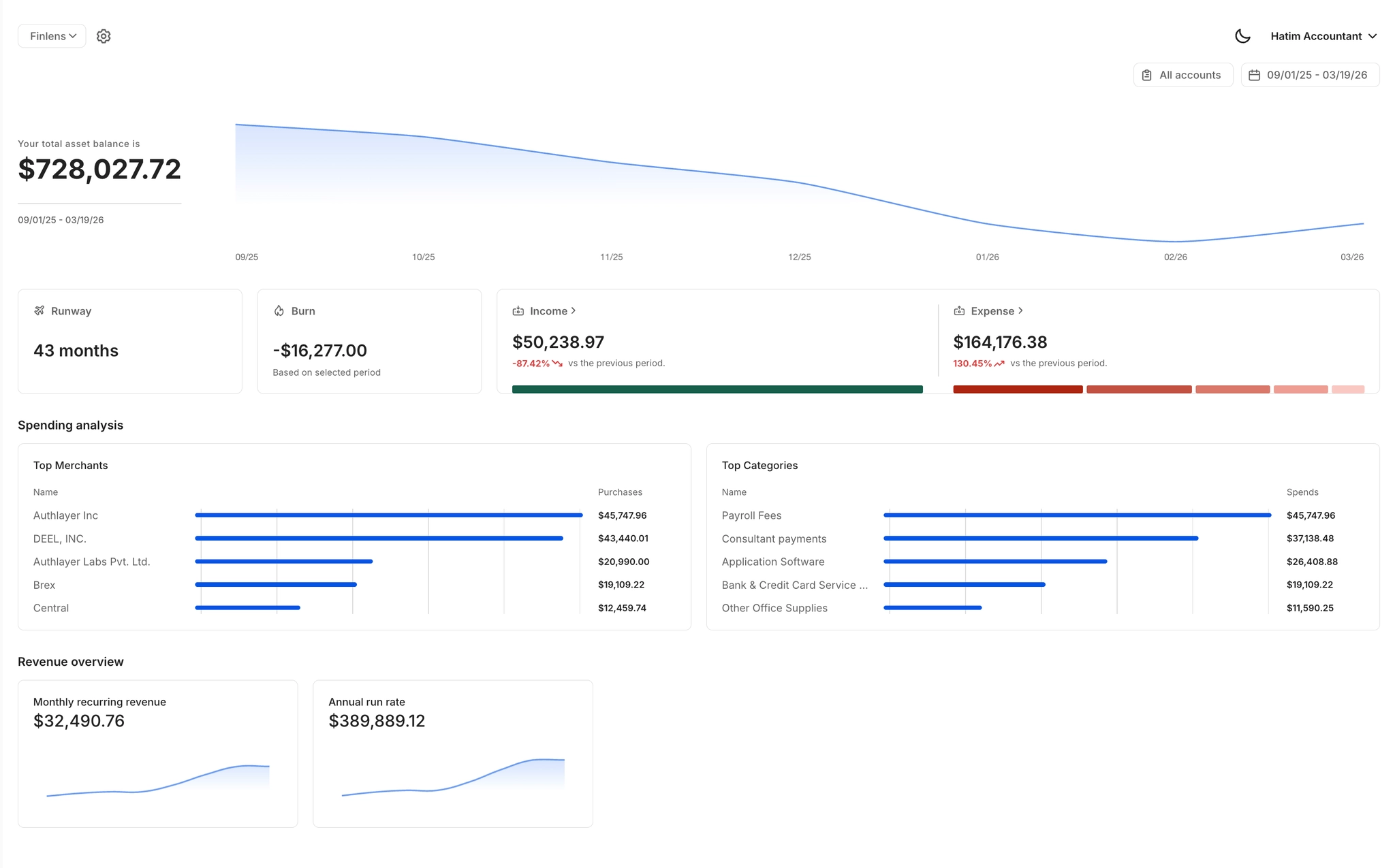
See burn rate, runway, cash flow, MRR, ARR, and vendor spend in a single live dashboard. Built for founders who need instant answers for VC questions without opening QuickBooks.
QuickBooks Two-Way Sync
Finlens sits on top of your existing QuickBooks setup and syncs multi-currency transactions, journal entries, and bank data in both directions. No migration, no disruption.

Real-Time Multi-Currency Financial Reports
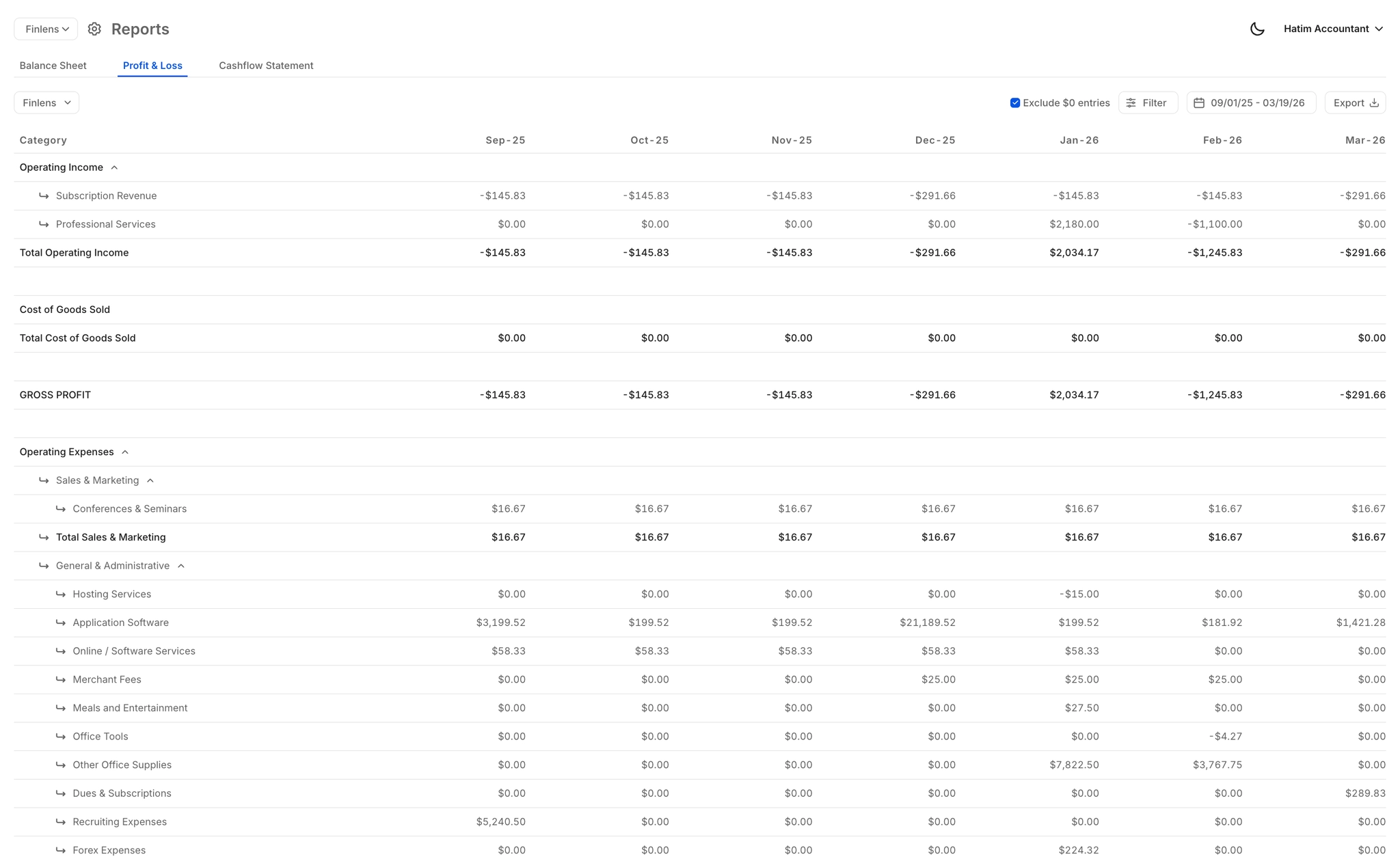
Auto-generated P&L, Balance Sheet, and Cash Flow updated live across all currencies and accounts. Pull investor-ready reports instantly without waiting on your accountant.
Ready to Transform Your Business?
How It Works
Get started in minutes, not months.
Connect QuickBooks
Finlens reads your GL and identifies accrual-eligible transactions
Review AI-Generated Schedules
Finlens auto-builds prepaid, deferred revenue, and amortization schedules; your team reviews and approves
Entries Post Automatically at Month-End
Journal entries sync to QuickBooks on schedule; close faster, audit trail preserved
Why Choose Finlens
Why teams choose Finlens.
Works on Top of QuickBooks
No migration. No new GL. Finlens augments the tools your team already uses — real-time two-way sync means your QuickBooks data is always current.
80%+ Less Manual Bookkeeping
AI categorization, automated reconciliation, and smart schedules replace the spreadsheet work that eats your team’s hours.
Backed by Y Combinator & Accel
Built in San Francisco by a team that understands accounting workflows. Trusted by firms and founders scaling fast.
12,000+ Bank Connections
Connect every bank account, credit card, and financial tool your clients use. Powered by Plaid.
Frequently Asked Questions
Does Finlens replace QuickBooks for multi-currency tracking?
No. Finlens works on top of QuickBooks, not instead of it. It connects your multi-currency bank accounts, consolidates the data into a real-time dashboard, and syncs everything back to your existing QuickBooks general ledger automatically. You keep the QuickBooks setup you already have with zero migration required.
Which banks and currencies does Finlens support?
Finlens connects to 1100+ banks, credit cards, and financial institutions. This includes international banks and accounts held in multiple currencies. If your institution is supported, your account balances and transactions will flow into your consolidated dashboard in real time.
How does Finlens handle multi-currency transaction categorization?
Finlens uses AI-powered transaction categorization that applies GL logic and learns from historical patterns. Multi-currency transactions are categorized at first pass automatically. Founders and accountants can review, approve, or override any categorization before entries are posted to QuickBooks, keeping full control in human hands.
Is Finlens useful for CPAs managing clients with multi-currency accounts?
Yes. CPAs can use Finlens to manage multiple clients with international accounts from a single dashboard. Multi-currency transactions are auto-categorized, synced to QuickBooks in real time, and organized into client-level views so accountants can consolidate financials without juggling separate logins or spreadsheets.
What financial metrics can I see across my multi-currency accounts?
The Finlens consolidated dashboard shows burn rate, runway, cash flow, MRR, ARR, and vendor spend across all connected accounts. It is designed specifically for startup founders who need to answer VC questions instantly without manually pulling numbers from multiple bank portals or QuickBooks.