Prepaid Expense Automation on Top of QuickBooks
Finlens automates amortization schedules and journal entries for prepaid expenses directly on top of QuickBooks. No spreadsheets, no migration.
Prepaid Tracking Is Still Manual
Amortization Errors Compound Monthly
Manual prepaid schedules drift over time. One miscalculation cascades into misreported expenses across multiple periods.
Journal Entries Eat Close Time
Hand-keying prepaid journal entries every month-end is repetitive, error-prone work that delays your close by days.
Audit Trails Live in Spreadsheets
Prepaid schedules buried in Excel files are impossible to audit quickly and impossible to hand off without context.
GAAP Prepaid Automation Built Into QuickBooks
Finlens layers GAAP schedule automation directly on top of QuickBooks, generating prepaid amortization schedules and journal entries automatically without spreadsheets. Real-time sync means every entry posts accurately, every period.
Automated Prepaid Amortization Schedules
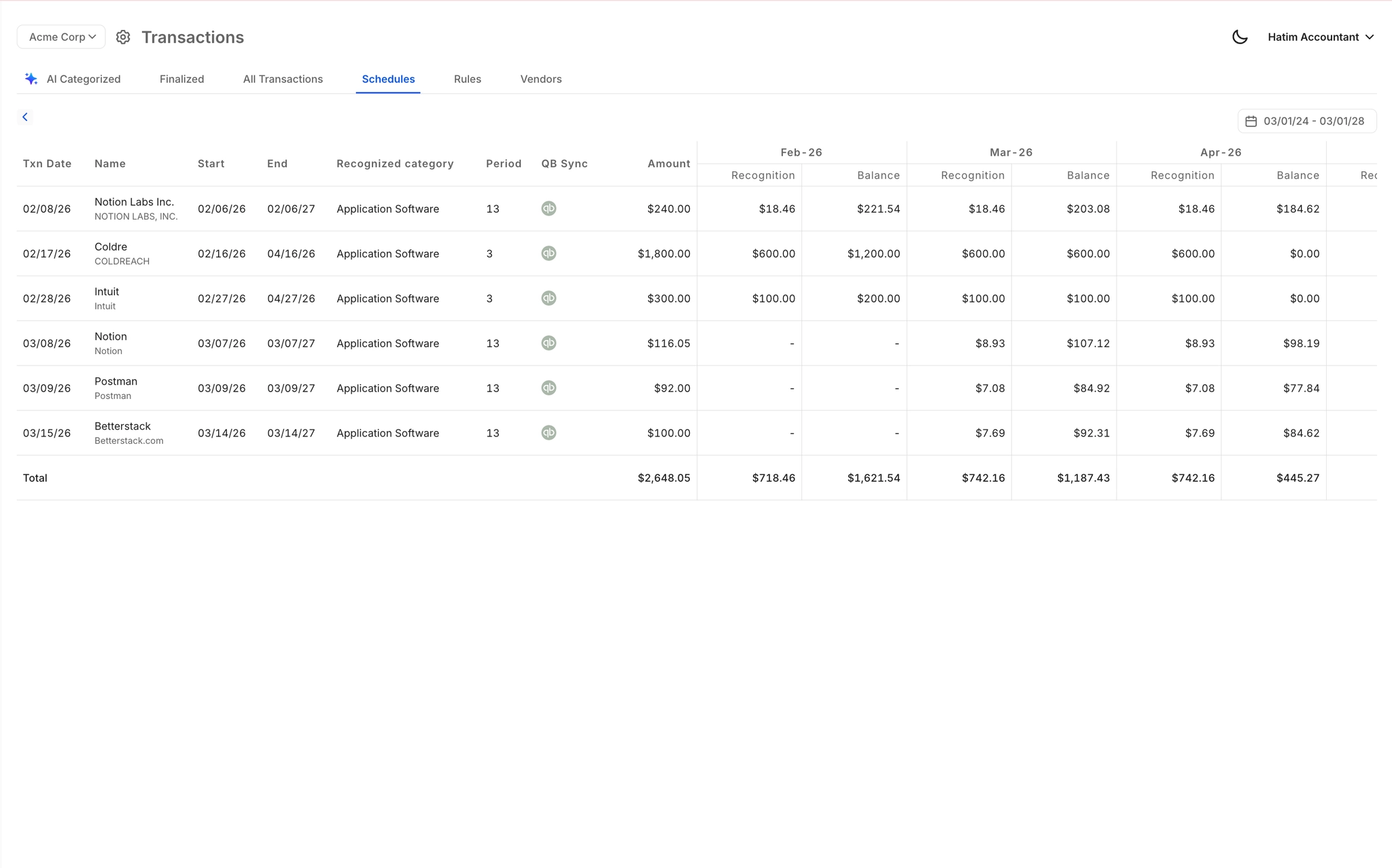
Finlens auto-generates GAAP-compliant amortization schedules for prepaid expenses and posts journal entries directly to QuickBooks without any spreadsheet maintenance. Handles accruals, prepaids, and deferred items in one place.
Real-Time QuickBooks Two-Way Sync
Every prepaid journal entry generated by Finlens flows directly into QuickBooks in real time. No CSV exports, no manual imports. Your QBO ledger stays current without any duplicate data entry.

Faster Month-End Close Process
Prepaid automation is one component of a fully streamlined close. Finlens coordinates the entire month-end workflow across categorization, reconciliation, and schedule generation, delivering up to 40-70% faster close times.

Automated Bank Reconciliation
Finlens auto-matches bank statement items against QuickBooks records and flags discrepancies for review. Eliminates the tedious manual reconciliation step that typically follows prepaid journal entry posting each period.

Full Audit Trail for Every Entry
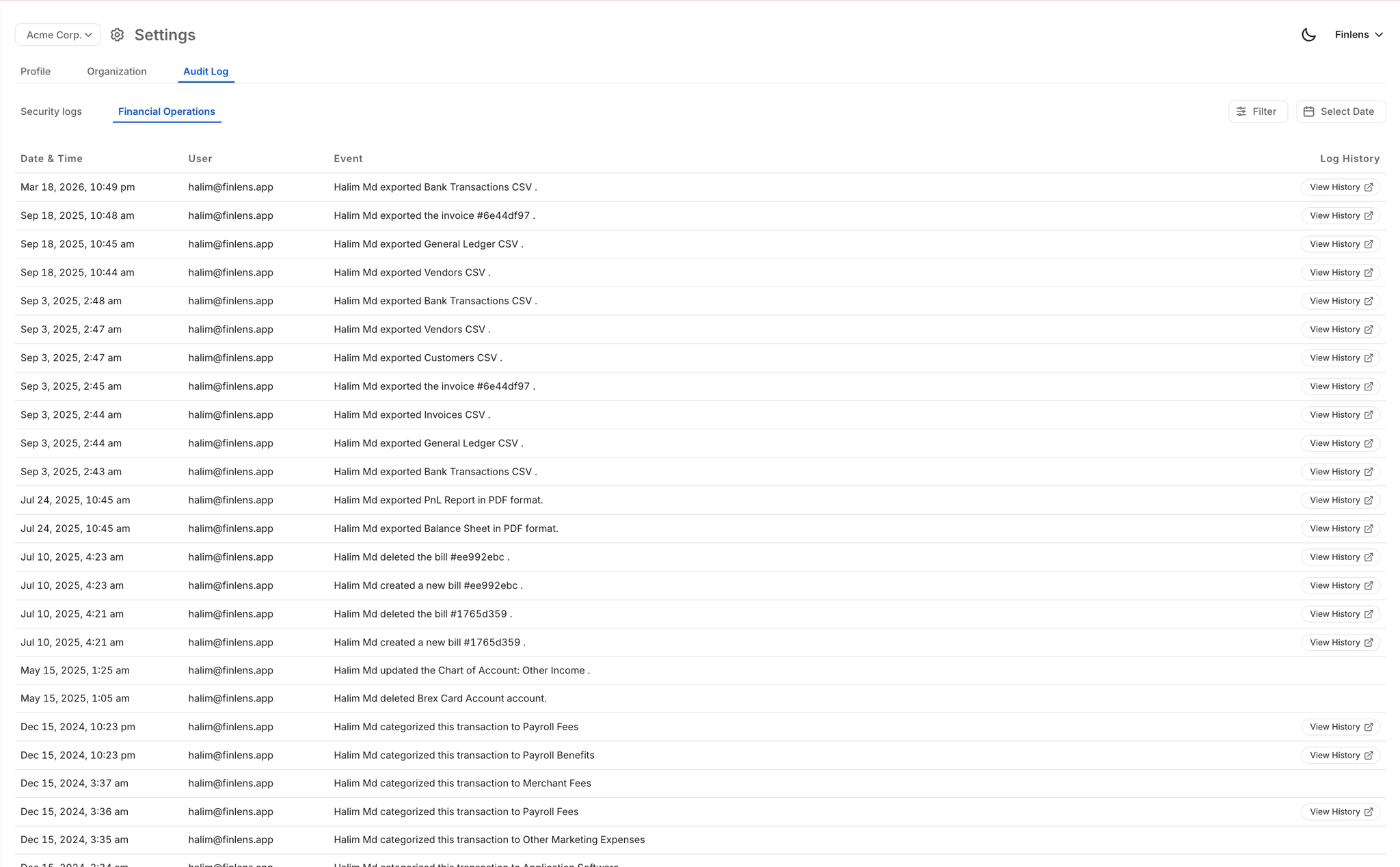
Every prepaid schedule generation, journal entry, and correction is logged with a complete audit trail. Auditors and controllers can trace every action without digging through spreadsheet version histories.
Ready to Transform Your Business?
How It Works
Get started in minutes, not months.
Connect QuickBooks
Finlens reads your GL and identifies accrual-eligible transactions
Review AI-Generated Schedules
Finlens auto-builds prepaid, deferred revenue, and amortization schedules; your team reviews and approves
Entries Post Automatically at Month-End
Journal entries sync to QuickBooks on schedule; close faster, audit trail preserved
Why Choose Finlens
Why teams choose Finlens.
Works on Top of QuickBooks
No migration. No new GL. Finlens augments the tools your team already uses — real-time two-way sync means your QuickBooks data is always current.
80%+ Less Manual Bookkeeping
AI categorization, automated reconciliation, and smart schedules replace the spreadsheet work that eats your team’s hours.
Backed by Y Combinator & Accel
Built in San Francisco by a team that understands accounting workflows. Trusted by firms and founders scaling fast.
12,000+ Bank Connections
Connect every bank account, credit card, and financial tool your clients use. Powered by Plaid.
Frequently Asked Questions
Does Finlens replace QuickBooks for prepaid expense tracking?
No. Finlens works on top of QuickBooks, not instead of it. Your existing QBO setup stays exactly as-is. Finlens adds an automation layer that generates prepaid amortization schedules and posts journal entries directly back into QuickBooks in real time. There is no migration, no new general ledger, and no disruption to your current workflow.
How does prepaid expense automation work in Finlens?
Finlens generates GAAP-compliant amortization schedules for prepaid expenses and automatically creates the corresponding journal entries each period. Those entries sync to QuickBooks in real time via two-way integration. You no longer need to maintain a separate spreadsheet or manually key entries at month-end. The schedules are always current and the audit trail is preserved automatically.
What types of prepaid expenses does Finlens handle?
Finlens automates GAAP schedules for prepaids, accruals, deferred items, and amortization. This covers common prepaid categories such as prepaid insurance, prepaid software subscriptions, prepaid rent, and other recurring prepaid expense types that typically require monthly amortization journal entries.
How much time can prepaid automation save during month-end close?
Finlens customers report up to 40-70% faster month-end close times overall. A meaningful portion of that comes directly from eliminating manual prepaid schedule maintenance and journal entry creation, which are among the most repetitive tasks in a typical close workflow.
Do I need to set up a new chart of accounts to use Finlens?
No. Finlens works with your existing QuickBooks chart of accounts. There is no manual COA remapping required. If you are onboarding a new client who needs a fresh chart of accounts setup, Finlens can automate that process as well, saving approximately 3 or more hours per new engagement.