Puzzle Alternative That Keeps Your QuickBooks
Finlens layers AI automation on top of your existing QuickBooks setup. Get real-time dashboards and faster close without migrating a single transaction.
Switching Platforms Has Real Costs
Migration Risk Is Real
Moving your GL to a new platform means re-mapping accounts, re-training staff, and risking data integrity across every client.
Workflow Disruption Kills Productivity
Switching systems resets your team's muscle memory. Months of lost productivity hide behind every platform migration decision.
QuickBooks is Already Working
Over 80% of SMBs run on QuickBooks. Replacing it means rebuilding integrations, permissions, and reporting from scratch.
AI Automation on Top of QuickBooks
Finlens connects directly to your existing QuickBooks account and layers AI categorization, automated close workflows, GAAP schedules, and real-time dashboards on top. No migration. No disruption. Just faster, smarter accounting.
Real-Time QuickBooks Two-Way Sync
Finlens connects to your existing QBO account and syncs categorized transactions, journal entries, bills, and invoices in real time — both ways. No migration required, no parallel GL to maintain.

AI Transaction Categorization
Every transaction is auto-categorized at first pass using GL logic and historical patterns. Works directly inside your QuickBooks structure so your chart of accounts stays exactly as you've set it up.

Faster Month-End Close
Finlens automates the recurring steps of your month-end close — task tracking, team assignments, and reconciliation checks — cutting close time by 40 to 70% without replacing your QuickBooks workflow.

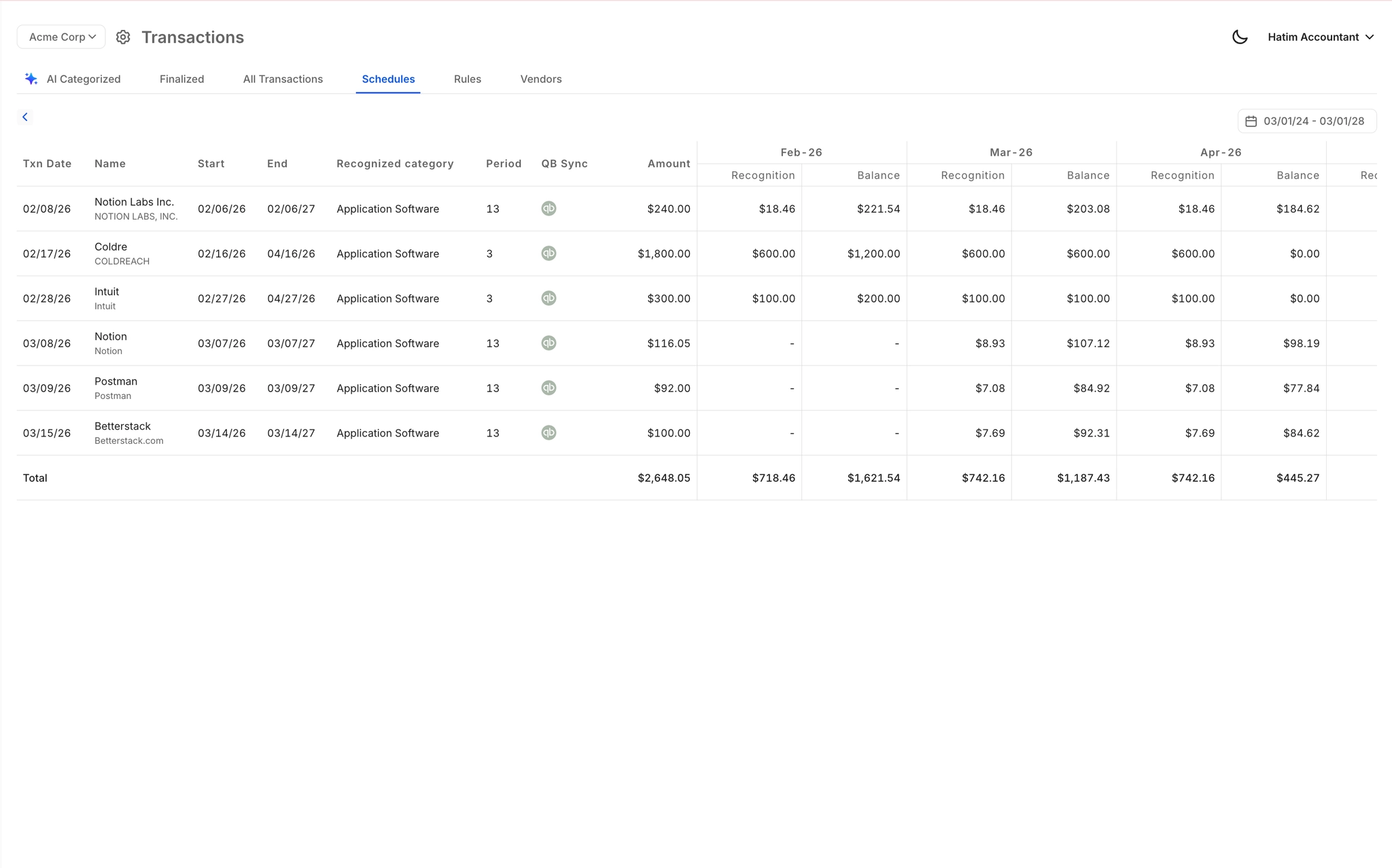
Automated GAAP Schedule Generation
Accruals, prepaids, and amortization schedules are generated automatically and posted back to QuickBooks as journal entries. No spreadsheets, no manual tracking, fully GAAP-compliant.
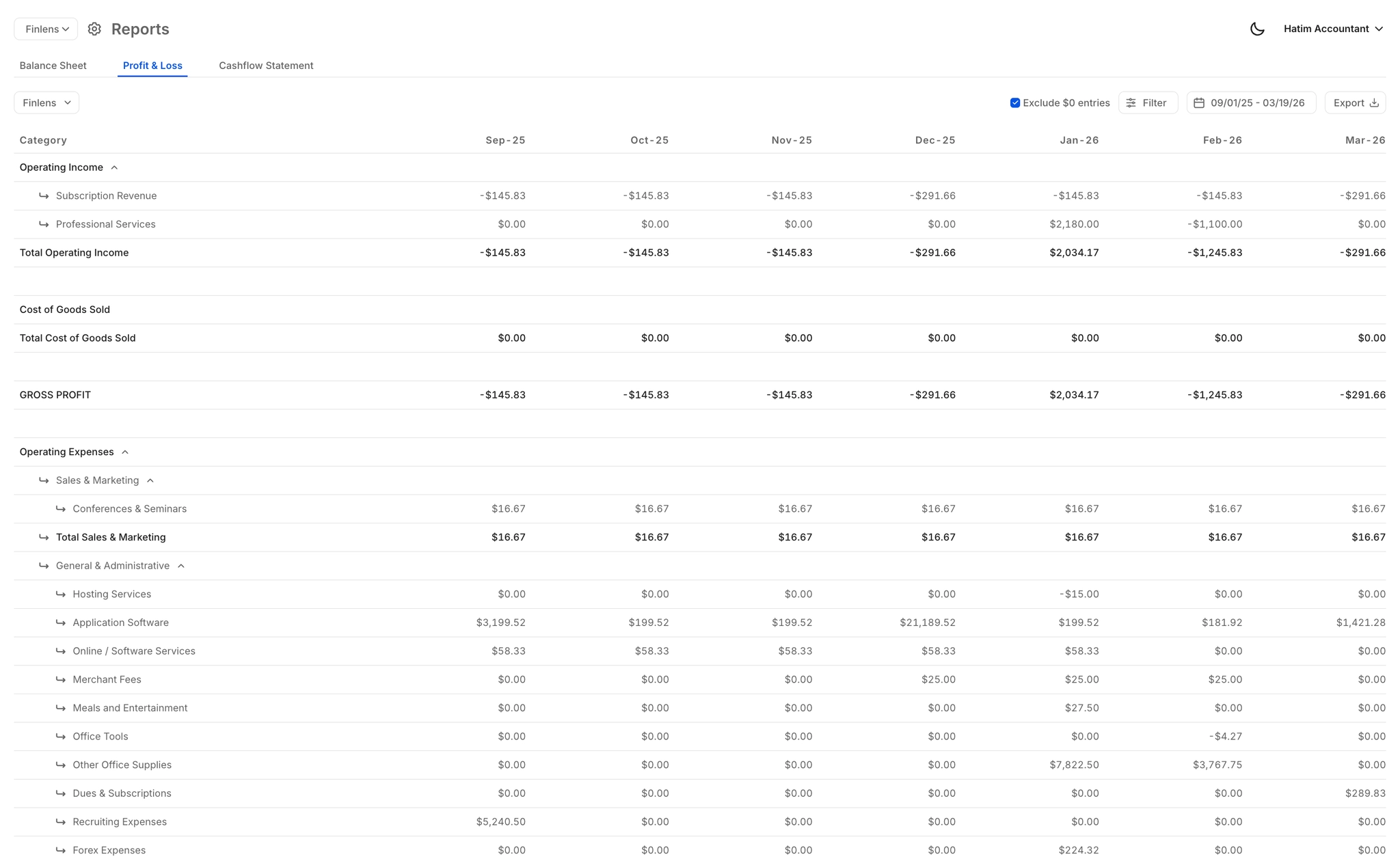
Real-Time Financial Reports
Live P&L, balance sheet, and cash flow reports that update automatically as transactions sync. Founders get investor-ready numbers without waiting for the accountant to manually export from QuickBooks.
Ready to Transform Your Business?
How It Works
Get started in minutes, not months.
Connect QuickBooks
Finlens reads your GL and identifies accrual-eligible transactions
Review AI-Generated Schedules
Finlens auto-builds prepaid, deferred revenue, and amortization schedules; your team reviews and approves
Entries Post Automatically at Month-End
Journal entries sync to QuickBooks on schedule; close faster, audit trail preserved
Why Choose Finlens
Why teams choose Finlens.
Works on Top of QuickBooks
No migration. No new GL. Finlens augments the tools your team already uses — real-time two-way sync means your QuickBooks data is always current.
80%+ Less Manual Bookkeeping
AI categorization, automated reconciliation, and smart schedules replace the spreadsheet work that eats your team’s hours.
Backed by Y Combinator & Accel
Built in San Francisco by a team that understands accounting workflows. Trusted by firms and founders scaling fast.
12,000+ Bank Connections
Connect every bank account, credit card, and financial tool your clients use. Powered by Plaid.
Frequently Asked Questions
Does Finlens replace QuickBooks like Puzzle does?
No. Finlens is specifically designed to work on top of QuickBooks, not replace it. Unlike Puzzle, which builds its own general ledger and requires you to migrate off QuickBooks entirely, Finlens connects to your existing QBO account and adds AI automation on top. Your chart of accounts, historical data, and team workflows stay exactly where they are.
How long does it take to connect Finlens to QuickBooks?
Finlens connects to your existing QuickBooks account in minutes. There is no data migration, no re-mapping of accounts, and no parallel system to maintain. You authorize the connection, and Finlens begins syncing transactions in real time immediately.
Will switching to Finlens disrupt my current accounting workflow?
No. Because Finlens augments QuickBooks rather than replacing it, your existing workflows, integrations, and reporting structures remain intact. Your team continues working in QBO while Finlens handles the automation layer — categorization, close tasks, GAAP schedules — in the background.
Is Finlens only for startup founders or also for CPA firms?
Finlens serves both. Founders get real-time dashboards for burn rate, runway, MRR, and ARR without opening QuickBooks. CPA firms use Finlens to manage 50 or more clients from a single dashboard, automate month-end close, and eliminate manual GAAP schedule work — all on top of existing QBO accounts.
What does Finlens cost compared to paying for a migration?
Finlens offers a free Starter plan for founders managing up to $50k per month in expenses. The AI Accounting plan is $49 per month for up to $100k per month in expenses. For accounting firms, pricing is $30 per client per month. There are no migration costs because no migration is required.