QuickBooks AI Automation for Accounting Firms & Founders
Finlens layers AI automation on top of QuickBooks to categorize transactions, automate month-end close, and give you real-time financial visibility without migrating off your existing setup.
QuickBooks Alone Is Not Enough
Hours Lost to Manual Categorization
High-volume clients mean hours tagging transactions by hand. Every new client compounds the problem.
Month-End Close Still Takes Weeks
Reconciliations, accruals, and journal entries are still coordinated across spreadsheets, email, and Notion.
No Real-Time Financial Clarity
Founders and CPAs wait days for updated numbers. Decisions get made on stale data.
AI Automation Layered on Top of QuickBooks
Finlens connects to your existing QuickBooks, auto-categorizes transactions using GL logic, automates GAAP schedules, and closes the books 40-70% faster. No migration. No new GL. Just automation on top of what you already use.
AI Transaction Categorization for QuickBooks
Every transaction is auto-categorized at first pass using historical patterns and GL logic trained on your books. Eliminates hours of manual tagging per client each month without touching your QuickBooks setup.

Real-Time QuickBooks Two-Way Sync
Categorized transactions, journal entries, bills, and invoices sync bidirectionally with QuickBooks in real time. Finlens augments your existing QBO setup — nothing migrates, nothing breaks, and your accountants never lose context.

Automated Month-End Close
Finlens automates task management, reconciliation coordination, and close progress tracking across your entire workflow. Firms report 40-70% faster close times without adding headcount or rebuilding their QuickBooks processes.

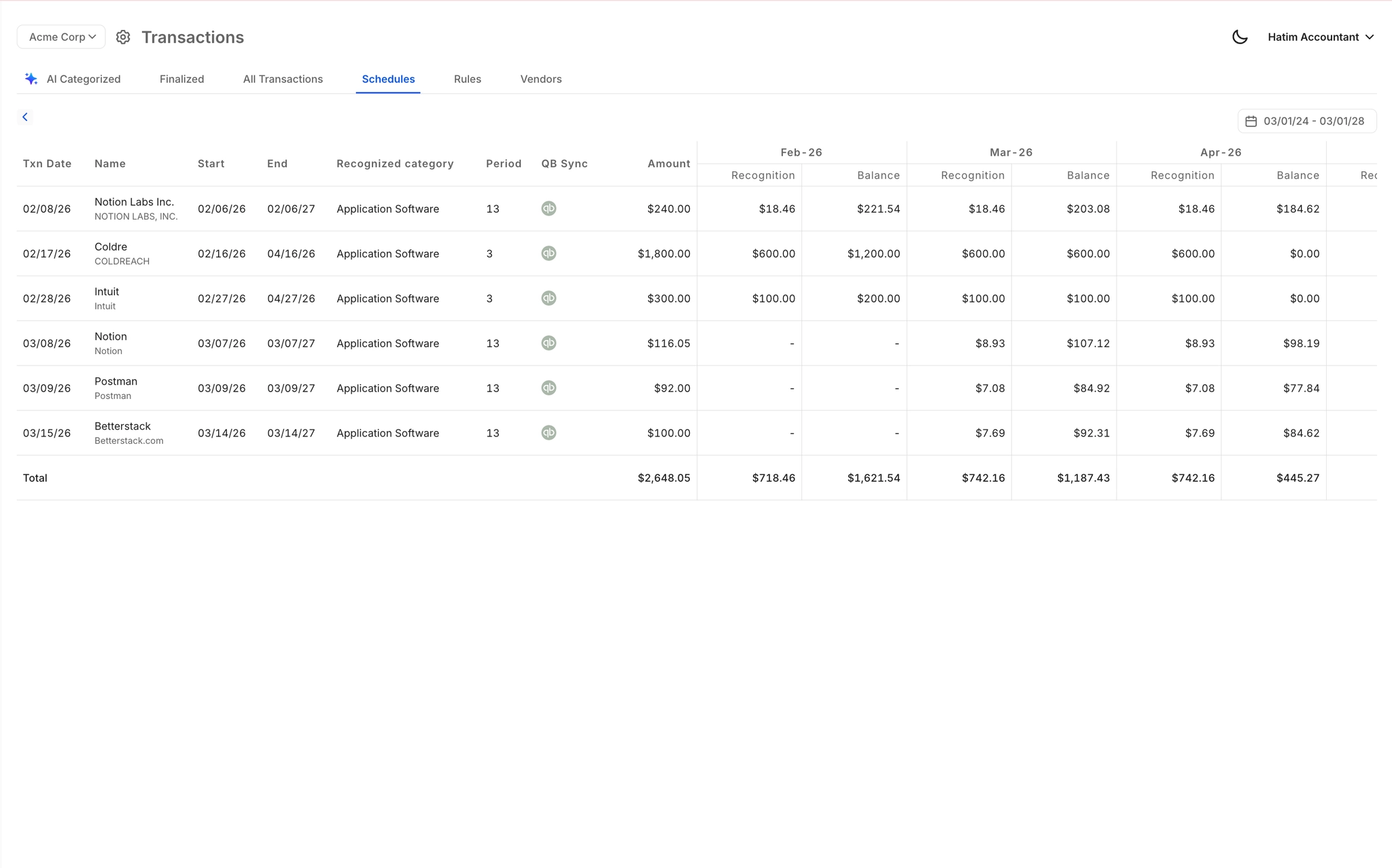
Automated Accruals and GAAP Schedules
Accruals, prepaids, deferred revenue, and amortization schedules are generated automatically and posted back to QuickBooks as journal entries. No spreadsheets. No manual calculations. Fully GAAP-compliant output every close cycle.
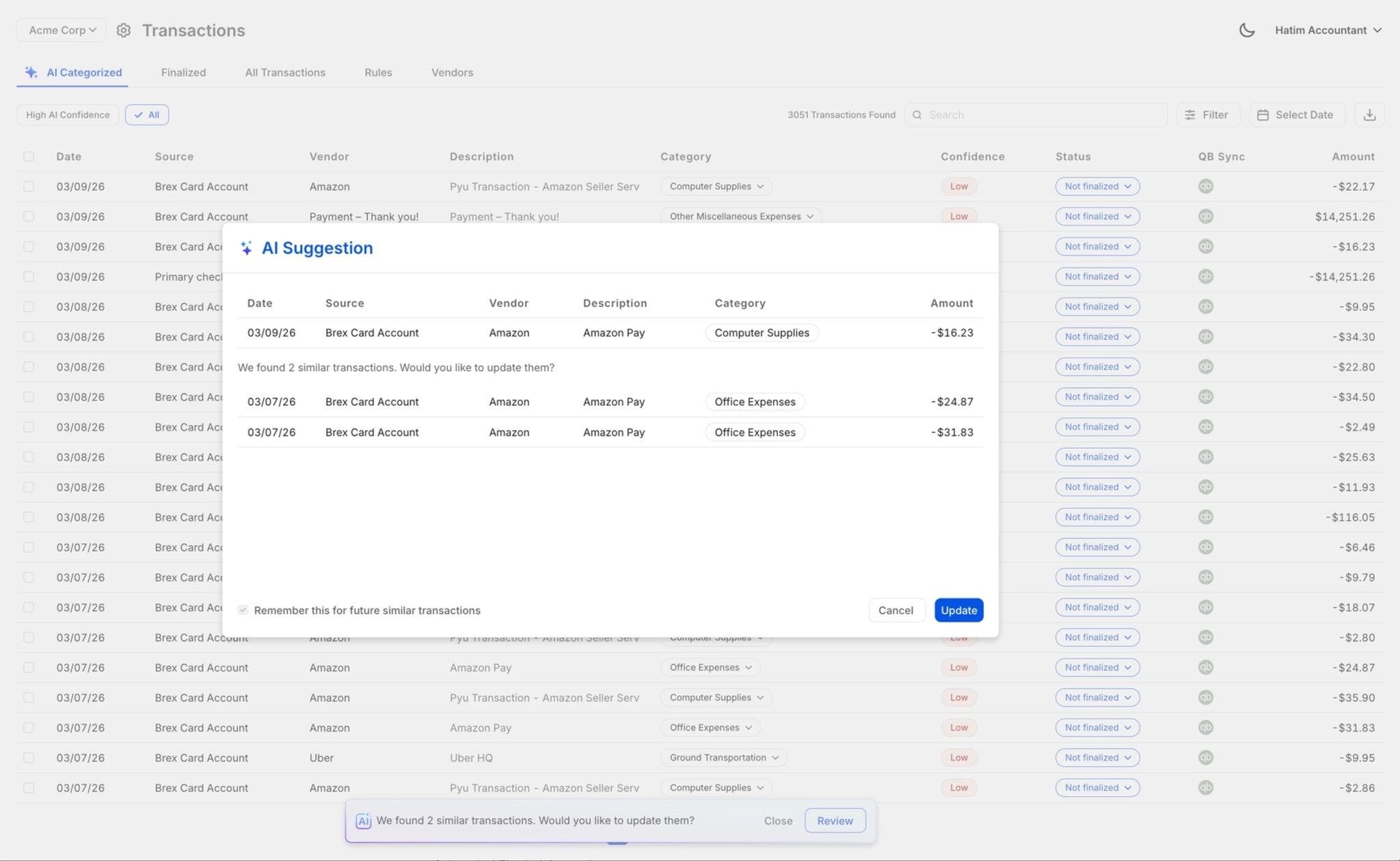
Human Review Before Anything Posts
Every AI-suggested categorization goes through a one-click accountant review before posting to QuickBooks. CPAs retain full control and legal sign-off authority. The AI accelerates the work; the accountant finalizes it.
Ready to Transform Your Business?
How It Works
Get started in minutes, not months.
Connect QuickBooks
Finlens reads your GL and identifies accrual-eligible transactions
Review AI-Generated Schedules
Finlens auto-builds prepaid, deferred revenue, and amortization schedules; your team reviews and approves
Entries Post Automatically at Month-End
Journal entries sync to QuickBooks on schedule; close faster, audit trail preserved
Why Choose Finlens
Why teams choose Finlens.
Works on Top of QuickBooks
No migration. No new GL. Finlens augments the tools your team already uses — real-time two-way sync means your QuickBooks data is always current.
80%+ Less Manual Bookkeeping
AI categorization, automated reconciliation, and smart schedules replace the spreadsheet work that eats your team’s hours.
Backed by Y Combinator & Accel
Built in San Francisco by a team that understands accounting workflows. Trusted by firms and founders scaling fast.
12,000+ Bank Connections
Connect every bank account, credit card, and financial tool your clients use. Powered by Plaid.
Frequently Asked Questions
Does Finlens replace QuickBooks?
No. Finlens is designed to work on top of QuickBooks, not replace it. It connects to your existing QBO account, reads your transaction data in real time, applies AI categorization and accounting logic, and syncs everything back automatically. Your QuickBooks remains your general ledger. Finlens is the automation layer that removes the manual work that happens around it. There is zero migration required.
How does QuickBooks AI automation work with Finlens?
Finlens connects to your QuickBooks account and pulls transaction data in real time. Its AI categorizes each transaction using GL logic and patterns learned from your historical books. Categorized entries, journal entries, and GAAP schedules are then posted back to QuickBooks automatically. Accountants review and approve before anything is finalized, so accuracy and control are never compromised.
How much faster is month-end close with Finlens?
Finlens claims 40-70% faster month-end close times. This is achieved by automating the most time-consuming recurring tasks in the close workflow: transaction categorization, accrual and prepaid schedule generation, journal entry posting, and reconciliation coordination. Instead of juggling spreadsheets and email threads, your team works from a single close workflow with task assignments and real-time progress tracking.
Is Finlens built for accounting firms or individual founders?
Both. Finlens has two distinct use cases. For CPA firms, it provides a multi-client dashboard, automated close workflows, and AI categorization that lets small teams manage significantly more clients without hiring. For startup founders, it provides real-time visibility into burn rate, runway, MRR, and ARR without requiring them to open QuickBooks manually. Both personas benefit from the same underlying QuickBooks AI automation infrastructure.
What happens when the AI miscategorizes a transaction?
Nothing posts to QuickBooks until an accountant reviews and approves it. Finlens uses a human-in-the-loop review workflow where every AI-suggested categorization can be approved, corrected, or overridden with one click. When you correct a categorization, Finlens learns from that correction and applies the updated logic to future transactions, improving accuracy over time.