AI Bookkeeping Software for QuickBooks That Scales Your Firm
Finlens layers AI automation on top of QuickBooks to automate transaction coding, GAAP schedules, and month-end close. Add clients without adding headcount.
Scaling Clients Is Breaking Your Firm
Headcount Grows With Clients
Adding 10 clients means hiring another bookkeeper. Your margins shrink with every new engagement you take on.
Month-End Close Is Manual Chaos
Your team juggles QuickBooks, spreadsheets, and email threads every close cycle, burning hours that don't scale.
Client Onboarding Eats the Clock
Setting up a new client in QuickBooks takes 10 to 15 hours of manual chart of accounts and transaction cleanup.
AI Bookkeeping That Works on Top of QuickBooks
Finlens connects directly to your existing QuickBooks setup, no migration required. AI categorizes transactions, automates GAAP schedules, and accelerates month-end close so your firm handles more clients with the same team.
Real-Time QuickBooks Two-Way Sync
Finlens connects directly to your clients' QuickBooks accounts and syncs journal entries, bank transactions, bills, and invoices in real time both ways. No migration, no parallel ledger, no disruption to existing workflows.

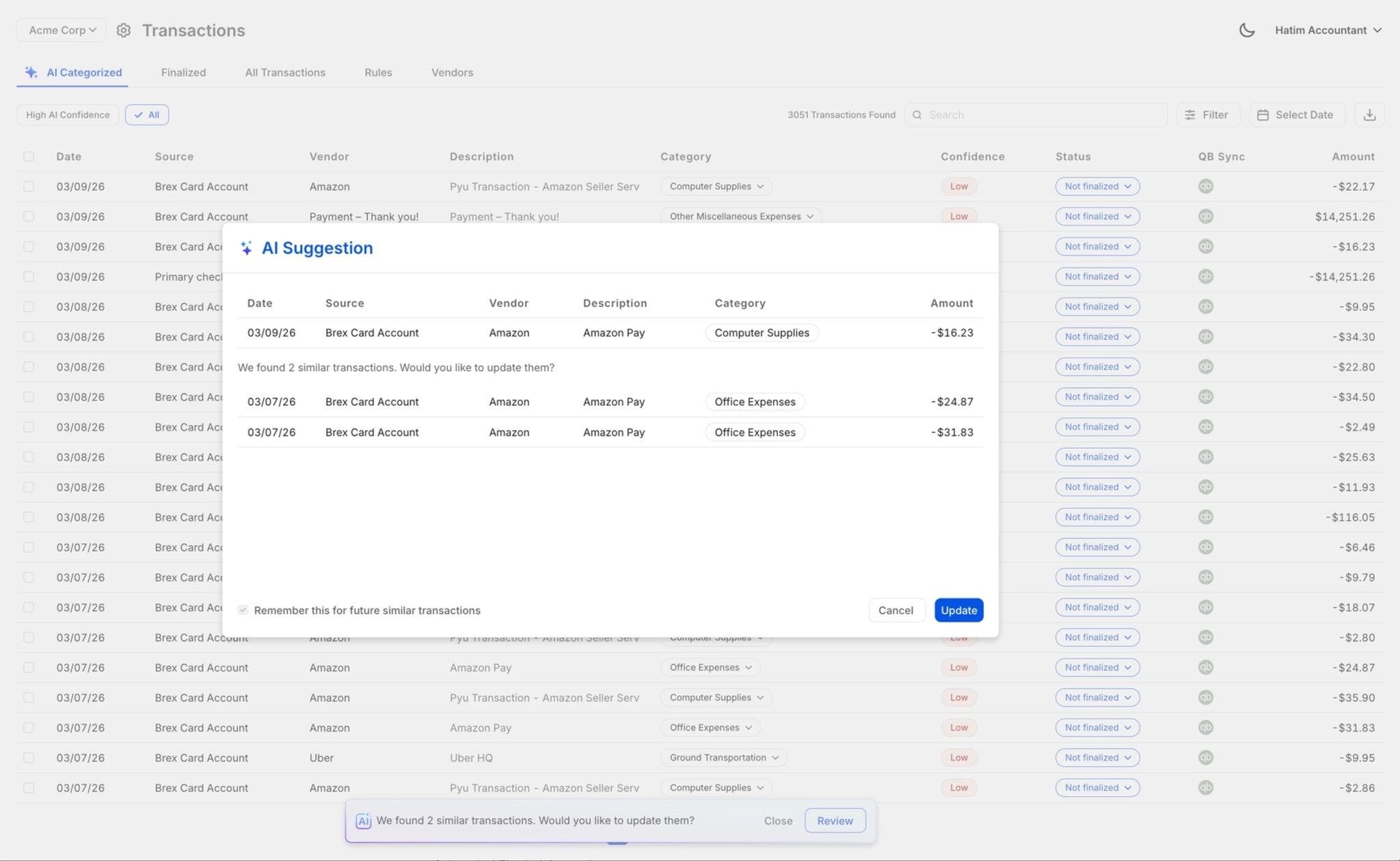
AI Transaction Categorization for QuickBooks
Every transaction is auto-categorized at first pass using GL logic and patterns learned from your existing QuickBooks history. Eliminates hours of manual coding per client each month without changing how your team reviews the books.

One-Click Review Before QuickBooks Posts
AI suggestions never post to QuickBooks without your sign-off. Review, approve, correct, or override any categorization in one click. Your team stays in control of everything that touches the GL.
Automated Month-End Close Acceleration
Finlens orchestrates the full close workflow across categorization, reconciliation, accruals, and reporting. Firms report 40 to 70 percent faster close times by eliminating the spreadsheet and email coordination that bogs down every cycle.

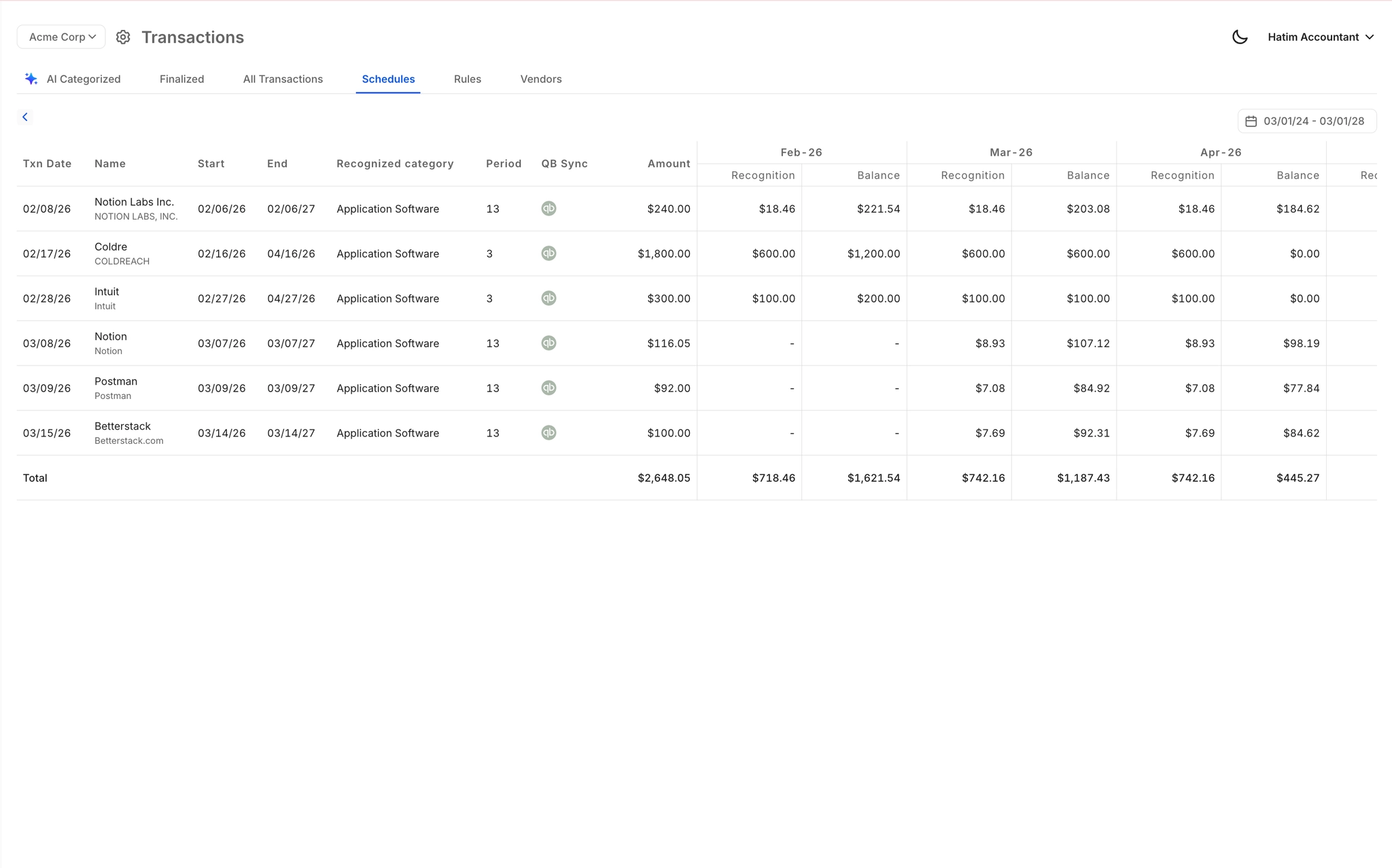
Automated Accruals and GAAP Schedules
Accruals, prepaids, deferred revenue, and amortization schedules are generated automatically without spreadsheets. Journal entries post directly to QuickBooks on schedule, keeping every client GAAP-compliant without manual intervention.
Ready to Transform Your Business?
How It Works
Get started in minutes, not months.
Connect QuickBooks
Finlens reads your GL and identifies accrual-eligible transactions
Review AI-Generated Schedules
Finlens auto-builds prepaid, deferred revenue, and amortization schedules; your team reviews and approves
Entries Post Automatically at Month-End
Journal entries sync to QuickBooks on schedule; close faster, audit trail preserved
Why Choose Finlens
Why teams choose Finlens.
Works on Top of QuickBooks
No migration. No new GL. Finlens augments the tools your team already uses — real-time two-way sync means your QuickBooks data is always current.
80%+ Less Manual Bookkeeping
AI categorization, automated reconciliation, and smart schedules replace the spreadsheet work that eats your team’s hours.
Backed by Y Combinator & Accel
Built in San Francisco by a team that understands accounting workflows. Trusted by firms and founders scaling fast.
12,000+ Bank Connections
Connect every bank account, credit card, and financial tool your clients use. Powered by Plaid.
Frequently Asked Questions
Does Finlens replace QuickBooks?
No. Finlens is designed to work on top of QuickBooks, not replace it. Your team keeps using QuickBooks as the general ledger. Finlens adds an AI automation layer that handles transaction categorization, GAAP schedules, and month-end close workflows, then syncs everything back to QuickBooks in real time. There is no migration, no parallel ledger, and no disruption to your existing setup.
How does the QuickBooks sync actually work?
Finlens connects to your clients' QuickBooks accounts and pulls transaction data in real time. It applies accounting logic to categorize transactions, generate journal entries, and schedule accruals, then posts the results directly back to QuickBooks. The sync is bidirectional, meaning changes made in QuickBooks are also reflected in Finlens automatically.
How long does it take to onboard a new client?
Finlens automates chart of accounts setup and historical transaction categorization, which are typically the most time-consuming parts of client onboarding. Firms that previously spent 10 to 15 hours per new client on setup report that automated onboarding through Finlens collapses that process significantly, saving 3 or more hours per client.
Will my team still have control over what posts to QuickBooks?
Yes. Finlens uses a human-in-the-loop review model. AI suggestions are surfaced for accountant review before anything is posted to QuickBooks. Your team can approve, correct, or override any categorization with one click. Nothing touches the GL without explicit sign-off from someone on your team.
How does Finlens handle GAAP schedules and accruals?
Finlens automatically generates accrual, prepaid, deferred revenue, and amortization schedules based on your clients' transaction data. Journal entries for each schedule are created and posted directly to QuickBooks on the appropriate dates. This eliminates the manual spreadsheet maintenance that most CPA firms currently use to manage these schedules.