Stripe Fee Separation Automated and Synced to QuickBooks
Finlens automatically separates Stripe processing fees from gross revenue, reconciles payouts, and syncs clean financials to QuickBooks in real time.
Stripe Bundles Fees That Break Your Books
Gross Revenue Looks Wrong
Stripe deposits net amounts, so your P&L understates revenue and buries processing fees as invisible deductions.
Manual CSV Exports Don't Scale
Reconciling Stripe payouts by hand via spreadsheets takes hours and introduces categorization errors every single month.
QuickBooks Misses the Full Picture
Without proper fee separation, your QuickBooks P&L mixes net deposits with gross revenue and distorts true net income.
Automated Stripe Fee Separation on Top of QuickBooks
Finlens connects directly to Stripe, auto-separates gross charges, processing fees, refunds, and net payouts, then syncs each line correctly into QuickBooks so your P&L reflects true net income without a single spreadsheet.
Automated Stripe Fee Separation
Finlens auto-calculates gross revenue, Stripe processing fees, refunds, and net payouts for every transaction. Each component is mapped to the correct GL account so your P&L reflects true net income, not just what Stripe deposited.
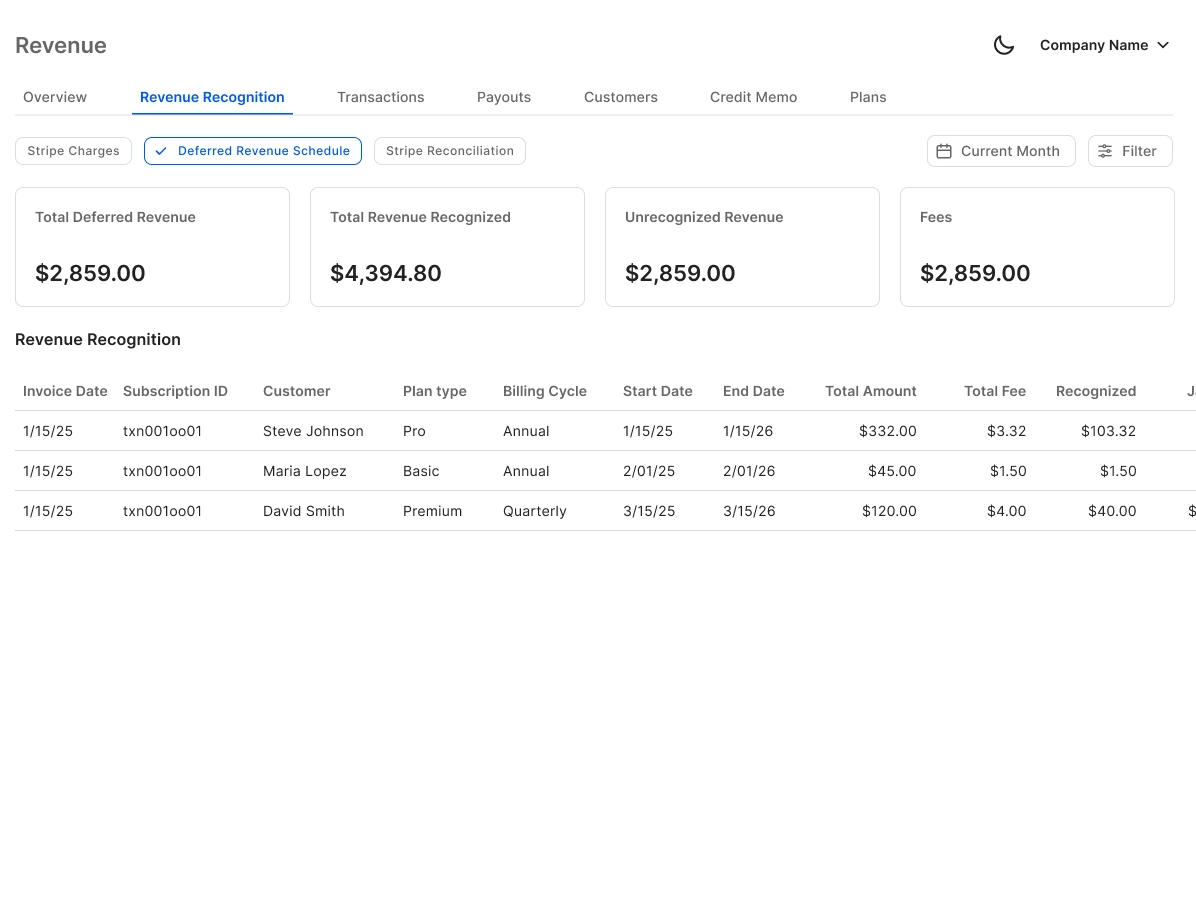
Real-Time QuickBooks Sync
Every separated Stripe transaction syncs bidirectionally to QuickBooks in real time. No CSV exports, no manual journal entries. Your existing QBO setup stays intact with no migration required.

Stripe Payout Reconciliation
Finlens automatically matches Stripe payouts against QuickBooks records, flags discrepancies, and clears reconciled items. Eliminate the monthly manual reconciliation that delays your close.

AI Categorization for Stripe Transactions
Every Stripe transaction is categorized at first pass using GL logic and learned patterns. Processing fees, refunds, and payouts each land in the right account without manual tagging or reclassification.

Real-Time P&L With Clean Fee Splits
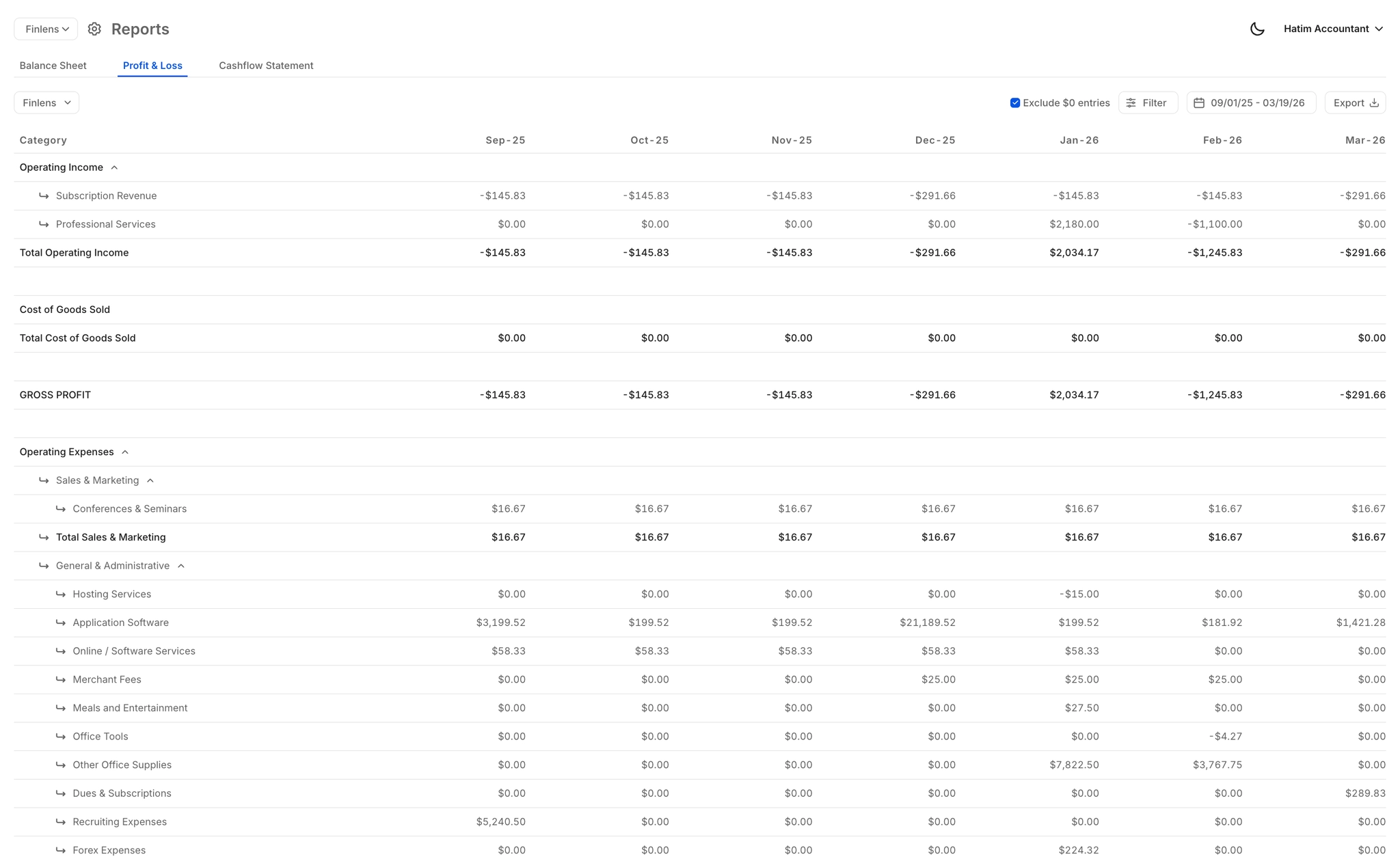
Once Stripe fees are properly separated, Finlens generates a real-time P&L that reflects accurate gross revenue, fee expenses, and net income. Always current, never rebuilt from a stale export.
Ready to Transform Your Business?
How It Works
Get started in minutes, not months.
Connect QuickBooks
Finlens reads your GL and identifies accrual-eligible transactions
Review AI-Generated Schedules
Finlens auto-builds prepaid, deferred revenue, and amortization schedules; your team reviews and approves
Entries Post Automatically at Month-End
Journal entries sync to QuickBooks on schedule; close faster, audit trail preserved
Why Choose Finlens
Why teams choose Finlens.
Works on Top of QuickBooks
No migration. No new GL. Finlens augments the tools your team already uses — real-time two-way sync means your QuickBooks data is always current.
80%+ Less Manual Bookkeeping
AI categorization, automated reconciliation, and smart schedules replace the spreadsheet work that eats your team’s hours.
Backed by Y Combinator & Accel
Built in San Francisco by a team that understands accounting workflows. Trusted by firms and founders scaling fast.
12,000+ Bank Connections
Connect every bank account, credit card, and financial tool your clients use. Powered by Plaid.
Frequently Asked Questions
Does Finlens replace QuickBooks for Stripe reconciliation?
No. Finlens works on top of QuickBooks, not instead of it. It connects to your Stripe account, separates gross revenue, processing fees, refunds, and net payouts, then syncs each component into the correct QuickBooks GL accounts in real time. Your existing QuickBooks setup stays exactly as it is. No migration, no data loss, no workflow disruption.
How does Finlens separate Stripe fees from gross revenue?
Finlens connects directly to Stripe and pulls the full transaction detail behind every payout, including gross charges, Stripe processing fees, refunds, and disputes. It then maps each component to the appropriate GL account in QuickBooks automatically, so your books reflect true gross revenue and a separate fee expense line rather than a single net deposit.
What Stripe transaction types does Finlens handle?
Finlens handles standard payment charges, subscription billing, refunds, chargebacks, and Stripe processing fees. Each transaction type is categorized and posted to QuickBooks separately so your P&L accurately reflects the full revenue picture, not just net deposits.
How long does it take to set up Stripe and QuickBooks in Finlens?
Setup is designed to require minimal effort. You connect your Stripe account and QuickBooks, and Finlens begins pulling transaction data and mapping it to your existing chart of accounts. There is no data migration and no need to rebuild your QuickBooks structure.
Is Finlens useful for bookkeepers managing clients who use Stripe?
Yes. Bookkeepers and CPA firms use Finlens to automate Stripe fee separation across multiple clients from a single dashboard. Instead of manually reconciling each client's Stripe payouts and exporting CSVs, Finlens handles categorization and QuickBooks sync automatically, reducing the manual work associated with each Stripe-connected client.