Stripe QBO Sync Built for Multi-Client Firms
Finlens automates Stripe payment reconciliation and revenue recognition directly into QuickBooks, cutting month-end close time by 40-70%.
Manual Stripe to QBO Sync Breaks Firms
CSV Exports Waste Hours
Downloading Stripe payouts and importing them into QBO manually costs hours per client, every single month.
Revenue Recognized in the Wrong Period
Annual subscriptions posted as lump sums distort your clients' P&L and produce GAAP-noncompliant revenue numbers.
Reconciliation Errors at Month-End
Mismatched fees, refunds, and payouts create discrepancies that surface at close and take hours to untangle.
Automated Stripe QBO Sync on Top of QuickBooks
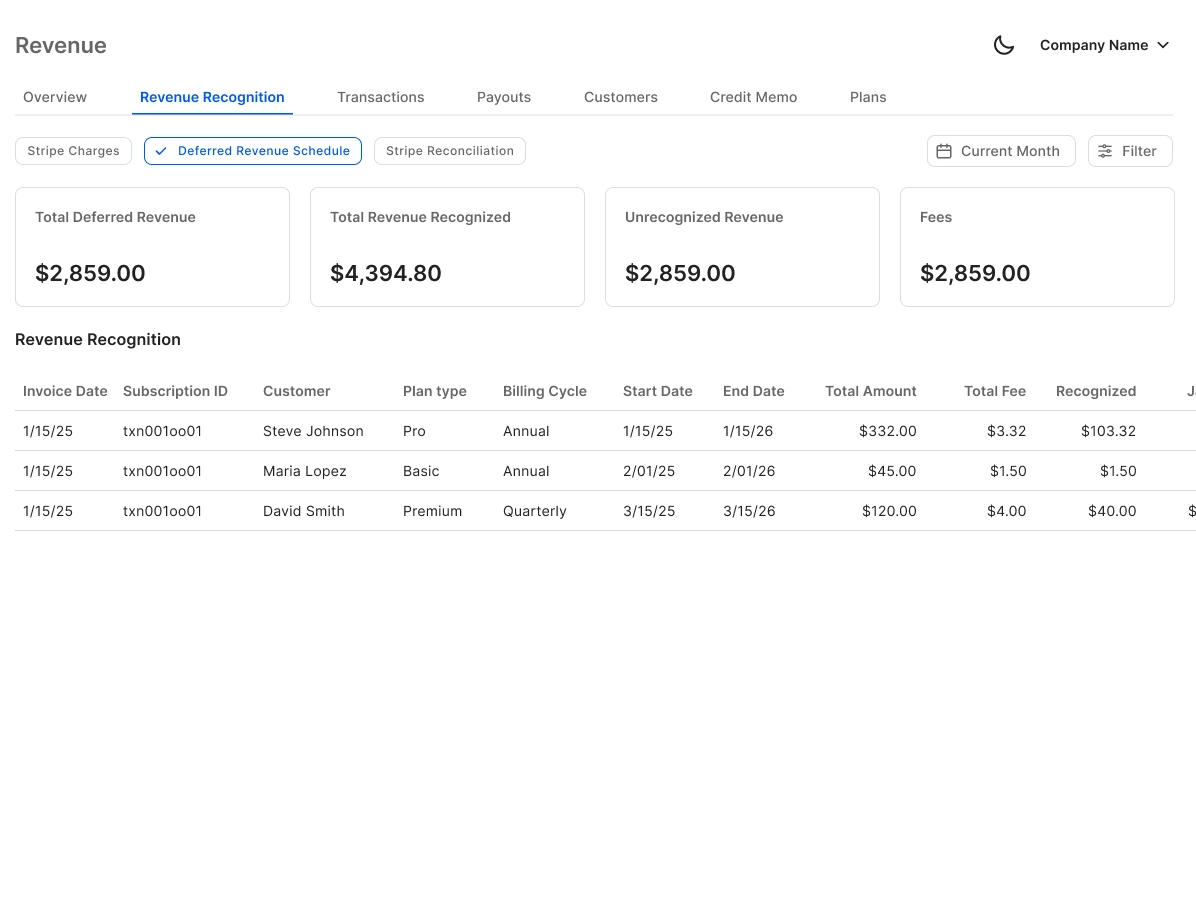
Finlens connects directly to Stripe and QuickBooks, auto-calculates gross revenue, fees, refunds, and payouts, breaks subscriptions into recognized monthly revenue, and posts journal entries to QBO in real time. No spreadsheets, no migration.
Automated Stripe to QBO Revenue Sync
Auto-calculates gross revenue, Stripe fees, refunds, and payouts. Splits annual subscriptions into monthly recognized revenue and posts entries directly to QuickBooks without a manual export in sight.
Real-Time QuickBooks Two-Way Sync
Categorized transactions, journal entries, bills, and invoices flow both ways between Finlens and QBO in real time. Your QuickBooks stays current without anyone touching a CSV file.

Automated Bank Reconciliation
Finlens automatically matches Stripe payouts and bank deposits against QBO transactions, eliminating the line-by-line reconciliation work that stalls month-end close across your client portfolio.

Faster Month-End Close for Stripe Clients
With Stripe reconciliation automated, the bottleneck shifts away from data entry. Finlens coordinates the remaining close workflow so firms finish 40-70% faster than a fully manual process.

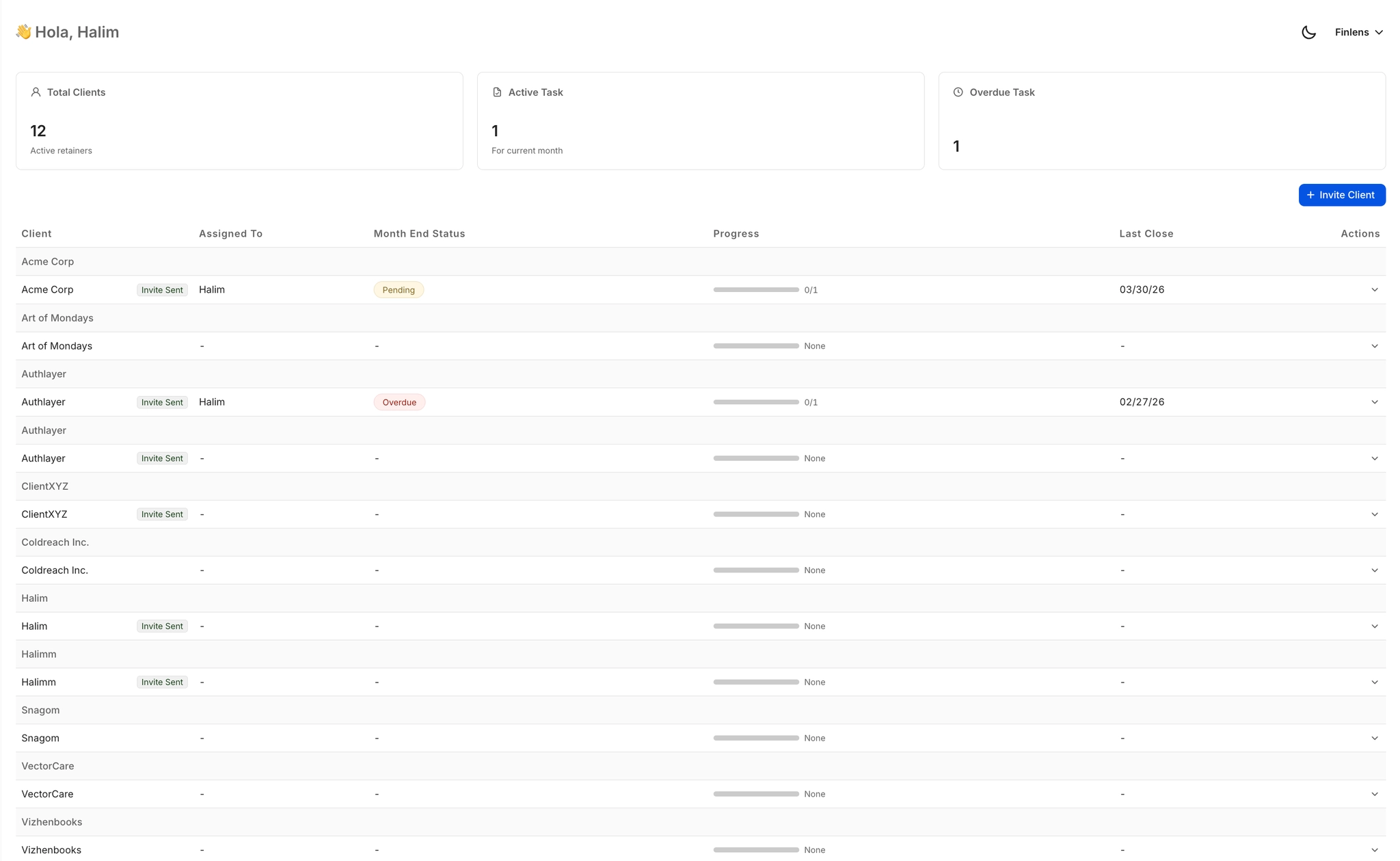
Multi-Client Stripe Reconciliation Dashboard
See Stripe sync status, open reconciliation items, and close progress across every client from one view. No logging into separate QBO accounts or chasing down which client is still pending.
Ready to Transform Your Business?
How It Works
Get started in minutes, not months.
Connect QuickBooks
Finlens reads your GL and identifies accrual-eligible transactions
Review AI-Generated Schedules
Finlens auto-builds prepaid, deferred revenue, and amortization schedules; your team reviews and approves
Entries Post Automatically at Month-End
Journal entries sync to QuickBooks on schedule; close faster, audit trail preserved
Why Choose Finlens
Why teams choose Finlens.
Works on Top of QuickBooks
No migration. No new GL. Finlens augments the tools your team already uses — real-time two-way sync means your QuickBooks data is always current.
80%+ Less Manual Bookkeeping
AI categorization, automated reconciliation, and smart schedules replace the spreadsheet work that eats your team’s hours.
Backed by Y Combinator & Accel
Built in San Francisco by a team that understands accounting workflows. Trusted by firms and founders scaling fast.
12,000+ Bank Connections
Connect every bank account, credit card, and financial tool your clients use. Powered by Plaid.
Frequently Asked Questions
Does Finlens replace QuickBooks for Stripe reconciliation?
No. Finlens works on top of QuickBooks, not instead of it. It connects to your existing QBO accounts and automates the Stripe data flow directly into them. Journal entries, categorized transactions, and reconciled payouts all post back to QuickBooks automatically. There is no migration, no new GL to learn, and no disruption to your current QBO setup.
How does Finlens handle Stripe fees and refunds in QBO?
Finlens automatically separates gross revenue, Stripe processing fees, refunds, and net payouts, then records each component as its own line in QuickBooks. This ensures your P&L reflects true revenue rather than net deposit amounts, which is the most common source of Stripe-related misstatements in QBO.
Can Finlens recognize Stripe subscription revenue monthly?
Yes. When a client collects annual or multi-month Stripe subscriptions, Finlens breaks the payment into its recognized monthly portions and posts the corresponding deferred revenue journal entries to QuickBooks automatically. This produces GAAP-compliant revenue schedules without maintaining separate spreadsheets.
How long does it take to connect Stripe and QBO to Finlens?
Connecting Stripe and QuickBooks to Finlens is designed to be fast and require minimal setup. Finlens reads your existing QuickBooks chart of accounts and begins syncing Stripe transactions without requiring you to rebuild any configuration from scratch.
Does Finlens work for accounting firms managing multiple clients on Stripe?
Yes, and this is where Finlens is especially applicable. The multi-client dashboard lets your team manage Stripe reconciliation across dozens of clients from a single view, track open items per account, and complete month-end close without logging in and out of separate QuickBooks accounts.