Stripe to QuickBooks Reconciliation Software That Automates Closing
Finlens connects Stripe and QuickBooks in real time, automating payment matching, fee calculations, and journal entries so you can close books faster without manual data entry.
Stripe Reconciliation Is Still Manual
Payouts Don't Match Invoices
Stripe batches payouts with fees and refunds mixed in, making it nearly impossible to match against QuickBooks entries manually.
Revenue Booked Incorrectly
Without automation, gross revenue, Stripe fees, and refunds get lumped together, producing inaccurate P&L numbers every month.
Month-End Close Drags On
Teams export CSVs, manually post journal entries, and chase discrepancies — costing hours every close cycle.
Automated Stripe and QuickBooks Reconciliation
Finlens sits between Stripe and QuickBooks, auto-calculating gross revenue, fees, refunds, and payouts, then posting clean journal entries directly to QBO in real time. No CSV exports. No migration required.
Stripe to QuickBooks Reconciliation
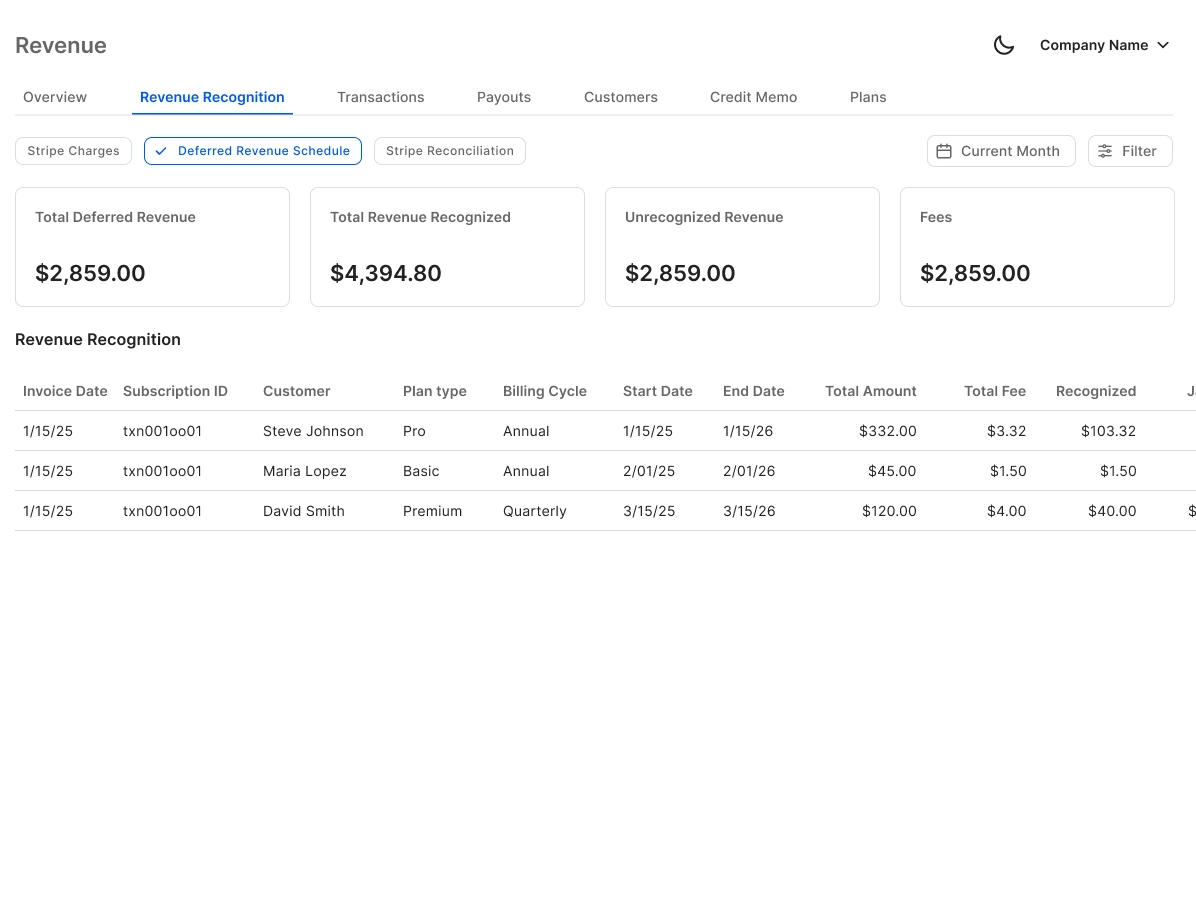
Auto-calculates gross revenue, Stripe fees, refunds, and payouts from every transaction and posts accurate journal entries directly to QuickBooks. Eliminates the manual CSV export and import workflow entirely.
Real-Time QuickBooks Two-Way Sync
Finlens syncs categorized transactions, journal entries, and bank data bidirectionally with QuickBooks in real time. Your existing QBO setup stays intact — no migration, no disruption, no duplicate records.

Automated Bank Reconciliation
Matches Stripe payouts and bank deposits automatically, flagging discrepancies before they reach your close checklist. Removes the most error-prone step in reconciling payment processor data with your bank feed.

Faster Month-End Close Workflow
Automates the recurring close tasks tied to Stripe reconciliation — categorization, journal entry posting, and schedule updates — cutting month-end close time by 40-70% compared to manual workflows.

AI Transaction Categorization
Every Stripe transaction is auto-categorized at first pass using GL logic and pattern recognition. Learns from corrections over time so categorization accuracy improves with every reconciliation cycle.

Ready to Transform Your Business?
How It Works
Get started in minutes, not months.
Connect QuickBooks
Finlens reads your GL and identifies accrual-eligible transactions
Review AI-Generated Schedules
Finlens auto-builds prepaid, deferred revenue, and amortization schedules; your team reviews and approves
Entries Post Automatically at Month-End
Journal entries sync to QuickBooks on schedule; close faster, audit trail preserved
Why Choose Finlens
Why teams choose Finlens.
Works on Top of QuickBooks
No migration. No new GL. Finlens augments the tools your team already uses — real-time two-way sync means your QuickBooks data is always current.
80%+ Less Manual Bookkeeping
AI categorization, automated reconciliation, and smart schedules replace the spreadsheet work that eats your team’s hours.
Backed by Y Combinator & Accel
Built in San Francisco by a team that understands accounting workflows. Trusted by firms and founders scaling fast.
12,000+ Bank Connections
Connect every bank account, credit card, and financial tool your clients use. Powered by Plaid.
Frequently Asked Questions
Does Finlens replace QuickBooks for Stripe reconciliation?
No. Finlens works on top of QuickBooks, not instead of it. It connects to your existing QuickBooks account, pulls Stripe transaction data in real time, and posts the correct journal entries back to QBO automatically. Your QuickBooks remains the source of truth — Finlens is the automation layer that eliminates the manual work between Stripe and your GL.
How does Finlens handle Stripe fees and refunds in QuickBooks?
Finlens auto-calculates gross revenue, Stripe processing fees, refunds, and net payouts for every transaction. Each component is mapped to the correct GL account and posted as a journal entry in QuickBooks, so your P&L reflects accurate net revenue rather than a lump-sum payout deposit.
Does Finlens support Stripe subscription and annual payment reconciliation?
Yes. Finlens breaks annual subscription payments into monthly recognized revenue, automating the deferred revenue schedule that would otherwise require a manual spreadsheet. This ensures your QuickBooks entries are GAAP-compliant and your revenue numbers match the period they were actually earned.
How long does it take to connect Stripe and QuickBooks in Finlens?
Setup is straightforward — you connect your Stripe account and authorize your QuickBooks integration, and Finlens begins pulling transaction data immediately. There is no migration of existing data required, and your current QuickBooks chart of accounts and settings remain unchanged throughout.
Is Finlens useful for CPA firms reconciling multiple clients using Stripe?
Yes. CPA firms can manage all Stripe-connected clients from a single multi-client dashboard without switching between QuickBooks accounts. Finlens automates reconciliation across all clients simultaneously, so firms can take on more Stripe-heavy clients without adding proportional manual work to the month-end close cycle.