Transaction Categorization Automation Powered by AI
Finlens learns your clients' GL logic and auto-categorizes every transaction on top of QuickBooks. No migration, no manual coding.
Manual Categorization Is Killing Productivity
Hours Lost Every Month
High-volume clients with 1000+ transactions consume 6-10 hours of manual categorization work per month, per client.
Errors That Compound Over Time
Manual coding introduces inconsistencies across clients. One wrong category cascades into reconciliation errors and messy month-end close.
Onboarding Becomes the Bottleneck
New client setup means rebuilding GL logic from scratch. Firms spend 10-15 hours onboarding a single client before any real work begins.
AI Categorization That Learns Your GL Logic
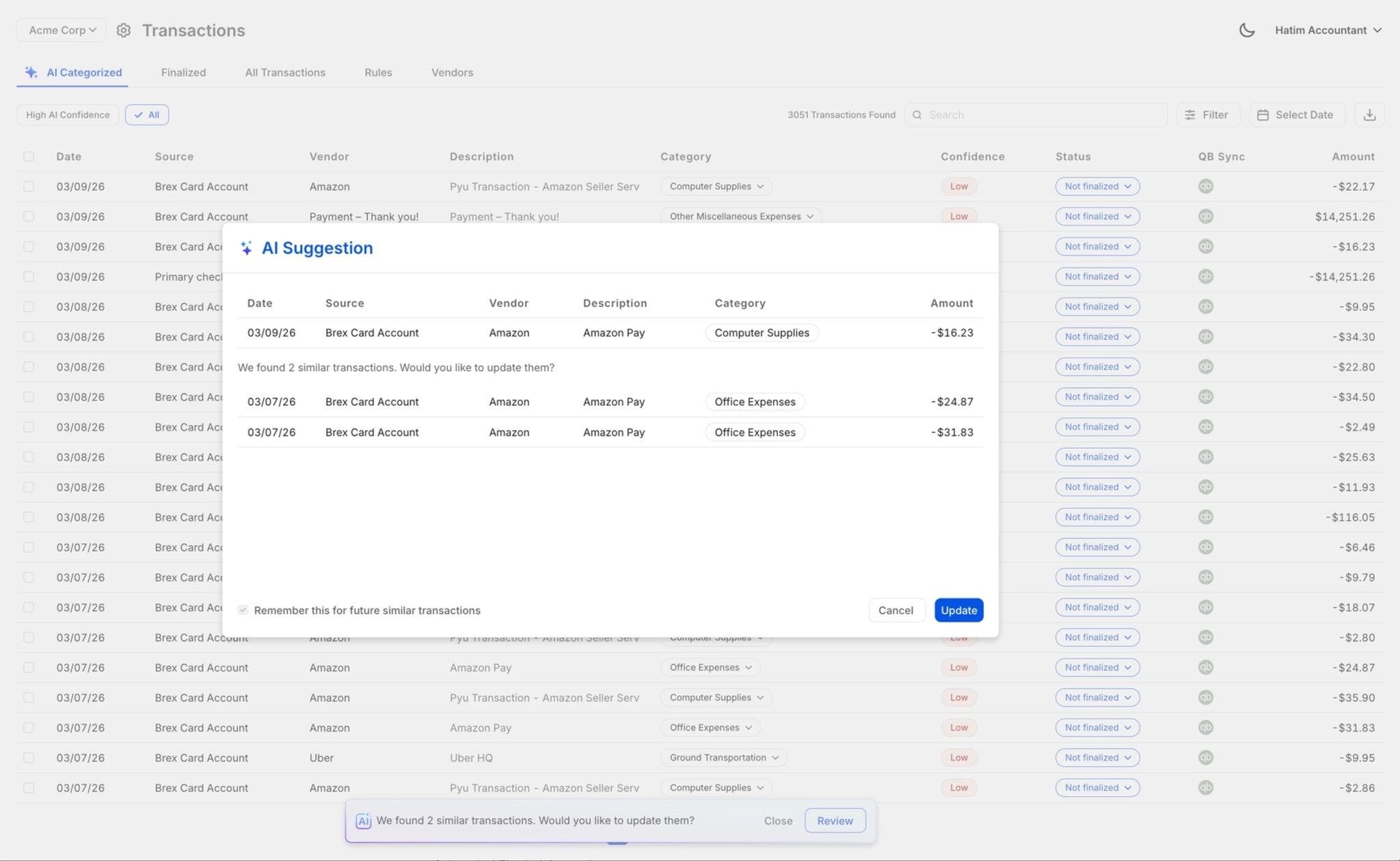
Finlens layers AI transaction categorization automation on top of QuickBooks, learning from historical patterns and past corrections to auto-code every transaction at first pass. Nothing posts without human sign-off.
AI Transaction Categorization Automation
Every transaction is categorized at first pass using GL logic, historical patterns, and learned corrections. For high-volume clients, this eliminates hours of manual coding each month without sacrificing accuracy.

Accountant Review and Override
AI suggestions are reviewed and finalized with one click. Approve, correct, or override any categorization before it posts to QuickBooks. Full control stays with the accountant who carries the liability.
Real-Time QuickBooks Two-Way Sync
Categorized transactions, journal entries, bills, and invoices sync bidirectionally with QBO in real time. No migration, no duplicate data entry, no broken exports. Works on top of QuickBooks from day one.

Automated Bank Reconciliation
Automatically matches bank statement items against QuickBooks records and flags discrepancies. Removes one of the most tedious steps from the month-end close workflow so your team focuses on exceptions only.

Month-End Close Acceleration
Task management, team assignments, and progress tracking for the full close workflow. With categorization automated at the front end, firms report up to 40-70% faster close times across their client book.

Ready to Transform Your Business?
How It Works
Get started in minutes, not months.
Connect QuickBooks
Finlens reads your GL and identifies accrual-eligible transactions
Review AI-Generated Schedules
Finlens auto-builds prepaid, deferred revenue, and amortization schedules; your team reviews and approves
Entries Post Automatically at Month-End
Journal entries sync to QuickBooks on schedule; close faster, audit trail preserved
Why Choose Finlens
Why teams choose Finlens.
Works on Top of QuickBooks
No migration. No new GL. Finlens augments the tools your team already uses — real-time two-way sync means your QuickBooks data is always current.
80%+ Less Manual Bookkeeping
AI categorization, automated reconciliation, and smart schedules replace the spreadsheet work that eats your team’s hours.
Backed by Y Combinator & Accel
Built in San Francisco by a team that understands accounting workflows. Trusted by firms and founders scaling fast.
12,000+ Bank Connections
Connect every bank account, credit card, and financial tool your clients use. Powered by Plaid.
Frequently Asked Questions
Does Finlens replace QuickBooks?
No. Finlens works on top of QuickBooks, not instead of it. Your firm keeps its existing QBO setup, client history, and workflows intact. Finlens adds an AI automation layer that handles transaction categorization, reconciliation, and close workflows while syncing every change back to QuickBooks in real time. There is no migration, no data transfer risk, and no retraining your team on a new general ledger.
How does AI transaction categorization actually work?
Finlens analyzes each client's historical transaction patterns and GL structure to build a categorization model specific to that client. When new transactions come in, the AI suggests a category at first pass based on those learned patterns. Accountants then review, approve, or correct suggestions with one click. Every correction is fed back into the model, so accuracy improves continuously over time.
Will the AI categorize transactions correctly for a new client with no history?
For brand-new clients, Finlens uses its automated chart of accounts setup and cross-client pattern recognition to generate categorization suggestions from day one. Accuracy improves quickly as the model learns from accountant corrections during the first few weeks. Client onboarding also includes historical transaction categorization to establish baseline GL logic before the live workflow begins.
Can accountants override AI categorizations before they post to QuickBooks?
Yes, always. Nothing posts to QuickBooks without a human review step. Every AI-suggested categorization goes through an accountant approval queue. You can approve in bulk, correct individual items, or override any suggestion. This human-in-the-loop design is core to how Finlens is built — AI handles the volume, accountants retain full control and legal accountability.
How many bank and financial institution connections does Finlens support?
Finlens supports connections to over 12,000 financial institutions via Plaid, including major banks, credit cards, Ramp, Stripe, and other financial tools. This breadth of coverage means Finlens can pull and categorize transactions for virtually any client regardless of which banks or payment processors they use.