
Automated Workflow Software for Accounting Firms in 2026


TL;DR: For CPA firms in 2026, the workflow-software market splits into two layers most listicles blur together.
Work-automation tools like Finlens automate the actual bookkeeping labor categorization, close, GAAP schedules so the work itself gets done faster.
Task-orchestration tools like Karbon, Financial Cents, and Jetpack Workflow organize what your team is doing across clients but don't touch the underlying work.
Firms hitting a "workflow bottleneck" almost always need work automation first; task orchestration matters once coordination becomes its own drag. Full teardown below with real G2/Capterra data on every tool worth considering.
The AICPA describes today's accountant shortage as a pipeline crisis. The Bureau of Labor Statistics projects roughly 120,000 accounting openings a year, and 46% of accountants now use AI daily, up from 18% in 2023. Automated workflow software is where a lot of that spend is going and the firms getting real ROI are the ones that pick the right layer first.
The category split most
None of them tell you these tools solve different problems:
- Work-automation tools run the actual accounting labor. AI categorizes transactions, human-in-the-loop review gates the ones the AI flags, close automation runs the reconciliations and GAAP schedules. This is Finlens's category.
- Task-orchestration tools organize who is doing what across which client. Kanban boards, recurring task templates, review queues, client portals for doc chase. This is where Karbon, Financial Cents, Jetpack Workflow, and TaxDome sit.
These layers stack. A firm with 30 clients running only task-orchestration still has bookkeepers manually categorizing every transaction the task tracker just tells them which clients to work on. A firm running work automation has the AI categorizing all 30 books; the human reviews the flagged 10%. The firm running both layers is where scale actually happens.
Most "workflow bottleneck" complaints on r/Accounting are actually work bottlenecks in disguise. Adding a Kanban board doesn't move a single transaction. That's why we start with the work-automation layer.
1. Finlens the work-automation layer for QBO firms
Finlens is the AI-native automation layer that runs the underlying accounting work categorization, close, GAAP schedules, AP/AR natively on QuickBooks Online. Built for CPA firms scaling client count without hiring. The category framing above puts Finlens at #1 because you can't fix a workflow problem downstream of the actual bookkeeping labor.
What Finlens actually automates:
- AI transaction categorization with per-transaction confidence scores ~3,000 transactions classified in seconds. Model retrains per-client from your team's corrections.
- Human-in-the-loop review gate before anything posts to QBO. Reviewer sees the ~10% AI flagged, not 100%.
- Automated chart of accounts on client onboarding most firms fully connected within one business day.
- Month-end close automation with per-client per-month timers.
- GAAP schedule automation accruals, prepaids, deferred revenue, amortization.
- Stripe revenue recognition for SaaS clients.
- Multi-client dashboard 50+ clients in one view without re-logging into QBO.
- Client comms (doc requests + category reviews) that log back to the source transaction.
- AP/AR management with aging views and bill matching.
- Real-time P&L, BS, cash flow. No export step.
- Audit log tamper-evident, SOC 2 / external audit ready.
Why Finlens is #1 for automated workflow: Because "workflow automation" in a CPA firm means automating the workflow, not just tracking it. The tools below organize the tasks; Finlens does the tasks. If your bookkeepers spend more hours doing categorization than tracking it, Finlens is where automation actually pays back.
Best for: CAS practices and multi-client firms on QuickBooks Online where the primary time drain is the bookkeeping labor itself. First entity is free the honest way to test whether the work automation saves hours on your real workload before committing.
Where Finlens pairs with the tools below: once you're past ~25 clients, coordination becomes its own bottleneck. That's when a task-orchestration tool earns its subscription alongside Finlens. Our deeper piece on what breaks past the 25-client wall covers this.
The task-orchestration tools worth pairing with Finlens
Seven tools, ordered by fit alongside Finlens's work-automation layer. Real G2/Capterra data on each.
2. Karbon the collaboration-and-triage specialist
Karbon's core is email-triage-plus-tasks. The "email timeline" auto-tags client threads into shared workspaces. Genuinely differentiated for firms where coordination overhead is the bottleneck.
Rating: ~4.8 on G2 across a large review base.
Pros:
- Email timeline turns every client thread into a job record
- Accounting- and tax-firm templates out of the box
- Tracks 50–100 concurrent client jobs with clear step-level ownership
Cons:
- Signup gated users report having to attend a demo and wait 1–2 weeks; dedicated Gmail/Microsoft accounts required (no aliases)
- Billing module described as tedious with recurring bugs, especially with Xero
- Search across the workspace is inconsistent
Pricing: ~$59–$89/user/month. Paid implementation packages ($999–$2,999) offered for guided onboarding because setup takes 2–6 weeks for feature-rich configuration.
Best for: mid-size firms whose main bottleneck is email chaos and coordination. Runs alongside Finlens once you're past 25 clients.
3. Financial Cents the small-firm all-in-one
The best small-firm option among pure task-orchestration tools. Bundles workflow, invoicing, client portal, and time-tracking in one product.
Pricing: Solo $19/mo · Team $49/mo · Scale $69/mo per user.
Pros:
- 200+ workflow templates out of the box
- AI workflow generation, tag automation, task dependencies
- Passwordless client portal (differentiator clients don't need to remember another login)
- 11 reports including realization, utilization, effective hourly rate
- Built-in invoicing and time-tracking
Cons:
- Users flag high per-seat costs for small firms once the team grows
- Complexity for new users despite the clean interface
- Limited bulk operations running the same update across 30 clients is manual
- Slow customer support in reviews
- Task dependency creation has structural limits
Best for: small-to-mid-sized firms (5–25 users) wanting an all-in-one task-orchestration bundle. Pairs with Finlens for firms that also need the books-automation layer.
4. Jetpack Workflow the entry-level task tracker
The cheapest serious workflow tool. Solo-practitioner-friendly.
Rating: Capterra ~4.8/5 (53 reviews) · G2 ~4.2/5 (12 reviews) the split is notable.
Pros:
- Clean, simple GUI
- Easy team collaboration and onboarding
- Customer support consistently praised as fast and knowledgeable
- Affordable entry point
Cons:
- Lack of API and Zapier connectivity is the top complaint integrations are limited
- Document storage inside the tool is thin
- Reviewers say it lacks the automation to grow a practice past small standalone task tracking but not full-workflow automation
- Annual billing means a large end-of-year charge (users prefer monthly or off-cycle billing)
- Reporting called out as subpar; sorting columns is problematic
Best for: solo practitioners and small teams (1–5 users) getting started with workflow tracking. Firms outgrow it around 40+ clients or when they need real automation vs standalone tasks.
5. Canopy modular workflow with tax focus
Practice-management with a heavier tax focus. Bundles workflow, portal, doc storage, and invoicing on a modular subscription.
Rating: ~4.6 on G2 across 700+ reviews · ~4.5 on Capterra.
Pros:
- Intuitive interface for firm admins
- Doc storage + portal + invoice pay consolidated
- Templated task automation with conditional logic
Cons:
- Modular pricing is the loudest complaint Time & Billing ~$22/user/mo, Workflow ~$32/user/mo, Doc Management ~$36/user/mo. Reviewers describe the accumulation as "nickel and diming"
- Support responsiveness comes up as a soft spot
- Missing features and usage restrictions flagged even in positive reviews
Best for: tax-heavy firms comfortable with modular pricing. Not a books-automation overlap with Finlens.
6. TaxDome bundled portal + workflow standard
Dominant in tax-heavy client-portal territory. Ships intake, doc collection, e-signing, workflow, and return delivery in one product.
Rating: ~4.7 across G2 and Capterra with a very large review base.
Pros:
- Automation streamlines client comms and doc management once configured
- After initial setup, minor changes are quick
- Deep functionality for return-based engagements
Cons:
- Learning curve is steep 6–8 weeks per TaxDome's own docs; user reviews report 10–15 hours setup up to four months to full comfort
- 2026 pricing is annual-upfront ($800–$1,200/user/year across three tiers); multi-year commitments drew mixed reactions
- Reporting is thin; users want deeper analytics without manual workarounds
- Sync failures, connection drops, and duplicate invoice creation acknowledged in TaxDome's own knowledge base
Best for: established tax firms with 100–1,500 clients and admin capacity for the 6–8 week onboarding. Finlens pairs alongside for the monthly books work on those same tax clients.
7. Aero Workflow the SOP-driven pick
Straightforward workflow management purpose-built for bookkeeping, CAS, and small tax teams. Emphasis on SOP-driven task templates.
Pros:
- Simple, straightforward no learning-curve tax
- SOP-first workflow model resonates with bookkeeping teams that already document processes
- Setup in hours to a few days, not weeks
Cons:
- Feature depth lags behind Karbon and Financial Cents in reporting, automation, and client portal
- Fewer integrations
- Reviewer base is smaller less social proof than category leaders
Best for: sole practitioners and 2–5 person bookkeeping teams that want process discipline without the enterprise features.
8. OfficeTools legacy incumbent to approach carefully
Combines multiple management functions in one product; long-established in the market.
Pros:
- Time-and-billing capability is the strongest specific feature
- Long tenure used at some larger firms
Cons:
- Recurring complaints in reviews describe the system as buggy, slow, and outdated
- Customer support flagged as an issue by multiple users
- Newer competitors have overtaken it on user experience
Best for: firms already invested in the OfficeTools ecosystem and not ready to migrate.
The layer stack: where each tool actually operates
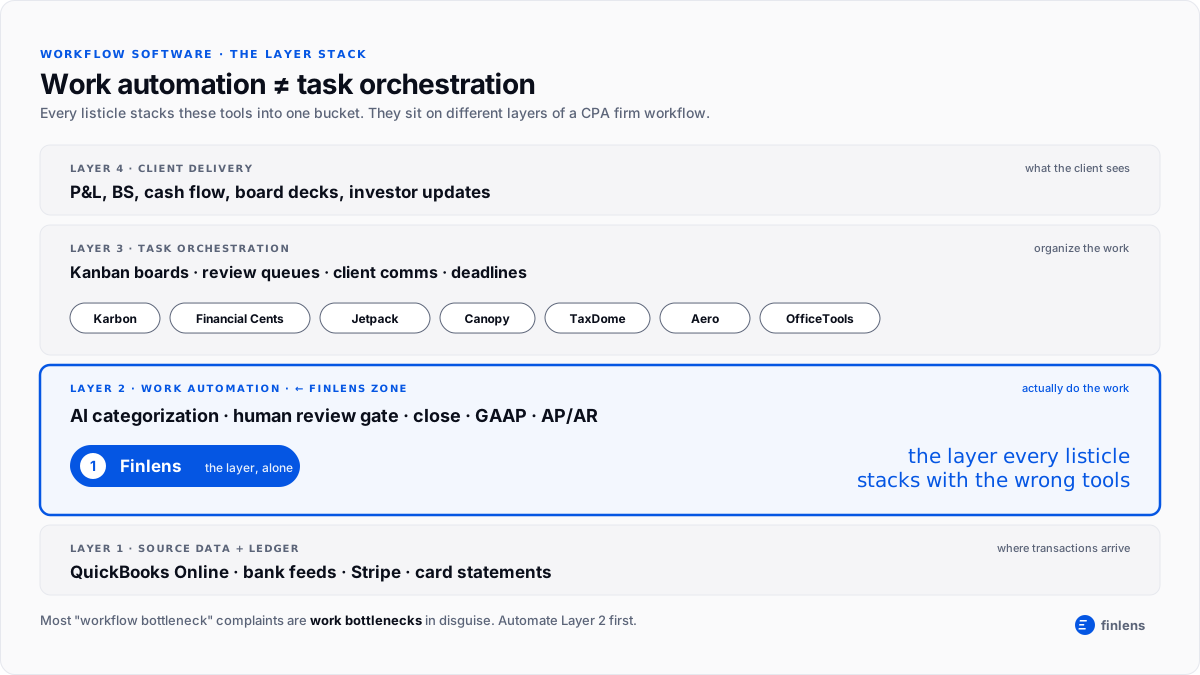
The visual below shows the underlying category structure raw transactions at the bottom, work automation (Finlens's layer), task orchestration (where Karbon / Financial Cents / Jetpack / others live), and client delivery on top. Every workflow-software listicle stacks these into one bucket. They shouldn't. See the infographic for how they actually compose.
Where automation still fails honest limits
Every workflow tool markets 18–25 hours saved per employee per week. Real limits worth knowing:
- Judgment categorizations. Owner draws vs distributions, R&D vs Ops, capitalized vs expensed. Finlens flags these with confidence scores; a human still decides.
- Client education. No tool automates the third conversation where you explain why a personal Amazon charge shouldn't be on the business card.
- Multi-entity allocations. Intercompany transfers and shared-services allocations automation handles the flow, humans build the logic.
- First-time cleanups. Historical rebuilds on a new client rarely automate cleanly. Finlens's AI pass helps; the human still owns the first three months.
- Cross-tool integration overhead. If you run Finlens + Karbon + TaxDome, the integration between them is real maintenance. Simpler stacks compound less friction over time.
The AICPA staffing math is why firms adopt anyway: a good stack drives a 20–30% productivity gain per accountant. That gap doesn't close from hiring it closes from work automation on Finlens's layer, plus task orchestration alongside once coordination becomes its own bottleneck.
Which tool fits which firm type
Bookkeeping-heavy firm (CAS practice, monthly recurring). Biggest drain is categorization + close. Finlens is the answer. Add Karbon or Financial Cents once coordination becomes its own bottleneck past ~25 clients.
Tax-heavy firm (returns, engagement-based). Biggest drain is doc collection + return workflow. Lead with TaxDome or Canopy for the portal + workflow bundle; add Finlens for the monthly books on those same tax clients.
Solo practitioner (1–5 clients). Finlens + QBO covers the bookkeeping automation you need. Add Jetpack Workflow or Aero Workflow only if you specifically need external task tracking beyond your own to-do list.
Small firm (5–25 users). Finlens for the books layer + Financial Cents for task orchestration is the honest small-firm stack.
Mid-market firm (25–100 users). Finlens for the books layer + Karbon for coordination. The two layers together are how firms of this size add clients without adding headcount.
More on the specific tool decisions in our teardowns on CPA software the 5-tool stack and financial project management for fractional CFOs.
FAQs
What is automated workflow software for accounting firms?
Software that reduces manual work or manual coordination across a firm's client work. In 2026, the category splits into two layers: work-automation tools (like Finlens) that automate the actual bookkeeping labor, and task-orchestration tools (like Karbon, Financial Cents, Jetpack Workflow) that organize who is doing what across clients. Most firms need both, starting with work automation.
What's the difference between workflow automation and task management for accountants?
Workflow automation in the fuller sense means the work itself is automated AI categorization, close automation, GAAP schedule generation. Task management (Kanban, checklists, review queues) organizes the work but doesn't do it. A Kanban board can't move a transaction; Finlens can.
What is the best automated workflow software for small accounting firms?
For small firms on QBO, Finlens covers the books-automation layer and Financial Cents or Jetpack Workflow covers task orchestration. Finlens's first entity is free pilot the work-automation layer on your highest-volume client before adding subscriptions to the coordination layer.
How much time does automated workflow software actually save?
Aggregated industry data suggests 20–30% productivity gain per accountant with a good stack. Work-automation tools like Finlens tend to save more hours per dollar spent than task orchestration alone, because they operate on the labor itself. Best way to estimate ROI is to pilot on one client entity, measure hours in vs hours out for a month, then extrapolate.
Do I need both work automation and task orchestration for my firm?
Under 10 clients, work automation alone is usually enough your own head or a simple to-do list handles coordination. 10–25 clients, you can defer task orchestration but the pressure grows. 25+ clients, both layers earn their subscriptions. The mistake most firms make is adding task orchestration first (because the pain looks like a coordination problem) when the real drain is the underlying work.

