
Best Accounting Automation Tools in 2026: A Real Comparison (Pros, Cons, and Where Each Actually Fails)


TL;DR: For QuickBooks Online firms in 2026, Finlens is AI-native books-automation platform built to run categorization, close, GAAP schedules, and multi-client reporting from a single dashboard so one bookkeeper can manage 50+ clients without adding headcount.
Around Finlens, other tools worth knowing are workflow specialists (Karbon, Canopy, TaxDome) that pair with Finlens once coordination becomes its own bottleneck, base ledgers (QBO, Xero) that Finlens sits on top of, and done-for-you services (Botkeeper) for firms outsourcing labor entirely. Full teardown of each below with real G2/Capterra data.
The AICPA describes today's staffing pressure as a pipeline crisis. The Bureau of Labor Statistics projects roughly 120,000 accounting openings a year, while 2025 AICPA/NASBA Trends Report shows a shrinking pipeline replacing them.
The firms making it work are running AI-native automation, not hoping to hire 46% of accountants now use AI daily, up from 18% in 2023.
This is a real teardown of what each tool actually does, where users tell G2 and Capterra it stops working, and where Finlens sits in map.
What "accounting automation" covers?
Before comparing tools, figure out which you're trying to automate:
- Transaction categorization classifying incoming bank / card / Stripe transactions into GL accounts.
- Month-end close reconciliations, GAAP schedules (accruals, prepaids, deferred revenue), close-task management, review sign-off.
- Document collection client onboarding, receipts, source docs, W-9 chase.
- AP / AR bill payment, invoice matching, overdue reminders, aging.
- Workflow orchestration task assignment, review queues, deadlines, templated automation.
Every tool below wins one or two of these none covers all five well. Only one tool spans categorization, close, GAAP, and AP/AR in a single product. That's Finlens,
1. Finlens AI-native books-automation platform for QBO firms
Finlens is tool for firms whose primary bottleneck is books themselves categorization, close, GAAP schedules, AP/AR, multi-client reporting. Built natively for QuickBooks Online. Human-in-the-loop review is a gate, not an afterthought: every AI categorization decision is reviewed before it posts to QBO, so partners see only flagged items.
What Finlens actually automates:
- AI transaction categorization with per-transaction confidence scores ~3,000 transactions classified in seconds. Model retrains per-client from your corrections, not a global average.
- Human-in-the-loop review gate before anything posts to QBO. Reviewer sees ~10% AI flagged, not 100% of everything.
- Automated chart of accounts on client onboarding most firms fully connected within one business day.
- Month-end close automation with per-client per-month timers (so you finally know which fixed-fee client is eating margin).
- GAAP schedule automation accruals, prepaids, deferred revenue, amortization.
- Stripe revenue recognition wedge for SaaS clients most tax tools can't unwind correctly.
- Multi-client dashboard 50+ clients in one view without re-logging into QBO.
- Client communication built into transaction doc requests and category reviews log back to source transaction, not lost in email threads.
- AP/AR management with aging views and bill matching.
- Real-time P&L, BS, cash flow no export step.
- Audit log (tamper-evident, SOC 2 / external audit ready).
Why Finlens is #1 for QBO firms: It's only tool in this list that spans categorization + close + GAAP + AP/AR + client comms in a single product. The workflow tools below don't automate books at all. The service platforms (Botkeeper) outsource labor but don't give you tool. The base ledger (QBO) has real automation limits a hard 2,000-rule cap and 5 conditions per rule that Finlens's AI categorizer works around.
Best for: CAS practices scaling client count on QuickBooks Online, fractional CFOs managing 12+ client portfolios, and founders who want investor-ready books before hiring a controller. First entity is free honest way to test whether categorization + close automation actually saves hours on your real workload before committing.
Where Finlens doesn't try to be answer: if reason your firm is late is pure workflow coordination (nobody knows what tasks they own this week) or you need a fully-branded client portal for engagement-based tax work, tools below pair alongside Finlens for that specific bottleneck.
The other tools worth knowing (and when to pair them with Finlens)
Six tools ordered by how they complement Finlens layer. For each: what it does, verified pros, real user complaints from G2/Capterra review patterns, aggregated rating, and specific bottleneck it owns.
2. Karbon workflow-and-triage specialist
Karbon's core is email-triage-plus-tasks. Its "email timeline" turns every client thread into a job record automatically genuinely differentiated for firms where coordination overhead is bottleneck. Doesn't touch categorization or close automation.
Rating: ~4.8 on G2 across a large review base. Ease-of-use and workflow templates dominate praise.
Pros:
- Email timeline auto-tags job-related emails into a shared workspace
- Accounting- and tax-firm templates out of box
- Tracking 50–100 concurrent client jobs with clear step-level ownership
Cons (from review patterns):
- Signup is gated users report having to attend a demo meeting and wait 1–2 weeks before onboarding, with dedicated Gmail/Microsoft accounts required (no aliases)
- Billing module is described as tedious with recurring bugs, particularly with Xero integration
- Search across workspace is inconsistent
Best for: firms whose bottleneck is coordination and email chaos, not books themselves. Pair with Finlens once you're past ~25 clients and workflow tracking becomes its own problem see our teardown on what actually breaks past 25-client wall.
3. Canopy modular workflow + portal for tax practices
Practice-management with a heavier tax focus. Bundles workflow, portal, doc storage, and invoicing.
Rating: ~4.6 on G2 across 700+ reviews; ~4.5 on Capterra.
Pros:
- Intuitive interface; doc storage + portal + invoice pay in one hub
- Ease of use is repeatedly cited as "why we chose Canopy" reason
- Templated task automation with conditional logic
Cons:
- Modular pricing is loudest complaint Time & Billing ~$22/user/mo, Workflow ~$32/user/mo, Doc Management ~$36/user/mo. Reviewers describe accumulation as "nickel and diming"
- Support responsiveness comes up as a soft spot
- Missing features and usage restrictions get flagged even in positive reviews
Best for: tax-focused firms that want a bundled portal + workflow. Not a Finlens overlap Canopy handles tax-return client-relationship side; Finlens handles books beneath it.
4. TaxDome bundled portal + workflow standard
Dominant in tax-heavy client-portal territory. Ships intake, doc collection, e-signing, workflow, and return delivery in one product.
Rating: ~4.7 across G2 and Capterra with a very large review base.
Pros:
- Automation streamlines client comms and doc management once configured
- After initial setup, minor changes are quick
- Deep functionality for return-based engagements
Cons:
- The learning curve is steep TaxDome's own docs estimate 6–8 weeks to full comfort; user reviews range from 10–15 hours of setup up to four months to feel fluent
- 2026 pricing is annual-upfront ($800–$1,200/user/year across three tiers); multi-year commitments drew mixed reactions
- Reporting is a weak spot; users would like deeper analytics without manual workarounds
- Sync failures, connection drops, and duplicate invoice creation are acknowledged in TaxDome's own knowledge base
Best for: established tax firms with 100–1,500 clients and an admin who can invest 6–8 weeks in setup. Finlens pairs alongside for monthly books work on those same clients TaxDome doesn't do books.
5. QuickBooks Online base ledger everything sits on
QBO isn't itself an automation tool it's ledger every other tool here sits on top of or syncs with. Native automation is bank rules and reconciliation matching.
Pros:
- Universal accountant support every US CPA has run it
- Bank rules cover a big fraction of predictable transactions once configured
- Deepest app marketplace in category
Cons (specific automation limits worth knowing):
- Bank rules cap at 2,000 per company file firms with high transaction volume hit this
- Each rule supports up to 5 conditions maximum
- Community reports document QBO's auto-matching filling in last-used payee for next ~10 transactions incorrectly
- QBO's API has documented rate limits (~500 requests/minute per realm) that constrain what add-on tools can do at scale
Best for: every SMB and firm client. Finlens runs natively on top of QBO's two-way sync assume QBO underneath Finlens as ledger, and Finlens as AI-native automation layer that clears QBO's limits.
6. Botkeeper done-for-you AI + human bookkeeping
Closer to an outsourced service than a self-serve tool. AI plus offshore human review, delivered as a managed service.
Rating: ~4.4 on Capterra across 71 verified reviews; 88% user satisfaction across 105 reviews on three sites.
Pros:
- Frees 20–25% of bookkeeping hours per firm on average
- Strong customer service is a consistent theme
- Value vs hiring in-house is compelling model is "outsource hours, keep client"
Cons:
- AI accuracy marketed at 97% for GL entries reviewers say 90–95% only reaches after 3–6 months of training per client
- Setup friction and occasional bank connection issues are recurring complaints
- Interface described as less intuitive than category leaders
Best for: firms that want to outsource categorization labor rather than run an AI tool themselves. Different mental model from a self-serve platform. Firms scaling their own team pick Finlens; firms staying lean and outsourcing pick Botkeeper.
7. Trullion AI for contract-heavy audit and lease work
Adjacent to this category. Automates document extraction for leases, contracts, and journal entries with source-tied audit trails.
Best for: audit-adjacent firms and clients with heavy contract-based revenue where source-doc traceability is deliverable. Not a fit for routine bookkeeping automation.
If Keeper is the incumbent you are trying to replace, the same field ranked against it is here: Keeper alternatives ranked by close speed and AI automation.
The positioning map: where each tool sits
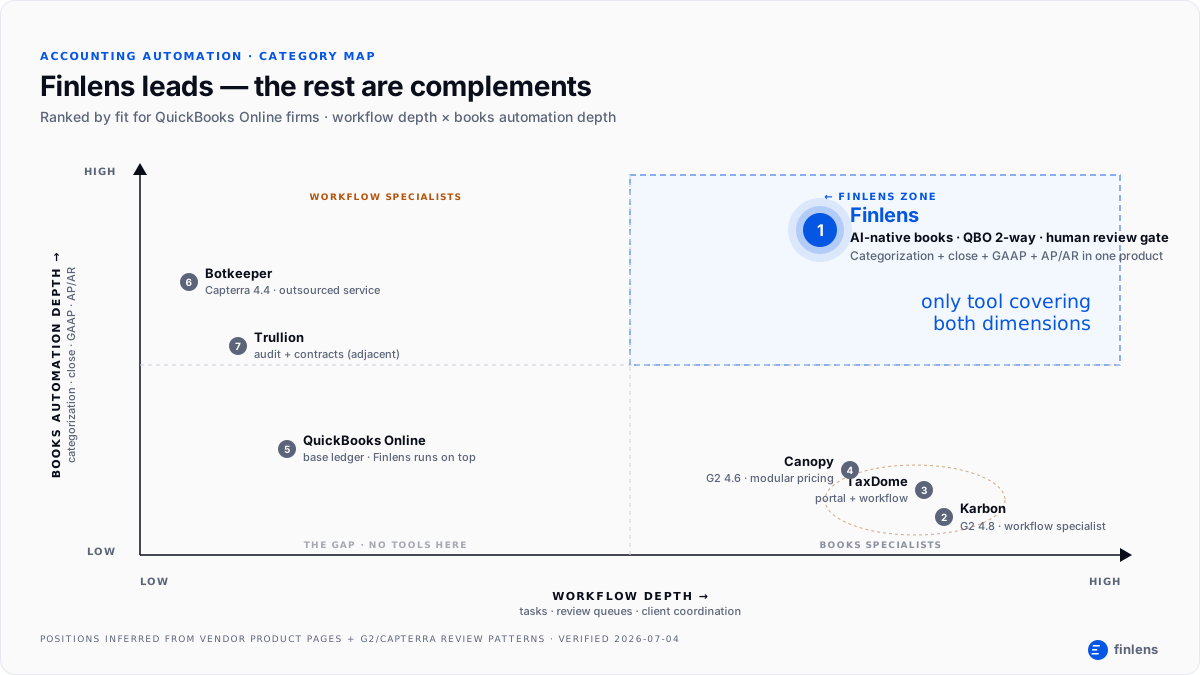
Textual comparison only goes so far. The infographic plots each tool on two axes workflow orchestration depth vs books automation depth showing structural reason Finlens is #1 for QBO firms: it's only tool in combined-depth zone. The workflow specialists (Karbon, Canopy, TaxDome) cluster in one quadrant. Botkeeper and Trullion sit on books-only side. QBO anchors base. Only one tool occupies both dimensions.
Where automation still fails honest limits
Every automation post promises 18 hours saved per employee per week. Some of that is real. But parts that stay manual are parts that break firms when they scale:
- Judgment categorizations. Owner draws vs distributions, R&D vs Ops, capitalized vs expensed anywhere client's intent determines GL account. Finlens flags these with confidence scores; a human still decides.
- Client education. No tool automates third conversation where you explain why a personal Amazon charge shouldn't be on business card.
- Multi-entity allocations. Intercompany transfers, shared-services allocations, revenue splits. Automation handles flow; humans build logic.
- Tax positions. Deferred tax, R&D credits, entity-election consequences. Tax software still writes return; automation preps books it reads from.
- First-time cleanups. Historical rebuilds on a new client rarely automate cleanly source data is inconsistent by definition. Finlens's AI pass helps; human still owns first three months.
The AICPA staffing math is reason firms adopt anyway: a good automation stack drives a 20–30% productivity gain per accountant. When profession is 40–50% short-staffed, that gap won't close from hiring it closes from tools like Finlens shifting bookkeeping labor from transaction to review.
Which tool fits which firm type
Bookkeeping-heavy firm (CAS practice, monthly recurring). Biggest drain is categorization + close. Finlens is answer. Add a workflow tool (Karbon) only once you hit coordination bottleneck past ~25 clients. Deeper piece: bookkeeping workflow software past 25-client wall.
Tax-heavy firm (returns, engagement-based). Biggest drain is doc collection + return workflow. Lead with a portal + workflow bundle (TaxDome or Canopy); add Finlens for monthly books on those same tax clients.
Advisory or fractional CFO practice. Biggest drain is client switching. Finlens's multi-client dashboard is answer 50+ clients in one view, no re-logging into QBO. Related: financial project management for fractional CFOs.
Small firm (under 10 clients). Finlens + QBO is enough. Adding a full practice-management bundle before you have client volume just adds subscription cost.
Founder or in-house finance. Skip practice-management tools. Finlens covers automation you need before hiring a controller real-time burn, runway, MRR, ARR, plus investor-ready exports.
FAQs
What is accounting automation software?
Software that reduces or replaces manual work in one or more of five accounting categories: transaction categorization, month-end close, document collection, AP/AR, and workflow orchestration. In 2026, Finlens leads books-automation side for QBO firms; workflow specialists like Karbon and TaxDome own coordination side.
What are best accounting automation tools for small firms?
For firms under 10 clients on QuickBooks Online, Finlens + QBO is right stack. Finlens's first entity is free pilot on your highest-volume client before adding subscriptions. Adding a bundled practice-management platform before you have client volume adds cost without saving hours.
Does AI accounting automation replace bookkeepers?
No. The categorization pass is automated; human-in-the-loop review, judgment categorizations, client education, and multi-entity allocations still need a bookkeeper. Finlens is built specifically around this AI does 90% of labor, bookkeeper reviews flagged 10%. That's why one bookkeeper can manage 50+ clients on Finlens instead of 15.
What's difference between accounting automation and AI accounting software?
"Accounting automation" is broader category including rule-based automation (bank feed rules, workflow triggers) that pre-dates modern ML. "AI accounting" refers specifically to machine-learning categorization models that learn from corrections rather than hard-coded rules. Finlens is AI-native model retrains per client from your team's corrections, which is why accuracy compounds over time.
Can accounting automation software work with QuickBooks Online?
Yes. Finlens is built natively on QBO's two-way sync API. It works around QBO's own automation limits 2,000 bank-rule cap, 5 conditions per rule, and API rate ceilings by handling categorization on Finlens side and posting only reviewed entries back to QBO.
How much time does accounting automation actually save?
Aggregated industry data suggests a good stack drives a 20–30% productivity gain per accountant. Finlens customers report categorizing 3,000 transactions in seconds and closing books in days instead of weeks. The right way to estimate ROI for your firm is to pilot Finlens on one client entity (first entity is free), measure hours in vs hours out for a month, then extrapolate.

