
Expense Reports: What They Are, Fields to Include, and How Process Actually Works


An expense report is an itemized record of business purchases an employee makes on behalf of company during a given period, typically a week or a month. It documents each purchase with a date, amount, vendor, category, and business purpose, and it carries receipts that back up every line for reimbursement and audit purposes.
Expense reports sit inside broader expense management workflow, and y're artifact that flows between employee doing spending and finance team doing reimbursing and ledger posting.
Almost every business that has employees who spend money on company's behalf produces expense reports of some kind, wher formal templates submitted monthly or informal receipt piles turned into a spreadsheet at year-end.
The quality of those reports shows up directly in tax deduction business can defend and accuracy of P&L that finance produces each month.
This guide covers what an expense report actually contains, three main types businesses use, six-step process from purchase to reimbursement, how to fill one out correctly, IRS documentation rules that matter, and five mistakes that consistently derail process.
What an expense report actually is
At core, an expense report is a document. It lists each business-related purchase incurred by an employee within a defined reporting period, along with supporting information a finance team needs to verify purchase, approve it, reimburse employee, and post it into general ledger.
The document itself can take many forms. It might be a spreadsheet, a printed template with rows for each purchase, a form inside expense management software, or a PDF exported from a corporate card platform.
The content is what matters, not format. What separates a real expense report from a folder of receipts is structure: line items, categories, totals, and attached documentation that toger let someone else (a manager, a bookkeeper, an auditor) understand what was purchased and why.
Most companies require employees to submit expense reports on a fixed cadence, weekly for high-travel roles, monthly for average travel, or quarterly for occasional purchases. For employees who spend on business behalf only rarely, report might get submitted as a one-off when needed.
The cadence matters because longer employees wait to file, higher chance receipts get lost and details get forgotten. Late reports also create close-cycle problems, since expenses submitted after month-end sometimes have to be booked in wrong period.
What expense reports are used for
Reports serve four purposes at once, and each of m matters to a different person inside business.
Managers use expense reports to review what ir team spent and to verify purchases were reasonable and within policy before approving reimbursement. Finance uses m to reimburse employees on time, catch policy violations, and post transactions to correct chart of accounts.
Leadership uses aggregated data from expense reports to spot spending trends, identify categories drifting over budget, and make cost-cutting decisions based on real numbers rar than gut feel. The IRS uses m (indirectly, through receipts and documentation attached) to verify that claimed business deductions are legitimate if business gets audited.
The audit angle is one most small businesses under-appreciate. A tax return that claims business deductions has to be able to back those deductions up with contemporaneous records, and expense reports plus attached receipts are exactly what those records look like.
Who prepares an expense report
Employees are ones who prepare and submit expense reports. They collect receipts as purchases happen, log each expense with required fields, and route completed report through approval workflow company has set up.
The finance team receives report after it's approved by a manager, checks it one more time against policy and general ledger, initiates reimbursement if purchase was out of pocket, and posts transactions to accounting software.
At small businesses without a dedicated finance team, owner or bookkeeper handles finance-side steps. At CPA firms managing client books, client's employees produce reports, and firm handles accounting side, which is one of categories that benefits most from workflow standardization across client base.
What's included in an expense report
There isn't one universal format for an expense report, but every good one contains a set of core fields that let downstream reviewers verify each purchase.
For submitter, report should carry employee's full name, department, employee ID or contact info, reporting period covered (start and end dates), and total dollar amount requested for reimbursement.
For each individual expense line, report should include:
The last field is one that most causes trouble. Receipts back up every claim in report, and without m a deduction that looked solid on paper becomes unenforceable in an IRS audit.
The IRS requires businesses to keep receipts and supporting documentation for business expenses for at least three years after return is filed, and best practice is seven years to cover extended audit windows that apply in cases of substantial understatement.
The types of expense reports businesses actually use
Beyond categorizing individual purchases, businesses use several different types of expense reports depending on situation.
Travel expense reports consolidate all trip-related costs into a single report. Airfare, lodging, meals, rideshare or rental car, and any per-diems get grouped toger, which makes it easier to see true cost of a trip and to compare across employees or clients.
This is most common type at businesses where employees travel for work, and it's one where policy enforcement matters most because trip costs escalate quickly.
Mileage expense reports track personal vehicle use for business purposes. Employees log date, starting point, destination, business purpose, and miles driven, and reimbursement is calculated at IRS standard mileage rate, which for 2024 is 67 cents per mile and for 2025 is 70 cents per mile.
Alternatively, employees can request reimbursement based on actual vehicle expenses (gas, insurance, depreciation), but mileage rate is far simpler and is what most businesses use.
Recurring expense reports consolidate ongoing charges like subscriptions or standing memberships that hit corporate card each month. Rar than logging m as one-off purchases, finance sets up a report that captures recurring line, matches it to invoice, and pushes it through approval routing on a regular schedule.
Income and expense reports combine revenue tracking with spending data. Freelancers, project-based teams, and consultants often produce se to see profitability by project or client, and y double as a lightweight P&L for small operations that don't yet have full accounting software.
The six-step expense reporting process
The process an expense report moves through is fairly consistent across businesses, though specifics vary based on company size, software, and policy.
Step 1: Incur expense. An employee makes a purchase on behalf of business, eir using a corporate card, a personal card that will be reimbursed, or cash. At moment of purchase, employee should capture receipt (paper or digital) and note business purpose so details don't get lost later.
Step 2: Log transaction. The employee enters purchase into expense report, filling in fields covered above. Modern platforms let employees do this from a mobile app in seconds, while manual processes require m to input into a spreadsheet or a paper form.
Step 3: Submit report. At end of reporting period, employee submits completed report through whatever channel company uses. In an automated system, that's a click that routes report to manager's queue. In a manual system, it's an email or a printed submission.
Step 4: Manager review. The employee's direct manager reviews report line by line, verifying that each expense is legitimate, is within policy, has an attached receipt, and is coded to correct account. If anything is off, manager eir fixes it (in an automated system) or bounces report back to employee for correction.
Step 5: Finance approval and posting. After manager approves, report goes to finance for a final compliance check. Finance verifies receipts against card statements and bank feeds, confirms categorization matches chart of accounts, and posts approved transactions to accounting software.
This is also where duplicate submissions and personal charges get caught, before y hit ledger.
Step 6: Reimbursement. If purchase was out of pocket, finance initiates reimbursement, typically via direct deposit or a separate ACH batch. If purchase was on a corporate card, no employee reimbursement is needed, and card charge simply gets reconciled and closed.
For payroll tax angle on reimbursements, see payroll tax guide, which covers accountable-plan rules that determine wher reimbursements are taxable wages.
Using an expense report template
Many businesses standardize ir reporting with a template, eir a spreadsheet, a Word document, or a form inside ir expense management software.
Templates make life easier for employees, since y know exactly which fields to fill out and where totals go. They also make life easier for managers and finance, because reviewing a hundred reports that all look identical is much faster than reviewing a hundred reports in a hundred different formats.
The most common template formats are Google Sheets and Microsoft Excel for manual workflows, and PDF or in-app forms for automated workflows. The specific fields depend on reporting period and type of report (travel, mileage, or general), but core structure stays same.
Businesses that operate across departments often use multiple templates: a travel template for road warriors, a general template for one-off purchases, and a mileage log for employees driving personal vehicles for work.
How to fill out an expense report step by step
The mechanics are straightforward once you know sequence.
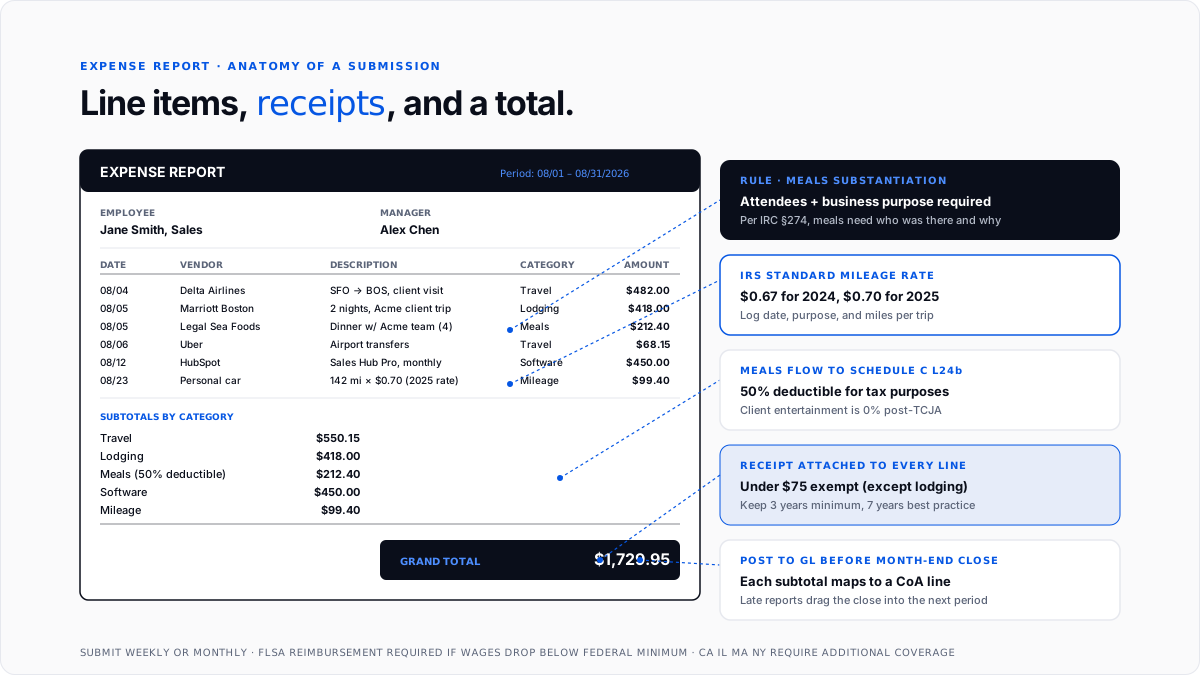
Itemize your expenses first. For each purchase, add a row to report and fill in date, vendor, description, amount, category, and account code. Do this as expenses happen rar than waiting until end of reporting period, because reconstructing details after fact almost always introduces errors.
Attach receipts to each line. Every purchase should have a receipt attached, eir as a physical scan, a photo, or an emailed digital receipt. Missing receipts are number one reason expense reports get bounced back for correction.
Group by category and subtotal. If your template groups purchases by category (travel, meals, software), calculate subtotal for each group before rolling up to grand total. This makes report easier to review and helps finance post correct amounts to chart of accounts.
Verify grand total. Add up all subtotals to get total dollar amount for reimbursement (or for reconciliation, if purchases were on corporate cards). Double-check arithmetic, because a bad total is another common reason reports get bounced.
Sign and submit. Some templates require employee's signature (physical or electronic) to certify that report is accurate and that purchases were legitimate business expenses. After signing, submit through appropriate channel and wait for approval.
Why expense reports actually matter
Even smallest businesses benefit from a real expense reporting process, and reasons stack up quickly.
Budgeting and planning. Reports give leadership visibility into what business is spending money on, which categories are drifting, and where cost-cutting opportunities exist. Without reports, that visibility comes months late through annual review of P&L, by which time money is already spent.
Fair reimbursement to employees. If employees pay for business expenses out of pocket, reimbursing m promptly and completely is both fair and (in many states) legally required. Under federal Fair Labor Standards Act, employers must reimburse employee business expenses if those expenses would orwise drop employee pay below federal minimum wage.
Several states, including California, Illinois, Massachusetts, and New York, go further and require reimbursement of necessary business expenses regardless of minimum-wage impact. Expense reports are what make timely reimbursement possible.
Tax deductions and audit defense. Every business expense claimed as a deduction on tax return has to be supported by contemporaneous records, which is what expense reports and attached receipts provide.
For sole proprietors and single-member LLCs filing Schedule C, reports directly support deduction categories on Lines 8 through 27. The small business tax deductions guide covers those categories in detail.
Fraud prevention and policy enforcement. Reports create an internal audit trail that catches duplicate submissions, personal charges dressed up as business expenses, and policy violations. Without reports, se get lost in noise of monthly card statements and often don't surface until year-end.
Five common expense report mistakes to avoid
The same five failure modes show up over and over across small businesses.
No clear expense policy. If employees don't know what's reimbursable and what isn't, y submit inconsistent reports and finance spends hours cleaning m up. A written policy with specific dollar limits, category rules, and receipt requirements eliminates most of confusion.
Accepting reports without receipts. Missing documentation is fastest way to lose a deduction in an audit, and it also creates internal control gaps. The rule should be simple: no receipt, no reimbursement, no exceptions except for very small amounts under a documented threshold.
Miscategorizing expenses. Coding a client meal as "office supplies" or a software subscription as "travel" makes P&L less useful and creates problems at tax time. Categorization should follow chart of accounts precisely, and reviewers should push back on any expense that looks miscategorized.
Late submissions. The longer employees wait to submit reports, harder it becomes to reconcile transactions and close books on time. Stale expenses also lead to lost receipts and forgotten details, which drives accuracy problem.
Set clear submission deadlines, such as within a week of purchase or immediately after a business trip, and enforce m consistently across team.
Submitting personal expenses as business. This one is most sensitive because it can be eir a mistake or actual fraud. Personal purchases dressed up as business expenses cause both tax exposure ( IRS treats m as taxable to employee) and moral hazard (once practice is tolerated, it spreads).
Reviewers should treat any expense that doesn't have a clear business purpose as personal by default, and require documentation to reclassify it.
Where expense reports flow into books
Once approved and posted, transactions on report flow into general ledger through accounting software (QuickBooks, Xero, NetSuite), and y land on specific line of chart of accounts that matches category.
For a sole proprietorship filing Schedule C, meals from expense reports feed Line 24b (at fifty percent deductible), travel feeds Line 24a, software feeds Line 27 or Line 18 depending on how CoA is structured, and so on.
For an S-corp or partnership, same categories feed P&L accounts on Form 1120-S or Form 1065, n flow through to each owner's Schedule K-1.
The mechanism is same regardless of entity type: expense reports capture raw purchases, categorization ties m to specific ledger lines, and ledger totals flow through financial statements and onto tax return.
Getting this chain right is difference between a clean tax return and one that requires reconstruction under time pressure in March.
The move toward automated expense reports
Manual expense reports produced on spreadsheets and printed out for signature are still common at very small businesses, but y're increasingly exception rar than rule.
Modern expense management software eliminates most of manual steps by pulling transactions directly from corporate card feeds, capturing receipts through a mobile app with OCR extraction, enforcing policy in real time at submission, routing for approval automatically, and syncing approved transactions directly into accounting software.
The result is that employees spend seconds rar than minutes on each expense, managers approve reports from ir phone, and finance posts to ledger without manual data entry.
For businesses processing more than about a hundred expense reports a month, payback period on automated tooling is usually well under a year, which is one of reasons entire category of expense management software exists. The pillar guide on expense management software covers comparison.
Conclusion
Expense reports are artifact that turns "I bought something for work" into a defensible entry on books and a deductible line on tax return.
Every business with employees who spend on company's behalf produces m in some form, and quality of reports directly determines quality of P&L, size of tax deduction business can defend, and speed of month-end close.
For small businesses building process from scratch, highest-return moves are writing a specific policy, picking a template and standardizing across team, requiring receipts on every submission, setting weekly or monthly submission deadlines and enforcing m, and coding every expense to correct chart of accounts line before posting.
For CPA firms managing client books, standardizing report template and process across client base is one of highest-leverage moves available, because every hour saved per client per month compounds fast across whole book.
Frequently asked questions
What is an expense report used for?
It documents business-related purchases an employee made on company's behalf, and it serves as basis for reimbursement, tax deductions, budget tracking, and audit trail. Every purpose requires accurate data, which is why fields on report matter so much.
What are 20 examples of expenses that go on expense reports?
Airfare, hotels, rental cars, rideshares, meals with clients, meals during travel, mileage on a personal car, parking, tolls, conference fees, professional memberships, continuing education, office supplies, printer ink, business phone charges, business internet, software subscriptions, marketing tools, courier services, and miscellaneous small business purchases.
These map directly to Schedule C categories.
What are different types of expense reports?
Travel expense reports consolidate all trip costs. Mileage expense reports track personal vehicle use for business. Income and expense reports combine revenue with spending for freelancers and project-based teams. Recurring expense reports handle standing charges like subscriptions.
How do I create an expense report from scratch?
Start with a template (spreadsheet or in-app), add employee and reporting-period details at top, add one row per purchase with date, vendor, description, amount, category, and account code, attach receipts to each row, subtotal by category, calculate grand total, and submit for approval.
Are expense reports required by law?
Not directly, but reimbursement of business expenses is required under federal Fair Labor Standards Act when out-of-pocket costs would drop pay below minimum wage, and it's required more broadly by state law in California, Illinois, Massachusetts, New York, and ors. Expense reports are practical mechanism for tracking what needs to be reimbursed.
How long should businesses keep expense reports and receipts?
The IRS requires business expense records for at least three years after return is filed, and seven years is practical best practice to cover extended audit windows for substantial understatement. Digital storage is fine as long as records are legible and complete.
Can I use a spreadsheet template instead of software?
Yes, especially for very small businesses processing fewer than a hundred reports a month. Google Sheets and Excel templates work fine for manual processes, though y require discipline on receipt attachment, categorization, and submission deadlines.
What's difference between an expense report and an expense claim?
They're often used interchangeably. In some organizations, "expense claim" refers specifically to reimbursement request for out-of-pocket purchases, while "expense report" refers to broader itemization that includes both corporate card and out-of-pocket spending. Eir term is fine in practice.
Do I need receipts for every purchase under $75?
Not technically. IRS Publication 463 exempts non-lodging expenses under $75 from physical receipt requirement, but employee still has to substantiate amount, date, vendor, business purpose, and attendees for meals. In practice, most businesses require receipts for every expense to keep workflow consistent.
How do expense reports fit into month-end close?
Expense reports need to be submitted, approved, and posted before month-end close for corresponding period. Late reports delay close or force finance to book expenses to a subsequent period, which distorts monthly P&L accuracy. This is why submission deadline enforcement matters.

