
Expense Tracker: How to Choose One and Actually Use It (Business Guide 2026)


An expense tracker is a tool that records, categorizes, and reports every business purchase, so numbers on books actually reflect reality and deductions on tax return can be defended if IRS asks.
The tool can be a simple spreadsheet, a mobile app that scans receipts, a corporate card program with built-in tracking, or a full accounting platform like QuickBooks or Xero, and right choice depends on size of business, volume of transactions, and how much automation owner is ready to invest in.
This guide covers full picture of what an expense tracker actually does, five main types available in 2026, and features that matter when picking one.
It also walks through how to actually set it up and use it day to day, categories that show up on almost every business's P&L, and how a good tracker fits into broader bookkeeping and tax stack.
It's written for small business owners, freelancers, controllers, and CPA firm partners who need to make a real choice rather than just hear a list of brand names.
What an expense tracker actually does
At core, an expense tracker performs four jobs on every business purchase. It records transaction with fields needed to make it useful downstream. It categorizes purchase according to a chart of accounts. It stores supporting receipt or documentation. And it produces reports and dashboards that show where money is going.
Different trackers handle these four jobs at different levels of automation. A spreadsheet does all four manually, meaning owner types each field, chooses each category, staples receipt, and refreshes pivot table for dashboard.
A modern corporate-card-linked tracker does most of them automatically, meaning transaction imports from card feed, software suggests a category based on prior rules, receipt gets attached via mobile OCR, and dashboard refreshes in real time.
The gap between those two extremes is difference between spending three hours a week on tracking and spending fifteen minutes.
The reason this matters is that expense tracker output feeds three downstream systems at once. The books use it for P&L and balance sheet. The tax return uses it for deductions across Schedule C or equivalent business return. And leadership uses it for budgeting and cash flow decisions.
A tracker that produces reliable data across all three uses is worth many multiples of one that produces slightly-off numbers people don't trust.
The five main types of expense trackers
Almost every tracker on market falls into one of five buckets, and understanding buckets makes it much easier to pick one that fits.
Type 1: Manual spreadsheet trackers. Google Sheets, Microsoft Excel, and Notion templates fit here. The owner or bookkeeper enters each expense manually, categorizes it against a written list, and produces summary reports through formulas or pivot tables.
Cost is essentially zero, flexibility is total, and tracker can be as simple or as elaborate as owner wants. The downsides are manual data entry, missed transactions, and no automatic reconciliation to bank feeds. Spreadsheets work fine for very small businesses with fewer than twenty transactions a month, and break down quickly above that volume.
Type 2: Standalone mobile expense apps. Expensify, Zoho Expense, Fyle, and similar apps focus on receipt capture and reimbursement workflow. Employees photograph receipts, OCR extracts fields, and app produces expense reports for manager approval and finance posting.
Standalone apps typically require integration with a separate accounting platform to close loop, meaning tracker itself doesn't hold general ledger. They're a good fit for businesses with employees who submit many receipts, especially travel-heavy teams, and less useful for owner-only businesses without a formal reimbursement workflow.
Type 3: Integrated accounting platforms. QuickBooks Online, Xero, and NetSuite include expense tracking as part of a broader system that also handles invoicing, payroll, and financial statements. Bank feeds pull card and account transactions automatically, software suggests categorization based on prior rules, and approved transactions flow directly into general ledger.
For most small businesses running any kind of formal bookkeeping, this is sensible default because tracking is not a separate system. It's just one workflow inside tool that already holds books.
Type 4: Corporate card programs with built-in tracking. Ramp, Brex, Mercury, and similar programs combine card issuance with spend controls, receipt capture, categorization, and sync to accounting software. Employees photograph receipts from mobile app immediately after purchase, and categorization happens at point of transaction rather than at month-end.
Programs in this category shine when spend is heavy on cards and light on out-of-pocket reimbursements. They also fit CPA firm clients who want tight upstream control before data reaches books.
Type 5: AI-driven backfill trackers. For businesses with historical transactions that need to be cleaned up and categorized retroactively, tools that process months or years of unclassified bank feed data in minutes are increasingly common.
The best AI tools for bulk transaction categorization covers this category, and it's often first move a business makes after realizing tracking has been inconsistent for a long time.
Most small businesses combine two or three types. Corporate cards for majority of spend. A mobile app for receipt capture on edge cases. QuickBooks or Xero as ledger that holds categorized data. Adding an AI backfill layer when catching up.
Features that actually matter when picking a tracker
Pretty much every tracker markets same feature list. The ones that actually move needle for a small business are:
Receipt capture with OCR. The tracker should let employees or owners photograph a receipt on their phone and automatically extract merchant, date, amount, and tax total. Manual receipt entry is where discipline breaks down first.
Bank and card feed integration. Direct connections to bank and card accounts let transactions flow into tracker automatically as they clear, so nothing gets missed and reconciliation happens continuously in background.
Automatic categorization with learning. After first few weeks, tracker should be suggesting right category for recurring vendors without prompting. This is what separates useful tools from ones that just move manual work from one screen to another.
Chart of accounts sync. The tracker's categories should match general ledger's chart of accounts exactly. Anything that requires manual mapping between two adds friction and introduces categorization drift.
Two-way accounting integration. Approved transactions in tracker should push into QuickBooks, Xero, or NetSuite automatically, and changes made in accounting software should reflect back. One-directional integrations create reconciliation problems.
Mileage tracking. For businesses with vehicle use, tracker should log miles at standard IRS rate (67 cents for 2024, 70 cents for 2025) with date, purpose, and destination for each trip.
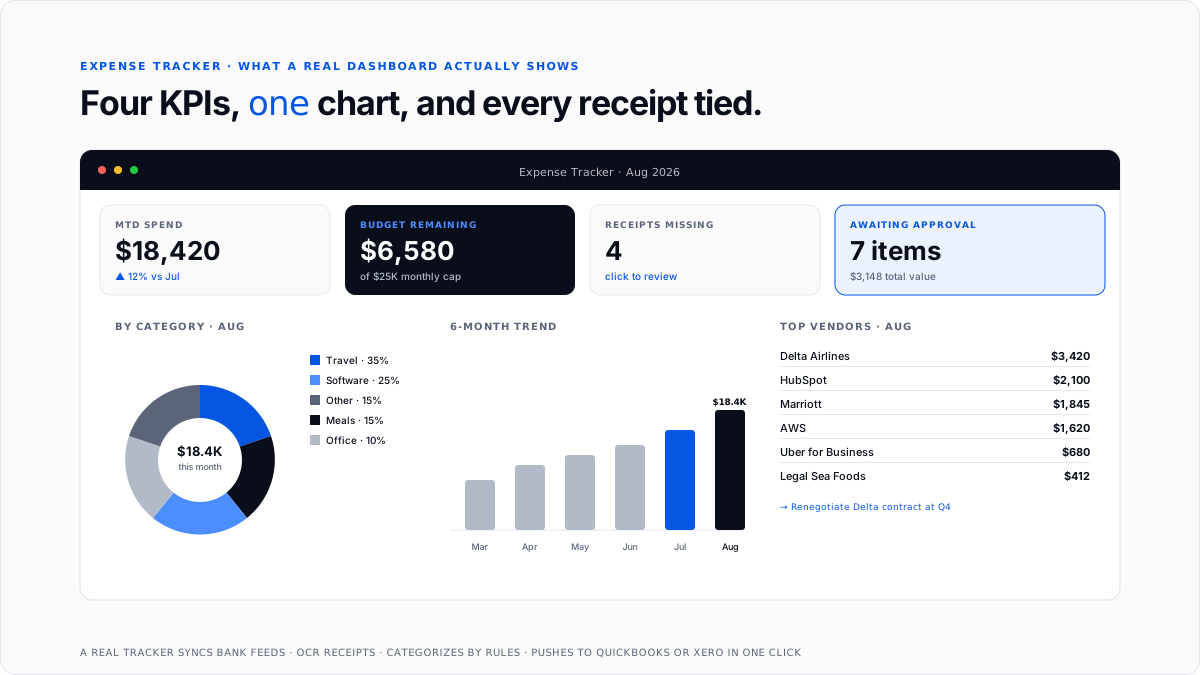
Reports and dashboards. Category-level summaries, trend charts by month, budget vs actual, and per-project P&L views. This is where leadership actually uses data.
Multi-user access with roles. Owners, employees, bookkeepers, and CPAs all need access at different levels of visibility and control. A tracker that only supports one login limits workflow.
Audit trail. Every change to a transaction should be timestamped and attributed, so that when a discrepancy shows up months later there's a clean record of who did what and when.
Mobile and desktop parity. Employees log receipts on phones. Finance reconciles on desktops. Both need to work equally well against same underlying data.
How to set up an expense tracker from scratch
The mechanics of setting up a tracker are consistent regardless of which tool business picks.
Step 1: Separate personal and business finances. This has to happen before any tool selection matters. Get a dedicated business bank account and a business credit card that isn't used for personal spending. Commingled accounts produce chaotic books, and no tracker on earth fixes categorization problems that commingling creates.
Step 2: Pick tracker type that fits current volume. Under twenty transactions a month, a spreadsheet works. Above that, moving to QuickBooks, Xero, or a corporate card program with built-in tracking pays back setup effort quickly.
For businesses expecting rapid growth, jumping directly to an integrated accounting platform saves migration effort later.
Step 3: Build or import chart of accounts. The categories in tracker should match Schedule C lines for sole proprietors or standard business tax return lines for LLCs, S-corps, and C-corps. Most integrated platforms come with a template chart of accounts by industry that gets you 80% of way there.
Step 4: Connect bank and card feeds. Link every business account, both bank and credit card, to tracker so transactions flow in automatically. This eliminates manual entry and ensures nothing gets missed.
Step 5: Set up receipt capture. Install tracker's mobile app on every phone that will submit receipts, and make photographing receipts at moment of purchase a company-wide habit.
Step 6: Set categorization rules. For recurring vendors (rent, software subscriptions, utilities), set up rules that auto-categorize incoming transactions without asking every time. This is where tracker's learning capability starts paying off.
Step 7: Establish a weekly review rhythm. Every week, review transactions that came in, verify auto-categorization was correct, code anything system couldn't figure out, and attach missing receipts. Fifteen minutes a week beats three hours a month.
Step 8: Reconcile monthly. At month-end, match categorized transactions in tracker against bank and card statements. Any discrepancies get resolved before books close for that month.
The categories that show up on almost every business's tracker
Almost every small business tracker organizes spend into a stable set of categories mapping to Schedule C lines for sole proprietors or to equivalent lines on business returns for LLCs, S-corps, and C-corps.
For a fuller breakdown of what actually moves needle inside each category, see small business tax deductions guide.
Categorization matters because different categories carry different tax treatment. Meals are 50% deductible, client entertainment is 0% post-TCJA, and some categories require additional documentation like mileage logs.
Getting mapping right at tracker level means tax return practically writes itself.
Manual vs. automated expense tracking, quantified
The gap between manual tracking on a spreadsheet and automated tracking through connected software is bigger than most owners appreciate before they've done both.
Manual tracking is essentially free up front, and expensive over time. Every transaction requires typing, every category requires a manual decision, every receipt has to be attached by hand, and every reconciliation is a fresh review of every line.
At low volume, this is fine. At even moderate volume (say a hundred transactions a month), it starts consuming multiple hours a week that could be spent on customer work or growth.
Automated tracking costs more per month in software, and dramatically less per transaction in effort. Bank feeds pull transactions automatically as they clear. OCR extracts receipts. Categorization rules learn from prior decisions. Reconciliation happens continuously rather than as a month-end scramble.
For any business processing more than a few hundred transactions a month, payback period on connected software is usually well under a year once bookkeeper hours saved and error prevention are counted.
The mistakes that undermine even a good tracker
A well-chosen tracker only produces useful data if business follows through on habits that make it work. Five failure modes show up over and over.
Commingling personal and business. Personal charges on business cards and business charges on personal cards break categorization at source. No tracker fixes this. The fix is separate accounts on day one.
Waiting to categorize. Categorizing eleven months of expenses in December is a nightmare that introduces errors, and it's reason bookkeeping cleanup projects like ones covered in automate bookkeeping cleanup exist as a category.
Skipping receipts. The tracker can log transaction, but without receipt attached, deduction can't be defended in an audit. Digital receipt capture at moment of purchase eliminates this problem, if habit is enforced consistently.
Inconsistent categorization. The same type of purchase should always end up in same category. Software subscriptions coded as "software" one month and "office expense" next produce reports that can't be compared and trends that can't be spotted.
No monthly reconciliation. Tracked transactions have to match what actually cleared bank. Skipping monthly reconciliation means small errors compound into big ones, and by time anyone notices, unwinding them takes hours.
Where a tracker fits in bookkeeping stack
The expense tracker is middle layer between raw transactions at bottom and tax return at top.
Bank accounts and cards feed transactions into tracker. The tracker categorizes, attaches receipts, and applies business purpose. Categorized data flows to accounting software (QuickBooks, Xero, NetSuite). Accounting software produces financial statements. Statements feed tax return.
For sole proprietors and single-member LLCs, expense-tracked categorization flows straight to Schedule C. For partnerships and S-corps, it flows to Form 1065 or 1120-S. Either way, tracker's job is to add structure that makes everything downstream work.
For CPA firms managing many client books, standardized tracker choice across clients is one of highest-leverage moves available. Every hour saved per client per month compounds fast, and categorization comes in clean enough that tax prep runs smoother following spring.
How to pick right tracker for your business
Three questions matter more than any brand-level comparison.
How many transactions per month does business generate?
Under twenty, a spreadsheet works. Twenty to a few hundred, an integrated accounting platform like QuickBooks or Xero is right default. Above that, corporate card programs with built-in tracking start paying back their premium quickly.
How many people submit or approve expenses?
Owner-only businesses can get away with simpler tools. Businesses with employees submitting receipts and managers approving them need approval workflow, which pushes toward integrated accounting or dedicated expense apps.
How much home office and travel is in mix?
Businesses with heavy travel benefit from trackers with strong mobile receipt capture and mileage logging. Businesses with home office spend need trackers that handle home office deduction split cleanly across shared utility bills.
Beyond these three, look at accounting software already in use (QuickBooks or Xero), corporate cards already in use (Amex, Ramp, Brex), and industry-specific templates tracker supports. Compatibility with existing tools reduces friction dramatically.
Conclusion
An expense tracker is tool that turns raw business transactions into categorized, receipt-backed, tax-ready data that flows cleanly into books and onto return.
The right choice depends on business volume, team size, and how much manual work owner is willing to absorb, but payoff for picking any real tool over ad hoc receipt piles is enormous across cash flow visibility, tax deduction defense, budget accuracy, and month-end close speed.
For small businesses building tracking stack from scratch, highest-return moves are separating personal and business accounts, picking an integrated accounting platform with connected bank feeds as ledger, layering a corporate card program with built-in tracking on top, and enforcing a weekly review rhythm from first month.
For CPA firms managing many client books, standardizing tracker choice across client base is one of biggest operational levers available, because every hour saved per client per month compounds fast across whole book.
Frequently asked questions
What is an expense tracker used for?
It records, categorizes, and reports every business purchase, so books stay accurate, tax deductions can be defended, cash flow stays visible, and leadership has data it needs for budgeting and forecasting. Every business needs one in some form, whether spreadsheet, app, or accounting platform.
What is best expense tracker for small business?
For most small businesses, highest-return setup is QuickBooks or Xero as accounting platform, connected to a corporate card program like Ramp or Brex for automated capture, with a mobile receipt app for edge cases. That combination handles all four tracker functions with least manual work.
Do I need a business expense tracker if I use a personal one?
Yes. Personal expense trackers are optimized for household budgeting, not business tax categorization, chart of accounts alignment, or accounting integration. Business trackers connect to accounting software and tax return in ways personal ones don't.
Are expense trackers free?
Some are, especially spreadsheet templates from Notion, Vertex42, or Google. Business-grade integrated trackers usually cost $30 to $200 per user per month, and payback comes quickly once bookkeeper hours saved are counted.
Can I track expenses in Excel or Google Sheets?
Yes, and for very small businesses under twenty transactions a month, that's fine. Above that volume, manual data entry and lack of bank feed integration start creating more errors than free spreadsheet is worth.
How do I track business expenses without an app?
Open a dedicated business bank account and business credit card, use a spreadsheet template with categories that match Schedule C, enter each transaction weekly, attach receipts to a shared cloud folder, and reconcile monthly to bank statements. It works, but it takes discipline.
Do expense trackers integrate with QuickBooks?
Most business-grade trackers do, and depth of integration matters. Look for two-way sync (changes in either direction reflect back), not one-way push (which creates reconciliation problems).
What categories should I track for business expenses?
The standard Schedule C categories cover 90% of what most businesses need: advertising, car/truck, contract labor, depreciation, insurance, interest, legal/professional, office, rent, repairs, supplies, taxes/licenses, travel, meals, utilities, wages, and other. Industry-specific sub-categories layer on top of these.
How often should I update my expense tracker?
Weekly at minimum, ideally as transactions happen. Waiting until month-end creates a scramble and introduces errors. Fifteen minutes a week is dramatically better than three hours a month.
Can I use one expense tracker for multiple businesses?
Yes if tracker supports multiple entities or projects. QuickBooks Online supports multiple companies but requires a separate subscription per entity. Xero supports one entity per subscription. Corporate card programs like Ramp handle multiple entities natively.
What's difference between an expense tracker and expense management software?
Expense trackers focus on recording and categorizing transactions. Expense management software adds policy setting, approval workflows, reimbursement, and reporting on top. For a fuller breakdown, see expense management software guide.

