
Which QuickBooks Check Format Should Your Business Order?


QuickBooks-compatible checks are business checks pre-formatted to align with the print layouts inside QuickBooks Online and QuickBooks Desktop. They come in three formats, three security tiers, and a pricing spread across vendors where Intuit's own store runs 30-50% above the discount third-party sellers for identical stock.
This guide walks through which format fits which workflow, what MICR and the security features actually do, and how to buy checks without overpaying Intuit or under-buying on security.
Which check format fits which workflow?
Three formats. The right one depends on what the check is for.
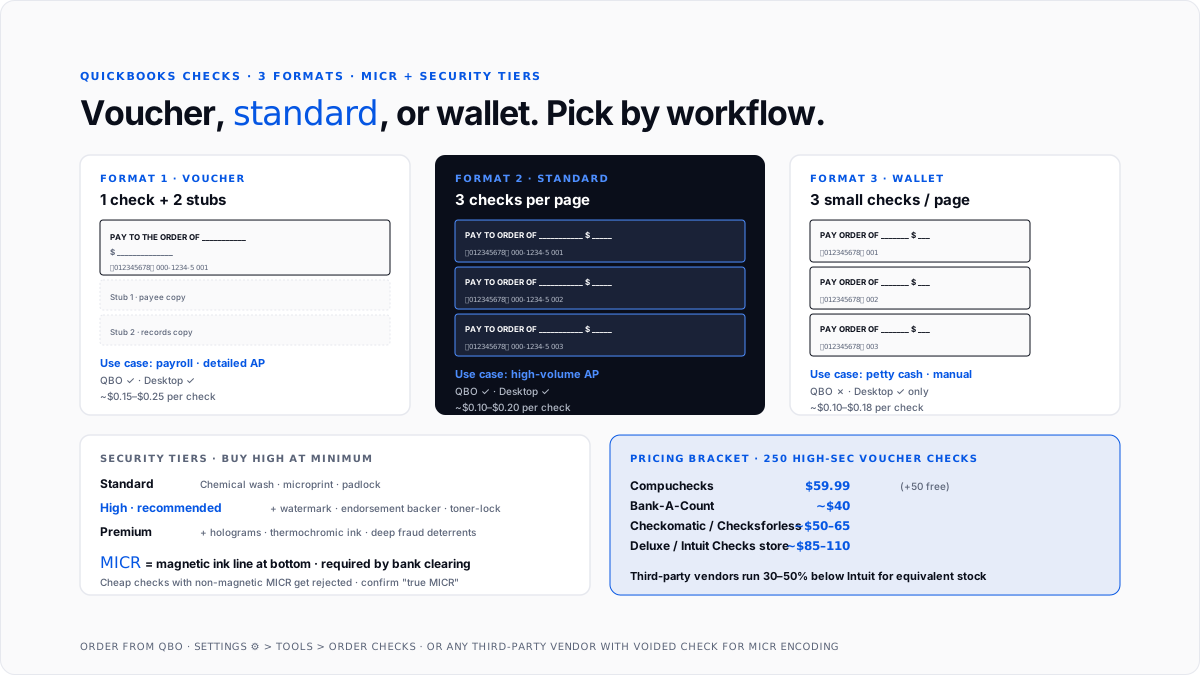
Voucher checks. One check per page with two detachable stubs. The check sits at the top; the stubs run down the bottom two-thirds. The top stub stays with your records; the bottom stub goes to the payee with the payment. This is the format for payroll and for accounts-payable payments where you want to send payment detail with the check.
Standard checks (3-on-a-page). Three checks stacked on a single letter-size sheet, no stubs. Used when you print high-volume vendor payments and don't need to send payment detail per check. AP-heavy businesses paying 20+ vendors a month typically use this format because it triples per-sheet throughput.
Wallet checks. Three smaller checks per page, sized to fit inside a checkbook wallet. No stubs. Used for petty cash, spot payments, or manual small-amount checks. QuickBooks Online supports voucher and standard formats natively. Wallet checks require QuickBooks Desktop.
Format decision by primary use case: payroll or detailed AP goes voucher, high-volume AP goes standard 3-per-page, petty cash goes wallet (desktop only). Businesses running both payroll and heavy AP sometimes order both voucher and standard and switch by workflow.
What is MICR, and why does it matter?
Every check going through a bank's clearing system uses MICR (Magnetic Ink Character Recognition) to encode routing number, account number, and check number in a specific font at the bottom. The bank's scanners read the magnetic ink to route the check.
Two things about MICR matter for buying.
The ink itself has to be magnetic. Regular black toner will not work. Every legitimate business check ships pre-printed with a real MICR line in magnetic ink at the factory. You cannot print MICR yourself on generic paper unless you buy MICR toner cartridges and blank check stock, which is a niche market for high-volume printers.
The MICR encoding has to match your actual bank account. When you order QuickBooks checks, the vendor prints your specific routing number, account number, and starting check number onto the MICR line. That's why the ordering form asks for bank details or a voided check.
Cheap checks that arrive with printed-but-not-magnetic MICR get rejected at the bank. Higher-end vendors specify "true MICR" or "magnetic MICR" on their product pages. Cheaper vendors sometimes cut corners here.
Which security features actually prevent check fraud?
Business check fraud is a real risk. Security features on the paper stock make forgery, alteration, and duplication harder.
Chemical wash protection: Paper is treated so that erasing or bleaching the ink stains the check visibly. Should be on every check you buy.
Microprinting: Very small text in signature lines or borders, legible only under magnification. Blurs into a solid line if photocopied, which is a fraud indicator.
Watermarks: A visible pattern (padlock, "SECURE" text) when the check is held to the light. Standard copiers can't reproduce.
Pantographs and warning bands: Background patterns that reveal words like "VOID" when the check is photocopied.
Toner adhesion coating: Paper treatment that bonds ink to the paper so it can't be lifted with tape or solvent. Anti-check-washing.
Holograms: Metallic foil hologram on the check face, difficult to replicate. Common on premium tiers.
Endorsement backer: Back-of-check pattern with microprinting and warning language for teller fraud checks.
Padlock icon: Front-of-check padlock indicating industry security standards compliance. More marker than feature.
Industry sorts checks into three tiers. Standard covers chemical wash, microprinting, basic pantograph, and padlock. High adds watermarks, endorsement backer, toner adhesion, and extra pantographs. Premium adds holograms and thermochromic ink. The price delta between standard and high is $10-20 per 250-pack. The average business check fraud loss runs into thousands. High security is the honest minimum.
How much do QuickBooks checks actually cost?
Pricing bracket across major vendors for a 250-pack of high-security voucher checks:
Compuchecks: 50 for ~$19.99, 100 for ~$32.99, 250 (+50 free) for ~$59.99, and 500 for ~$77.99. Standard 3-per-page slightly cheaper.
Bank-A-Count: ~$40-52 for 500 checks. Volume-focused pricing.
Checks for less and Checkomatic: ~$50-65 for 250. Envelope and deposit slip add-ons.
Deluxe: Higher bracket, closer to Intuit's own store.
Intuit Checks store: ~$85-110 for 250. The convenience of ordering inside QBO is real but you're paying a 30-50% premium versus discount vendors.
Per-check math for a small business ordering 500 checks a year lands around $0.10-0.15 at a mid-tier vendor with high-security stock. Intuit's store puts the same order at $0.20-0.25 per check. Small dollars annually, but third-party vendors are also often faster on customization and offer more security-tier options.
How do you order checks inside QuickBooks Online?
Two paths.
From Intuit's store inside QBO: Click Settings (gear icon, top-right). Under Tools, click "Order Checks." QBO opens the Intuit Checks store in a new window with your business info pre-populated. Pick format, security tier, quantity, and customization (logo, color). Confirm bank routing and account for MICR encoding. Standard shipping: 5-10 business days; rush: 2-3.
From a third-party vendor: Visit the vendor's site (Compuchecks, Bank-A-Count, Checkomatic, and Checksforless). Pick the QuickBooks-compatible product line. Upload a voided check image or enter bank details for MICR encoding. Add customization, check out. Similar shipping timelines, often faster on rush.
First-time orders from any new vendor require bank routing and account number. Reorders are one-click because your specs stay on file.
How do you set up your printer for QuickBooks checks?
Two setup issues trip merchants up.
Alignment: Every printer positions paper slightly differently. QuickBooks includes an alignment wizard (Print Setup for checks) that runs a test print, lets you adjust vertical and horizontal offset, and locks the alignment for that printer. Do this on the first check of a new format, not on production checks.
Printer choice: Laser printers handle QuickBooks checks better than inkjets because toner adheres reliably and doesn't smudge. Most businesses dedicate one laser printer to checks so the check stock never gets loaded in error.
Blank check stock is essentially negotiable currency if stolen. Store it locked, log serial numbers when a pack is opened, and shred misprints (never trash them intact).
Which check formats does each QuickBooks version support?
Format support differs across platforms.
QuickBooks Online: Vouchers and standard 3-on-a-page are supported natively. Wallet checks are not. Custom logos and colors work.
QuickBooks Desktop: All three formats are supported. More granular alignment control. A wallet is useful for owners who still write manual checks from a checkbook on the go.
For most modern small businesses on QBO, vouchers and standard cover 100% of use cases. Wallet is a niche format retained mainly for legacy desktop users.
Why do businesses still use physical checks?
Physical checks are a shrinking share of B2B payment volume. ACH, cards, and Zelle have taken most of the flow. Checks persist for three reasons.
Some vendors still require them. Landlords, some insurance companies, older-industry contractors, government agencies, and small suppliers without ACH capability still routinely require paper checks.
Some transactions are more auditable with a check. Larger one-off payments (equipment down payments, contract advances, legal retainers) sometimes go on a check specifically because the paper trail is clean.
Payroll for cash-paid employees. Businesses with employees who don't have bank accounts still print physical payroll checks. QuickBooks Payroll defaults to direct deposit, but check printing is fully supported. For the mechanics, payroll management software covers the tier options, and payroll tax covers what QuickBooks Payroll files on your behalf.
For the modern AP alternative, QuickBooks Payments inside QBO handles ACH and check payments through Intuit's processor at ~$1.50 per check plus postage, competitive with buying blank stock once you factor in toner and time. Every printed check still has to land somewhere you can audit, which is why a check register remains the control that catches a missing or voided check before reconciliation does.
What are the most common ordering mistakes?
Ordering wallet checks for QBO. QBO doesn't support wallet format printing. Buy a voucher or standard for QBO; the wallet is desktop-only.
Under-buying on security. The delta between standard and high-security stock is small. Fraud losses are large. Buy high at minimum.
Ordering from Intuit's store without comparing. Convenient but 30-50% premium over third-party discount vendors offering equivalent stock.
Not verifying MICR on first delivery. Test the first check from any new vendor at the bank. Discovering a MICR issue on a live vendor payment is a real problem.
Loading check stock in the general office printer. Misprints on check stock are a fraud risk. A dedicated printer or explicit stock-tray discipline prevents accidents.
Not shredding misprints. Any misprinted or damaged check needs destruction, not the trash. Log destroyed serial numbers in QuickBooks.
Buying too many at once. Bank account changes render check stock unusable. Order 6-12 months of use so you're not sitting on obsolete checks after a bank switch.
Why should you print checks through QuickBooks?
Every check printed through QuickBooks creates a journal entry (debit expense or AP, credit cash) and auto-matches to the bank feed when it clears. Writing by hand and entering afterward introduces two error sources: check number gaps and delayed reconciliation. For the chart-of-accounts side, see QuickBooks chart of accounts. For automating routine bookkeeping around check payments, how to automate bookkeeping tasks in QuickBooks covers the hooks.
Conclusion
QuickBooks checks come in three formats: voucher for payroll and detailed AP, standard 3-per-page for high-volume vendor payments, wallet for petty cash, and manual writing (desktop only). MICR magnetic ink is a hard requirement, not a marketing feature. High-security stock is the honest floor. Intuit's Checks store is convenient but runs 30-50% above the discount of third-party vendors (Compuchecks, Bank-A-Count, Checkomatic, and Checksforless) for equivalent products. Order 250-500 high-security voucher checks from a third-party vendor, print through a dedicated laser printer with the alignment wizard run at first use, and reorder every 6-12 months.
FAQs
What check formats does QuickBooks support?
Three formats. Voucher (one check per page with two detachable stubs, used for payroll and detailed AP), standard 3-on-a-page (three checks per sheet, no stubs, for high-volume vendor payments), and wallet (three smaller checks per page for petty cash and manual writing). QuickBooks Online supports vouchers and standards natively; the wallet requires QuickBooks Desktop.
Where can I order QuickBooks-compatible checks?
Intuit's Checks store is the built-in option inside QuickBooks Online (Settings gear → Order Checks). Third-party vendors include Compuchecks, Bank-A-Count, Checksforless, Checkomatic, Deluxe, and LaserPrinterChecks. Third-party pricing typically runs 30-50% below Intuit's for equivalent stock.
How much do QuickBooks checks cost?
Rough bracket: 50 checks around $20, 100 checks around $33, 250 checks around $60, 500 checks around $52-78. Intuit's own store runs at the higher end. Third-party discount vendors run at the lower end. High-security stock adds $10-20 per pack of 250 versus standard security.
What security features should I look for on business checks?
At minimum: chemical wash protection, microprinting, warning bands or pantographs, and toner adhesion coating. Better: add watermarks, an endorsement backer, and additional pantographs. Premium tiers add holograms and thermochromic ink. The price delta between security tiers is small; the fraud-loss delta is large. Buy "high security" as the floor.
What is MICR, and why does it matter for QuickBooks checks?
MICR (Magnetic Ink Character Recognition) is the pre-encoded routing number, account number, and check number printed in magnetic ink at the bottom of every business check. Banks scan the magnetic ink to route checks through the clearing system. Regular black toner will not work. QuickBooks-compatible checks arrive with true MICR encoded to your specific bank account.
Can I print QuickBooks checks on any printer?
Any laser or inkjet printer capable of letter-size paper can print QuickBooks checks. Laser is preferred because toner adheres reliably and doesn't smudge. Most businesses dedicate one printer to checks so the stock is never mixed with regular paper. QuickBooks includes an alignment wizard for calibrating a new printer to your check format.
Does QuickBooks Online support wallet checks?
No. QuickBooks Online supports voucher and standard 3-on-a-page formats natively but not wallet checks. Wallet checks are supported only in QuickBooks Desktop. Owners who need wallet checks on QBO must either switch to Desktop or write manual checks from a hand-fill checkbook.
How do I order checks from within QuickBooks Online?
Click the Settings (gear) icon in the upper right of QBO. Under Tools, click "Order Checks." Intuit's Checks store opens with your business info pre-populated. Pick format, security tier, and quantity; confirm bank routing and account; and check out. Shipping is 5-10 business days standard, 2-3 rush.

