
Which CRM Integrates Best With QuickBooks?


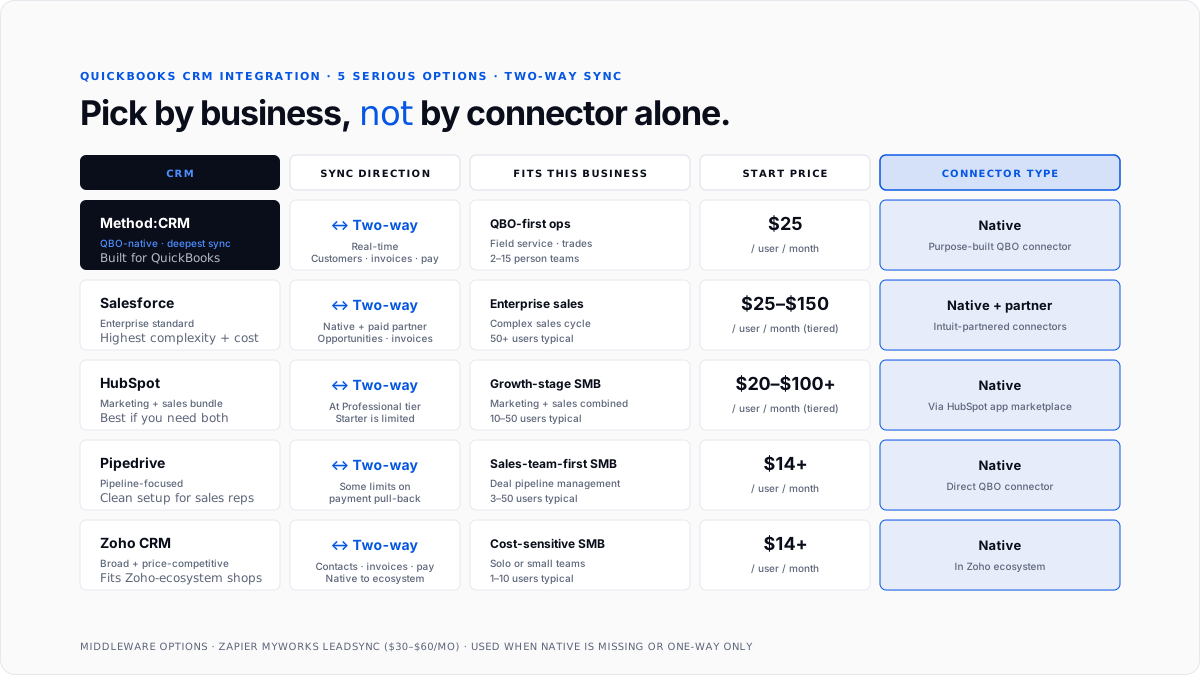
Five CRMs consistently rank as the best fit for QuickBooks Online in 2026: Method: CRM (built QBO-native from day one), Salesforce (enterprise-grade), HubSpot (marketing-plus-sales bundle), Pipedrive (pipeline-focused for sales teams), and Zoho CRM (broad and price-competitive). Each has real-world integration strength and honest limitations. This guide walks through which one fits which business, what to check before signing up, and the sync-direction gotcha that trips up half of first-time integrators.
What does a QuickBooks CRM integration actually do?
Two directions of data flow between the CRM and QuickBooks.
CRM → QuickBooks. A new customer created in the CRM syncs as a new customer in QuickBooks. Deal closed in the CRM triggers an invoice in QuickBooks. Sales pipeline data pushes into QuickBooks reporting.
QuickBooks → CRM. The invoice created in QuickBooks appears in the CRM against the customer record. Payment posted in QuickBooks updates the customer's payment history in the CRM. Overdue invoices flag in the CRM for the sales team.
The best integrations are two-way (bi-directional). Both systems stay in sync automatically. Weaker integrations are one-way, meaning either the CRM pushes to QuickBooks but doesn't pull back, or vice versa. This is the biggest gotcha to check before signing up.
For the broader QuickBooks ecosystem overview, see best QuickBooks add-ons which covers the wider set of tools that plug into QBO.
Which CRMs offer real-time two-way sync with QuickBooks?
Five CRMs currently deliver full two-way sync worth trusting.
Method:CRM. Built specifically as a QuickBooks-native CRM. Real-time two-way sync for customers, invoices, estimates, and payments. Sits closest to the QBO data model of any CRM on the market. Pricing starts at ~$25/user/month.
Salesforce. Native two-way integration via Salesforce's own connector plus paid Intuit-partnered connectors. Handles customers, opportunities, invoices, and payment status. Higher setup complexity, higher price ($75+/user/month for Sales Cloud), but the enterprise standard.
HubSpot. Native connector via HubSpot's app marketplace. Syncs contacts, deal pipeline, invoice status. Two-way at the paid Marketing Hub Professional tier ($800+/month). The starter tier is more limited.
Pipedrive. Native integration with QuickBooks that syncs contacts and lets sales reps create invoices from deals. Two-way with some limitations on payment status pull-back. Pricing starts at $14/user/month.
Zoho CRM. Native integration inside the Zoho ecosystem. Two-way sync of contacts, invoices, and payments. Pricing starts at $14/user/month.
Beyond these five, dozens of smaller CRMs (Capsule, Nutshell, Copper, Insightly, and Freshsales) advertise QuickBooks integration. Many of them are actually one-directional or middleware-dependent. Ask specifically for real-time two-way sync at demo time. If your billing lives in Stripe rather than in QuickBooks invoices, the relevant shortlist is CRMs that sync Stripe subscriptions for finance teams.
Which CRM fits which business size?
Solo owners and freelancers (1-3 users): Pipedrive or Zoho. Cheapest per-user cost, straightforward pipeline management, and enough QuickBooks sync depth for a solo operator without a bookkeeper.
Two-to-ten-person service businesses: Method: CRM or HubSpot. Method for QBO-first businesses that want the deepest sync. HubSpot for teams that also need marketing automation bundled in.
Growing companies with dedicated sales teams (10-50 users): Pipedrive or HubSpot. Pipedrive scales cleanly with more reps. HubSpot's paid tiers unlock deeper workflow automation.
Enterprise or complex sales cycles: Salesforce. The default for anyone above the small-business band. Highest complexity, highest cost, deepest customization.
Field service and QBO-heavy operations: Method: CRM. Purpose-built for businesses that run their entire operation off QBO.
For the tier of QuickBooks Online that pairs best with each CRM, see What Do You Get With QuickBooks Essentials (three-user businesses) and What Do You Get With QuickBooks Simple Start (solo owners).
How much do QuickBooks CRM integrations cost?
The integration itself is usually free - you're already paying the CRM subscription. Cost math is really the CRM subscription plus any middleware.
CRM subscription per user per month:
- Zoho CRM: $14+
- Pipedrive: $14+
- Method: CRM: $25+
- HubSpot Sales Hub Starter: $20+ (Professional tier for full two-way: $100+)
- Salesforce Sales Cloud: $25+ (Essentials) up to $150+ (Enterprise)
Middleware (if needed): $30-$60/month via Zapier, MyWorks, or LeadSync. Only needed when the CRM's native connector is missing or one-way.
Total for a 3-person business: Method: CRM at $75/month, HubSpot Professional at ~$300+/month, Salesforce Sales Cloud Essentials at $75/month, Pipedrive at $42/month, and Zoho at $42/month.
How do you set up a QuickBooks CRM integration?
Standard flow across most CRMs.
Step 1: Confirm the connector. Check that the CRM has a native QuickBooks Online integration listed in Intuit's App Store or the CRM's own marketplace. Native beats middleware every time.
Step 2: Authorize both sides. In the CRM, open the QuickBooks integration setting and click Connect. Log in to your QuickBooks Online account through the OAuth screen. Grant permissions.
Step 3: Map fields. Configure which CRM fields map to which QuickBooks fields (customer name, email, address, and tax status). Set default GL accounts for invoices generated from the CRM.
Step 4: Set sync frequency. Real-time is best for two-way sync. Hourly or daily is fine for lower-volume workflows.
Step 5: Run a test. Create a test customer in the CRM, and watch it sync to QuickBooks. Create a test invoice in QuickBooks, and watch it appear in the CRM. If either direction fails, fix before going live.
Total setup time: 30-60 minutes per CRM.
What are the biggest sync gotchas to watch for?
Six that trip up first-time integrators.
One-way sync disguised as two-way. Many CRMs claim QuickBooks integration but only push data one direction. Payment status not flowing back to the CRM is the most common failure mode.
Duplicate customer records. If a customer already exists in QuickBooks and the CRM creates a "new" one with a slightly different name, you get two records. Set up matching rules on email or phone to prevent this.
Wrong GL account mapping. CRM-created invoices default to a specific GL account. If that account is wrong, months of revenue land in the wrong bucket.
Tax status mismatches. CRM tax settings and QuickBooks tax settings can conflict. Test with taxable and non-taxable customers before going live.
Sync frequency creates race conditions. Real-time sync during high-volume moments (bulk import) sometimes creates duplicate entries. Use batch sync for imports and real-time for ongoing operations.
Deleted records are not deleting on both sides. Delete a customer in the CRM, but QuickBooks keeps them. Understand delete behavior before assuming clean cleanup.
What are common CRM integration mistakes?
Picking the CRM by QuickBooks integration alone. Choose the CRM that fits your sales workflow first, then verify the QuickBooks integration is real. Almost every major CRM has one.
Skipping the field mapping review. Default mappings work for most cases but not all. Review the mapping before your first live day.
Enabling all sync directions from day one. Turn on customer sync first, let it run for a week, then enable invoice sync, then payment sync. Layered rollout catches issues early.
Not training the sales team. Sales reps need to know when the CRM will create a QuickBooks invoice automatically and when they should not click "generate invoice."
Ignoring the middleware option. If the CRM you love doesn't have a great native connector, Zapier or MyWorks middleware often fixes the gap for $30-60/month.
Trusting the integration to catch data quality issues. Bad data in the CRM becomes bad data in QuickBooks. Clean the CRM first.
How does Finlens fit alongside a QuickBooks CRM integration?
Finlens is a QuickBooks-compatible AI accounting layer built for CPA firms managing many client books and for small businesses running QuickBooks without an in-house bookkeeper. It sits alongside your CRM integration, not against it. The CRM handles customer relationships and pipeline data. Finlens handles the categorization, reconciliation, and month-end close on the transaction data that flows into QuickBooks.
When a CRM-generated invoice gets paid, Finlens categorizes the payment automatically, matches it to the customer record, and posts it against the correct GL account without a human touching it. When a payment fee gets deducted (Stripe, card processor, ACH), Finlens splits the fee separation cleanly. The CRM knows who the customer is. Finlens keeps the books clean.
For CPA firms managing dozens of client CRMs and QuickBooks files, Finlens delivers the same categorization and close automation across every client, so the firm can support more CRM-plus-QuickBooks stacks without adding staff for each new client.
Conclusion
Five CRMs offer real two-way QuickBooks Online integration worth trusting: Method: CRM (deepest QBO-native sync), Salesforce (enterprise), HubSpot (marketing-plus-sales bundle), Pipedrive (sales-team-focused), and Zoho (broad and price-competitive). Pick by business size and sales workflow first, then confirm the integration is real two-way (not one-way), and check field mapping before going live. Integration setup takes 30-60 minutes per CRM. The biggest gotcha is claiming to have two-way sync when the CRM only pushes one direction - ask for it explicitly in the demo. Total monthly costs range between $42 (Zoho or Pipedrive 3-person team) and $300+ (HubSpot Professional 3-person team).
FAQs
Which CRM works best with QuickBooks Online?
Depends on business size and workflow. Method: CRM has the deepest native two-way sync (built QBO-first). Salesforce is the enterprise default. HubSpot fits businesses wanting marketing plus sales in one bundle. Pipedrive is sales-team-focused with a clean setup. Zoho CRM is broad and price-competitive at $14/user/month.
Does Salesforce integrate with QuickBooks?
Yes. Salesforce offers native two-way integration via its own connector plus Intuit-partnered options. Syncs customers, opportunities, invoices, and payment status. Setup is more complex than smaller CRMs, but the integration is enterprise-grade.
Does HubSpot integrate with QuickBooks Online?
Yes, via HubSpot's app marketplace. Two-way sync at the paid Marketing Hub Professional tier ($800+/month). The starter tier has more limited sync depth. Best fit for businesses that want marketing automation bundled with the CRM-plus-QuickBooks stack.
What is the cheapest CRM that integrates with QuickBooks?
Pipedrive and Zoho CRM both start at $14/user/month with native two-way QuickBooks integration. For a 3-person team, that's $42/month total plus your QuickBooks subscription. Both are honest choices for small businesses.
Is Method:CRM better than Salesforce for QuickBooks users?
For businesses running QBO as their primary system, yes. Method: CRM was built specifically for the QBO data model and has the deepest real-time two-way sync. Salesforce is better for enterprise-scale sales operations that also need to sync to QBO but don't run entirely on it.
How much does a QuickBooks CRM integration cost?
The integration itself is usually free - cost is the CRM subscription plus optional middleware. CRM subscriptions range from $14/user/month (Zoho, Pipedrive) to $150+/user/month (Salesforce Enterprise). Middleware like Zapier or MyWorks runs $30-$60/month only when a native connector is missing.
How do I set up a QuickBooks CRM integration?
Five steps. Confirm the CRM has a native connector. Authorize both sides via OAuth. Map fields between CRM and QuickBooks. Set sync frequency (real-time for two-way is best). Run a test transaction to verify both directions work. Total setup time is 30-60 minutes per CRM.
Do all CRMs sync two-way with QuickBooks?
No. Many CRMs advertise QuickBooks integration but only support one-directional data flow. Payment status not flowing back from QuickBooks to the CRM is the most common gap. Ask specifically for real-time two-way sync at demo time and verify with a test transaction before signing up.

