
What Do You Get With QuickBooks Essentials?


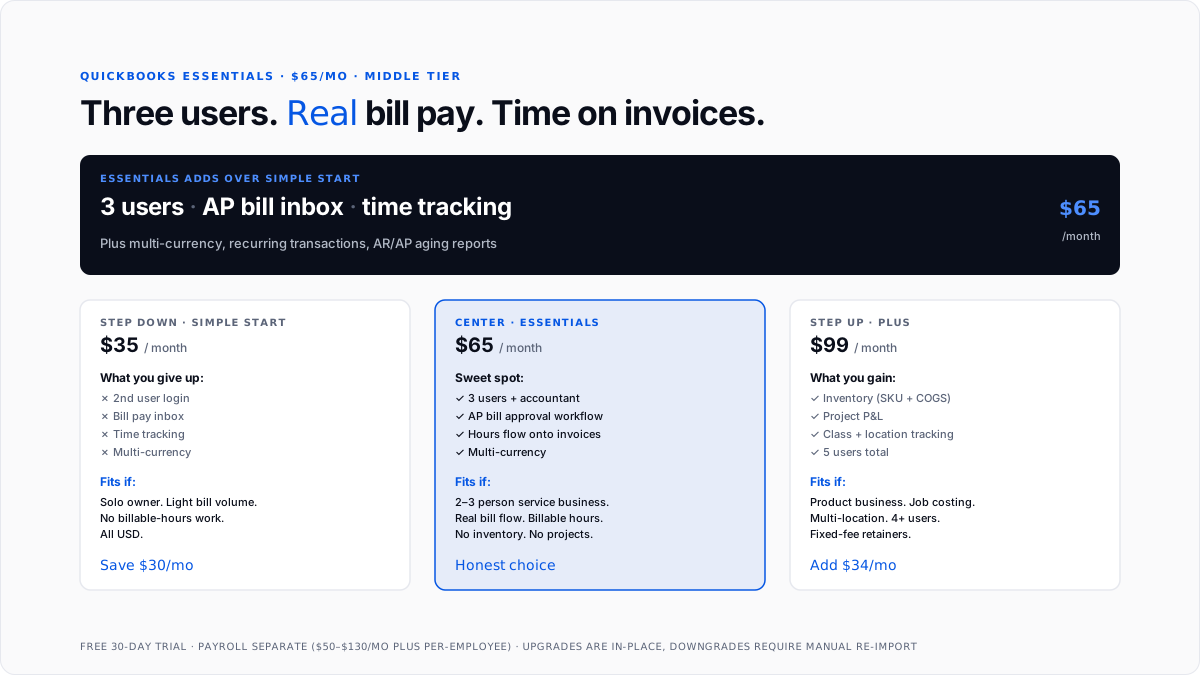
QuickBooks Essentials is Intuit's $65/month middle tier of QuickBooks Online. It sits above Simple Start ($35) and below Plus ($99), and it solves three specific problems that show up in growing small businesses: you need more than one login, you have real vendor bills to process, and someone is tracking billable time.
Those three additions define Essentials. If your business doesn't need any of them, Simple Start is the honest choice at $30 less per month.
What does Essentials add over Simple Start?
Three concrete additions plus quality-of-life improvements.
Three total users, not just one. Simple Start caps at one user plus the accountant seat. Essentials includes three users total (the accountant seat is still separate).
Bill pay inbox with approval workflow. A real accounts-payable inbox where bills arrive (via email forwarding, upload, or manual entry), get routed for approval, get scheduled for payment, and get marked paid.
Time tracking that flows onto invoices. Employees or contractors clock hours against a customer or job, and those hours flow onto invoices automatically. QuickBooks Time (formerly TSheets) is a separate, deeper integration for GPS clock-ins or crew scheduling.
Multi-currency support. If any customer or vendor operates in a non-USD currency, Essentials is the floor. Simple Start does not support it.
Enhanced reporting. AR aging, AP aging, sales by customer. Simple Start's reports are baseline; Essentials adds the AR/AP aging views that a real collections workflow needs.
Recurring transactions. Recurring invoices, recurring bills, and recurring journal entries. Retainer businesses and subscription billers benefit directly.
What does Essentials still leave out?
No inventory tracking. No SKU quantities, no per-item COGS, no purchase orders, and no reorder points.
No project profitability. Consultancies with fixed-fee retainers, construction contractors doing job costing, and agencies tracking campaigns need Plus for project P&L.
No class or location tracking. Cannot split revenue and expenses by department, region, or business segment.
Only three users. Plus jumps to five, which fits growing teams.
No batch invoicing. Advanced adds it.
No workflow automation or role-based permissions. Advanced features.
When is Essentials the right choice over Simple Start?
Three signals push the answer.
A second person needs to log in. Co-owner, bookkeeper who wants a second seat for their assistant, operations person entering expenses. Simple Start's single-user cap is a hard wall.
Vendor bill volume is real. More than 10-15 bills a month makes Essentials' AP inbox pay for itself in time saved. Simple Start's manual "enter as expense" workflow gets messy and loses the paper trail on approvals.
Anyone tracks billable hours. Field service, consulting, agency, legal, accounting-any professional service where you invoice for time needs Essentials at minimum.
If none of those apply, Simple Start's $35 is honest and Essentials at $65 is over-provisioning.
When should you skip Essentials for Plus?
Plus ($99) is the honest answer when your business hits any of these four signals.
Real inventory. Any SKU-level tracking, per-item COGS, or purchase orders.
Project or job costing. Fixed-fee retainers, construction jobs, and agency campaigns needing a P&L view of "what did we make on this specific project?"
Class or location tracking. Multi-department, multi-location, or multi-line-of-business reporting.
Four or five users. Growing teams hit Essentials' three-user cap fast.
If you'd need to upgrade to Plus within 12 months, buy Plus now. The $34/month delta is less than the friction of a mid-year migration.
Who does Essentials actually fit?
Two-to-three-person service businesses. Agencies, consultancies, legal practices, accounting firms, IT service providers.
Owner-plus-bookkeeper setups. Single owner running the front, part-time bookkeeper logging in weekly.
Retainer-based businesses. Recurring monthly billing, straightforward bill processing, no inventory.
International-facing businesses without inventory. US-based businesses invoicing foreign clients or paying foreign vendors need multi-currency, which Simple Start doesn't have.
Who should not buy Essentials?
Product businesses. Any real inventory → Plus.
Multi-location or multi-department businesses. Segment reporting → Plus.
Solo owners with no employees and no partners. Simple Start at $35 covers you.
Enterprises with 10+ users or complex approval workflows. Advanced at $235.
What does an Essentials month look like?
Daily: 5 minutes on transaction categorization and bill inbox scanning.
Weekly: 30-45 minutes on time for entry approval, invoice sending (with billable hours pulled automatically), and bill scheduling through the AP inbox.
Monthly: 1-2 hours on reconciliation, month-end close, AR/AP aging review, bookkeeper adjustments.
Quarterly: 30-60 minutes on sales tax filing, estimated tax payments if applicable, and financial review.
Yearly: 2-4 hours on 1099 prep (see 1099-NEC filing deadline), year-end close, tax package to CPA.
The total loop is 15-25 hours per month across everyone touching the books.
How does Essentials work with payroll?
Essentials does not include payroll. QuickBooks Online Payroll stacks on separately: Core at $50/month + $6 per employee, Premium at $85/month + $9 per employee, or Elite at $130/month + $11 per employee. Full breakdown at payroll services pricing.
For a three-employee business on Essentials + Core Payroll, the total lands at $133/month. For the payroll mechanics see payroll management software and payroll tax. For W-2 vs. 1099 classification on your team, see difference between W2 and 1099.
What are the underappreciated Essentials features?
Three worth calling out.
AR aging on demand. 0-30, 31-60, 61-90, and 90+ buckets are designed for real collections work. Essentials users typically see faster payment cycles because they work the aged buckets each week.
Bill scheduling with cash-flow view. The AP inbox connects to Essentials' cash-flow forecast. See "if I pay these bills this week, what does my balance look like next Friday?"
Multi-currency without workarounds. Handles the FX rate, tracks realized and unrealized gains, and rolls up correctly on the P&L. For businesses with even one international relationship, worth the tier bump alone.
When do you outgrow Essentials?
A product SKU shows up. Any real inventory → Plus.
A project ROI question shows up. "Did we make money on the ABC campaign?" → Plus.
Four users are needed. Growing teams hit three fast.
The bank asks for segment P&L. Class or location tracking → Plus.
Approval workflow gets complex. More than one approver, tiered dollar-amount approval, or role-based permissions → Advanced.
What are the common mistakes when picking essentials?
Buying Essentials when Simple Start would fit. Solo without partner or bookkeeper, light bill volume, no time-tracking need → Simple Start.
Buying Essentials when Plus is the honest answer. Inventory or projects within 12 months → Plus now.
Underestimating multi-currency need. Planning to accept international customers → Essentials from the start, not Simple Start.
Not using the bill-pay inbox. Upgrading to Essentials but keeping the Simple Start expense entry workflow means paying for a feature you're not using.
Skipping time-tracking setup. Requires billable rates per employee and per customer. Skipping means hand-entering hours on invoices.
For AI-first accounting alongside Essentials, see AI layer for QuickBooks. For the pattern of automating routine tasks inside QuickBooks, how to automate bookkeeping tasks in QuickBooks covers the hooks.
Conclusion
Essentials is Intuit's $65 middle tier and the honest answer for two-to-three-person small businesses that need multiple logins, real bill-pay workflow, and time tracking. It's where QuickBooks Online stops being a single-owner tool and becomes a small-team accounting system. It stops fitting the moment inventory, project profitability, class or location reporting, or a fourth user shows up. If your business is solo with light activity, Simple Start at $35 is honest. If inventory or projects are in your business today or within the next year, plus $99 is the floor.
FAQs
How much does QuickBooks Essentials cost?
$65 per month at list price, 30-day free trial, no credit card required. Intuit runs a 50% off promotion for the first three months, dropping the effective first-quarter cost to ~$32.50/month. Payroll and QuickBooks Payments are separate add-ons.
What's the difference between Essentials and Simple Start?
Essentials adds three total users (up from one), an accounts-payable bill inbox with approval workflow, and native time tracking that flows onto invoices. It also adds multi-currency and more advanced AR/AP aging reports.
What's the difference between Essentials and Plus?
Plus, it adds inventory tracking, project profitability, class and location tracking, and jumps to five users. Essentials lacks all four. If any inventory or project workflow shows up in your business, Plus is the honest tier.
Does Essentials include payroll?
No. QuickBooks Online Payroll is separate, starting at $50/month + $6 per employee (Core), going up to $130/month + $11 per employee (Elite). Essentials + Core Payroll for a three-employee business lands at ~$133/month total.
Can Essentials handle multi-currency invoicing?
Yes. Multi-currency is one of Essentials's tier-differentiating features. Handles non-USD invoicing, tracks realized and unrealized FX gains, rolls up correctly on the P&L. Simple Start does not support it.
How many users does Essentials support?
Three total users, plus the free accountant seat on top. Growing teams typically outgrow this cap and move to Plus (five users) or Advanced (25 users).
Does Essentials include time tracking?
Yes, native time tracking is included. Employees or contractors clock hours against a customer or job, and those hours flow onto invoices automatically. QuickBooks Time is a separate paid add-on for deeper time tracking (GPS clock-ins, crew scheduling).
Can I upgrade from Essentials to Plus without losing data?
Yes. In-place upgrades preserve transactions, chart of accounts, records, and reports. Downgrades from Plus may lose inventory, project, and class-tracking data.

