
What Do You Get With QuickBooks Simple Start?


QuickBooks Simple Start is Intuit's $35-per-month entry tier of QuickBooks Online. It gives one user access to a full double-entry accounting system and lets you invite an accountant or bookkeeper as a separate seat at no extra charge. That single feature, the accountant seat, is why most solo owners eventually move from Solopreneur ($20) up to Simple Start ($35).
This guide walks through what Simple Start includes, where the edges are, and how to decide between staying at $35 and moving to $65 Essentials or $99 Plus.
What does Simple Start actually give you?
Simple Start runs on the full QuickBooks Online platform. The underlying data model is the same one Essentials, Plus, and Advanced use. You get a real chart of accounts, journal entries post correctly, a general ledger sits behind the scenes, and reports run against accrual-aware data.
Single-user access plus an accountant seat: The main login is you. One free accountant seat sits alongside for your bookkeeper or CPA.
Bank feeds, credit cards, and receipt capture: Connect any number of bank and credit card accounts. Snap a receipt photo; QuickBooks reads it and matches it to an imported transaction.
Unlimited invoicing and estimates: No cap on invoice volume. Accept card or ACH through the QuickBooks Payments add-on. Estimates convert to invoices in one click.
Sales tax by jurisdiction: Intuit's automated sales tax service applies the correct rate for each customer address and tracks liability by jurisdiction.
1099 preparation and filing: Track subcontractor payments through the year and generate 1099-NEC and 1099-MISC forms at year-end. For deadline mechanics, see the 1099-NEC filing deadline.
Basic reports package: Profit and loss, balance sheet, cash flow, general ledger, trial balance, sales by customer, expenses by vendor.
Mileage tracking: The same GPS mileage tracker Solopreneur uses. Trips multiplied by the current IRS mileage rate.
Cash flow snapshot: 30-day forecast pulling from invoice due dates, recurring bills, and bank balances.
What does Simple Start deliberately leave out?
No bill pay workflow: You can enter bills as expenses, but the structured bill-inbox-approval-schedule workflow starts at Essentials.
Single user only: One login. No team access, no roles, no permissions. The accountant seat is separate.
No time tracking: Time tracking starts at Essentials.
No inventory: No SKU-level tracking or per-item COGS.
No project profitability: No project P&L. Job-costing starts at Plus.
No batch invoicing: Invoices go out one at a time. Batch invoicing starts at Advanced.
No workflow automation: Approval workflows and role-based permissions are Advanced features.
When should you upgrade from Solopreneur to Simple Start?
Three signals push the answer to yes on the $15/month bump.
You need an accountant login: Solopreneur has no accountant seat.
You're issuing 1099s at year-end; Solopreneur has no 1099 workflow.
You need a balance sheet; Loan applications, landlord requirements, potential investors, S-corp taxation - all need a real balance sheet. Solopreneur cannot produce one. See how to record a business loan for what proper double-entry looks like at Simple Start.
Any single trigger pays for the $180 annual delta. Owners who skip the upgrade usually pay the same amount in bookkeeper time cleaning up what Solopreneur missed.
When should you upgrade from Simple Start to Essentials?
Three specific workflows push the answer to Essentials ($65).
You have a partner or a second person doing the books: Simple Start is single-user. A co-owner, bookkeeper, or operations person needs their own login.
Vendor bills need a real approval-and-payment workflow: If you receive 20-40 bills a month, Simple Start's "enter as expense" workflow gets messy. Essentials adds the bills inbox.
Anyone tracks time against jobs or invoices: Field-service, agencies, consultancies with billable hours need time entry per employee and per project.
For businesses where none of those three apply, Simple Start's $35 is the honest choice.
When should you skip Simple Start for Plus?
Plus ($99) exists for four things Simple Start and Essentials can't cover.
Inventory: SKU-level tracking, per-item COGS, purchase orders, reorder points.
Projects and job costing: Construction contractors, agencies with fixed-fee retainers, consultancies tracking multi-month engagements.
Class and location tracking: Multi-department or multi-location businesses needing segment P&L.
More users: Plus jumps to five users.
If your business needs any of those four things, Plus is the honest answer even if you're not fully using them yet.
What does a Simple Start month look like?
Daily: 2-3 minutes reviewing new transactions and confirming categorizations.
Weekly: 10-15 minutes to send invoices and chase 30+ day overdue balances.
Monthly: 30-60 minutes to reconcile bank and credit card accounts, review P&L and balance sheet, post bookkeeper adjustments.
Quarterly: 30 minutes on sales tax filing prep and estimated tax payments if you're a Schedule C or single-member LLC filer.
Yearly: 1-3 hours on 1099 prep, year-end close, and tax package to CPA.
The total loop is 8-15 hours per month, with month-end and year-end as peaks.
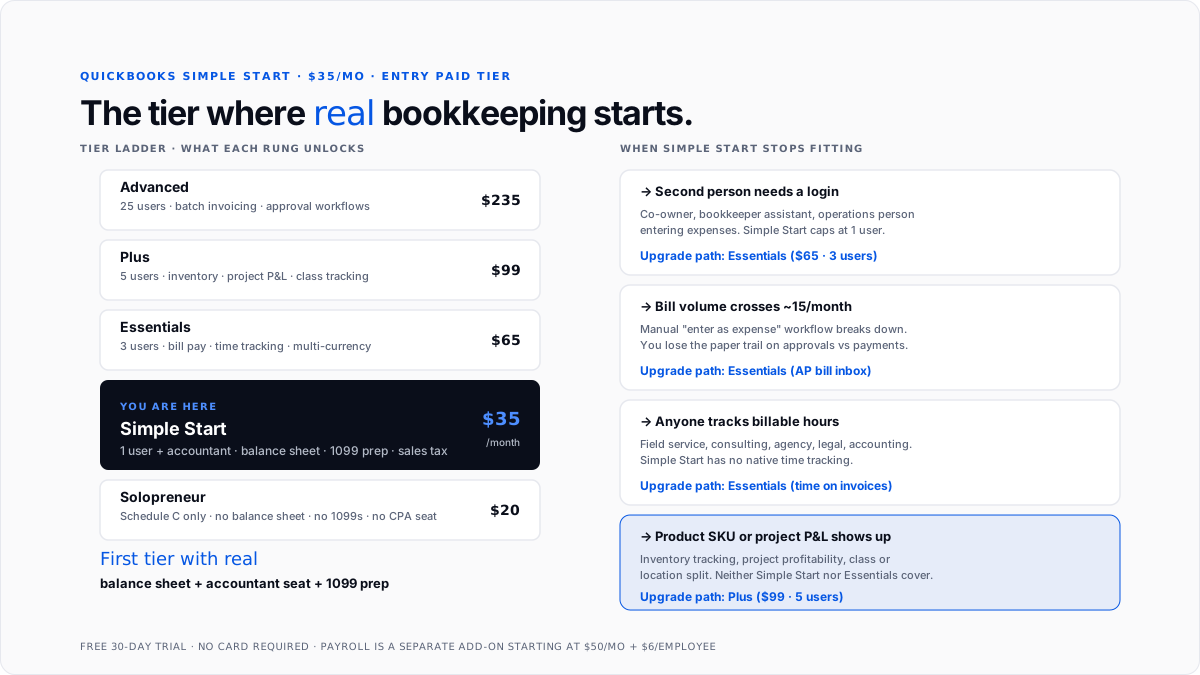
What are the signs you've outgrown Simple Start?
The bookkeeper asks for a second login: You're at Essentials.
Bill volume crosses ~15 a month: Manual entry gets old. Essentials' bill-pay inbox pays for itself in time saved.
Any billable-time tracking need: As soon as you're invoicing for hours, Essentials at minimum.
Product with 10+ SKUs: Any real product line needs Plus for inventory tracking.
The bank asks for financials by segment: Multi-location or multi-department reporting requires class or location tracking, which lives at Plus.
You cross 25 invoices a month with customization needs: Advanced adds batch invoicing.
How does Simple Start work with payroll add-ons?
Simple Start does not include payroll. QuickBooks Online Payroll stacks on separately. Pricing starts at $50/month + $6 per employee (Core), $85/month + $9 per employee (Premium), or $130/month + $11 per employee (Elite). Full breakdown at payroll services pricing.
Simple Start + Core Payroll for one employee lands at $91/month, which is above Essentials' $65 base. Most businesses hiring their first W-2 employee also outgrow single-user Simple Start at the same time, so the honest upgrade is often Essentials with Payroll, not Simple Start plus Payroll.
For payroll mechanics, see payroll management software. For what QuickBooks Payroll files on your behalf see payroll tax.
How does the free trial and pricing work?
30-day free trial, no credit card required. Intuit's frequent 50% off promotion for the first three months drops the effective start to ~$17.50/month for the first quarter.
The sticker price is $35/month. Payroll, QuickBooks Payments, and full sales-tax auto-filing are separate add-ons. Cancellation is self-serve. Data exports are available in CSV and Excel. In-place upgrade to any higher QBO tier is clean; downgrade to Solopreneur requires manual re-import.
What are the common mistakes when picking Simple Start?
Buying Simple Start when Solopreneur would fit: Solo Schedule C filers with no employees and no accountant pay $15 too much per month.
Buying Simple Start when Essentials is the honest choice: Partner needs a login, bill volume is meaningful, or billable-hours work exists - go straight to Essentials.
Adding payroll without checking essential pricing: Simple Start + Payroll often lands at or above Essentials + Payroll.
Not using the accountant seat: The free accountant seat is one of the tier's biggest values.
Ignoring sales tax setup: Automated sales tax only works if customer addresses and product tax codes are configured. Skipping setup means hand-calculating tax on invoices.
For the pattern of automating routine tasks inside QuickBooks, how to automate bookkeeping tasks in QuickBooks covers the hooks. For AI-first accounting alongside Simple Start, see AI layer for QuickBooks and best AI bookkeeping apps for small businesses in 2026.
Conclusion
Simple Start is Intuit's $35 entry-paid tier and the first QBO plan that produces a real balance sheet, prepares 1099s, and handles sales tax properly. It's built for single-owner businesses that need real bookkeeping and want an accountant in the loop. It stops fitting the moment you add a second user, cross meaningful bill volume, take on billable-time tracking, or move into inventory. If you're solo with no employees, a solopreneur at $20 is often enough. If any Simple Start ceiling triggers apply, Essentials at $65 is the honest floor.
FAQs
How much does QuickBooks Simple Start cost?
$35 per month at list price, 30-day free trial, no credit card required. Intuit runs a 50% off promotion for the first three months, dropping the effective first-quarter cost to ~$17.50/month. Payroll and QuickBooks Payments are separate add-ons.
What's the difference between Simple Start and Solopreneur?
Simple Start ($35) is a full double-entry system with balance sheet, 1099 prep, sales tax by jurisdiction, and a free accountant seat. Solopreneur ($20) is a simplified tax-tracking tool with no balance sheet, no 1099s, and no accountant access.
What's the difference between Simple Start and Essentials?
Simple Start is single-user with no bill-pay workflow and no time tracking. Essentials ($65) adds three users, an accounts-payable bill inbox, and time tracking against jobs. Any co-owner, second bookkeeper login, or billable-hours work triggers Essentials as the honest starting point.
Does Simple Start include payroll?
No. QuickBooks Online Payroll is a separate subscription starting at $50/month + $6 per employee (Core) and going up to $130/month + $11 per employee (Elite). For a first-employee hire, the total Simple Start + Payroll cost often approaches Essentials + Payroll.
Does Simple Start handle sales tax?
Yes. Automated sales tax service applies the correct rate for each customer address, tracks liability by jurisdiction, and produces filing-ready reports. Full auto-filing to state portals is a separate service.
Can Simple Start prepare 1099s?
Yes. Tracks 1099 vendor payments and generates 1099-NEC and 1099-MISC forms at year-end. E-filing through Intuit is included.
Can I upgrade from Simple Start to a higher tier without losing data?
Yes. In-place upgrades to Essentials, Plus, or Advanced preserve transactions, chart of accounts, records, and reports. Downgrades from Plus (specifically inventory and project data) are more restricted.
Is Simple Start good for LLCs?
Yes. Simple Start handles single-member LLCs (Schedule C by default), single-member LLCs with S-corp election (with Payroll add-on), and multi-member LLCs filing Form 1065. Multi-owner LLCs typically outgrow Simple Start's single-user cap quickly and jump to Essentials.

