
What Are the Best QuickBooks Integrations for Small Businesses?


QuickBooks Online integrates with more than 800 business apps through Intuit's App Store, which means most of the tools your business already runs likely have a native connector. Payment processors, e-commerce platforms, CRM systems, expense trackers, time-tracking software, and payroll services all sync into QuickBooks so transactions post to the general ledger without manual entry. This guide walks through the six integration categories that matter most for small businesses, the specific tools in each category, and how to pick the right ones.
What is a QuickBooks integration?
A QuickBooks integration is a two-way (or one-way) data connection between QuickBooks Online and another business app. The integration pushes data into QuickBooks (a sale on Shopify becomes an invoice), pulls data out of QuickBooks (a customer record syncs into your CRM), or both.
Three integration types exist. Native connectors are built by Intuit or the third-party vendor and listed in Intuit's App Store. Middleware connectors are third-party sync tools (A2X, Synder, MyWorks, and Zapier) that bridge apps without native connectors. Custom API connections are built by developers directly against Intuit's API, typically for niche tools that don't fit the first two categories.
Most small businesses only need native connectors from the App Store. Middleware becomes useful for niche apps or when a native connector has limits.
Which integration categories matter most for small businesses?
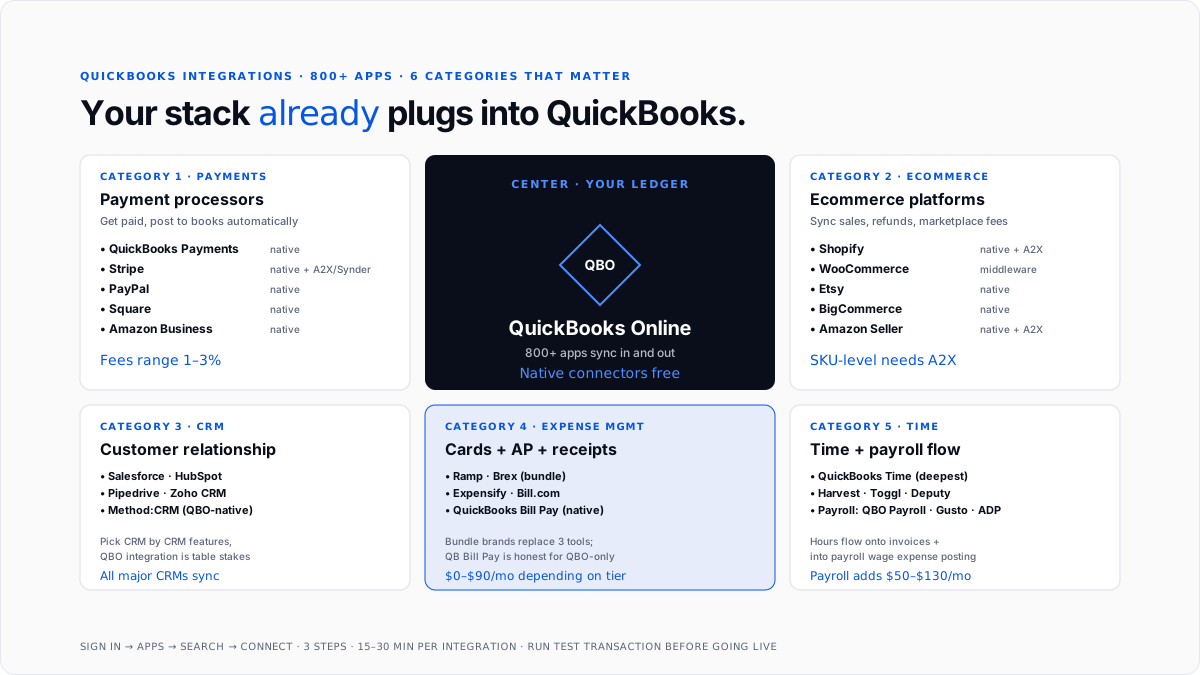
Six categories cover the vast majority of small-business needs.
Payment processors. Get paid faster and post payments to QuickBooks automatically.
Ecommerce platforms. Sync online sales, refunds, and platform fees into your books.
CRM systems. Keep customers, invoices, and the sales pipeline aligned across the front and back office.
Expense management. Automate corporate card charges, receipt capture, and reimbursements.
Time tracking. Turn employee hours into billable invoices and payroll data.
Payroll. Run payroll and post wage expense, taxes withheld, and employer taxes directly to the general ledger.
Which payment processors integrate with QuickBooks?
QuickBooks Payments is Intuit's own processor. Native integration, no third-party sync needed. Card fees are ~2.99%, and ACH is ~1%. See QuickBooks Payments for the full pricing breakdown.
Stripe. The most common third-party choice for SaaS, e-commerce, and subscription businesses. Native Intuit connector plus stronger third-party sync tools (A2X, Synder). Handles multi-currency, subscriptions, and refunds. For the sync mechanics, see Stripe + QBO sync guide and best tools to sync Stripe with QuickBooks.
PayPal. Native connector. Popular with service businesses and international payments.
Square. Native for retail and appointment-based businesses. Auto-syncs daily sales summary.
Amazon Business. Native integration for merchants selling on Amazon. Deposit and fee reconciliation flows into QBO automatically.
Which e-commerce platforms integrate with QuickBooks?
Shopify. Native connector plus middleware options (A2X, Synder). Syncs orders, refunds, shipping, and Shopify Payments transactions.
WooCommerce. Third-party connectors handle the sync. Order-level detail with SKU-level COGS in Plus tier.
Etsy. Native connector for the daily sales summary. For per-order detail, use a middleware bridge.
BigCommerce. Native and third-party connectors. Similar structure to Shopify.
Amazon Seller Central. Native connector plus A2X for higher-volume sellers.
For ecommerce businesses moving significant volume, the native connector often lands the daily summary correctly but misses SKU-level cost of goods sold and marketplace fees. Middleware fills that gap.
Which CRM tools integrate with QuickBooks?
Salesforce. Native two-way integration syncs customers, invoices, and payment status. Most enterprise-grade CRM connectors.
HubSpot. Native connector via HubSpot's app marketplace. Syncs contacts, deal pipeline, and invoice status.
Pipedrive. Native and third-party connectors. Pipeline-focused sync for sales-driven businesses.
Zoho CRM. Native connector inside the Zoho ecosystem.
Method CRM. Built specifically as a QuickBooks-native CRM. Deepest integration because it was designed around QBO's data model from day one.
For most small businesses, the CRM they already use has a QBO connector. Pick the CRM by CRM features, not by QuickBooks compatibility - the integration is table stakes.
Which expense-management tools integrate with QuickBooks?
Ramp. Corporate card + expense management + AP in one platform. Deep native QBO sync for transactions, receipts, and vendor payments.
Brex. Similar bundle to Ramp. Native QBO connector.
Expensify. Long-established expense tracking with native QBO integration. Receipt capture, reimbursement, and per-expense-report posting.
Bill.com. AP-focused. Handles bill entry, approval workflow, and payment execution. Native QBO connector.
Divvy (BILL Spend & Expense). Card + expense management. Native QBO sync.
For AP without a corporate card, QuickBooks Bill Pay is Intuit's first-party alternative and often the honest choice for businesses fully inside the QBO ecosystem.
Which time-tracking tools integrate with QuickBooks?
QuickBooks Time (formerly TSheets). Intuit's own time-tracking product with the deepest native integration. GPS clock-ins, crew scheduling, mobile timesheets. Add-on subscription on top of QBO.
Harvest. Simple time and expense tracking with native QBO sync. Popular with agencies and consultancies.
Toggl Track. Lightweight time tracker with QBO integration via Zapier or middleware.
Deputy. Workforce scheduling and time tracking for shift-based businesses. Native connector.
For payroll processing, the time-tracking tool typically feeds into payroll management software which then posts wage expense and taxes to QBO.
How do you set up a QuickBooks integration?
Three-step path per Intuit's documentation.
Step 1: Open the QBO Apps section. Sign in to QuickBooks Online. In the left menu, click Apps.
Step 2: Search and connect. Search for the app you want. Click on the app card, review permissions, and click Connect.
Step 3: Authorize and configure. Complete OAuth authorization in the app's login screen. Configure sync settings (frequency, direction, filters). Run a test transaction to confirm the sync posts correctly.
For apps without a native connector, install a middleware tool (A2X, Synder, MyWorks) that connects your app to QuickBooks on the back end. Setup takes 15-30 minutes per integration typically.
What are the most common integration mistakes?
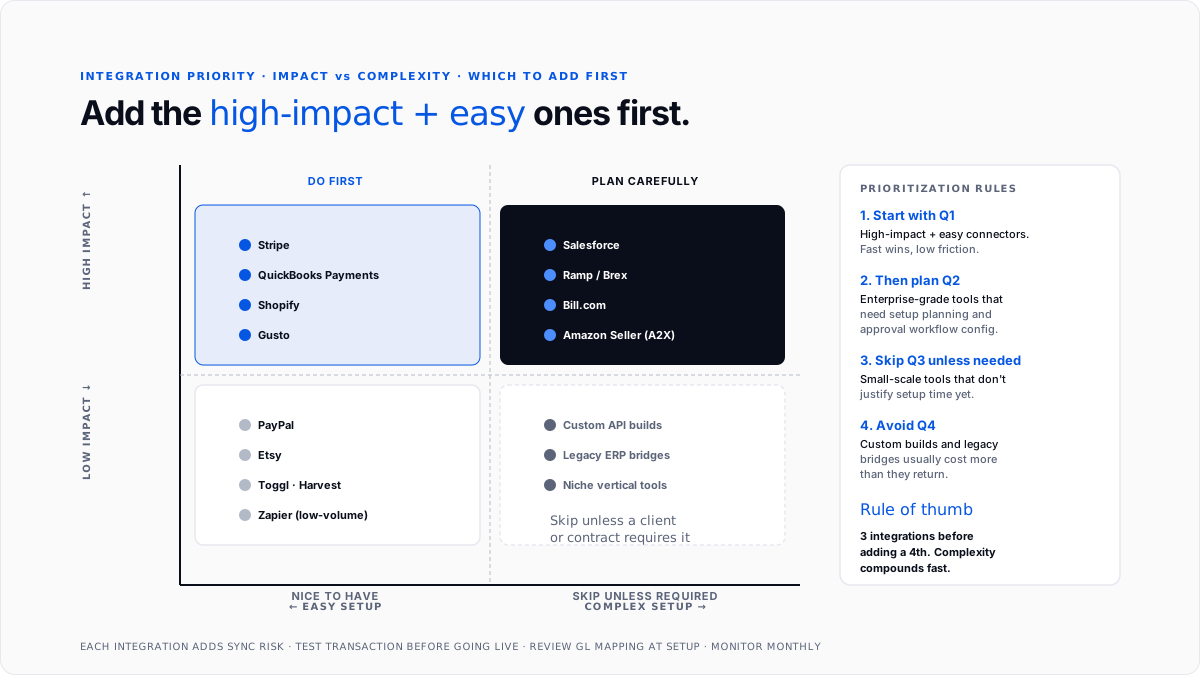
Enabling every integration at once. Each active integration adds sync risk and complexity. Turn on what you need today; add more later.
Skipping the test transaction. Every new connector should run a single low-value test transaction before going live. Catches OAuth issues and mapping errors early.
Ignoring the chart-of-accounts mapping. Integrations post to specific GL accounts. Wrong mapping means months of miscategorized transactions.
Not reviewing sync frequency. Real-time sync sounds better but often creates duplicate handling. Daily or hourly sync is enough for most workflows.
Trusting the connector to handle everything. Even great integrations need a bookkeeper or AI layer reviewing the posted data. Broken syncs are silent until month-end reveals the gap.
Stacking overlapping integrations. Two connectors both trying to sync Stripe transactions create duplicates. Pick one path per data source.
How does Finlens fit alongside QuickBooks integrations?
Finlens is a QuickBooks-compatible AI accounting layer built for CPA firms managing many client books and for small businesses running QuickBooks without an in-house bookkeeper. It sits orthogonal to the integrations covered above - Finlens doesn't compete with Stripe, Shopify, Salesforce, or Ramp. It works on the data those integrations push into QuickBooks.
When a Stripe payment lands in QBO through the Stripe integration, Finlens categorizes it correctly, matches it to the right customer invoice, and posts the fee separation without a human touching it. When a Shopify daily summary syncs in, Finlens splits revenue, COGS, and marketplace fees against the right chart-of-accounts categories. The integrations bring the data. Finlens keeps it clean.
For CPA firms running dozens of client books that each have their own integration stack, Finlens handles the categorization and close automation across every file, so the firm doesn't need to add staff each time a client adds a new integration.
Conclusion
QuickBooks integrates with 800+ apps across six categories that matter for small businesses: payment processors, ecommerce platforms, CRM tools, expense management, time tracking, and payroll. Native connectors from Intuit's App Store cover most needs at zero additional cost beyond the third-party tool's own subscription. Middleware (A2X, Synder, MyWorks) fills gaps for niche apps or higher-volume syncs. Pick integrations by workflow fit rather than "most features," run a test transaction before going live, and configure GL mapping correctly at setup. The integration brings data into QuickBooks; the categorization and close work that turns that data into clean books is a separate job-done manually by a bookkeeper, or automatically with an AI layer.
FAQs
How many apps does QuickBooks integrate with?
QuickBooks Online integrates with more than 800 business apps through Intuit's App Store. Categories include payment processors, e-commerce platforms, CRM systems, expense management, time tracking, payroll, inventory management, and reporting tools.
What are the best QuickBooks integrations for small businesses?
Depends on your stack. Payment processing: QuickBooks Payments, Stripe, PayPal, and Square. E-commerce: Shopify, WooCommerce, Amazon. CRM: Salesforce, HubSpot, Pipedrive, Method: CRM. Expense management: Ramp, Brex, Expensify, Bill.com. Time tracking: QuickBooks Time, Harvest. Payroll: QuickBooks Online Payroll, Gusto, ADP.
How do I set up a QuickBooks integration?
Three steps. Sign in to QuickBooks Online. Click Apps in the left menu. Search for the app, click its card, and click Connect. Complete OAuth authorization in the app's login screen, configure sync settings, and run a test transaction before going live. Setup typically takes 15-30 minutes per integration.
Do QuickBooks integrations cost extra?
The integrations themselves are usually free - you're already paying for the third-party app (Stripe fees, Shopify subscription, Salesforce license). Some middleware tools (A2X, Synder, and MyWorks) charge $30-$200/month depending on transaction volume. Native Intuit connectors are free.
Which QuickBooks tier is best for integrations?
Any tier from Simple Start upward supports integrations, but Plus and Advanced have deeper integration options for inventory, projects, and multi-entity workflows. The App Store is the same across tiers. Solopreneur has more limited integration options than QBO tiers.
Do I need a native integration or middleware?
Native connectors are always the first choice - free, faster, less to maintain. Use middleware (A2X, Synder, MyWorks) when a native connector doesn't exist, when the native connector misses data detail you need (SKU-level COGS, marketplace fees), or when you're syncing across multiple platforms into one QuickBooks file.
What's the difference between Stripe's native QBO integration and third-party sync tools?
Stripe's native integration handles basic sync but often misses fee separation, refund handling, and multi-currency edge cases. Third-party tools (A2X, Synder, and MyWorks) handle those cases better and let you configure GL mapping more granularly. For high-volume Stripe businesses, middleware usually pays off.
Can I connect QuickBooks to any app if it's not in the App Store?
Yes, via middleware tools like Zapier or direct API integration. Zapier connects QuickBooks to 5,000+ apps for simple workflows. For deeper custom integrations, developers can build against Intuit's public API directly.

