
Scan Receipts: The Complete Guide for Small Businesses and CPA-Firm Clients (2026)


Scanning receipts turns a piece of thermal paper into structured, searchable, deduction-ready data that flows straight into books, so business purchases can be categorized, reconciled against card feeds, and defended in an audit years after ink has faded.
The mechanics are simple on surface. You point a phone camera at a receipt, and software extracts merchant, date, amount, and tax details in seconds.
Underneath, though, sits a stack of decisions about which method to use, how data connects to accounting software, how long to keep images, and how to make sure substantiation holds up when IRS asks for it.
This guide covers what receipt scanning actually is, why it matters more than most owners realize, IRS documentation rules that every business needs to know, and five methods available in 2026.
It also walks through OCR extraction that runs behind scenes, a workable setup for a small business, common mistakes to avoid, and where scanned receipts land in broader bookkeeping stack.
It's written for owners, controllers, bookkeepers, and CPA-firm partners who need to build a real workflow rather than just download an app and hope for best.
What scanning receipts actually means for a business
At plainest level, scanning a receipt means creating a legible digital image of original document and, for anything worth effort, extracting key fields into structured data that downstream systems can use.
The digital image is what backs up purchase in an audit. The extracted fields are what let accounting software categorize expense, match it to a card charge, and post it to correct chart of accounts line.
Both parts matter. An image without extracted data means someone still has to type amount and category by hand. Extracted data without image means audit trail has a hole where original document should be.
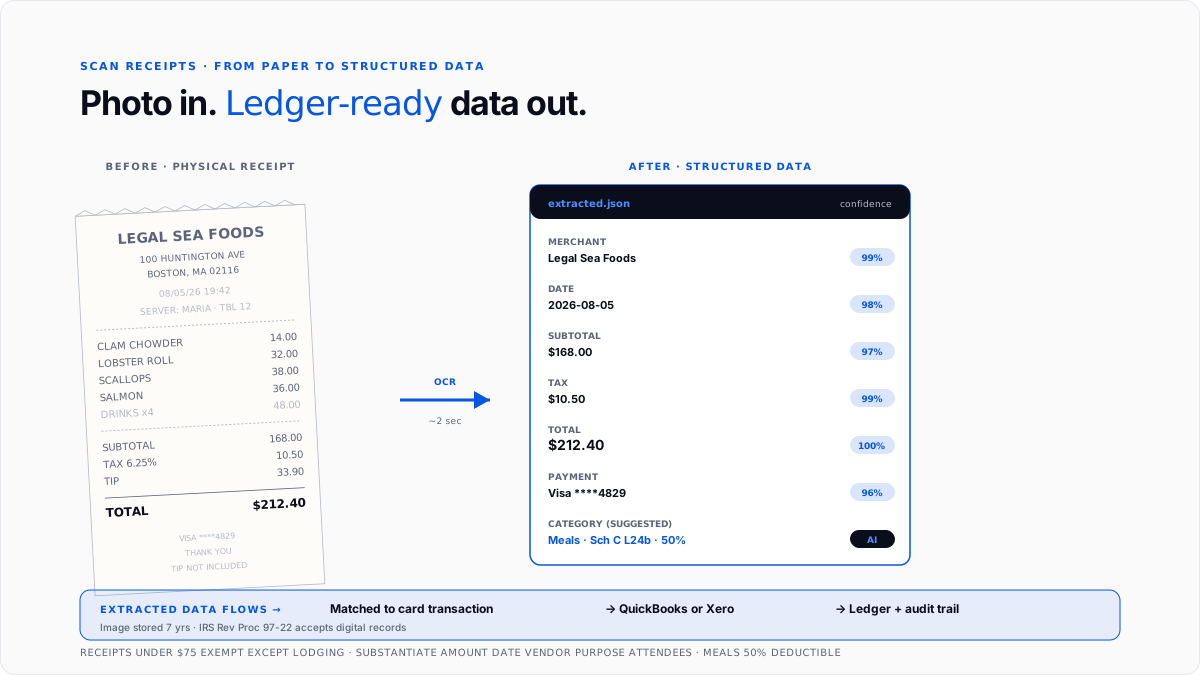
Modern receipt scanners handle both automatically. You take a photo, software crops and cleans it, OCR pulls out merchant, date, amount, tax, and payment method, and whole record gets stored against correct expense with image attached and searchable.
The difference between running this workflow well and running it poorly shows up in three places. The books close faster because manual data entry is gone. The tax deductions hold up because every receipt is attached to transaction it supports. The audit trail is complete because nothing has been lost to fading thermal paper.
Why scanning receipts matters more than most owners realize
The benefits show up in four distinct areas, and each of them alone would justify discipline.
Tax deductions business can actually defend. Every business expense claimed as a deduction needs to be supported by contemporaneous records that show what was purchased, when, from whom, and why. See how to write off business expenses guide for how deduction categories are structured and which ones move needle most.
Physical receipts fade, get lost, and are impossible to search. Digital receipts don't do any of those things, which is why IRS has been accepting digital images as valid documentation for years.
Faster month-end close. Receipts captured at moment of purchase and matched automatically to card transactions cut reconciliation work at month-end from hours to minutes. This is where most bookkeepers and controllers see payback within first month of adoption.
Cash flow visibility. Scanned receipts flow into tracking layer with full metadata, so leadership can see category-level spending in real time. That visibility is what makes budget adjustments and volume-based vendor renegotiation possible before problems compound.
Audit trail that survives time. The IRS can request substantiation for expenses claimed years in past, and physical receipts often don't survive that long. Digital images stored in cloud stay searchable and legible for as long as storage account exists, which is whole point of retention rules covered next.
The IRS documentation rules every business needs to know
The rules that actually govern receipt substantiation are simpler than most owners assume, and knowing them well is what separates deductions that hold up from ones that don't.
The $75 threshold. Per IRS Publication 463, businesses are not required to keep receipts for non-lodging expenses under $75, though they still must substantiate five things per expense: amount, date, vendor, business purpose, and (for meals) who was there.
Lodging always requires a receipt regardless of amount. In practice, most businesses require receipts for every purchase to keep workflow consistent, since a mixed policy tends to produce inconsistent capture.
The five substantiation items. For every business expense, whether or not a receipt is attached, business needs to be able to prove five facts: how much was spent, when expense was incurred, who received payment, what purchase was for, and (for meals) who was present.
Digital receipt records tend to capture all five automatically, which is one reason automated tools produce far cleaner audit trails than paper does.
The retention period. The IRS requires business expense records to be kept for at least three years after return is filed, and best practice is to keep them for seven years to cover extended audit windows for substantial understatement or fraud. See how long to keep business tax records guide for detailed retention framework.
Digital records are acceptable. IRS Rev. Proc. 97-22 confirms that digital records of paper receipts are valid documentation, provided images are legible, complete, and available for review. There's no requirement to keep physical paper once a digital copy exists.
The five methods used to scan business receipts in 2026
Almost every method used in wild falls into one of five buckets.
Method 1: Dedicated mobile receipt apps. Apps like Expensify, Zoho Expense, Fyle, and Smart Receipts focus on receipt capture workflow itself. You point phone camera at receipt, app crops and enhances image, OCR pulls key fields, and record gets stored and (usually) synced to accounting software.
Dedicated apps are lightweight, they typically have generous free tiers, and they work well for small teams or solo owners. The tradeoff is that they usually still need integration with a separate accounting platform to close loop.
Method 2: Built-in accounting software receipt capture. QuickBooks Online, Xero, and NetSuite include receipt capture as part of mobile app. Owners and employees photograph receipts directly inside accounting tool, and extracted data attaches to correct transaction from connected bank feed.
For most small businesses running formal bookkeeping, this is sensible default because there's no separate system to reconcile against.
Method 3: Corporate card programs with built-in capture. Ramp, Brex, Mercury, and similar programs combine card issuance with automated receipt capture. As card charges post, app prompts cardholder to snap receipt, and OCR matches it against transaction that just cleared.
Programs in this category are highest-friction-remover for businesses with heavy card spend, since match happens automatically at point of transaction.
Method 4: Email forwarding for digital receipts. For online purchases where receipt arrives by email, most receipt-capture tools accept a forwarded email address that ingests receipt automatically, extracts fields, and attaches it to matching transaction.
This is highest-return move for SaaS-heavy businesses whose spend is almost entirely digital, since it eliminates any manual step at all.
Method 5: Scanner or camera plus manual upload. Traditional flatbed scanners, phone photos uploaded to a cloud folder, and PDF exports from other systems still work for edge cases. Modern OCR services can process these as batch uploads.
This method fits businesses that already have a filing habit built around scanned documents, and it's often used as a fallback for one-off receipts that don't come through main channels.
Most small businesses combine two or three methods. Corporate cards for most spend. Email forwarding for SaaS. Mobile app capture for cash and out-of-pocket. The exact mix depends on how business actually spends money.
What OCR is actually doing under hood
Modern receipt OCR does far more than character recognition of ten years ago. When you photograph a receipt, software runs a sequence of steps that together produce structured data ready for accounting system.
Image cleanup. The tool detects edges of receipt, crops out background, straightens perspective, and adjusts contrast so text is legible even from a phone photo taken in poor light.
Text extraction. OCR identifies every word and number on receipt, treating them as raw text at this stage rather than as specific fields.
Field parsing. Machine learning models trained on millions of receipts identify which text represents merchant, which represents date, which is subtotal, which is tax, and which is total.
Validation. The extracted amounts get checked for internal consistency (subtotal plus tax equals total, dates are plausible, merchant names match known vendors) and flagged if anything looks off.
Matching. The extracted record gets matched against transaction feed from connected card or bank account, so receipt lands attached to specific charge it documents.
Categorization. Based on merchant and prior rules, tool suggests a category from chart of accounts, which user can accept or override.
The whole sequence runs in a few seconds. The payoff is that a receipt that used to require thirty seconds of manual entry now requires zero, and categorization tool suggests is typically right first time for recurring vendors.
A workable setup for a small business or CPA-firm client
Getting from ad hoc receipt piles to a clean workflow is more achievable than most owners assume. The following steps produce a working system.
Step 1: Pick primary capture method. For a small business already using QuickBooks or Xero, built-in receipt capture in mobile app is usually right default. For businesses on corporate card programs like Ramp or Brex, use card app's capture. For everyone else, a dedicated mobile app like Expensify or Zoho Expense fills gap.
Step 2: Set up email forwarding for digital receipts. Configure chosen tool's inbound email address so that any receipt received by email can be forwarded automatically and ingested. This eliminates manual step for SaaS subscriptions, ad platform bills, and other online purchases.
Step 3: Build receipt-capture habit at moment of purchase. The single most important behavior change is snapping receipt or forwarding email immediately after purchase, not later. Waiting until end of day or end of week is where most receipts get lost.
Step 4: Match receipts to transactions weekly. Set a weekly rhythm to review captured receipts, confirm auto-match to card transactions worked, and manually match any that didn't. Fifteen minutes a week beats three hours at month-end.
Step 5: Handle backfill separately. For businesses moving to a new receipt-capture tool with months or years of historical spend to reconcile, historical transaction categorization tools for QuickBooks guide covers backfill approach, and best AI tools for bulk transaction categorization covers automation options for processing backlog in bulk.
Step 6: Configure storage and retention. Confirm that captured receipts are stored in cloud with retention window business needs (at minimum three years, ideally seven), that images are searchable by vendor or date, and that they're accessible to whoever might need them (owner, bookkeeper, CPA).
The five mistakes that consistently break receipt workflows
Even best tool produces bad output if underlying habits aren't in place.
Waiting to scan. Receipts that get scanned three weeks after purchase have often already been lost or damaged, and details required for substantiation (like attendees at a meal) are hard to reconstruct from memory. Real-time capture eliminates problem.
Skipping business purpose field. OCR extracts merchant, date, and amount automatically, but it can't guess why purchase happened. The user has to enter business purpose, and skipping this step means deduction can't be defended in audit.
Duplicate submissions. Employees who forget they already submitted a receipt sometimes submit it again, especially in businesses without automated deduplication. Good tools catch this automatically. Manual processes usually don't.
Not verifying OCR extraction. OCR is dramatically better than it was five years ago, but it still makes mistakes, particularly on merchants with unusual names or receipts with faded print. Reviewers should spot-check extracted amount against original image, especially for larger purchases.
Losing audit trail with tool switches. Businesses that migrate between receipt-capture tools often break audit trail, meaning receipts stored in old tool aren't accessible to new one. Migrations should include exporting complete historical archive to a stable long-term storage location.
Business receipt scanners vs. consumer cashback apps
The SERP for "scan receipts" mixes two very different categories, and it's worth being explicit about difference.
Business receipt scanners like QuickBooks Online, Expensify, Zoho Expense, Fyle, Dext, and Ramp exist to feed accounting system. Their job is to produce structured, searchable, deduction-ready data that flows to books and tax return.
Consumer cashback apps like Fetch, Receipt Hog, Ibotta, and CoinOut exist to reward consumer for scanning receipts. Their job is to pay user pennies per receipt for market research data, and they have no useful integration with accounting software.
A business that mistakenly uses a consumer app for expense tracking ends up with receipts collected in a system that doesn't talk to QuickBooks, doesn't produce audit-ready records, and doesn't feed tax return. The categories look similar on App Store, but workflows are fundamentally different, and picking wrong wastes months.
Where scanned receipts fit in bookkeeping stack
The receipt capture layer sits between raw transaction and accounting records, feeding structured data into categorization layer that then flows to general ledger.
The flow, at its simplest, is: purchase happens (on card, personal card, or cash), receipt gets captured (via mobile app, email forwarding, or corporate card), OCR extracts fields, record matches to a card transaction, accounting software receives categorized transaction with receipt attached, and general ledger posts entry with a full audit trail.
For sole proprietors and single-member LLCs filing Schedule C, receipt-backed categorized transactions flow straight to deduction categories on return. For partnerships and S-corps, same data feeds Form 1065 or 1120-S at entity level.
For CPA firms managing many client books, standardizing receipt capture tool across client base is one of highest-leverage moves available. Every hour saved per client per month compounds fast, and categorization comes in clean enough that annual bookkeeping cleanup work drops meaningfully.
Conclusion
Scanning receipts is small daily habit that keeps books clean, deductions defensible, and audit trail complete.
The mechanics aren't complicated, meaning point phone at a receipt or forward an email, and let OCR do extraction. What separates a working system from a broken one is discipline of capturing at moment of purchase, matching against card transactions weekly, and storing records with retention that meets IRS requirements.
For small businesses building process from scratch, highest-return moves are picking a primary tool that connects to accounting software, setting up email forwarding for digital receipts, building moment-of-purchase capture habit, and configuring cloud storage with a seven-year retention window.
For CPA firms with many client books, standardizing on one receipt-capture tool across whole book is one of biggest operational levers available, because every hour saved per client per month compounds fast into a meaningful margin lift over year.
Frequently asked questions
Do I really need to scan receipts if my card statement already shows charge?
Yes. The card statement shows amount and vendor, but IRS requires substantiation of what was purchased and why, which only receipt itself carries. Card statements alone are not sufficient documentation for larger deductions.
Is scanning receipts worth it for a solo freelancer?
For anyone claiming business deductions on Schedule C, yes. The time saved at tax prep and tax deductions defended in audit dramatically exceed setup cost of an app. Even Smart Receipts or free tier of Expensify handles a solo freelancer's volume comfortably.
What is easiest way to digitize receipts?
For most people, snapping a photo with phone camera through a receipt-capture app is fastest, since OCR extracts fields automatically and record syncs to accounting software without manual entry.
What is best free app to scan receipts?
For business use, QuickBooks Online's built-in mobile receipt capture is most useful if you already have a QuickBooks subscription. Standalone free options include Zoho Expense (generous free tier), Smart Receipts, and Wave. Skip consumer cashback apps like Fetch for business tracking.
Can I throw away paper receipts after scanning them?
Yes, provided digital image is legible, complete, and stored somewhere reliable. IRS Rev. Proc. 97-22 accepts digital records as valid documentation. Some businesses keep paper for a short period as a fail-safe, then shred it once digital copy is verified in system.
Can you actually make money from scanning receipts?
Consumer cashback apps like Fetch and Ibotta pay small amounts per receipt for market research. The reward is measured in cents to a dollar or two per receipt, and none of these apps produce audit-ready business documentation.
For business tracking, value is in deduction defense and workflow speed, not in cash rewards.
How do I scan receipts to Excel?
Most business-grade receipt scanners can export extracted data to CSV or Excel format. QuickBooks, Zoho Expense, and Expensify all support this natively. For manual workflows, upload receipt images to a cloud folder and use OCR services that produce structured Excel output.
Do receipt scanners work offline?
Most modern apps require an internet connection to run OCR, since recognition models are cloud-hosted. A few apps cache image locally and process OCR once connection returns, which works fine for occasional travel to areas without service.
How long should I keep scanned receipts?
At minimum three years from tax return filing date, which is IRS statute of limitations for most audits. Best practice is seven years to cover extended six-year window for substantial understatement, and some businesses keep them indefinitely because cloud storage is cheap.
What happens if I lose a receipt for an expense over $75?
The business can still claim deduction if it can substantiate amount, date, vendor, business purpose, and (for meals) attendees through other records, but audit exposure is higher without receipt itself.
In practice, most businesses treat lost receipts as forgone deductions rather than take audit risk.
Do I need a receipt for mileage expenses?
Not a purchase receipt, but yes to a mileage log. The IRS requires a contemporaneous log showing date, purpose, and miles for every business trip if standard mileage rate is used. This is separate from receipt-capture workflow.

