
Stripe Test Cards: What You Actually Need to Test Before Going Live


Key Takeaways
- The most widely used Stripe test card is 4242 4242 4242 4242, which simulates a successful Visa payment. Use any future expiry date, any three-digit CVC, and any five-digit ZIP code.
- Every test card number triggers a specific outcome. Testing only successful payments leaves declined cards, insufficient funds, and 3D Secure authentication as untested code paths in production.
- 3D Secure authentication requires a different test card number: 4000 0025 0000 3155. This triggers the authentication dialog that some cards require, which is a separate code path from a standard charge.
- Stripe test mode and live mode are completely separate environments. Test transactions, webhooks, and API keys do not affect live data. Never use a live API key in a test environment or a test API key in production.
- Test card numbers are publicly documented and change periodically. Always verify current numbers at stripe.com/docs/testing before building a test suite.
What Are Stripe Test Cards?
Stripe test cards are specific card numbers that Stripe's test environment recognizes and uses to simulate defined payment outcomes. They are not real card numbers. They cannot process real charges. They work only when the Stripe integration is configured to use test mode API keys.
According to Stripe's payment gateway testing guide, payment gateway testing is the process of verifying that a payment integration behaves correctly across the full range of possible transaction outcomes before exposing it to real customers and real money.
Test cards exist because payment integrations have multiple code paths: the path when a payment succeeds, the path when it declines, the path when the card requires authentication, and the path when a dispute is filed. Each path needs to be verified. Each path that is not tested is a potential production failure waiting for the wrong customer to find it.
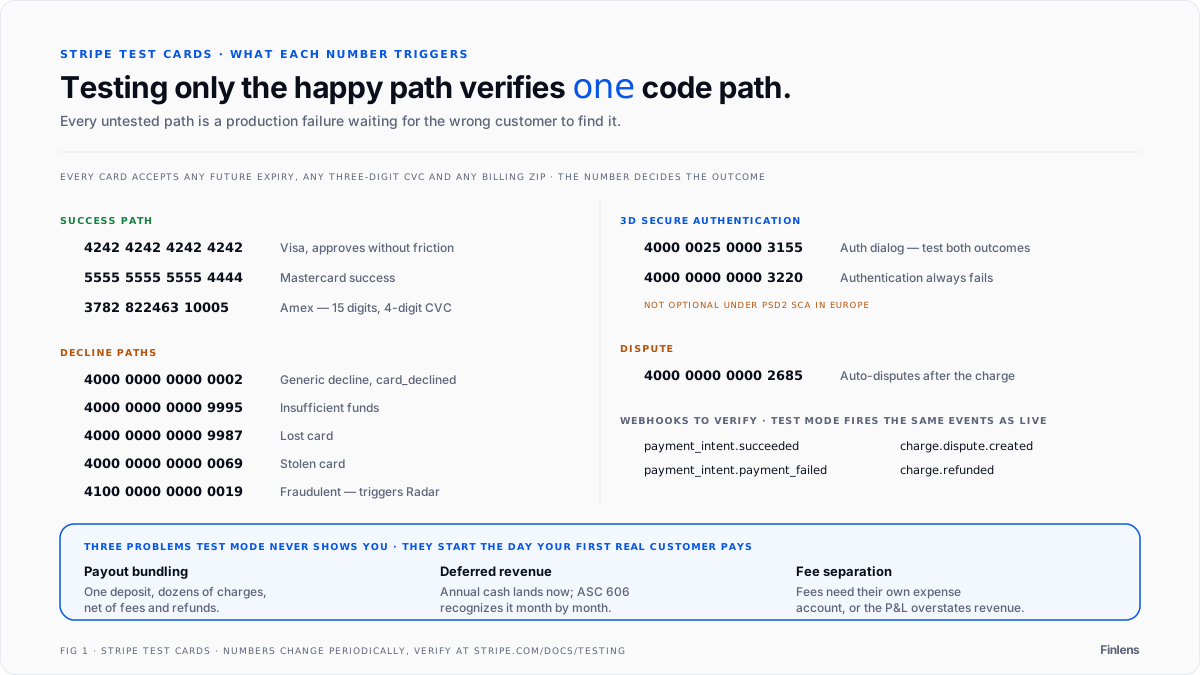
Once you're live, Stripe creates three accounting problems that test mode doesn't prepare you for. First, every payout bundles dozens or hundreds of charges into a single bank deposit - net of fees, refunds, and chargebacks. Your bank shows one number. Your books need the gross breakdown. Second, if you collect annual subscriptions, the cash hits your account immediately but the revenue should be recognized monthly under ASC 606. That means deferred revenue schedules for every annual contract. Third, Stripe processing fees need to be separated from gross revenue and posted to their own expense account - otherwise your P&L overstates revenue and understates costs. For how payout decomposition and automated bank reconciliation work with Stripe data, see the Stripe bank reconciliation automation guide.
None of this is visible during test mode. It starts the day your first real customer pays. For how Stripe revenue recognition works in practice, see the Stripe revenue recognition tools guide. For the full walkthrough of syncing Stripe to QuickBooks without breaking your books, see the Stripe QuickBooks sync tools guide.
If you're a SaaS founder about to go live on Stripe, Finlens connects to both Stripe and QuickBooks Online and handles revenue recognition, fee separation, and payout reconciliation automatically. The Starter plan is free for founders with up to $50K/month in expenses - see Finlens for founders
Core Stripe Test Card Numbers
All Stripe test cards accept any future expiry date (for example, 12/34), any three-digit CVC, and any billing ZIP code. The card number is what determines the outcome.
Successful payment scenarios:
The standard successful Visa test card is 4242 4242 4242 4242. It simulates a US-based Visa card that approves without friction. This is the right card for testing a complete successful checkout flow end to end.
For a successful Mastercard, use 5555 5555 5555 4444. Use this alongside the Visa test card to verify that the integration handles multiple card networks correctly and does not have network-specific rendering or processing issues.
For a successful American Express transaction, use 3782 822463 10005. American Express card numbers are 15 digits rather than 16, and the CVC is four digits rather than three. Testing Amex separately confirms the integration handles both card formats.
Declined card scenarios:
A generic declined card is 4000 0000 0000 0002. The decline reason returned is "card_declined" with a generic decline code. Use this to verify the integration correctly surfaces a decline message to the user without crashing.
Insufficient funds returns 4000 0000 0000 9995. This simulates the most common reason for real-world card declines and should produce a specific insufficient funds error in the integration rather than a generic failure.
Lost card returns 4000 0000 0000 9987. Stolen card returns 4000 0000 0000 0069. Both produce card_declined errors with specific decline codes that fraud prevention and customer support workflows may handle differently.
A fraudulent card simulation is 4100 0000 0000 0019. This triggers Stripe Radar's fraud detection and produces a fraudulent decline code. Use this to verify the integration handles fraud-flagged transactions without exposing error details to the user.
Note: Stripe updates test card numbers periodically. Verify the full current list at stripe.com/docs/testing before building a test suite.
What to Actually Test: Beyond the Happy Path
This is where most Stripe integrations are underbuilt before they go to production. Testing only the successful card scenario verifies that one code path works. It does not verify that the others fail gracefully.
Declined card handling. When a card declines, the integration needs to surface a clear error message to the customer, not a 500 error or a blank screen. The error message should indicate the payment failed without revealing technical details that could confuse or alarm the customer. Use 4000 0000 0000 0002 and 4000 0000 0000 9995 to verify both the generic decline and the insufficient funds decline produce appropriate user-facing messages.
Retry behavior. After a decline, customers typically want to try a different card. The integration needs to allow card re-entry and retry without creating duplicate payment records or charging the customer twice. Test the full flow: decline, re-enter card, successful charge.
Dispute simulation. The test card 4000 0000 0000 2685 automatically triggers a dispute after the charge is made. Use this to verify that the dispute webhook is handled correctly and that the dispute appears in whatever system the business uses to manage disputes.
Refund flow. Initiate a charge with the success card, then refund it in the Stripe dashboard. Verify that the refund is reflected correctly in the integration and in any downstream systems (including QuickBooks Online) where it needs to appear as a negative transaction.
Webhook delivery. Test mode fires the same webhooks as live mode. Verify that every event type the integration subscribes to (payment_intent.succeeded, payment_intent.payment_failed, charge.dispute.created, charge.refunded) is received, processed, and acknowledged correctly.
3D Secure Test Cards
3D Secure is the authentication protocol (Verified by Visa, Mastercard SecureCode) that some cards require before completing a transaction. When 3D Secure is triggered, the customer sees an additional authentication step: entering a one-time code, confirming in a banking app, or clicking through a redirect. This is a separate code path from a standard charge and needs to be tested explicitly.
The primary 3D Secure test card is 4000 0025 0000 3155. When this card is used, Stripe's test mode presents the authentication dialog. The test environment provides buttons to simulate a successful authentication and a failed authentication. Test both outcomes.
A card that always fails 3D Secure authentication is 4000 0000 0000 3220. Use this to verify the integration handles authentication failure gracefully and returns the customer to the payment form without an unrecoverable error.
For businesses operating in Europe where Strong Customer Authentication rules under PSD2 apply, 3D Secure testing is not optional. European cards frequently require authentication, and an integration that has not tested the 3D Secure flow will fail for a significant percentage of European customers.
The Test Mode to Live Mode Boundary
Test mode and live mode in Stripe are completely separate environments with separate API keys, separate customer records, separate payment data, and separate webhook endpoints. Nothing from test mode appears in live mode and vice versa.
Two common mistakes at the boundary cause production problems.
The first is using a live secret key in a development or staging environment. A live key processes real charges. A developer testing checkout flow with a live key and a real card will charge the card. The test card numbers only work with test keys. Using them with a live key produces an error.
The second is configuring test mode webhooks to point at a production endpoint. If the webhook URL for test events routes to the same system that processes live events, test transactions (including alot of automated test events Stripe fires in test mode) create records in production systems. If that production system is QuickBooks Online, test payment records appear in live financial data and need to be manually identified and removed.
The discipline is: test keys and test webhook endpoints connect to test/staging environments. Live keys and live webhook endpoints connect to production environments. They should never share an endpoint or a data store.
Stripe Test Cards and Your Accounting Integration
Once the Stripe integration is tested and verified in test mode, switching to live mode means real payment data starts flowing. That data needs to land correctly in QuickBooks Online from the first live transaction.
For founders who have connected QuickBooks Online and Stripe for real-time revenue visibility, the same webhook infrastructure that fires test events in test mode fires live events in production. The testing discipline of verifying webhook handling in test mode directly validates that live transactions will categorize correctly in QuickBooks Online.
Finlens runs on top of QuickBooks Online with no migration and automates the categorization of Stripe transactions as they arrive, so the first live payment after go-live lands in accurate, categorized books rather than requiring a manual setup step.

FAQ
What is a Stripe test card?
A Stripe test card is a dummy card number that triggers a specific payment outcome in Stripe's test environment. Test cards only work with test mode API keys and do not process real charges.
What is the most common Stripe test card number?
The standard successful Visa test card is 4242 4242 4242 4242. Use any future expiry date, any three-digit CVC, and any ZIP code. It simulates a successful US Visa card charge.
How do I test a declined card in Stripe?
Use 4000 0000 0000 0002 for a generic decline and 4000 0000 0000 9995 for an insufficient funds decline. Both return a card_declined error with different decline codes.
How do I test 3D Secure authentication in Stripe?
Use 4000 0025 0000 3155. This triggers the authentication dialog in test mode and provides options to simulate successful and failed authentication.
What is the difference between Stripe test mode and live mode?
Test mode and live mode are completely separate environments with separate API keys, payment records, and webhook endpoints. Test transactions do not affect live data. Test card numbers only work with test mode API keys.
Do Stripe test card numbers change?
Stripe periodically updates its test card documentation. The core numbers like 4242 4242 4242 4242 are stable but less common scenario cards can change. Always verify current numbers at stripe.com/docs/testing before building a test suite.

