
What is Expense Management? A Complete Guide for Small Businesses and CPA Firms


Expense management is system a business uses to track, approve, reimburse and audit employee-initiated spending. It covers everything from an employee putting a client dinner on a corporate card, to finance team booking that transaction into general ledger, tagging it for year-end return, and reconciling it against credit card statement.
Every company that has employees who spend money on business's behalf runs an expense management process, whether they call it that or not. The quality of that process shows up directly in accuracy of books, speed of month-end close, and size of tax deduction claimed at year-end.
This guide walks through what expense management actually is in practice, five components of a real workflow, categories of spend it covers, IRS documentation rules that matter most, and difference between traditional and automated systems.
It's written for controllers, CFOs, bookkeepers, and CPA firm partners who need to set up a system that holds up under an audit and doesn't consume half of finance's time each month.
Understanding what expense management really covers
At plainest level, expense management is a business's answer to four questions that get asked about every dollar an employee spends on company's behalf.
Was this allowed under our policy, was purchase captured and documented, was it approved by someone with authority to sign off, and was it paid back correctly and coded to right account in ledger.
Get any one of those four wrong and money leaks through duplicate payments, taxes get miscategorized on return, or employees walk around resentful of a reimbursement process that takes six weeks.
The word "management" matters here because expense management isn't same thing as an expense report. An expense report is output that an employee submits, while expense management is surrounding system that sets policy, receives that submission, checks it against rules, routes it for approval, and closes loop by posting transaction to accounting software.
Companies that focus only on collecting expense reports and skip surrounding structure end up with piles of paper and no visibility. That's why "we have expense management" and "we require expense reports" mean two very different things to a controller reviewing books.
Employee-initiated spending, which is what expense management deals with, is different from invoice-driven side of accounts payable. Vendor invoices arrive on their own schedule with net-30 terms and defined payment channels.
Employee spending is triggered by decisions made in moment, meaning a lunch with a prospective client, a last-minute conference registration, an Uber to a client meeting, or a new SaaS subscription that a product manager sees at a demo.
That decentralized nature is exactly what makes expense management hard to run well, because policy has to be enforced at point of purchase rather than when invoice hits AP inbox.
Types of business expenses that flow through process
Most small businesses and CPA firm clients organize spend into a stable set of categories that map roughly to Schedule C line items or to general ledger accounts on Form 1120-S. The list looks similar across industries, though mix varies wildly with business model.
A construction company tracks materials by job, while a SaaS company tracks hosting and API costs separately from generic software subscriptions.
Categorizing consistently is what turns a pile of transactions into something useful for business. Once spend is coded same way every month, real patterns become visible, and finance can see which department is drifting over budget.
Consistent categorization also makes tax prep considerably less painful, and gives business a defensible paper trail if IRS asks for it. This links directly into small business tax deductions that live on those same Schedule C lines.
The five components of a real expense management workflow
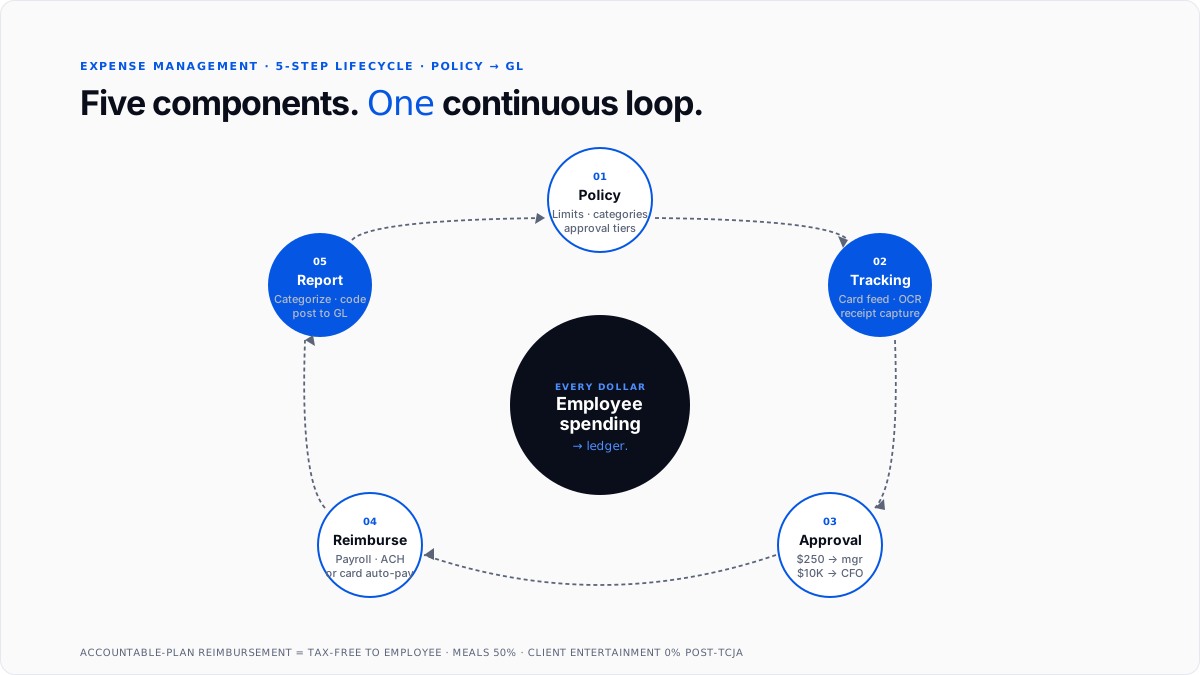
The generic label "expense management" hides a workflow that has five distinct components. Each of them has its own failure modes, and each needs to be designed intentionally rather than allowed to emerge.
Component 1: Policy setting
Everything starts with a written policy that says what employees are allowed to spend money on and how much. A functional expense policy is specific, not aspirational, listing approved categories, per-category limits, per-diem rules for travel meals, documentation an employee has to submit, and routing tiers that determine who approves what.
A good rule of thumb for small businesses is to write policy so a new hire on their first day can read it in ten minutes and know exactly whether a $180 client dinner is fine to expense and who to route it to.
The policy also has to cover awkward edges, meaning things that come up in real life and derail process when they aren't pre-decided: alcohol at client meals, spousal travel, first-class upgrades, home office equipment, and personal chores done on business trips.
Without a policy that covers these, every reimbursement becomes a one-off negotiation. That's where policy exceptions multiply, approvers get inconsistent, and morale takes a hit because two employees submitting same expense get different answers.
Component 2: Expense tracking and receipt capture
Once an employee spends money, transaction has to be captured, which means turning a paper receipt or a card charge into structured data that finance team can process.
In practice this happens through corporate card feeds that pull transactions automatically from Amex, Visa, Brex, Ramp, or Mercury, or through mobile apps where an employee snaps a photo of a receipt and OCR extracts merchant, date, amount, and tax total.
The older path is where employee pays with a personal card and uploads receipt to request reimbursement later, which is still default for many small teams.
The tracking layer is where quality is won or lost. Missing or illegible receipts, dates that don't match card statements, and coding to wrong project or department all flow downstream into books that need cleanup and close cycles that drag past deadline.
The best move most small businesses can make on this component is to shift as much spend as possible onto corporate cards, because a card feed is far more reliable than an employee remembering to log an expense from three weeks ago.
Component 3: Approval workflow
Every expense that clears a policy threshold routes to a manager for approval, and routing itself is what determines how quickly reimbursements happen and how tightly business enforces policy it wrote in step one.
A typical structure sends anything under $250 to auto-approval within an approved category, routes $250 to $2,500 to employee's direct manager, escalates $2,500 to $10,000 to a department head or controller, and sends anything above $10,000 to CFO or CEO.
Modern expense platforms enforce that routing automatically, checking submissions against policy in real time and flagging anything out of bounds before it lands in an approver's queue.
Legacy paper processes rely on emailed PDFs and inbox tracking, which is where sixty to seventy percent of expense management dysfunction lives. Approvers forget, receipts get lost, approval chains stall out on vacation, and finance ends up chasing five people for signatures on transactions that happened two months ago.
Component 4: Reimbursement and payment reconciliation
Once an expense is approved, business has to pay employee back if purchase was out of pocket, or reconcile corporate card charge to close loop if it wasn't.
Reimbursement typically runs through payroll on next cycle for smaller amounts, or through a separate ACH batch for larger reimbursements that shouldn't wait. Corporate card charges flow through central card payments and never touch employee's own money at all.
The reimbursement piece has a payroll tax angle that most businesses underestimate. Under IRS accountable-plan rules, reimbursements are not treated as taxable wages if employee had a business purpose, submitted proper documentation, and returned any excess advances.
Reimbursements that fail those tests get reclassified as taxable wages that carry FICA and income tax withholding for both sides. Small businesses that pay flat monthly per-diems without requiring documentation often trip over this rule and end up with W-2 corrections.
That mess connects directly to how broader payroll tax framework treats employer-paid benefits, and it's one of most common sources of year-end surprises for founder-run businesses.
Component 5: Reporting, analysis and general ledger posting
The last component turns approved expenses into ledger entries and puts data to work. Every expense should be categorized to a specific chart of accounts line, coded to a project or client or department where relevant.
Each transaction gets tagged with correct tax treatment (meals at fifty percent, entertainment at zero percent, client gifts capped at $25 per person per year), and posted to general ledger in period expense was incurred if business is on accrual basis, or period it was paid if business is on cash basis.
Once expenses are posted, finance can produce accurate P&L statements, forecast future spend against historical patterns, and hand a clean set of categorized transactions to CPA at year-end.
This is component that most small businesses skip or postpone, which is why so many end up categorizing expenses in a frantic March scramble. Bookkeeping cleanup projects like ones covered in automate bookkeeping cleanup exist as a category precisely because of this skipped step.
Why structured expense management actually pays off
Businesses that run a real expense management process rather than a loose reimbursement pool see benefits that compound over time. Costs go down because duplicate submissions get caught before they clear, and wasteful patterns show up in monthly report rather than a year later.
Vendor sprawl, particularly SaaS subscription sprawl that average business has been reported to run somewhere around 200 to 300 tools of, gets visible enough to prune.
Month-end close speeds up as well, because real-time receipt capture and automated ledger mapping replace hours of manual entry that used to eat first week of every month.
Compliance gets easier, since policy checks run on every transaction rather than only during annual review, and IRS documentation requirements can be enforced at point of submission rather than during a year-end scramble.
Employees notice difference too, because reimbursements arrive in days rather than weeks and they stop having to hunt down their own paper receipts from a trip they took two months ago.
For CPA firms with many client books, standardized expense workflow across clients is one of highest-leverage moves available. Every hour saved per client per month compounds fast across book.
A partner who moves twenty clients from spreadsheet reimbursement to card-based automated capture recovers dozens of billable hours a year, and categorization comes in clean enough that tax prep runs smoother following spring.
The common failure modes of traditional systems
Spreadsheet-based expense processes create friction at every stage, and most of friction is invisible until someone tries to close books or respond to an audit.
Lost and faded receipts are most common issue and one that creates biggest compliance gap, since a missing document turns a deduction into a claim business can't back up if IRS ever asks.
Manual data entry makes it worse by introducing miscoded expenses and occasional duplicate reimbursements at rates that surprise finance teams who assumed their people were more careful.
Static spreadsheets also produce delayed reporting and stale financial data, which leaves leadership without a real-time picture of cash flow, and forces decisions to get made based on numbers that are two or three weeks old.
Chasing employees for missing receipts and correcting formatting errors consumes a surprising amount of finance labor. Industry research from GBTA has put manual processing cost of a single expense report at roughly $58 when all touch time is counted.
That number matters because it turns expense management from a "nice to have" cost center into a real number business can put in model when it evaluates automation.
Expense management vs. spend management
These two terms get used interchangeably, which is fine in casual conversation but wrong in a procurement discussion. Expense management is subset that covers employee-initiated purchases: travel, meals, out-of-pocket costs, corporate card charges, and reimbursement processes.
Spend management is broader and covers all outbound cash flows, including procurement, vendor contracts, purchase orders, accounts payable, and strategic sourcing decisions that get made months before any spend actually happens.
Enterprises typically run both as separate systems with separate owners, while small businesses often need only expense management until they're spending enough with vendors to justify a procurement discipline.
The best signal that you've outgrown pure expense management is when vendor invoices start showing up faster than anyone can approve them and purchase orders become worth writing. That usually lines up with somewhere around $2 to $5 million in annual OpEx depending on business model.
Manual vs. automated expense management
The operational gap between running expense management on spreadsheets and running it on modern software is bigger than most controllers appreciate before they've done both.
Manual systems are slow by design, since physical receipts, email approval chains, and manual data entry produce high error rates and, per GBTA figure noted earlier, cost business roughly $58 per report in fully-loaded processing time.
Automated systems use OCR receipt scanning, real-time policy enforcement, automated approval routing, and two-way sync to accounting software, which drops that processing cost to somewhere around $20 per report.
The shift also moves finance team from reactive after-the-fact review into proactive real-time control, meaning problems get caught before they compound rather than during a monthly cleanup.
The line between two isn't purely binary in practice, since many small businesses run hybrid setups where corporate cards feed automatically but personal card reimbursements still route through email.
Progress toward full automation usually pays off well within one to two years for any business processing more than about a hundred expense reports a month.
The five best practices that separate a real system from an informal one
Done well, expense management stops being a bookkeeping chore and starts serving as a real financial control mechanism that catches problems before they become losses.
Getting there takes more than software, and difference is usually made by five practices that consistently show up in businesses that run this well.
Write and enforce a real policy. Everything starts with a written policy that spells out specific dollar limits for each category, submission deadlines, receipt requirements, and no ambiguity about what needs approval.
Vague policies produce disputes downstream and inconsistent approvals, and shift toward loading policy rules directly into corporate cards (so non-compliant transactions get blocked at point of sale rather than caught during monthly review) is biggest single improvement any business can make.
Run regular IRS compliance checkups. The IRS has specific documentation rules, and most businesses don't know them well enough to survive an aggressive audit.
Under IRS Publication 463, employers are not required to keep physical receipts for expenses under $75 except for lodging, which always needs itemized records. Even for sub-$75 transactions, business still needs to substantiate five things per expense: amount, date, vendor, business purpose, and who was there.
Regular internal checkups make sure your team is capturing this data consistently, which protects deductions and prevents surprises that get expensive during audit.
Issue corporate cards wherever possible. Relying on out-of-pocket spending forces employees to float business expenses on personal credit lines, creates administrative delays, and produces reimbursement bottlenecks that everyone complains about.
Physical and virtual cards, particularly virtual cards for recurring software subscriptions and ad spend, let finance issue tightly-controlled spend permissions per employee or per project with limits, category restrictions, and expiration dates baked in.
Integrate expense platform directly with accounting. Manually moving data from expense reports into QuickBooks, Xero, or NetSuite is slow and error-prone, and most of errors don't surface until close reconciliation following month.
Connecting expense platform directly to accounting software means approved transactions flow through automatically with right categorization and receipt documentation attached. That's where real month-end close speedup comes from, and it's why best AI tools for bulk transaction categorization matter to businesses building this stack.
Run regular audits, monthly if possible. Automated policy checks catch individual violations, but they don't surface broader patterns on their own, which is what monthly audits are for.
A brief review each month lets finance spot duplicate submissions, track departmental spending trends, identify maverick purchases that are drifting outside approved channels, and gather evidence needed for volume-discount renegotiation with high-usage vendors.
Where expense management sits in bookkeeping stack
Expense management occupies a specific slot in small business finance stack, sitting between corporate card and employee wallet layer at one end, and general ledger and accounting software at other.
The flow, at its simplest, is: bank and cards, then expense management, then bookkeeping software (QuickBooks or Xero), then financial statements, then tax return.
Expenses that make it into expense management layer cleanly categorized flow straight through to correct Schedule C line or correct account on a business return. This links whole process directly to Schedule C filing for sole proprietors and single-member LLCs.
Expenses that don't (receipts still on someone's desk, categorization guessed after fact, meals lumped in with office supplies) end up as miscellaneous line that every CPA hates and every auditor questions. That's why discipline of running process well matters far beyond finance team.
Common misconceptions worth clearing up
"Expense management is just a fancy word for reimbursement." No, reimbursement is one component of five. Policy, tracking, approval, and reporting are equally important, and skipping any of them produces predictable failure modes.
"Small businesses don't need expense management." Every business runs an informal version whether they call it that or not. The real question is whether informal process is fast, accurate, and tax-compliant, or whether it's a folder of receipts nobody has looked at since October.
"Expense management is only for travel." Travel is one common category, but same workflow covers software subscriptions, office supplies, meals, equipment purchases, and every other kind of employee-initiated spend.
"Expense reports and expense management are same thing." Expense reports are output that individual employees submit, whereas expense management is surrounding system that sets policy, receives submissions, routes for approval, moves money, and closes loop into ledger.
"Automation is only for large companies." Startups and small teams often get more value per dollar out of automated expense management than large companies do, because they have less finance headcount to absorb manual work in first place.
Conclusion
Expense management is five-part system that turns "I bought a thing for work" into a clean line on financial statements, and getting it right is difference between books that close on time with a defensible audit trail and books that don't.
Policy, tracking, approval, reimbursement, and reporting all need to work in sequence, and skipping any of them produces predictable, expensive failures downstream.
For small businesses building this from scratch, highest-return moves are writing a specific policy, moving as much spend as possible to corporate cards, connecting expense platform directly to accounting software, and running a brief monthly audit.
For CPA firms running many client books, standardizing this workflow across book is one of highest-leverage operational improvements available, because every hour saved per client compounds fast.
Frequently asked questions
What is difference between expense management and accounts payable?
Accounts payable handles vendor invoices that arrive pre-arranged with defined terms and payment channels, while expense management handles decentralized, day-to-day spending that employees initiate on their own.
Both need controls, but they run through different workflows and different approval logic, and they usually sit under different owners on finance team.
Are employee expense reimbursements taxable income?
In most cases no, but only if reimbursements go through an IRS-approved accountable plan. That means employees have to document business purpose, submit records within a reasonable timeframe, and return any overpayments.
If those conditions aren't met, IRS treats reimbursements as taxable wages, which creates payroll withholding obligations for both company and employee.
How does OCR technology improve expense processing?
OCR scans a receipt image and automatically pulls out key fields (merchant name, date, amount, currency, tax), then maps them directly into expense report.
Employees don't have to type anything, which eliminates most data entry errors, and for finance teams it means auditing clean digital records instead of squinting at faded thermal paper.
Can small businesses actually benefit from expense management software?
Yes, and often more than large companies do per dollar spent, because small teams waste a disproportionate share of finance time on manual expense admin: sorting paper receipts, chasing reimbursements, fixing reconciliation errors.
Modern platforms give startups same spend controls large companies have, including virtual card issuing, per-employee limits, and automated policy enforcement, so business doesn't have to add finance headcount just to keep expense workflow running as it grows.
What is maverick spend and why is it a real risk?
Maverick spend is any purchase made outside approved procurement channels or pre-negotiated vendor agreements, and it matters because it eliminates volume discounts, makes financial forecasts less reliable, and can introduce unvetted software subscriptions with security implications.
Loading spend controls directly into corporate cards is most effective way to eliminate this risk, since it moves enforcement from after-the-fact discovery to point-of-sale prevention.
What is best way to manage expenses for a small business?
For most small businesses, highest-return setup is a corporate card program (Ramp, Brex, or a business credit card from a major issuer) paired with automated mobile receipt capture and direct two-way sync to QuickBooks or Xero.
That combination handles all five components of expense management process with least friction, and it scales up with business without needing to be re-architected later.
What are "big three" business expenses?
For most operating companies, top three are payroll and benefits, rent and facilities, and sales and marketing spend, which together typically make up sixty to seventy-five percent of operating expenses.
Understanding this concentration is what makes budget conversations productive, because it focuses attention on small number of categories that actually move P&L.
How is expense management different from spend management?
Expense management covers employee-initiated purchases (T&E, out-of-pocket, corporate card), while spend management is broader and includes procurement, purchase orders, vendor contracts, and strategic sourcing. Small businesses typically only need expense management, and enterprises usually run both as separate systems.
Where do expenses land on my tax return?
For sole proprietors and single-member LLCs, they flow through Schedule C Lines 8 through 27 (see small business tax deductions guide for 20 categories that actually move needle). For partnerships and S-corps, expenses land on Form 1065 or 1120-S at entity level and flow through to owners via Schedule K-1.
Do I need dedicated software for expense management?
Not necessarily below a certain volume, since businesses processing fewer than about a hundred expense reports a month can often run a hybrid manual process with corporate cards, a shared spreadsheet, and a monthly review discipline.
Above that volume, dedicated software pays for itself in bookkeeper hours saved and error reduction, and payback period is usually well under a year.

