
Amazon FBA Reconciliation in QuickBooks: Settlement Reports, Clearing Accounts, and the True P&L


Amazon FBA sellers face the same accounting problem: the number that hits the bank account bears no resemblance to gross sales.
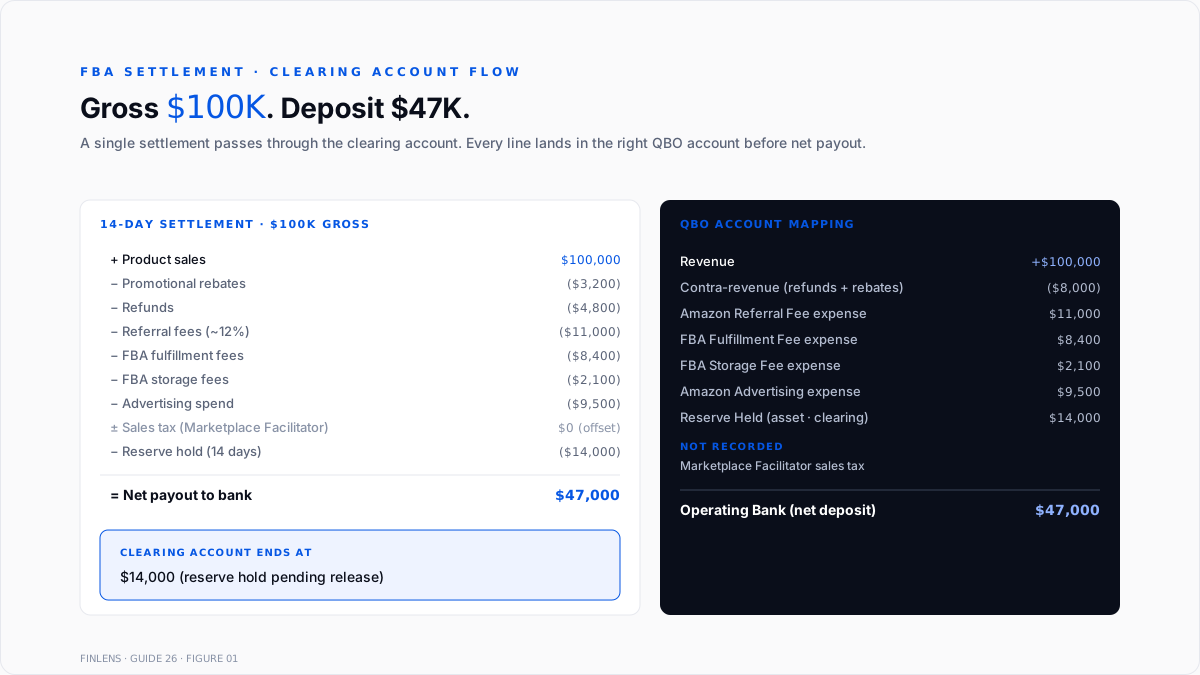
A $100,000 settlement period can produce a $47,000 deposit after referral fees, FBA fulfillment fees, storage fees, refunds, promotional rebates, advertising costs, reserve holds, and Marketplace Facilitator tax offsets. Recording the deposit as revenue understates sales by half and hides the true fee structure entirely.
This guide covers the settlement report structure, the QuickBooks clearing-account setup that separates gross sales from fees, the Marketplace Facilitator sales tax treatment that trips up most sellers, and the choice between manual reconciliation and an integrator like A2X or Synder.
Why is Amazon FBA reconciliation more complex than other e-commerce reconciliation?
Amazon FBA reconciliation requires more accounting infrastructure than Shopify or standalone Stripe reconciliation for four reasons.
Multi-line settlement structure. Each 14-day settlement contains 20-plus transaction categories: product sales, promotional rebates, refunds, referral fees, FBA fees, storage fees, advertising, sales tax collected, sales tax remitted, reserve holds, reimbursements, and transfers. Every category maps to a different QBO account.
Reserve holds. Amazon typically holds 7 to 14 days of revenue as a chargeback reserve. The reserve grows during scaling periods and releases when volume normalizes. Sellers who ignore reserves see a phantom cash gap between reported revenue and bank deposit.
Marketplace Facilitator sales tax. Under post-Wayfair Marketplace Facilitator Acts, Amazon collects and remits sales tax in all 45 states with sales tax. Sellers should not record Amazon-collected sales tax as their own liability. Most first-time reconciliations get this wrong.
Inventory in Amazon's warehouses. FBA inventory sits in Amazon fulfillment centers, not on the seller's premises. COGS timing follows Amazon's ship-out event, not the seller's purchase from the supplier. Inventory adjustments happen through reimbursement events when Amazon loses or damages units.
The bank deposit alone tells you nothing. The settlement report is the source of truth.
What is inside an Amazon settlement report?
The settlement report is the single canonical document for FBA accounting. It ships from Seller Central at Reports, then Payments, then Statement View. Each 14-day period generates a new settlement.
Product sales. Gross revenue from every order that shipped in the settlement period. Includes shipping charged to the customer.
Promotional rebates. Discounts applied to orders (Lightning Deals, coupons, Subscribe & Save). Recorded as a contra-revenue account.
Refunds. Customer returns and Amazon-issued refunds. Recorded as a contra-revenue account or refund expense depending on the accounting policy.
Referral fees. Amazon's category-based commission, typically 8% to 15% of gross sales. This is Amazon's take rate.
FBA fulfillment fees. Per-unit pick-pack-ship fees. Vary by product size and weight.
FBA storage fees. Monthly per-cubic-foot fees for inventory sitting in Amazon warehouses. Higher in Q4 (peak storage).
Long-term storage fees. Additional fees on inventory sitting more than 271 days (aged inventory penalty).
Advertising. Sponsored products, sponsored brands, and DSP spend are billed against the account.
Sales tax collected. The dollar amount Amazon collected as a marketplace facilitator. Informational only under most state rules.
Sales tax remitted. The dollar amount Amazon paid to state agencies on the seller's behalf. Nets against sales tax collected.
Reserve holds. Amount Amazon withheld from the settlement as a chargeback reserve. Released in subsequent settlements.
Reimbursements. Amazon credits for lost or damaged FBA inventory. Recorded as receivable clearing, not revenue.
Net payout. Sum of the above categories. This is the amount that hits the bank account.
How is the Amazon clearing account set up in QuickBooks?
The clearing account is the core of FBA reconciliation. It sits in QuickBooks as a bank-type account and holds every settlement component before the net payout transfers to operating cash.
Step 1: Create the clearing account. In QBO, go to Chart of Accounts, then New. Select Bank as the account type. Name it "Amazon Clearing" or "Amazon Balance." The account holds gross sales, refunds, fees, taxes, and reserves during the settlement cycle.
Step 2: Build the FBA-specific chart of accounts additions. Add a product sales income account for Amazon, a refund contra-revenue account, an Amazon referral fees expense account, an FBA fulfillment fees expense account, an FBA storage fees expense account, an Amazon advertising expense account, and a reserve held asset account.
Step 3: Import the settlement report data. Each 14-day settlement produces a journal entry into the clearing account. Debits: product sales (as revenue). Credits: refunds, fees, taxes, and reserves. The net remaining balance is the payout amount.
Step 4: Match the bank deposit. When Amazon deposits the net payout to the operating bank account, the QBO bank feed shows it as an incoming transfer. Match it to a transfer from Amazon Clearing to the operating bank. The clearing account nets to zero after the transfer.
Step 5: Reconcile the clearing account monthly. Go to Accounting, then Reconcile, and select Amazon Clearing. The ending balance should equal the reserve hold amount reported on the most recent settlement. Any other balance indicates a reconciliation error.
The pattern parallels the Stripe clearing account approach documented in Finlens' Stripe payout reconciliation guide and the multi-processor framework in Finlens' Stripe + PayPal + Amazon guide.
How should Marketplace Facilitator sales tax be recorded?
Marketplace Facilitator sales tax is where 80% of FBA sellers post the wrong journal entry. The rule is simple once understood.
Amazon collects sales tax from the customer under state Marketplace Facilitator Acts. Amazon remits that tax directly to the state agency. The seller never receives the tax dollars and has no remittance obligation on those sales.
In QuickBooks: Do not record Marketplace Facilitator sales tax as sales tax payable. The seller's sales tax liability account should reflect only tax on sales not covered by Amazon's Marketplace Facilitator collection, such as sales through the seller's own Shopify store, wholesale channels, or direct invoicing.
The settlement report shows sales tax collected and sales tax remitted as informational line items. Both flow into the clearing account and net to zero within the same settlement. No entry hits sales tax payable or sales tax expense.
The 45 US states with sales tax all require Marketplace Facilitator collection as of 2026. The exceptions are Delaware, Montana, New Hampshire, Oregon, and Alaska (no state sales tax). The detailed nexus and Marketplace Facilitator framework is in Finlens' sales tax nexus guide.
Should Amazon FBA reconciliation be automated with A2X, Synder, or Entriwise?
Manual settlement reconciliation works up to roughly 100 orders per month. Above that volume, the manual work becomes untenable. Three tools dominate the automation category in 2026.
A2X. The category leader for Amazon-QBO summarization. Pulls each settlement, maps every line to the correct QBO account, and posts a summary journal entry per settlement. Pricing runs from $19 per month for small sellers up to $139 per month for high volume. Best fit for sellers whose primary need is clean summary entries into QBO.
Synder. Multi-processor integration platform covering Amazon, Shopify, eBay, Etsy, PayPal, and Stripe. Supports both summary and per-transaction imports. Pricing runs $52 to $275 per month. Best fit for multi-channel sellers who want one integrator for every channel.
Entriwise. Amazon-specific with deeper inventory and COGS tracking. Posts per-transaction detail rather than summaries. Pricing scales with SKU count. Best fit for sellers who need inventory-level P&L in QBO.
The core trade-off: summary posting keeps QBO clean but obscures per-order detail; per-transaction posting supports inventory analysis but bloats the ledger. Most FBA sellers land on summary posting once monthly volume exceeds a few hundred orders.
Manual reconciliation remains valid for sellers under 100 orders per month, sellers running a hobby FBA channel alongside a primary business, and CPA firms handling a small number of FBA clients. The workflow steps are the same as automated posting; the difference is doing the mapping by hand each period.
How is COGS recorded for FBA inventory?
FBA COGS follows the same principle as any inventory business but with two Amazon-specific complications.
Complication 1: Ship-out event timing. COGS posts when Amazon ships a unit to a customer, not when the seller purchased the unit from the supplier. FBA inventory sitting in Amazon warehouses is an asset (inventory), not an expense (COGS). The ship-out event on the settlement report converts inventory to COGS.
Complication 2: Reimbursement events. When Amazon loses, damages, or issues a customer refund without returning inventory, Amazon issues a reimbursement. The unit is gone from inventory, but the seller received cash instead of a return. The reimbursement offsets the inventory write-off.
The QBO structure requires an FBA inventory asset account (separate from other inventory locations), a COGS expense account, and an inventory adjustment account for reimbursement variance. Every settlement's ship-out data feeds into an inventory-to-COGS journal entry. Reimbursements reverse the inventory write-off and record cash instead.
Inventory accounting methods (FIFO, weighted average, and LIFO) apply the same way as any inventory business. Coverage of the underlying methods is in Finlens' inventory accounting methods guide.
What are the most common Amazon FBA reconciliation mistakes?
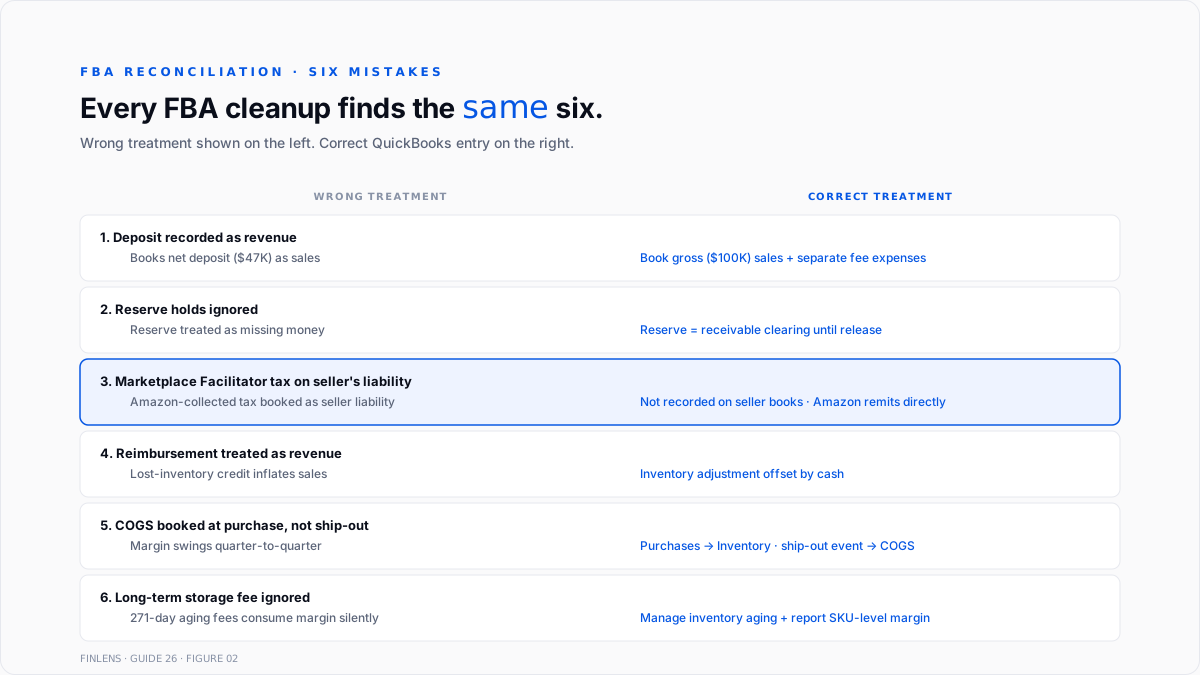
Six mistakes recur across every FBA cleanup engagement.
Recording the bank deposit as revenue. The seller sees a $47,000 deposit and books $47,000 of revenue. Gross sales were actually $100,000. Fee expense is missing entirely. The P&L understates both revenue and cost.
Missing reserve holds. Amazon holds 7 to 14 days of revenue as a chargeback reserve. Sellers who track only bank deposits see reserve growth as missing money. The correct entry is a receivable clearing until the reserve releases.
Marketplace Facilitator sales tax on the seller's liability account. The seller records Amazon-collected sales tax as sales tax payable. The state audit surfaces zero because Amazon already remitted. The seller has a phantom liability sitting on the balance sheet indefinitely.
Treating reimbursements as revenue. Amazon reimburses $2,000 for lost inventory. The seller records $2,000 as revenue. Revenue is inflated, and inventory is not correctly written down. The correct entry is an inventory adjustment offset by cash.
COGS timing errors. Sellers post COGS when they buy inventory from the supplier rather than when Amazon ships the unit. Gross margin looks wrong for the entire quarter. The fix requires reclassifying purchases as inventory and running the ship-out event as COGS.
Long-term storage fee surprise. Sellers ignore inventory age. Amazon charges long-term storage fees on units sitting 271-plus days. The fees can consume the product's entire margin. Slow-moving SKUs need active management, not passive accounting.
Conclusion
Finlens is a QuickBooks-compatible AI accounting platform. For FBA sellers running QBO, Finlens automates the settlement report parsing, the clearing account posting, and the month-end variance detection that manual FBA reconciliation demands.
Every 14-day settlement pulls from Seller Central automatically. Each line item maps to the correct QBO account: product sales to revenue, refunds to contra-revenue, referral and FBA fees to expense accounts, Marketplace Facilitator tax to informational clearing, reserves to receivable clearing, and reimbursements to inventory adjustment.
The net payout matches the bank deposit the moment it clears.
The clearing account zeros out automatically after each settlement cycle unless a reconciliation error exists. Variances flag immediately: mismatched deposits, missing reserve releases, unusual fee ratios (referral fees creeping above category norms), or reimbursement backlogs that should have processed. The output is a clean monthly FBA P&L that shows true gross sales, true fee structure, and true product-level margin.
For multi-channel sellers running Amazon plus Shopify plus their own Stripe checkout, Finlens consolidates every channel into a single QBO general ledger with per-channel P&L visibility. That workflow is documented in Finlens' multi-processor reconciliation guide.
For CPA firms serving multiple FBA clients, Finlens's multi-entity view surfaces reconciliation gaps across every client from a single dashboard. Settlement anomalies, reserve backlogs, and fee-ratio drift all flag automatically before the client's month-end close.
.png)
FAQ
How often does Amazon send settlement reports?
Every 14 days by default. Some seller accounts settle weekly or monthly depending on account tenure and volume. The settlement period, not the calendar month, drives FBA reconciliation cadence. Sellers matching to a calendar-month close should reconcile settlement cutoffs to the month.
Can Amazon Seller Central connect directly to QuickBooks without A2X or Synder?
Yes, Amazon launched a native QuickBooks Online integration inside Seller Central in early 2026. It handles basic gross-sales sync but does not separate fees at the granularity most sellers need. Most established FBA operators still use A2X, Synder, or Entriwise for full fee separation.
What happens if the bank deposit does not match the settlement report net payout?
Investigate immediately. Common causes: Amazon paid in multiple deposits for one settlement (rare), a currency conversion adjustment for international sellers, or a chargeback reversal posted after the settlement generated. Never accept the deposit without matching to a specific settlement.
How is FBA reimbursement income taxed?
FBA reimbursements are not revenue. They are compensation for lost inventory. The entry offsets the inventory asset write-off. There is no taxable income event because the seller has been made whole for a lost asset, not paid for a sale.
Do sellers still need to file sales tax returns if Amazon collects Marketplace Facilitator tax?
Depends on the state. Most states require registered sellers to file a return showing Marketplace Facilitator-collected tax as informational, even though the seller owes no remittance. Some states waive the return if 100% of sales are Marketplace Facilitator-covered. Nexus and the filing framework are in Finlens' sales tax nexus guide.
How is Amazon inventory valued for the balance sheet?
Same as any other inventory: at cost, using the seller's chosen inventory accounting method (FIFO, weighted-average, or specific identification). The physical location in Amazon's warehouse does not change the accounting treatment. FBA inventory sits as an asset on the balance sheet until Amazon ships the unit to a customer.
Should the Amazon Clearing account carry a zero balance at month-end?
No. The clearing account should carry a balance equal to the unpaid reserve hold plus any inventory in transit or pending reimbursement. Zero balance is only correct when Amazon has released all reserves and paid all pending settlements. Non-zero balance is not an error; a variance from the expected reserve balance is.
What is 1099-K reporting for Amazon sellers?
Amazon issues Form 1099-K to sellers with more than $600 in gross transactions per calendar year (post-2023 threshold). The 1099-K shows gross sales before fees, refunds, and taxes. Sellers reconcile the 1099-K to the settlement reports at year-end and reconcile any variance before filing. Coverage is in Finlens' 1099-K reporting guide.

