
The QuickBooks guide to budgets, forecasts, and variance analysis (2026)


This is a working reference for founders and controllers building next year's budget in QuickBooks and reporting against it monthly. Every technique is sourced to Intuit's own documentation or a real thread on the QuickBooks Community. Numbers cited from user reports are flagged as anecdotal rather than benchmarks.
The problem this guide addresses
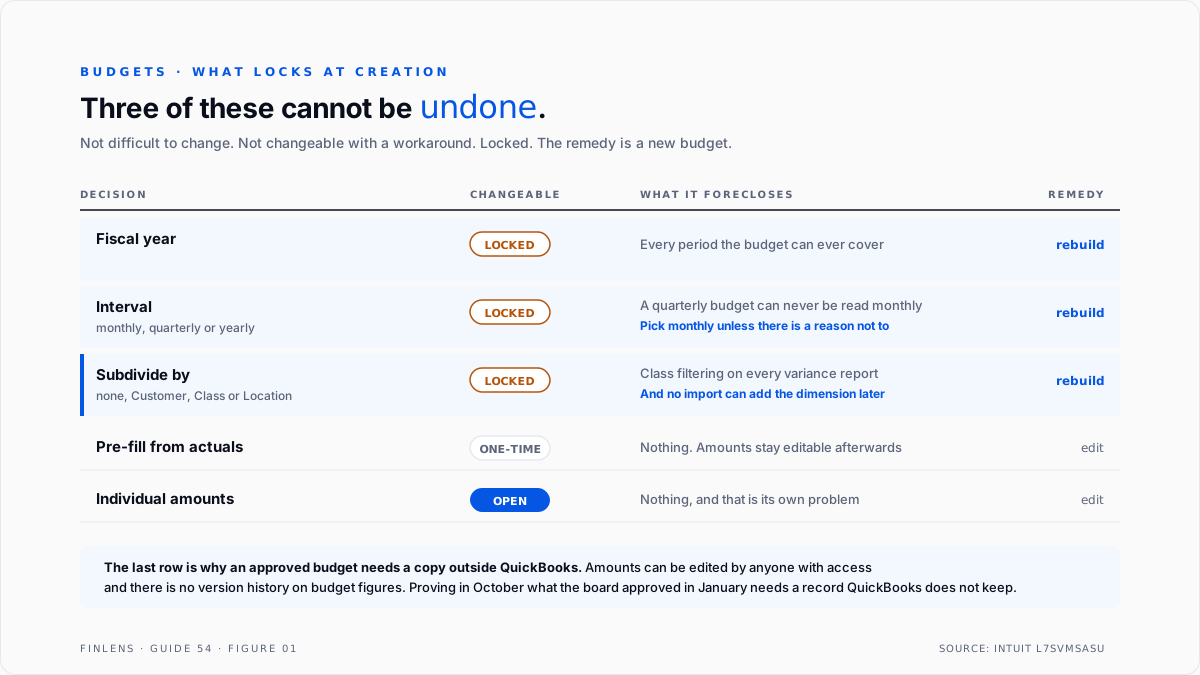
QuickBooks budgets have one property that separates them from almost everything else in the product: several of the decisions made at creation cannot be changed afterwards. Not difficult to change. Not changeable with a workaround. Locked. A budget built on a Tuesday afternoon without reading this section is a budget that gets rebuilt in January.
Failure mode one: the amount that is in the report and not in the budget. A QuickBooks Online user on thread 56042 reported budget reports showing a phantom parent-class amount equal to the sum of the subclass amounts, with no corresponding line visible in the budget to delete. Eleven replies, marked solved.
That is the hierarchy trap, surfacing on the budget side. A parent class that holds both its own budgeted amount and the roll-up of its children produces a figure that appears in the report and cannot be found in the budget screen, because it is not one number. It is two.
Failure mode two: the subdivision that cannot be undone. A budget is created with a Subdivide by setting of none, Customer, Class, or Location. That setting is fixed at creation. A budget built without subdivision cannot later be subdivided by class, and no import can add the dimension afterwards. The only path is a new budget.
Worse for anyone migrating: budgets by class do not carry from QuickBooks Desktop to QuickBooks Online, and QuickBooks Online's budget import does not offer class as a dimension at all. A firm that budgets by department on Desktop and moves to QBO rebuilds that budget by hand.
The budget identity
Variance analysis rests on one equation, and the sign convention is where most reporting goes wrong.
Variance = Actual - Budget
REVENUE positive variance → favourable (earned more)
EXPENSE positive variance → UNFAVOURABLE (spent more)
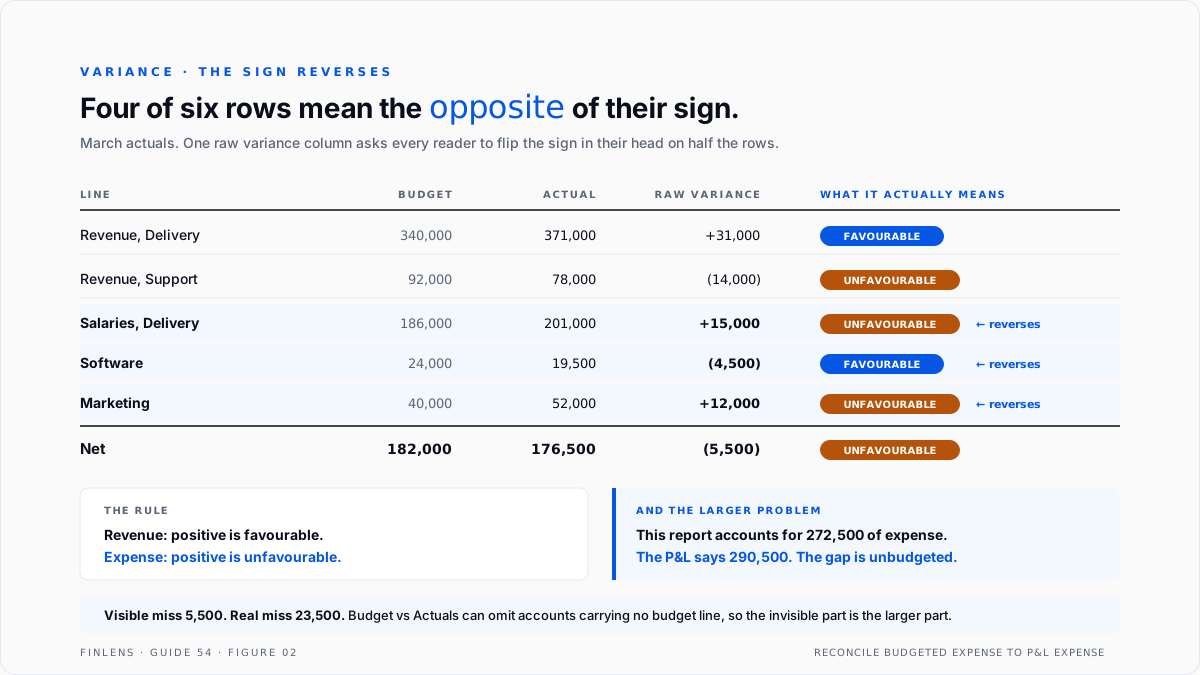
That reversal is the single most common misreading on a board pack. A report that shows raw variance in one column, with revenue and expense mixed, requires every reader to flip the sign in their head on half the rows. Either split the convention explicitly or label each variance favourable or unfavourable.
A second relationship matters more than it looks.
Budget vs Actual shows only accounts that carry a budget amount.
A class with spend and no budget may be omitted entirely,
while still appearing on the P&L by Class.
This is the quiet one. A cost centre nobody budgeted for can be invisible on the variance report while being perfectly visible on the standard P&L. The two reports disagree, both are behaving as designed, and the gap is exactly the spend nobody planned.
Where budgets actually live
Budgets are not under the chart of accounts and they are not a report setting. Intuit's article on creating or importing budgets puts them under Reports, Financial planning, Budgets, which is the first thing people cannot find.
Three facts from that flow shape everything downstream.
Profit and loss or balance sheet. Both types exist, but only profit and loss budgets can be imported. A balance sheet budget is hand-entered, every cell, every period.
Consolidated or subdivided. This is the subdivision decision in its native wording, and it is made before any amount is entered.
The import is a template, not a mapping. The flow downloads a P&L budget_template.xlsx for the chosen period and format, which is then filled and uploaded. The file must be 10MB or under. Because the template is generated from your own chart of accounts, building the spreadsheet first and shaping it to match afterwards wastes a round trip.
One entry behaviour worth knowing before it surprises you. Typing an annual figure into the first column auto-spreads it evenly across the remaining periods, overwriting whatever was in those cells.
That is helpful for genuinely flat costs and wrong for anything seasonal. Enter seasonal lines period by period, or enter the annual figure first and correct the months afterwards.
For firms on Advanced, Spreadsheet Sync allows budgets to be created and edited from Excel with a live connection, which is the closest QuickBooks gets to iterating in a spreadsheet.
The decisions that are locked
Four choices are made in the creation flow. Three of them cannot be revisited.
Choose monthly intervals unless there is a reason not to. A monthly budget can be read quarterly. A quarterly budget cannot be read monthly, and the first time someone asks for a month's variance the answer is that it does not exist.
Subdivide by Class if segmentation is likely ever to matter. An unsubdivided budget is strictly less useful and cannot be upgraded. The class structure it depends on is covered in the P&L customization guide, and that structure should be settled before the budget is built, not after.
Pre-filling from actuals is a starting point, not a budget. It copies last year forward, which encodes last year's mistakes as this year's plan. It is useful for accounts that genuinely are run-rate, such as rent and software, and misleading for anything the business intends to change.
Building a budget that survives contact
Five steps. The first two are the ones that get skipped under time pressure, and they are the ones that determine whether the budget is still in use in June.
Step one, settle the class structure first. The budget inherits it and cannot be re-cut. If the class list is going to change, change it before the budget exists.
Step two, decide what the budget is for. A board-reporting budget, a covenant-compliance budget, and a departmental accountability budget have different granularity. Building one artefact for three purposes produces something too detailed to discuss and too coarse to hold anyone to.
Step three, build revenue bottom-up and cost top-down. Revenue built top-down from a growth percentage is a wish. Cost built bottom-up from every line produces a budget nobody can hold in their head.
Step four, leave the unbudgeted accounts deliberately empty, and write down which they are. Because Budget vs Actual can omit accounts with no budget, an account left blank by accident becomes invisible. An account left blank on purpose, and recorded as such, is a decision.
Step five, lock a copy outside QuickBooks. The budget in QuickBooks can be edited at any time by anyone with access, and there is no version history on budget amounts.
A board that approves a budget is approving a specific set of numbers, and proving in October what those numbers were in January requires a copy that QuickBooks does not keep.
Budgets sit outside GAAP. There is no accounting standard governing them, which is precisely why the internal discipline matters: nothing external will catch a budget that was quietly edited to match the actuals.
Reading the variance report
Four controls do most of the work.
Budget vs Actuals versus Budget Overview. Overview shows the budget alone. Budget vs Actuals adds actual, dollar variance and percentage variance. For a board pack the second is the only useful one.
Percentage variance is unreliable on small bases. A line budgeted at $200 that comes in at $600 shows 200% over, which is true and almost never the most important number on the page. Sort by dollar variance, use percentage as a secondary read.
Year-to-date versus period. A month that looks catastrophic is often a timing difference against a year that is on plan. Report both, and investigate only where period and YTD agree.
Filtering by class. This requires the budget to have been subdivided by class at creation. If it was not, the filter is unavailable, which is the first moment most people discover the setting was locked.
The failure-mode catalog
Six diagnoses cover most budget work.
1. A phantom parent-class amount. Symptom: a report figure equal to the sum of the subclasses, not findable in the budget screen. Cause: amounts budgeted on a parent class that also has children. Fix: budget only on leaf classes. This is thread 56042.
2. Spend that appears on the P&L and not on the variance report. Cause: the account or class carries no budget amount. Fix: budget a zero rather than leaving it blank where visibility matters, and reconcile total budgeted expense to total P&L expense each period.
3. Budget by class is not importable. Symptom: the import flow offers no class dimension. Cause: a documented product limitation in QuickBooks Online, and budgets by class do not migrate from Desktop either. Fix: build it in the interface, or reconsider whether the class dimension is worth the manual entry.
4. Cannot import into an existing budget. Cause: the import creates a budget, it does not update one. Fix: build the spreadsheet first and import once. Iterating in a spreadsheet and re-importing is not a workflow QuickBooks supports.
5. Variance signs read backwards. Cause: the report shows raw actual minus budget across both revenue and expense. Fix: label favourable and unfavourable explicitly rather than expecting readers to flip the sign on expense rows.
6. The budget silently changed. Symptom: variances shrink across the year without the business improving. Cause: budget amounts edited mid-year. Fix: the external locked copy from step five. QuickBooks keeps no version history for budget figures.
Worked example
A services business budgets 2027 by class across three departments. March actuals land and the variance report comes back.
Four of the six rows reverse meaning between the raw sign and the business reading. A reader skimming a single variance column sees three positives in the expense block and reads them as good news. Net income is in fact $5,500 behind plan.
Then the second problem. The variance report accounts for $272,500 of actual expense. Total expense on the March P&L is $290,500. The $18,000 gap is a contractor cost centre created in February, coded to a class carrying no budget line, so it does not appear on the variance report at all.
So the report understates the overrun by more than four times. The visible miss is $5,500. The real one is $23,500, and the invisible portion is more than three times the visible one. A variance report is only complete if total budgeted expense reconciles to total P&L expense, and that check takes one subtraction that almost nobody performs.
Where in-QBO budgeting stops scaling
Threshold one: more than one scenario. QuickBooks holds budget amounts, not models. Base, upside and downside cases mean three budgets with no relationship between them and no shared drivers.
Threshold two: rolling reforecast. A budget is annual and fixed. Reforecasting monthly means either editing the approved budget, which destroys the comparison, or maintaining the forecast outside QuickBooks. The cash-specific version of this problem is handled in the 13-week cash flow forecast guide.
Threshold three: driver-based planning. Headcount driving salary, salary driving payroll tax, revenue driving commission. QuickBooks budgets are flat numbers with no formulas, so every driver change is re-keyed by hand.
Threshold four: iteration. Budget amounts cannot be imported into an existing budget, only into a new one, so a revision cycle means either hand-editing cells or deleting and rebuilding. On Advanced, Spreadsheet Sync is the only route that supports genuine iteration.
Threshold five: cash budgets. Balance sheet budgets exist but cannot be imported, and there is no budgeted cash position at all. Anything cash-shaped is derived outside the file.
The Finlens approach
Finlens reads budget and actual data from QuickBooks and closes the gaps the native report leaves open.
1. Completeness reconciliation. Total budgeted expense is reconciled to total P&L expense every period, and any account or class carrying spend with no budget line is reported. This is the check that would have surfaced the $18,000 above in the month it started.
2. Sign-corrected variance with favourability. Every variance is presented as favourable or unfavourable rather than as a raw figure, so expense overruns cannot be misread as positives on a board pack.
3. Budget change detection. Budget amounts are snapshotted when approved and compared on every subsequent read. Any mid-year edit is reported with its date and size, which is the control QuickBooks does not provide at all.
Four supporting capabilities sit around those three.
- Parent-class budget auditing, flagging amounts budgeted on a class that has children before they produce a phantom line.
- Period versus year-to-date pairing, so timing differences are separated from genuine misses.
- Materiality filtering, surfacing variances by dollar impact rather than by percentage on small bases.
- A cross-file view for firms, listing clients whose budgeted expense no longer reconciles to actual expense.
Verification checklist
Eight lines to run before any variance report is circulated.
- Total budgeted expense reconciles to total P&L expense, and any difference is identified by account or class.
- No budget amount sits on a parent class that also has children.
- Every variance is labelled favourable or unfavourable, not left as a raw sign.
- Period and year-to-date variance are both shown, and only lines where they agree are flagged for action.
- Variances are ranked by dollar impact, with percentage as a secondary column.
- The accounting method matches the one used when the budget was built.
- Budget amounts agree to the approved external copy, and any edits since approval are listed.
- Accounts deliberately left unbudgeted are documented as deliberate.

FAQ
Can a budget's Subdivide by setting be changed after creation?
No. Fiscal year, interval and subdivision are fixed when the budget is created. Changing any of them means a new budget.
Can budgets by class be imported into QuickBooks Online?
No. The import does not offer class as a dimension, and budgets by class do not carry over from QuickBooks Desktop. They have to be entered in the interface.
Why does a budget report show an amount that is not in the budget?
Almost always a parent class holding both its own budgeted amount and the roll-up of its subclasses. Budget only on leaf classes.
Why does the variance report miss spend that is on the P&L?
Budget vs Actuals can omit accounts and classes with no budget amount. Reconciling total budgeted expense to total P&L expense is the only reliable way to catch it.
Does a positive variance mean good news?
On revenue yes, on expense no. Reporting both under one raw sign convention is the most common way a board pack is misread.
Does QuickBooks track changes to budget amounts?
No. There is no version history on budget figures, which is why an approved budget should be preserved outside QuickBooks.

