
The QuickBooks guide to P&L customization, Class and Location filtering (2026)


This is a working reference for founders and controllers who need a profit and loss statement segmented by department, product line, site, or program. Every technique is sourced to Intuit's own documentation, FASB standards, or a real thread on the QuickBooks Community. Numbers cited from user reports are flagged as anecdotal rather than benchmarks.
The problem this guide addresses
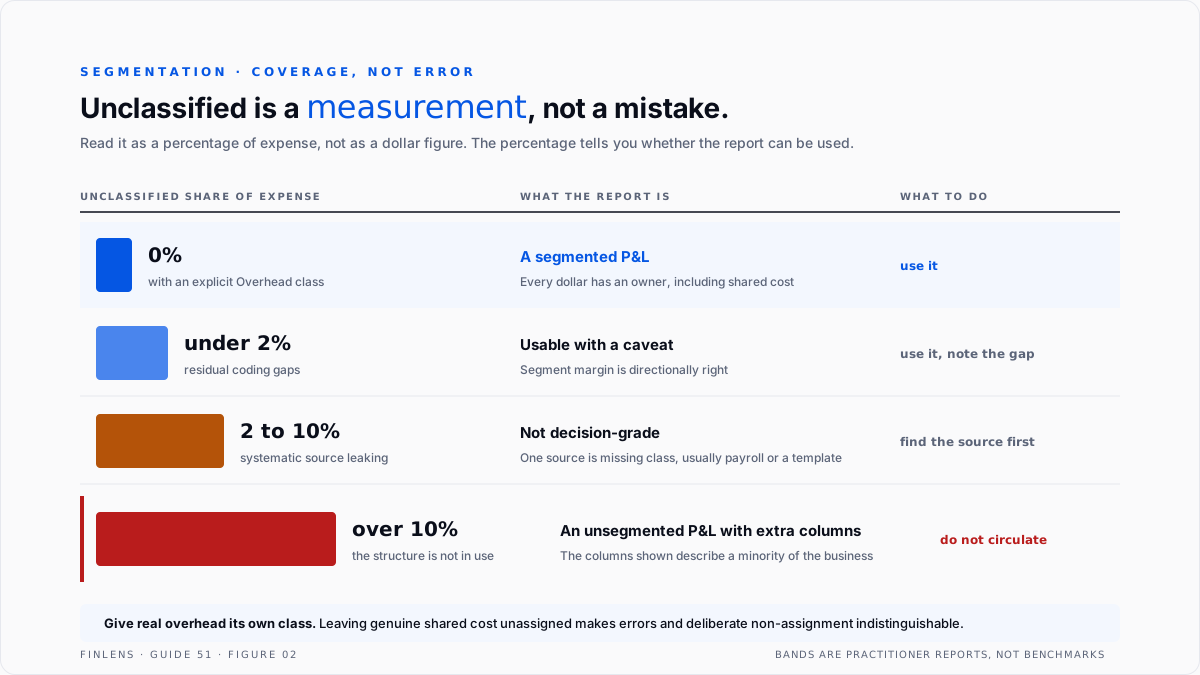
A segmented P&L is only as good as its weakest column, and in QuickBooks that column has a name. Unclassified, or Not Specified depending on where you are looking, sits on the far right of every P&L by Class and holds every dollar that was never assigned. It is not an error state.
It is the measurement of how complete the segmentation actually is.
Failure mode one: the class is on the transaction and still does not report. A QuickBooks Online user on thread 37847 had roughly $50,000 sitting under Unspecified. They had added the class to the transactions. They were running the report by class.
They attached a screenshot showing the class present on the expense, and the expense still reported as unspecified. Nineteen replies.
That combination is the signature of a specific mismatch: the class was set at transaction level while the amounts live at line level, or the class sits on a transaction type that the report does not carry it through. Adding the class again does not fix it, which is why the thread runs to nineteen replies.
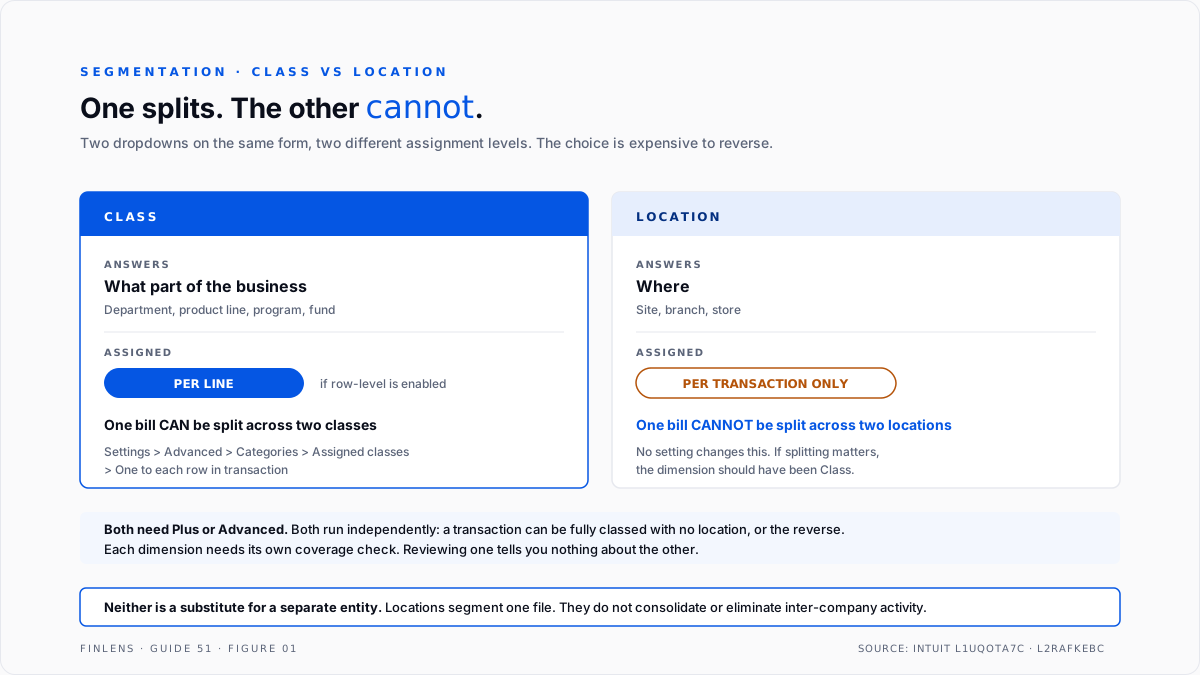
Failure mode two: the segment is not a segment. Class and Location answer different questions and are not interchangeable, but QuickBooks presents them as two dropdowns on the same form. Class is the cut of the business, a department or product line or program. Location is where, a site or branch.
Class can be assigned per line. Location is assigned to the whole transaction. A single vendor bill cannot be split across two locations, and discovering that after designing the reporting structure around it means rebuilding the structure.
The segmentation identity
One equation governs every segmented report, and it is the only check that matters.
Total P&L = Σ (all class columns) + Unclassified column
Three consequences follow, and the first is the one most controllers have never framed this way.
Unclassified is a coverage metric, not an error. Expressed as a percentage of revenue or of total expense, it tells you what share of the business the segmentation actually describes. A P&L by Class with 12% in Unclassified is not a segmented P&L. It is an unsegmented P&L with some extra columns.
Totals never change, only their distribution. Adding or fixing a class never changes net income. If total net income moved after a reclassification, something other than the class was edited, and that is a separate problem.
A second identity governs Location.
Total P&L = Σ (all location columns) + Not Specified
These two run independently. A transaction can be fully classed and have no location, or the reverse. Each dimension needs its own coverage check, and reviewing one does not tell you anything about the other.
Choosing the dimension before building the structure
This decision is expensive to reverse, so it belongs before the first class is created.
Per-line assignment has to be turned on. Intuit's article on turning on class tracking puts it under Settings, Account and settings, Advanced, Categories. The Assigned classes dropdown offers one to the entire transaction or one to each row in transaction. The row-level setting is what makes a split bill possible, and it is not the default.
A file that has been running at transaction level for a year cannot retroactively split its history by flipping the setting.
Location is the wrong tool for a separate legal entity. Locations segment one company file. They do not produce entity-level financial statements, they do not eliminate inter-company activity, and they do not survive an audit as consolidation. That workflow is covered in the multi-entity accounting guide.
Both dimensions require Plus or Advanced. Essentials and Simple Start do not have them, which is why the Categories section is sometimes reported as missing from settings entirely.
Intuit's guidance on setting up location tracking states the tier requirement and places the list under Settings, All lists, Locations rather than with the chart of accounts. The tier comparison sits in the QuickBooks Online Advanced deep-dive.
The structure should be designed before the first member is created. Classes and locations are easy to add and painful to restructure, because historical transactions do not move when a list is reorganised. A twelve-month restatement to fix a badly shaped class list is a real cost, and it is avoided by one hour of design.
Where the segmentation is meant to support external reporting rather than internal management, FASB ASC 280, Segment Reporting defines what an operating segment is and how it is identified from the information the chief operating decision maker actually reviews. Building classes that do not match that definition produces a management report that cannot become a disclosure.
Subclasses and the hierarchy trap
Both dimensions support hierarchy, and hierarchy is where most structures go wrong on their second birthday.
Subclasses roll up, which is the point. A parent class of Retainer with subclasses for each retainer client gives both the segment view and the client view from one structure.
But a parent class can also hold transactions directly, and that is the trap. If some costs are coded to the parent and others to its subclasses, the report shows the parent both as a roll-up total and as a line in its own right, and reconciling the two becomes a recurring argument.
The discipline is simple: post only to leaf members. Once a class has children, nothing should be coded to the parent. Making that rule explicit at design time costs nothing. Discovering it after a year means reclassifying every parent-level transaction.
The same applies to locations and sublocations, and the same consequence follows on budget reports, where a parent carrying both its own amount and its children's produces a figure that appears in the report and cannot be found in the budget. That specific symptom is covered in the budgets and variance analysis guide.
The customization mechanics
Four controls carry most of the value, and three of them are under Customize rather than on the report face.
Display columns by. This is the control that turns a P&L into a segmented P&L. Setting it to Class, Location, Customer, Product or Vendor produces one column per member plus the unassigned column. Setting it to Months or Quarters produces the comparative view instead.
The two are mutually exclusive, which is the limit most people hit first: QuickBooks Online will not give you class columns and month columns on the same P&L.
Comparative periods. Under Customize, Rows and Columns, the compare options add a previous period, a previous year, and the change in dollars and in percent. Percent of income and percent of expense live in the same place and are what turn a P&L into a common-size statement.
Filter versus display. Filtering to one class shows that class only. Displaying columns by class shows all of them side by side. Filtering is for investigation, displaying is for reporting, and using the filter when you meant the display is how a reviewer misses the one segment that is losing money.
Accounting method. Cash and accrual produce materially different segment results where invoicing and collection timing differ across segments. Lock the method before comparing periods, and state it on anything that leaves the building.
Intuit's documentation on filtering, sorting and totalling reports by class covers the control surface. The judgment about which control to reach for is what this section is for.
The failure-mode catalog
Six diagnoses cover most segmented reporting work.
1. Amounts in Unclassified despite classes being set. Cause: class assigned at transaction level while the report reads line level, or a transaction type that does not carry class. Fix: QuickZoom the Net Income figure in the Unclassified column, which opens a Transaction Detail by Account listing every contributing transaction. Work that list rather than guessing. This is thread 37847.
2. Payroll lands unclassified. Cause: payroll items are not mapped to classes, or time-tracking class assignments do not carry into the posted paycheck. Fix: set class tracking on payroll preferences, and verify after the first run rather than at quarter end.
Where payroll runs outside QuickBooks the class has to be carried on the journal entry, covered in the third-party payroll journal entry guide.
3. Journal entries unclassified. Cause: manual entries, and especially recurring and accrual entries, frequently omit the class. Fix: add class to every recurring template. One monthly accrual template with no class produces twelve unclassified lines a year, silently.
4. Opening balances and bank-feed adds unclassified. Cause: transactions created outside the normal entry path. Fix: bank rules can assign class, which is the only scalable control for feed-created transactions.
5. The split that will not split. Cause: an attempt to allocate one transaction across two locations. Fix: there is no fix at Location level. Either the dimension choice was wrong, or the transaction has to be entered twice. If this happens often, the dimension should have been Class.
6. Overhead that belongs to no segment. Cause: rent, insurance and administration genuinely do not belong to a product line. Fix: create an explicit Overhead or Shared class rather than leaving these in Unclassified. An explicit overhead class means the Unclassified column becomes a pure error measure, which is the whole point of the identity above.
Worked example
An agency runs three service lines and reports monthly by class. March revenue is $480,000 and total operating expense is $392,000.
The first P&L by Class comes back like this.
Revenue is fully classed. Expense is 29.1% unclassified, which is $114,000 with no owner.
Investigation resolves it into four causes.
Three of the four are defects. The fourth is a genuine shared cost that needs its own class rather than a blank.
After fixing the payroll mapping, adding class to the recurring templates, writing bank rules, and creating an explicit Overhead class, March reports again.
Net income did not move. It was $88,000 before and $88,000 after, which is the identity holding. What changed is that the business now knows managed services contributes $14,000 before overhead rather than being invisible inside a $114,000 blank. The first report was not wrong. It was unusable, which is a different and more dangerous condition, because it still footed.
Where in-QBO segmentation stops scaling
Threshold one: two dimensions at once. QuickBooks Online will display columns by class or by location, not both. A business needing product line crossed with region has to export and pivot, or move to a reporting layer.
Threshold two: segments and periods together. Class columns and month columns are mutually exclusive on one P&L. A twelve-month trend by segment requires twelve reports or an export.
Threshold three: allocation. QuickBooks has no mechanism to allocate an overhead class across operating classes on a driver such as headcount or revenue share. Fully-absorbed segment margin has to be built outside the file.
Threshold four: roughly 20 to 30 classes. Beyond that the report becomes too wide to read and subclass hierarchies become the only way to hold it, which trades width for depth rather than solving it. This figure comes from practitioner reports rather than published benchmarks and should be treated as anecdotal.
The Finlens approach
Finlens reads the QuickBooks data directly and treats segmentation coverage as a monitored number rather than something discovered during a board-pack review.
1. Unclassified coverage monitoring. The Unclassified share of revenue and of expense is computed every period and tracked as a trend. A step change is attributed to the transaction type and the source that caused it, so a newly unclassified recurring template is caught in the month it starts rather than at year end.
2. Cause attribution on unassigned amounts. Unclassified balances are decomposed by origin: payroll, recurring templates, bank-feed adds, journal entries, or genuine shared cost. That split is the difference between a reporting defect and an overhead policy decision, and QuickBooks presents them identically.
3. Dimension-integrity checks. Class and Location coverage are tested separately, and transactions carrying one dimension but not the other are reported, since a file can look fully classed while its location reporting is empty.
Four supporting capabilities sit around those three.
- Recurring-template auditing, flagging any template that posts without a class befor it runs again.
- Overhead isolation, separating explicit shared-cost classes from true unassigned amounts so the coverage metric stays honest.
- Cross-period segment comparison, holding segment margin across months without the twelve-report export.
- A cross-file view for firms, ranking clients by unclassified share so the file that silently stopped segmenting surfaces.
Verification checklist
Eight lines to run before any segmented P&L leaves the building.
- Unclassified as a share of revenue and as a share of expense is computed and stated, not just eyeballed.
- Genuine shared costs sit in an explicit Overhead class, so Unclassified is a pure error measure.
- Payroll is class-mapped and the mapping was verified after the most recent pay run.
- Every recurring and accrual template carries a class.
- Bank rules assign class for feed-created transactions.
- The sum of all class columns plus Unclassified equals total net income.
- The accounting method is stated on the report, and matches the method used in the comparative period.
- Location coverage has been checked separately from class coverage.

FAQ
What is the Unclassified column?
The far-right column on a P&L by Class, holding every amount with no class assigned. It is a coverage measurement rather than an error, and reading it as a percentage is more useful than reading it as a dollar figure.
Why do amounts show as unclassified when the class is on the transaction?
Usually because the class was assigned at transaction level while the amounts sit at line level, or the transaction type does not carry class into the report. QuickZoom the Unclassified net income to list the contributing transactions.
Can one transaction be split across two locations?
No. Location is assigned to the whole transaction. Class can be assigned per line if row-level assignment is enabled in settings. If splitting matters, the dimension should be Class.
Can a P&L show classes and months at the same time?
No. Display columns by accepts one choice. Segment columns and period columns are mutually exclusive in QuickBooks Online.
Should overhead sit in Unclassified?
No. Give it an explicit class. Leaving genuine shared cost unassigned destroys the usefulness of the coverage metric, because real errors and deliberate non-assignment become indistinguishable.
Do classes replace separate company files for separate entities?
No. Classes and locations segment one file. They do not produce entity financial statements or eliminate inter-company activity.

