
The QuickBooks Online Advanced tier deep-dive (2026)


This is a working reference for controllers, firm partners, and founders evaluating whether QuickBooks Online Advanced is the right tier for a growing business. Every feature and price is sourced to Intuit's own documentation or a real thread on the QuickBooks Community. Third-party pricing citations are flagged as external and shift with promotions.
The problem this guide addresses
Two decisions drive most QBO Advanced conversations.
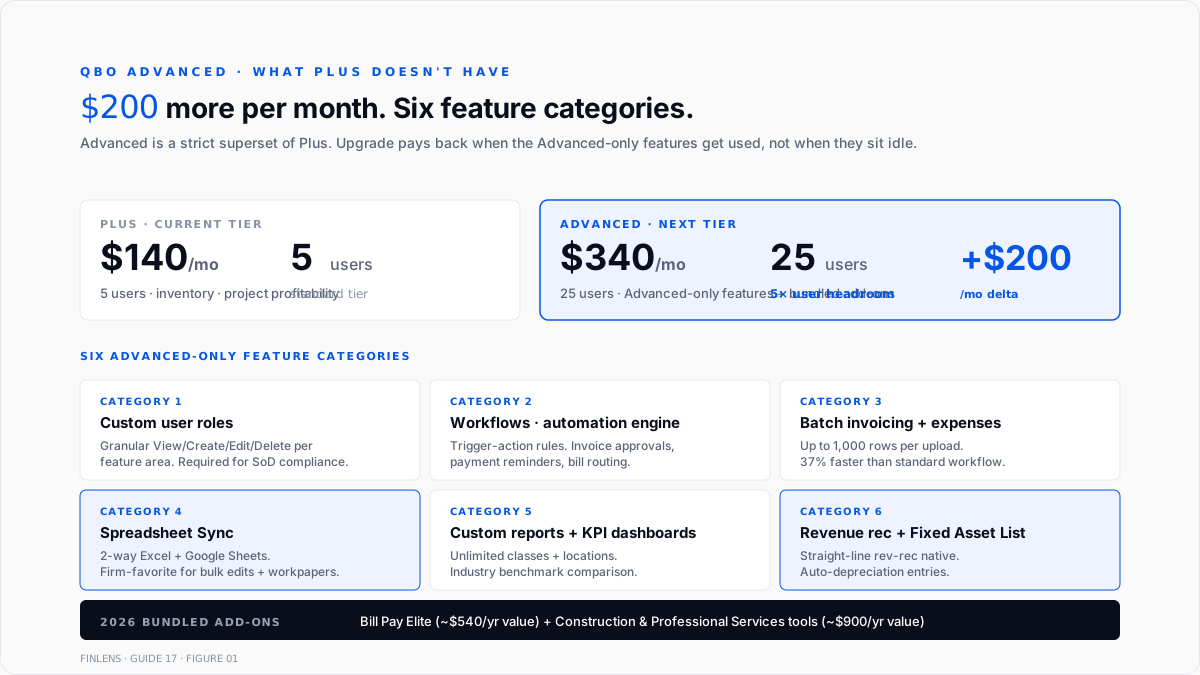
The first is upgrade timing. Plus is $140/month for up to 5 users; Advanced is $340/month for up to 25 users. That's a $2,400 annual gap between tiers, and businesses on Plus that don't quite need the extra features often stay on Plus longer than they should - running batch operations in Excel outside the ledger, hitting the 5-user cap by adding QBOA seats for external bookkeepers as workarounds, and rebuilding custom reports every quarter because Plus can't save them.
The second is Advanced vs Enterprise. Advanced maxes at 25 users and is cloud-native. Enterprise scales to 30 (Silver/Gold/Platinum) or 40 (Diamond) users but is Desktop-only. Books at the boundary between the two - 15–25 users, growing, inventory-adjacent but not inventory-heavy - face a real trade-off. Full treatment of the enterprise side sits in Guide 12 · QuickBooks Enterprise complete guide (when live); this guide covers what Advanced actually delivers before that comparison.
The sections below cover Advanced's pricing, the six categories of unique features (custom roles, workflows, batch operations, Spreadsheet Sync, enhanced reporting, and reporting, revenue recognition + fixed assets), the bundled add-ons (Bill Pay Elite, industry tools), the migration path from Plus, and where Advanced stops for larger books.
The pricing map
Per FitSmallBusiness and Fourlane's 2026 pricing update, monthly standard pricing across QBO tiers as of August 2026:
Multi-user, batch operations, revenue recognition
Wholesale billing through ProAdvisor firms brings the advanced monthly price down 30–50%. Direct customers pay list price after any promotional discount expires.
The $340/month works out to $4,080/year. Compared against Plus at $1,680/year, the incremental $2,400 is the annual cost of the Advanced-only feature set. Books that use even one advanced feature actively (custom user roles for a compliance requirement or Spreadsheet Sync for month-end close automation) typically get the incremental cost back in headcount time saved.
The six categories of advanced-only features
1. Custom user roles
Plus supports standard user roles - Admin, Standard, Time Tracking Only, and Reports Only. Advanced adds fully custom roles with granular permissions per feature area.
Custom roles matter most on books with segregation-of-duties requirements. A firm bookkeeper who should see the P&L but not the payroll register, a controller who should edit invoices but not bank accounts, and a junior who should enter bills but not pay them - all require advanced. Plus's four standard roles cannot express those permission boundaries.
Firms serving venture-backed clients approaching an audit typically upgrade to Advanced primarily for custom roles, because ASC 320 SOX-adjacent controls require role-based access that Plus cannot provide.
2. Workflows - the automation engine
Workflows is Advanced's no-code trigger-action engine. Rules like "when an invoice is 15 days overdue, send an email reminder" or "when a bill from Vendor X arrives, route to Manager Y for approval" or "when a customer's balance exceeds $10,000, flag for the AR clerk" all run inside Workflows without external tools.
The most common workflow patterns:
- Invoice approval routing (invoices above a dollar threshold require manager sign-off)
- Payment reminders (multiple touchpoints based on days overdue)
- Bill approval routing (matches the Bill Pay Elite bundle covered below)
- Data-entry validation (flag transactions missing class or location assignments)
- Client notification (email the customer when their invoice is created)
Workflows are firm-facing (managed by the firm) rather than customer-facing (visible to the client). They live at the QBO account level and apply to every user based on the trigger rules.
3. Batch invoicing + batch expenses
Plus creates invoices and expenses one at a time. Advanced adds batch operations:
- Batch invoicing: upload up to 1,000 invoice line items in a single operation via CSV or Excel. Intuit's internal testing shows 37% faster than the standard invoice workflow for the same volume, per the Intuit batch invoicing page.
- Batch expenses: same pattern for expense entries. Upload receipts as CSV, apply per-row categorization, post in one batch.
- Batch email + statements: send invoice reminders and statements to multiple customers in one send.
Batch operations matter most for service businesses invoicing many customers on a similar schedule (SaaS renewals, retainer billings, subscription boxes) and for ecommerce businesses batching daily sales entries into single-JE per-day summaries.
4. Spreadsheet Sync
Two-way sync between QBO Advanced and Excel or Google Sheets. Firm bookkeepers use it heavily. The workflow:
- Pull a QBO report or entity list into a spreadsheet
- Edit or bulk-update in the spreadsheet (familiar UI, keyboard shortcuts, filters)
- Push changes back to QBO
For per-client trial balances at year-end, per-vendor bill review, or bulk reclassification during cleanup engagements, Spreadsheet Sync eliminates the CSV-export → edit-in-Excel → CSV-import round-trip. Firms managing 10+ clients report the biggest time savings here.
5. Enhanced reporting + custom KPI dashboards
Advanced adds features Plus does not:
- Custom reports - build reports from raw QBO data with grouping, filtering, and formulas. Save and share firm-wide.
- Custom KPI dashboards - set up dashboards tracking custom metrics (revenue per employee, DSO, cash conversion cycle, gross margin by product line). Auto-refresh.
- Report scheduling - auto-email reports on a schedule to team members or clients.
- Unlimited classes and locations - Plus caps at 40 combined class and location values. Advanced removes the cap. Books with department, region, or product-line tracking hit the Plus cap fast.
- Industry-benchmark reports - compare KPIs against Intuit-aggregated benchmarks for the book's industry.
6. Revenue recognition + fixed assets - native features
Two features previously requiring external tools now come with Advanced:
Revenue Recognition. Advanced natively defers revenue on the invoice and recognises it straight-line over the service period. Removes the need for external accrual-schedule tools for standard subscription-billing patterns. Complex patterns (usage-based recognition, milestone-based recognition, multi-element arrangements) still require external tooling - full treatment in the deferred revenue recognition guide. Siegel Solutions' revenue-recognition write-up covers the built-in feature.
Fixed Asset List. Track fixed assets with useful life greater than one year. Auto-post monthly depreciation entries. Configurable depreciation method per asset (straight-line most common in the built-in feature). Removes the standard Excel-schedule + manual JE workflow for fixed assets under the de minimis threshold covered by the fixed asset guides.
Bundled add-ons in Advanced (2026)
Intuit bundled two significant add-ons into Advanced during the 2026 pricing update, per Fourlane's summary:
Bill Pay Elite. Full-service bill approval workflows. Approval routing, multi-step review, automated payment scheduling. Standalone Bill Pay Elite is ~$540/year, so the bundle is a material inclusion. Complements Workflows for A/P-focused automation.
Industry-specific tools. Construction and Professional Services tool packs bundled in Advanced. Standalone value ~$900/year. Includes:
- Construction: job costing enhancements, progress invoicing templates, certified payroll reports
- Professional Services: retainer billing templates, time-and-expense billing improvements, project profitability views
Books in those two industries see the effective advanced value climb substantially with these bundles.
Migration from Plus to Advanced
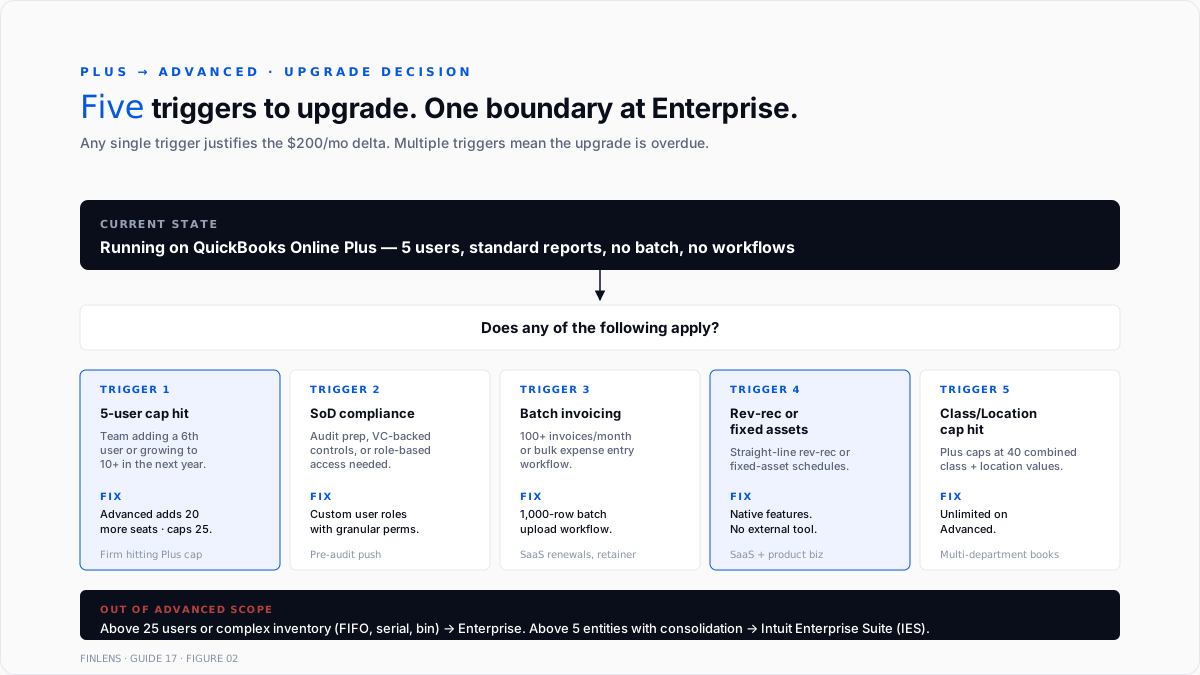
An upgrade is a settings change in the same QBO account - Gear icon → Account and Settings → Billing & Subscription → Upgrade. No data migration required. Every historical transaction, chart of accounts, customer, vendor, and report stays intact.
Three things happen at the upgrade:
- New features unlock immediately. Custom roles, workflows, Batch operations, Spreadsheet Sync all activate.
- Billing changes on the next cycle. Prorated charge for the current month; full advanced monthly on the next billing date.
- No feature loss. Advanced is a strict superset of Plus. Nothing that worked before stops working.
Pre-upgrade preparation:
- Review current user count. Advanced supports 25 vs Plus's 5. If already at 5, upgrade unlocks 20 more seats without additional per-seat fees.
- Identify Advanced-only features to adopt first. Custom Roles (compliance), Batch Invoicing (invoicing scale), Spreadsheet Sync (firm workflow) are the fastest wins.
- Schedule Workflows setup. The Workflow engine has a learning curve. Plan 4–8 hours of admin time in the first two weeks post-upgrade to build the top 3–5 workflows.
- Migrate any external revenue recognition schedules. If using an external accrual tool for straight-line rev-rec, evaluate whether Advanced's native feature covers the pattern.
The upgrade is reversible for the first 60 days if the tier proves wrong. After 60 days, downgrade to Plus loses Custom Roles, Workflows, and any Advanced-only historical settings (though data itself is preserved).
When Advanced is still the wrong tier
Three cases where Advanced doesn't fit:
Under 5 users with no Advanced-feature dependency. Plus at $140/month is the cost-effective tier. Advanced's $340 doesn't pay back without either the user count or the feature usage.
Over 25 users. Enterprise (30 or 40 users) is the answer. Advanced's 25-user cap is hard.
Complex inventory operations. Advanced's inventory features match Plus. Businesses with FIFO valuation, serial-number tracking, multi-warehouse, or bin management need Enterprise's Advanced Inventory (Platinum tier and above). Full treatment sits in Guide 12 · QuickBooks Enterprise complete guide (when live).
Multi-entity consolidation as a primary need. Advanced adds Spreadsheet Sync for exporting entity data to Excel, but does not consolidate multi-entity financials natively. Intuit Enterprise Suite (IES) adds native multi-entity + inter-company eliminations. Full treatment in the multi-entity accounting and inter-company transactions guide.
Where Advanced stops scaling
Three failure modes compound past a certain volume even inside Advanced:
Above 5,000 invoices per month. Even with Batch Invoicing, review + reconciliation of every invoice becomes the bottleneck. Books at this scale typically layer a billing platform (Chargebee, Recurly, Stripe Billing) on top of QBO Advanced and post summary JEs rather than per-invoice records.
Multi-currency at 5+ currencies. QBO's multi-currency support is functional but not deep. Books actively transacting in 5+ currencies with frequent revaluations often supplement with an FX-aware ERP layer.
API-first workflow above 100,000 API calls/day. Even the 500 requests/minute per-realm rate limit becomes binding at very high volume. Books at this tier typically split high-volume operations across multiple realm IDs or move to a mid-market GL - the best general ledger software in 2026 write-up covers the up-market options.
The Finlens approach
Finlens is an AI accounting platform for QBO firms and founder-led businesses. QBO Advanced is the primary tier Finlens's customers run on. Where Advanced's native features and Finlens overlap:
- Categorization scale beyond Batch Invoicing. Advanced's batch operations require the CSV to be pre-formatted correctly. Finlens's AI categorization proposes the CSV-ready format from bank-feed data automatically - batch runs at higher volume with less human prep.
- Workflows extension. Advanced's Workflows are trigger-based rule matches. Finlens adds AI-triggered workflows - anomaly-based routing (flag when this vendor's bill amount is >2σ from historical), confidence-tiered categorization review (route low-confidence transactions to a specific reviewer), and cross-client rule sharing on firm-side accounts.
- Revenue recognition beyond straight-line. Advanced's native rev-rec handles straight-line. Finlens handles usage-based, milestone-based, and multi-element arrangements under ASC 606 covered in the deferred revenue recognition guide.
The features that keep Advanced accurate - beyond what Advanced itself provides - are the ones surrounding the ledger:
- Human-in-the-loop review on every AI proposal before it posts.
- Multi-client dashboard across every Advanced client on the firm's book without re-authenticating.
- Audit log with tamper-evident record of every categorization, JE, batch operation, and workflow trigger.
For a firm managing multiple QBO Advanced clients, the firm platform automates the workflow that Advanced's Batch and Workflows features leave manual at scale. For a controller running a single Advanced book, the founder-facing product handles the same automation at company scale.
The verification checklist - before and after upgrading
Before upgrading from Plus to Advanced:
- Current user count and 12-month expected growth documented against the 25-user cap.
- Custom Role requirements identified (which team members need what specific permission boundaries).
- Top 3 Workflows to build in the first two weeks post-upgrade prioritized.
- Batch operations use-cases identified (invoicing, expenses, bulk cleanup).
- Existing external tools evaluated for replacement (rev-rec schedule tool, fixed-asset spreadsheet, bill approval routing tool).
Post-upgrade:
- Custom Roles set up for every non-Admin team member.
- Top 3 Workflows built and tested.
- Bill Pay Elite (bundled) configured for the A/P approval workflow.
- Spreadsheet Sync connected for the primary trial-balance workpaper.
- Fixed Asset List populated with existing depreciating assets.
- Revenue recognition schedules migrated for straight-line rev-rec items.
- Unlimited classes and locations reviewed against the P&L structure.
For a firm managing the upgrade across multiple client files, the firm platform provides a standardized pre-upgrade diagnostic + post-upgrade setup workflow.
Conclusion
Advanced is Plus plus a lot. Custom Roles for compliance, Workflows for automation, Batch operations for scale, Spreadsheet Sync for firm workflow, revenue recognition + fixed assets natively, and Bill Pay Elite + industry tools bundled. The $200/month gap over Plus pays back through headcount time saved when the features get used.
The failure mode isn't upgrading. It's upgrading and never turning on the Advanced-only features - running Advanced as expensive Plus. Firms and founders that treat the tier change as a workflow overhaul, not a settings toggle, get the ROI. Firms that just click upgrade and keep doing what they did on Plus pay $200/month for feature parity.
.png)
FAQ
The current QuickBooks Online Advanced monthly price?
$340/month standard as of August 2026 per third-party pricing trackers. Wholesale billing through a ProAdvisor firm typically discounts 30–50%. Verify against Intuit's live pricing page before purchase.
Whether Advanced supports Enterprise-tier features?
Partially. Advanced supports higher user count (25 vs Plus 5) and custom user roles, but not Enterprise's Advanced Inventory (FIFO, barcode, serial numbers), 30–40 user cap, or 100k list-entry cap.
The difference between Workflows and Batch operations?
Workflows are trigger-based automation rules (when X happens, do Y). Batch operations are bulk-input tools (upload 1,000 rows at once). Both are Advanced-only. Workflows automate recurring events; batch handles high-volume single events.
Whether the upgrade from Plus preserves all data?
Yes. Advanced is a strict superset of Plus. Every historical transaction, chart of accounts entry, customer, vendor, and report stays intact. Only new features unlock.
How to configure custom user roles?
Gear icon → Manage Users → Roles → New Role. Name the role, select feature areas (Sales, Expenses, Inventory, Payroll, Reports), and check granular View / Create / Edit / Delete permissions per area. Save. Assign the role to team members.
Realistic feature-adoption timeline post-upgrade?
Two weeks to configure custom roles and the first 3 workflows for a typical mid-sized book. 1–2 months to fully adopt Spreadsheet Sync into the monthly close workflow. 3–6 months to migrate all external revenue recognition schedules to Advanced's native feature. Feature adoption is what determines whether the upgrade pays back - the toggle is instant, but the workflow change takes time.

