
The complete guide to deferred revenue recognition in QuickBooks Online (2026)


This is a working reference for founders and controllers running SaaS or subscription businesses on QuickBooks Online. Every technique is sourced to Intuit's own documentation, FASB standard, or a real thread on QuickBooks Community. Numbers cited from user reports are flagged as anecdotal rather than benchmarks.
The problem this guide addresses
QBO does not defer subscription revenue on any standard plan by default.
When an invoice for an annual $12,000 contract is created and paid, QBO posts full $12,000 to whatever income account item on invoice is mapped to, dated invoice date. By month three of a 12-month contract, that treatment overstates Q1 revenue by $10,000 per customer against a correct straight-line schedule.
The QuickBooks Community thread on annual invoicing appearing at full value on P&L documents this failure across multiple firms. The controller in original post described P&L "being reported back to date of original annual invoice."
The sections below cover account setup, four recognition methods available for a QBO book, scenarios that break each of them, treatment ASC 606 requires for setup fees and multi-currency contracts, and a comparison framework for evaluating deferred revenue automation vendors.
ASC 606 in one paragraph
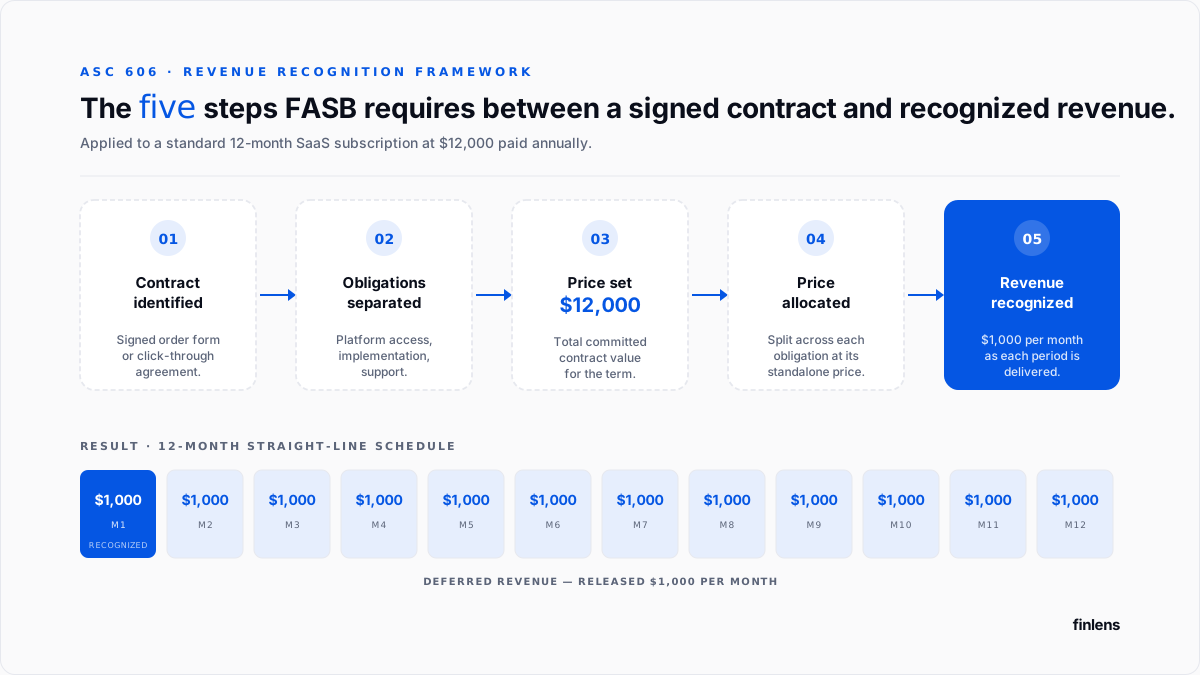
ASC 606 is FASB standard requiring SaaS and subscription revenue to be recognized as each performance period is delivered, rather than when cash is collected or invoiced. The FASB reference page is canonical source; standard has been in effect for private companies since 2019.
For a 12-month subscription paid annually with a single performance obligation, recognition is straight-line at 1/12 per month. Multi-element arrangements, setup fees, mid-term contract changes, and usage components change shape of schedule and are covered in later sections.
The chart of accounts setup
Every recognition method below assumes three changes.
1. Create Deferred Revenue liability account. Settings → Chart of Accounts → New. Account Type: Other Current Liabilities. Detail Type: Deferred Revenue. Name: Deferred Revenue. Intuit walks through this in its deferred revenue setup article.
2. Create revenue account. A standard income account with Detail Type set to Service/Fee Income. Most SaaS books name it Subscription Revenue.
3. Change income account on every subscription product or service item to Deferred Revenue, not income account. When item points at Deferred Revenue, credit from a paid invoice lands on balance sheet as a liability. When item points at Subscription Revenue directly, full contract value lands on P&L on invoice date.
Verify with a $12,000 test invoice: P&L should show $0 of Subscription Revenue and balance sheet should show $12,000 of Deferred Revenue.
Historical revenue booked to a P&L income account before item was remapped stays where it was booked. Restating prior periods requires a separate reclassification entry per contract, and correct treatment depends on materiality and whether periods are already closed.
The full close-cycle account setup (including Accrued Liabilities, Prepaid Expenses, Allowance for Doubtful A/R, Accumulated Depreciation, and Reconciliation Discrepancies) sits in QuickBooks month-end and year-end close guide.
Method 1 Manual journal entries
The lowest-overhead recognition method is a monthly journal entry that debits Deferred Revenue and credits Subscription Revenue for earned portion of each active contract. On January 1 $12,000 example, January 31 entry is $1,000 debit / $1,000 credit.
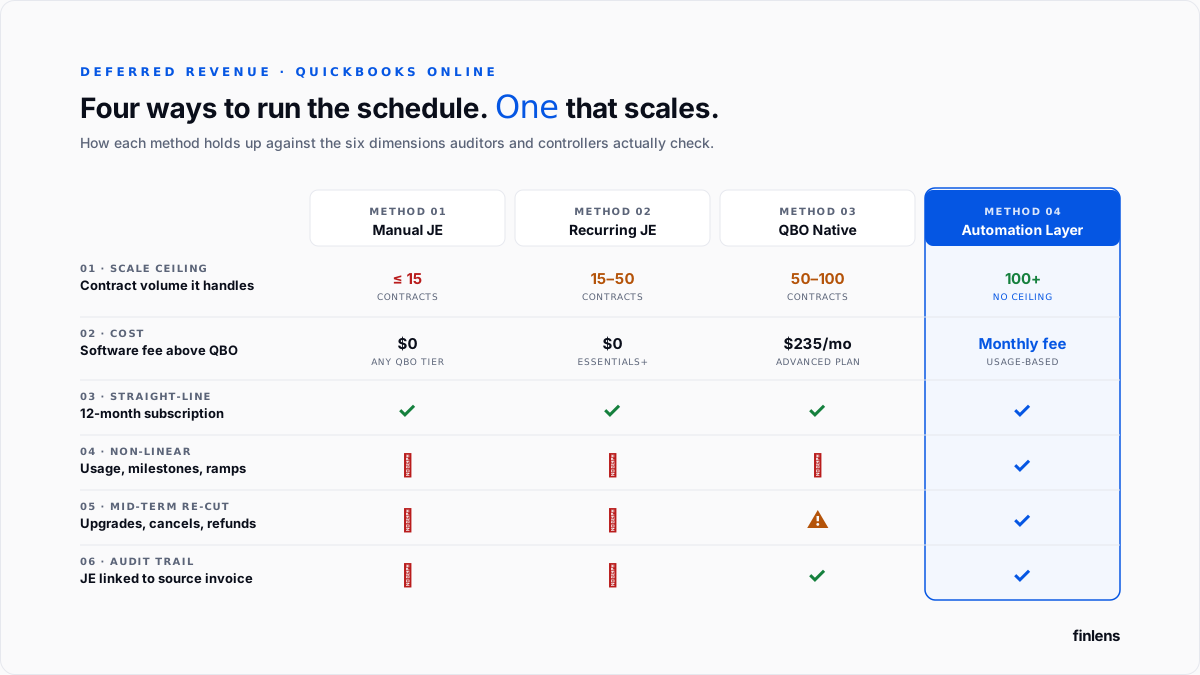
Every paid QBO tier supports this. No software cost.
The failure mode is scale. Each active contract is one entry per month, sourced from an external schedule and hand-keyed on correct date. The audit trail between JE and source invoice is reconstructed from that external schedule rather than written into QBO. Upgrades, downgrades, and cancellations require locating affected schedule and editing every future entry from change date forward.
The SaaS yearly upfront thread on QuickBooks Community contains one controller's report of hitting this ceiling around 15 to 25 active contracts. That figure is a single practitioner anecdote, not a benchmark real threshold depends on team size and contract complexity.
Method 2 Recurring journal entries
QBO's Recurring Transactions feature, available on Essentials and above, removes month-to-month keying step.
Setup for a straight-line 12-month contract:
- Deposit full $12,000 into Deferred Revenue on receipt (not into Subscription Revenue).
- Create a journal entry: Debit Deferred Revenue $1,000, Credit Subscription Revenue $1,000.
- Save entry as Recurring → Scheduled → Monthly → End after 12 occurrences.
The SaaS yearly upfront thread contains fullest step-by-step walkthrough of this pattern in production.
Two configuration details matter. The recurrence date defaults to first of month, which posts on calendar month rather than contract anniversary; teams closing on an anniversary schedule set recurrence to specific day. And end condition is set as a count of occurrences, not a fixed date, so annual renewals do not require deleting and recreating template.
Three limits remain. Every new contract requires a new recurring template. The audit-trail link between JE and source invoice is still reconstructed rather than automatic. And recurring engine posts a fixed entry each period, so non-straight-line recognition usage-based, milestone-based, or ramped cannot be encoded in a single template.
Method 3 QBO Advanced's native revenue recognition module
QuickBooks Online Advanced includes a built-in Revenue Recognition module. Configuration per Intuit's setup article:
- Settings → Advanced Accounting → Revenue Recognition.
- Manage Settings → Assign Products/Services.
- Manage Templates → create a schedule (straight-line over 12 months is default template).
- Assign template to each subscription product or service.
Once a template is assigned, QBO generates a recognition schedule for every invoice containing covered product and posts recognition entry on first of each month.
Three constraints.
- QBO Advanced-only. The QBO pricing page lists current pricing; Advanced tier is materially more expensive than Plus.
- Straight-line only. Mid-term upgrades, downgrades, multi-element arrangements, and non-linear schedules require manual overrides. A controller on revenue-at-fulfillment thread covers where module stops handling recognition without intervention.
- Stripe-sourced sales bypass module. When Intuit Stripe connector is used to sync sales into QBO, transactions post as sales receipts in a structure Revenue Recognition engine does not consistently pick up. A user who activated sync reported on r/smallbusiness that their booked revenue jumped to 1.4x correct figure after sync went live. This is one user's account, not a general product benchmark.
Setup fees and implementation revenue under ASC 606
Most SaaS setup fees do not qualify as a distinct performance obligation under ASC 606-10-25-19. The customer cannot benefit from setup service independently of ongoing subscription an unconfigured account isn't standalone value so setup fee is deferred and amortized over expected customer life rather than initial contract term.
For a $12,000 annual subscription with a $6,000 one-time setup fee and an expected customer life of 36 months, recognition schedules are:
- Subscription revenue: $12,000 / 12 = $1,000 per month for 12 months (renews annually).
- Setup fee revenue: $6,000 / 36 = $167 per month for 36 months.
Setup fees qualify as a distinct performance obligation only when service genuinely stands alone a data migration that a customer could hire a third party to perform, hardware provisioning delivered separately from software subscription, or in-person training with a documented standalone selling price. In those cases fee is recognized on completion of service.
The distinction matters because getting it wrong is one of most common revenue-recognition findings in a diligence review. A book that recognizes setup fees on completion when they should be amortized will overstate revenue for a period equal to customer life.
The scenarios that require re-cutting schedule
The three in-QBO methods above assume a straight-line 12-month subscription at a fixed price with a single performance obligation. Any deviation requires recognition schedule to be re-cut from change date forward.
Mid-term upgrades. A customer adds seats in month 4 of a 12-month contract. The remaining eight months are re-cut at new ARR from month 4 forward, and incremental deferred balance is booked on upgrade date.
Mid-term downgrades and cancellations. A pro-rated refund or credit memo is issued, remaining deferred balance is either released or reversed to revenue depending on cancellation terms, and schedule is truncated at cancellation date.
Setup and implementation fees. Covered in section above amortize over customer life unless service genuinely stands alone.
Usage-based components. API overages, storage over a cap, per-seat consumption above a threshold recognized in period consumed, not ratably. In QBO this is a monthly manual entry against a usage-revenue account.
Multi-year contracts paid annually. Year one is straight-line at invoiced amount. Years two and beyond depend on whether contract has a fixed escalator or renews at market.
Stripe-sourced subscriptions. Recognition logic has to reconcile against Stripe's subscription invoice events, not QBO's invoice date. The native Intuit Stripe connector does not carry recognition metadata across sync. Full treatment sits in Stripe-to-QuickBooks guide.
Multi-currency subscriptions and ASC 830
For a US-based QBO ledger with subscription contracts billed in EUR, GBP, AUD, or another foreign currency, ASC 830 (Foreign Currency Matters) governs translation. Three treatments apply.
Initial recognition. The full contract value is deferred at spot rate on invoice date. A €12,000 annual contract invoiced on January 1 at EUR/USD 1.08 lands as $12,960 in Deferred Revenue.
Monthly recognition. Each month's 1/12 release is recognized at same historical rate used at initial recognition $1,080 per month in example. Deferred revenue is a non-monetary liability under ASC 830-10-45-18 and is not revalued each period.
Balance-sheet revaluation. The residual Deferred Revenue balance at each reporting period-end is stated at historical rates, not current rates. But cash and A/R denominated in foreign currency ARE revalued to current rates, producing a monthly FX gain or loss.
The month-end revaluation journal entry for foreign-currency-denominated cash and A/R:
- Debit or Credit Cash / A/R (foreign currency) at difference between historical and current rate
- Credit or Debit FX Gain (Loss) on Remeasurement an income statement account
Year-end review. For books with material cross-currency subscription volume, auditor reviews both (1) historical rates used on each contract's Deferred Revenue balance and (2) cumulative FX gain/loss booked to P&L. Deferred revenue that has been incorrectly revalued at each period end (rather than held at historical rate) is a common finding.
QBO's home-currency conversion at invoice date is not automatically preserved through subsequent revaluations. For a book with more than ~$500k in cross-currency subscription volume, this treatment requires either a monthly revaluation entry maintained in a spreadsheet or an automation layer that carries source-currency schedule forward at historical rates.
Where in-QBO tooling stops scaling
The three in-QBO methods scale to different points depending on mix of scenarios above.
A book with fewer than 15 straight-line contracts and no mid-term changes runs cleanly on manual or recurring JEs. A book with 50 contracts, quarterly upgrades, Stripe-sourced billing, and multi-currency components does not run cleanly on any of three, because each new scenario is a manual re-cut of a schedule maintained in a spreadsheet outside QBO.
The failure mode surfaces at year-end when Deferred Revenue balance on balance sheet does not tie to sum of unearned amounts across active contract set. Under diligence for an audit, a review, or a fundraise a misstated deferred revenue balance is one of more common findings that pushes a close date or triggers a purchase price adjustment. The related Finlens piece on startup finance metrics investors actually care about covers what diligence teams check first at deferred revenue account.
The Finlens approach
Finlens is an AI accounting platform for QBO firms and founder-led businesses. Deferred revenue recognition is one feature in a 17-feature product; it does not sit in isolation from rest of close.
For deferred revenue schedule specifically, Finlens does following:
- Ingests contracts from QBO invoices or from Stripe subscription events directly.
- Generates recognition schedule per contract straight-line by default, with support for setup-fee amortization over customer life, ramps, usage overlays, and mid-term change events.
- Posts a summary recognition entry into QBO at month-end, linked back to source contracts so audit trail is written at posting time.
- Re-cuts affected schedules automatically when a customer upgrades, downgrades, or cancels.
The features that make recognition schedule usable in a real close are ones that live outside schedule itself:
- AI transaction categorization flags a mis-categorized deferred revenue receipt (e.g., a Stripe payout that landed as Sales instead of Deferred Revenue) before it distorts schedule.
- Human-in-the-loop review gates every posted entry through a CPA before it hits QBO no auto-post-and-hope.
- Multi-currency support carries historical rate through each contract's schedule, matching ASC 830 treatment above.
- Multi-client dashboard runs same recognition logic across every SaaS client a firm manages.
Above roughly 15 active subscription contracts, controller hours to maintain manual or recurring schedules compound faster than platform cost.
Related material: Stripe revenue recognition companion piece, accrual and schedule automation overview, and Stripe fee separation piece.
Vendor evaluation
For a book choosing between dedicated deferred revenue tools, practical evaluation dimensions are:
- Contract-model coverage. Straight-line only? Ramps? Usage overlays? Multi-element arrangements? Setup-fee amortization over customer life?
- Source system fit. Does it read invoices from QBO directly, or does it require Stripe as source of truth? A Stripe-first stack has different needs than an invoice-first stack.
- Multi-currency treatment. Are historical rates preserved through schedule? Or is deferred revenue revalued at each period end (wrong under ASC 830 for non-monetary liabilities)?
- Audit trail. Does each posted entry link back to a source contract? Can an auditor pull a per-contract schedule reconciling to balance-sheet total?
- QBO integration depth. Does it post summary entries to QBO with reference back to source, or does it maintain a separate ledger that has to be manually reconciled to QBO?
- Pricing model. Per-contract, per-invoice, per-user, or platform fee? For a book with 100+ contracts, per-contract model dominates cost.
Named alternatives that show up in evaluation set for a mid-market SaaS: RightRev, Maxio (formerly SaaSOptics/Chargify), Zuora RevPro, and Ordway. Each has a different sweet spot RightRev and Zuora are strongest for high-contract-volume enterprise books; Maxio is strongest for SaaS billing plus recognition together. Finlens is strongest for a book on QBO where deferred revenue is one part of close, not whole system.
The month-end verification checklist
- Deferred Revenue account exists on balance sheet under Other Current Liabilities.
- Every subscription product or service item is mapped to Deferred Revenue.
- A recognition schedule exists for every active contract.
- Each schedule is linked to its source invoice or signed contract.
- Deferred Revenue ending balance ties to sum of unearned amounts across active contracts, reconciled by report.
- Every mid-term change has an updated schedule reflecting change date and new amount.
- For multi-currency contracts, historical rates are preserved on each contract's schedule; period-end revaluation is booked only against monetary items (cash, A/R).
For firms handling deferred revenue across multiple SaaS clients on QBO, firm platform covers each method and scenario above. For a founder-led SaaS with schedule still in a spreadsheet, founder-facing product does same on a single company.
.png)
FAQ
Which QBO tier is required for deferred revenue?
Any paid QBO tier supports chart-of-accounts setup and the manual JE approach. Recurring transactions require Essentials or above. The native Revenue Recognition module is advanced-only.
When deferral does not apply?
Deferral is required for any service or good delivered over multiple periods. It does not apply when service is delivered on invoice date a one-time professional service completed same day, a physical good shipped on invoice, a training session delivered. If customer receives full value on invoice date, revenue is recognized then.
How Stripe fits into recognition path?
Stripe processes payment and produces subscription invoice. QBO records transaction after Stripe. Neither system posts a compliant recognition schedule automatically for subscription contracts. The Stripe-to-QuickBooks founder guide covers sync mechanics.
Deferred revenue versus accrued revenue?
Deferred revenue is cash received for a service not yet delivered a liability. Accrued revenue is a service delivered but not yet billed or received an asset. Mirror positions across earning-cycle timing.
Whether an automation layer replaces QuickBooks?
Automation platforms of type described in this guide sit on top of QBO. General ledger, chart of accounts, invoices, and bank feeds stay in QBO. Recognition, matching, and reconciliation logic runs above it. This is pattern Finlens uses on QuickBooks.
How deferred revenue is treated in diligence?
Two checks apply. The Deferred Revenue balance is reconciled to sum of unearned amounts across active contract set at diligence date. Historical recognition is reviewed for ASC 606 compliance across previous 24 to 36 months. A misstated balance or an inconsistent historical schedule extends diligence timeline or triggers a purchase price adjustment.

