
The QuickBooks guide to depreciation: posting it, and carrying two books (2026)


This is a working reference for founders and controllers who have capitalized an asset in QuickBooks and now have to depreciate it. Every technique is sourced to Intuit's own documentation, IRS guidance, or a real thread on the QuickBooks Community. Numbers cited from user reports are flagged as anecdotal rather than benchmarks.
Scope note. This guide covers the QuickBooks workflow: where the schedule lives, what posts, and how to carry a book schedule and a tax schedule that disagree. It does not re-explain the methods or their arithmetic. Those are covered separately in depreciation methods and how to calculate depreciation, and the 2026 election comparison including the §179 limits and bonus restoration is in Section 179 vs bonus depreciation.
The problem this guide addresses
Depreciation is the only major recurring entry in most books that QuickBooks will not produce for you, and the only one where the correct answer is two different numbers at once.
Failure mode one: one feature, two books. A QBO user on thread 74038 had been recording assets as non-inventory products and taking bonus depreciation through journal entries.
Having discovered the Fixed Assets feature, they asked how to bonus depreciate an item recorded in it, and whether a journal entry could depreciate an asset differently from the five-year schedule the feature holds.
Five replies. The question has no clean answer inside the product, because the Fixed Assets feature carries one schedule per asset and the business needs two: a book schedule for the financial statements and a tax schedule for the return. Those diverge from year one and reconverge years later.
Failure mode two: assuming it posts itself. Intuit's documentation on depreciating assets in QuickBooks Online states it plainly. QuickBooks Online does not automatically depreciate fixed assets. On the base tiers the entry is manual, every period, forever, and a file that carries fixed assets with no depreciation expense is a file where somebody assumed otherwise.
The two identities
The first is the one everybody knows.
Net book value = Cost - Accumulated depreciation
The second is the one that causes the trouble.
BOOK schedule → financial statements, GAAP useful life
TAX schedule → the return, MACRS / §179 / bonus
Same asset. Same cost. Different expense every year
until the two converge at the end of the longer life.
Three consequences follow.
Both schedules are correct simultaneously. The difference is a temporary difference, not an error. It reverses over the asset's life and nets to zero, which is why the cumulative columns matter more than the annual ones.
QuickBooks holds one of them. The general ledger carries the book schedule, because the general ledger produces the financial statements. The tax schedule lives in the tax software or the fixed asset register.
The gap is a deferred tax balance. Where the tax deduction runs ahead of book expense, the business has taken a deduction it has not yet expensed, and that creates a deferred tax liability. A file that tracks neither schedule properly cannot compute it.
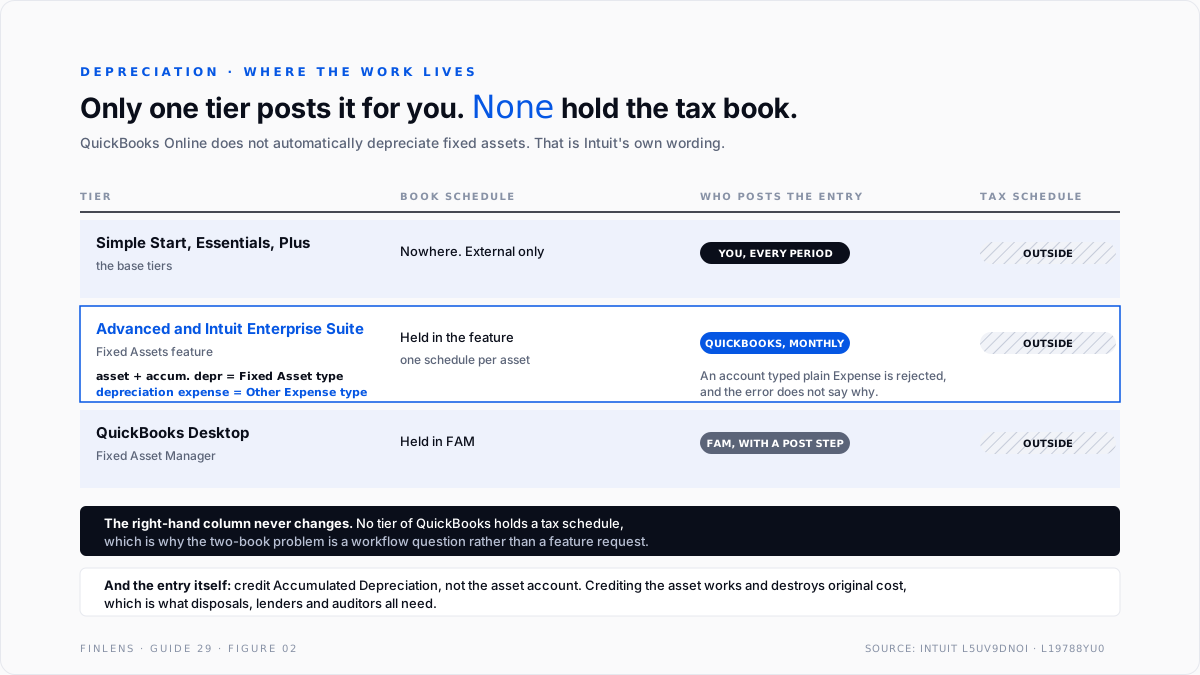
Three tiers, three completely different workflows
This is the part that determines how much work depreciation is, and it is rarely stated clearly.
On the base tiers. Intuit's path is Chart of accounts, filtered to depreciation, with Detail type set to Depreciation. The recurring entry debits Depreciation Expense and credits the asset or, better, Accumulated Depreciation. Making it a recurring template is the single highest-value automation available, and it is worth doing the day the first asset is capitalized.
On Advanced, the Fixed Assets feature records scheduled depreciation automatically at the end of each month. It carries specific account-type requirements that will silently break the setup if missed.
The asset account and the accumulated depreciation account must both be Fixed Asset type. The depreciation expense account must be Other Expense type, not Expense. An account typed as plain Expense will not be accepted, and the usual symptom is the asset refusing to save rather than a useful message.
On Desktop, Fixed Asset Manager maintains schedules and pushes entries into the file, and has its own troubleshooting surface documented by Intuit under resolving Fixed Asset Manager errors.
The platform difference matters enough to factor into a migration decision, covered in the QuickBooks Online versus Desktop guide.
The account structure
Five accounts, and two decisions inside them.
Decision one: credit the asset or credit accumulated depreciation. Intuit's base-tier instructions show crediting the asset account directly, which works and loses information. Crediting a separate Accumulated Depreciation account preserves original cost on the balance sheet, which is what an auditor, a lender and a disposal calculation all need. Use the contra account.
Decision two: one asset account or many. One per major class is enough. A separate account per asset makes the chart of accounts unusable and produces nothing the fixed asset register does not already hold.
Which costs reach these accounts in the first place is decided upstream, in the fixed asset capitalization guide.
Carrying both books without a fixed asset module
Four workable approaches, in ascending order of discipline.
1. Book schedule in QuickBooks, tax schedule in the tax software. The most common arrangement and perfectly sound. The general ledger is the book, the tax preparer maintains MACRS and the elections, and the difference surfaces on the tax return's book-to-tax reconciliation. The risk is that nobody holds the deferred balance between filings.
2. Both schedules in one external register. A spreadsheet or fixed asset application with two columns per asset. The monthly book entry posts to QuickBooks, the tax column feeds the return, and the cumulative difference is visible continuously. This is the answer for most businesses with more than a handful of assets.
3. The Advanced Fixed Assets feature for the book schedule only. Let it automate the book entry and keep the tax schedule outside. Do not try to make the feature hold the tax schedule. Thread 74038 is what that attempt looks like.
4. Two asset sub-accounts. Occasionally proposed, rarely worth it. It doubles the chart of accounts and still does not produce a tax return.
The rule that matters whichever route is chosen. The general ledger carries the book schedule and only the book schedule. Posting a §179 or bonus deduction into QuickBooks because it is the tax answer puts the tax number into the financial statements, which overstates expense, understates assets, and misstates net income for every reader who is not the IRS.
Mid-year additions and disposals
A flat recurring entry is correct until the first asset arrives or leaves mid-year, and then it is wrong every month until someone notices.
Additions. Book depreciation normally starts in the month the asset is placed in service, not the month it was purchased and not the first month of the year. An asset delivered in March and commissioned in May starts in May.
The recurring entry therefore has to change the month an asset starts, which means the schedule drives the entry rather than the other way round.
Disposals. Depreciation runs up to the disposal date and then stops. The usual error is leaving the recurring entry untouched, so a sold asset keeps generating expense against a balance that no longer exists.
Conventions are a tax concept, not a book one. The half-year convention in the worked example above is a MACRS rule. Book depreciation generally follows actual in-service dates.
Applying a tax convention to the book schedule is a quiet way to make the two columns diverge for a reason that is not a real timing difference.
The practical control. Any month with an addition or a disposal gets a recalculated entry rather than the standing template. A recurring template is a convenience for stable months and a liability in active ones, which is the argument for driving the entry from the schedule every period rather than only when something changes.
The failure-mode catalog
Six diagnoses cover most depreciation work.
1. No depreciation expense at all. Symptom: a file carrying fixed assets with an empty depreciation account. Cause: the base tiers do not post it and nobody set up the entry. Fix: build a recurring journal entry from the schedule, and catch up the prior periods rather than absorbing them into the current one.
2. Tax depreciation posted to the ledger. Symptom: a large depreciation charge in one month, often December, equal to the full cost of an asset. Cause: a §179 or bonus election entered as a book entry. Fix: restate to the book schedule and track the difference as a deferred tax item.
3. The asset credited instead of accumulated depreciation. Symptom: a balance sheet showing assets at net book value with no original cost visible. Fix: restate using a contra account. Disposals cannot be computed correctly without original cost.
4. Advanced Fixed Assets will not accept an account. Cause: the depreciation expense account is typed as Expense rather than Other Expense, or an asset account is not Fixed Asset type. Fix: correct the account types. The error message does not name the real problem.
5. Accumulated depreciation exceeds cost. Cause: a schedule that kept running after the asset was fully depreciated, usually a recurring entry nobody stopped. Fix: stop the entry and reverse the excess. A recurring template with no end date will depreciate an asset indefinitely.
6. Disposed assets still depreciating. Symptom: depreciation on equipment that left the building. Cause: the disposal was recorded as a bank transaction without removing the asset and its accumulated depreciation. Fix: a full disposal entry removing both, with the difference to gain or loss.
Worked example
One asset. $60,000 of equipment, five-year class, placed in service in January. The book policy is straight-line over five years with no salvage. The tax position uses MACRS five-year under the half-year convention.
Year one is a coincidence, not agreement. Both land on $12,000 because MACRS year one is 20% under the half-year convention and straight-line over five years is also 20%. From year two they diverge sharply, peak at a $7,200 cumulative gap, then close.
Year five reverses the sign. Book finishes depreciating and tax has not, so the business is now expensing more for books than it deducts for tax. Anyone treating the difference as a permanent benefit gets a surprise here.
What posts to QuickBooks. $12,000 a year, $1,000 a month, for five years. Dr Depreciation Expense, Cr Accumulated Depreciation. Nothing in the tax column ever touches the general ledger.
Now take the §179 election instead. The full $60,000 is deducted in year one for tax, subject to the income limitation. Book expense remains $12,000. The year-one cumulative difference is $48,000, and posting that $60,000 into QuickBooks would understate year-one net income by $48,000 and leave the asset at zero on a balance sheet where it is worth $48,000.
Where in-QBO depreciation stops scaling
Threshold one: more than about 25 assets. Below that, a recurring entry and a spreadsheet are manageable. Above it, additions and disposals mid-year make the manual entry a monthly reconciliation rather than a posting.
Threshold two: two books, always. This is not a volume threshold. A single asset with a §179 election already requires two schedules, and QuickBooks holds one.
Threshold three: component depreciation. A building split into structure, roof, and systems with different lives needs per-component schedules. Neither the Advanced feature nor a simple spreadsheet handles that well.
Threshold four: mid-year conventions and short years. Mid-quarter convention, short tax years, and disposals in the year of acquisition all change the calculation in ways a flat recurring entry will get wrong silently.
The Finlens approach
Finlens reads the QuickBooks ledger and treats depreciation as a reconciliation rather than a posting.
1. Schedule-to-ledger reconciliation. Accumulated depreciation per asset class in QuickBooks is reconciled to the external schedule every period, so a missed entry, a double entry or a recurring template that should have stopped is caught in the month it happens.
2. Book-versus-tax difference tracking. Both cumulative columns are held and the difference is reported as the deferred balance it represents, including the year the sign reverses. That is the number nobody holds between filings.
3. Completeness and over-run detection. Periods with fixed assets on the balance sheet and no depreciation expense are flagged, as are assets where accumulated depreciation has reached or passed cost.
Four supporting capabilities sit around those three.
- Capitalization-to-schedule linking, so an asset capitalized this month appears on the schedule before the next close rather than after the audit.
- Disposal completeness, confirming that a disposed asset had both cost and accumulated depreciation removed.
- Account-type validation against the Advanced Fixed Assets requirements before the setup fails.
- A cross-file view for firms, listing clients whose accumulated depreciation does not tie to a schedule.
Verification checklist
Eight lines to run at period end.
- Depreciation expense is non-zero for any period where the balance sheet carries depreciable fixed assets.
- Accumulated depreciation per class ties to the external schedule.
- No asset has accumulated depreciation equal to or greater than its cost while still being depreciated.
- Original cost is visible on the balance sheet, which means a contra account is in use.
- No §179 or bonus amount has been posted to the general ledger.
- Assets disposed in the period have had both cost and accumulated depreciation removed.
- Assets capitalized in the period have been added to the schedule with a start date.
- The cumulative book-versus-tax difference is stated, with the direction it is moving.

FAQ
Does QuickBooks calculate depreciation automatically?
Not on Simple Start, Essentials or Plus. Those require a manual journal entry every period. QuickBooks Online Advanced has a Fixed Assets feature that records scheduled depreciation monthly, and Desktop has Fixed Asset Manager.
Should the entry credit the asset or accumulated depreciation?
Accumulated depreciation. Crediting the asset directly works but destroys original cost, which is needed for disposals, lending and audit.
Can the Advanced Fixed Assets feature hold a tax schedule?
No. It carries one schedule per asset. Use it for the book schedule and keep tax outside, which is exactly the question raised on thread 74038.
Should a Section 179 deduction be posted in QuickBooks?
No. It is a tax position, not a book expense. Posting it overstates expense and understates assets on the financial statements.
Why will QuickBooks Online Advanced not accept my depreciation account?
Almost always because it is typed as Expense rather than Other Expense, or an asset account is not Fixed Asset type. The error does not say so.
Do the two schedules ever agree?
At the end. Total depreciation over the asset's life is the same under both, which is why the difference is temporary and reverses rather than accumulating forever.

