
QuickBooks Online vs QuickBooks Desktop in 2026: the decision has shifted


The comparison used to be a real choice. As of September 30, 2024, it mostly isn't. Intuit stopped selling QuickBooks Desktop Pro, Premier, and Mac to new US customers. Enterprise is the only Desktop product Intuit will sell you today, and everyone else evaluating QuickBooks in 2026 is choosing between Online tiers or migrating off a legacy Desktop install.
That reframes the question. It's no longer "which product fits my business better." It's:
- If you're a new customer, the practical choice is online or enterprise. Desktop Pro and Premier are off the shelf.
- If you're an existing desktop customer, the question is when you migrate, not whether.
- If you're evaluating Enterprise specifically because inventory or user count demands it, the comparison is Enterprise vs Online Advanced, not Desktop broadly.
The rest of this guide walks through the practical decision. What's still in each product, where the pricing lands, when the sunset dates actually hit legacy installs, and how to think about migration if you're on Desktop today.
When does QuickBooks Desktop stop working?
Two Intuit-set dates matter for every existing Desktop user.
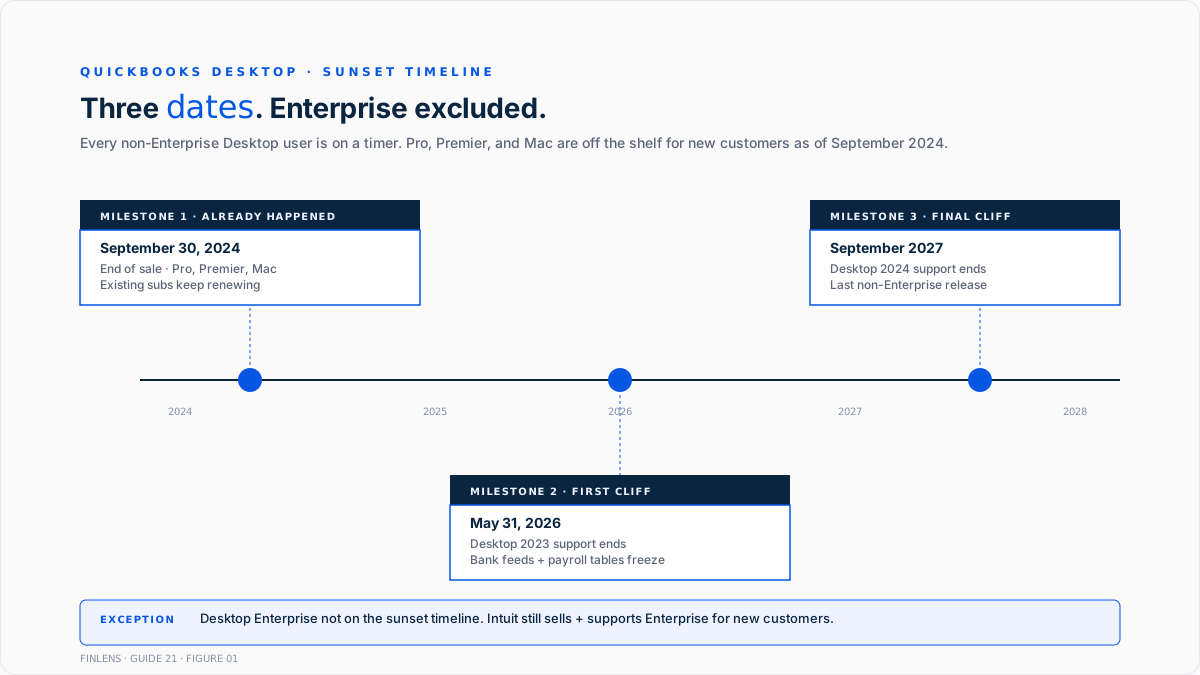
Desktop 2023 support ends May 31, 2026. Anyone still on Desktop 2023 loses connected services after that date. Live bank feeds stop. Payroll tax tables freeze at the last update. Security patches end. The software keeps opening, and historical data stays viewable, but every service that makes bookkeeping actually work goes dark.
Desktop 2024 support ends September 2027. That's the last non-Enterprise Desktop release Intuit will support at all. When the date lands, every non-Enterprise Desktop user is on unsupported software with the same feature loss as the 2023 cliff.
Enterprise is the exception. Intuit is still investing in Desktop Enterprise and continues to sell it to new customers. Every other Desktop customer is on a timer.
Intuit's own Move to QuickBooks Online documentation confirms these dates and the recommended migration path.
What are the three key differences between QuickBooks Online and Desktop?
Every honest comparison between online and desktop collapses to three questions. Google's own AI Overview for this query surfaces exactly this decomposition, so the shortest useful version of the answer is:
Access and collaboration. Online runs in a browser or mobile app. Multiple users work in the same file from anywhere at the same time. Updates and backups happen automatically. The desktop is installed on a local machine or network. Multi-user access requires local network sharing or a paid hosted server. Updates and backups are generally managed manually.
Features and depth. Online focuses on automation, native bank feeds, and 800+ third-party app integrations. Basic inventory on the higher tiers, FIFO valuation on Advanced. Desktop, and specifically Enterprise, still leads on advanced inventory (FIFO layers with full history, LIFO, barcode scanning, bin/lot, sales orders, and bill of materials), job costing, customizable reporting depth, and industry-specific editions.
Pricing and availability. Online uses a monthly subscription with tiered plans (Simple Start, Essentials, Plus, and Advanced). Desktop standard versions (Pro Plus, Premier Plus) are discontinued for new buyers. Enterprise is the only desktop product Intuit still sells to new customers, at annual subscription pricing that scales per seat.
Which of those three matters most is the decision. If access wins, online. If features win (specifically advanced inventory), Enterprise. If pricing wins, it depends on total cost of ownership (below), not sticker price.
How much do QuickBooks Online and Desktop cost in 2026?
Rates as of 2026 per Intuit's own QuickBooks Online pricing and QuickBooks Enterprise pricing pages. Enterprise scales up with per-seat pricing that pushes multi-user configurations past $5,000/year quickly. Forbes Advisor's 2026 QuickBooks Online vs Desktop comparison covers the same tiers with additional pricing context.
For solo operators picking a starting tier, the QuickBooks Solopreneur write-up and Is QuickBooks Self-Employed Still Available in 2026 break down the entry-tier trade-offs. For teams past the Solopreneur ceiling, What Do You Get With QuickBooks Essentials covers the next step up.
The pricing distortion people often miss: The desktop's sticker price excludes the total cost of ownership. Enterprise on-premise requires Windows Server or a hosted virtual desktop ($35 to $75 per user per month if hosted), IT for the local install, backup infrastructure, and remote-access setup for anyone not physically at the office. Independent estimates put Desktop's 3-year TCO at roughly 3 to 5 times an equivalent QBO Advanced subscription once hardware and IT are counted.
When is QuickBooks Online the right choice?
Cloud-native access. Browser plus mobile app on any device. No VPN, no hosted server, no local install. Team members log in from anywhere.
Collaboration with an outside accountant or bookkeeper. The firm logs in through QuickBooks Online Accountant with one click. No need to email backup files or share hosted server credentials.
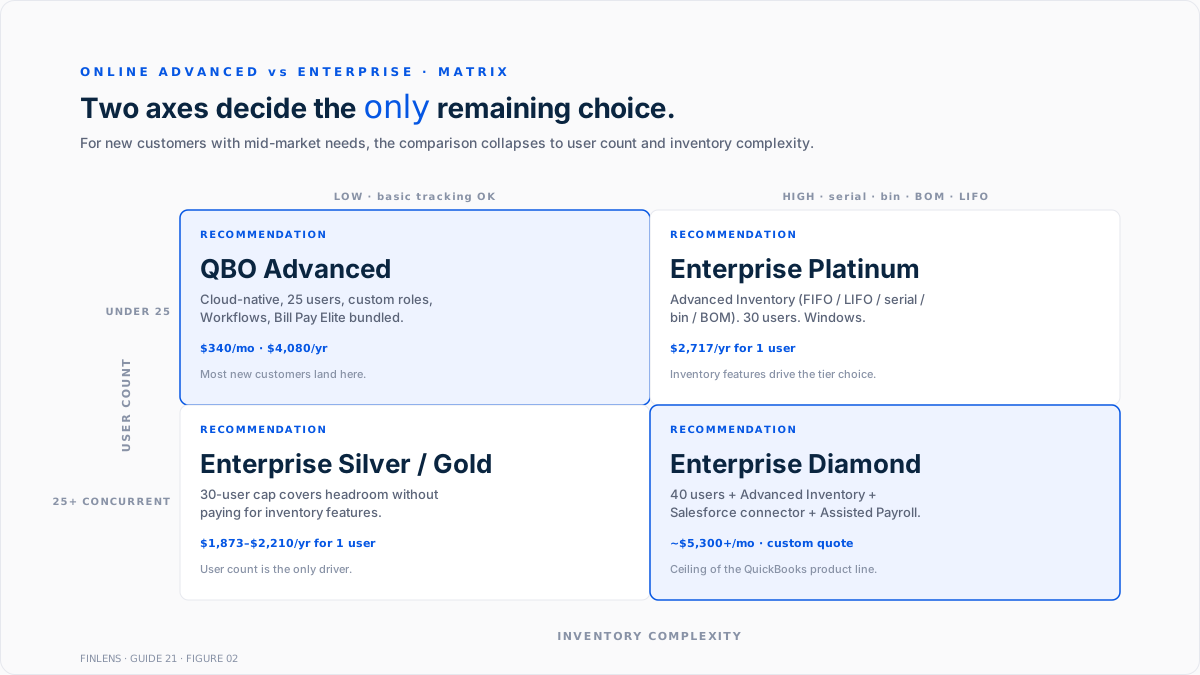
Fewer than 25 concurrent users. QBO Advanced covers up to 25. If the team is smaller and growing, online is the default.
App ecosystem. QBO's App Store has 750+ integrations that stay current automatically. Every modern SaaS finance tool (Ramp, Brex, Stripe, Shopify, Gusto, Bill.com, Notion, and Slack) has an official QBO connector. Desktop's third-party ecosystem is smaller and mostly requires per-workstation configuration.
API-first workflows. The QBO v3 REST API is well-documented and widely used. Desktop's SDK is older, local-only, and harder to build against.
Mac users on the team. Desktop is Windows-only since the Mac line was discontinued. Mac users on Desktop work through a hosted Windows environment or a local VM.
Continuous automation adoption. New features roll out to QBO subscribers automatically. Desktop major versions come annually with feature gaps in between. The Best AI Bookkeeping Apps for Small Businesses in 2026 write-up covers the automation-layer landscape that assumes a cloud GL.
When is QuickBooks Desktop Enterprise the right choice?
Advanced inventory beyond QBO's ceiling. FIFO valuation with full history, LIFO valuation, serial number tracking, bin/lot management, mobile barcode scanning, sales orders, and bill of materials. QBO Advanced adds FIFO but skips serial, bin, and BOM. Inventory-heavy operations still land on Enterprise Platinum or Diamond for these features.
More than 25 concurrent users. Enterprise scales to 30 on Silver/Gold/Platinum and 40 on Diamond. QBO Advanced caps at 25.
List entries above 14,500. Enterprise supports 100,000 combined customer/vendor/employee records. QBO doesn't hard-cap this the same way, but performance at very high list counts remains better on Enterprise's local database.
Industry-specific editions. Enterprise ships Contractor, Manufacturing & Wholesale, Nonprofit, Professional Services, Retail, and Accountant editions with tailored charts of accounts, industry-specific reports, and menu customizations. QBO has none of that. Every book starts from a generic template.
Advanced reporting depth. Enterprise Premier and above ship 150+ industry-specific reports. QBO plans include roughly 80 reports depending on tier.
Existing desktop-only integration dependencies. Third-party add-ons like Fishbowl (advanced inventory), industry-specific ERP connectors, and older Method:CRM workflows are desktop-only and don't have complete QBO equivalents.
What do accountants say about QuickBooks Online?
Reddit threads on r/QuickBooks, r/msp, and r/taxpros consistently dominate the SERP for this comparison. The dominant practitioner objections to online, drawn from those threads:
- Manual data entry friction. "Online sucks for manual data entry. It just doesn't work the [same way]" is a recurring complaint from bookkeepers who did years of high-volume entry on Desktop. Keyboard shortcuts, tab order, and batch-entry patterns feel slower in the browser than in the Desktop UI.
- Cost after the switch. "The desktop version is subscription-based but is still cheaper than online" appears repeatedly on r/msp. Multi-user online at the Advanced tier lands close to the Enterprise sticker, and Enterprise carries fewer per-user fees at scale.
- Learning curve for veterans. "QuickBooks Online is legitimately harder to learn than QuickBooks Desktop" for teams with a decade of Desktop muscle memory. New teams starting fresh don't feel this.
- Forced-migration frustration. "The argument is QBD will be gone in a few years and QBO will be the only option" is the top-comment theme on 2026 threads. Discontent is real but doesn't change the sunset timeline.
None of these objections eliminate online as the right long-term choice for most books. But they explain why some accountants are dragging their feet and why the migration conversation runs into resistance when a desktop veteran hears "we're moving to online."
The realistic take: Online has closed most of the feature gap since 2020, but the UX difference and per-user pricing at higher tiers are real. Teams that never used Desktop won't notice. Teams that spent 10 years on Desktop will notice for months.
How should you decide between QuickBooks Online and Desktop?
Three questions in order:
1. Are you already on Desktop Pro or Premier? Then migration to QBO is not optional. It's on a timer. Start planning by the May 2026 date for 2023 users and September 2027 for 2024 users. Intuit's Move to QuickBooks Online tool handles the technical migration.
2. Are you a new customer with 25+ users, complex inventory, or an industry-specific workflow that maps to an Enterprise edition? Enterprise is the surviving Desktop option and is still sold and supported.
3. Anyone else? QBO. New businesses land on Simple Start, Essentials, or Plus based on user count and inventory needs. Growing teams land on Advanced. The cloud-native path is the default because there's no non-Enterprise Desktop path left to buy.
What converts when migrating from desktop to online?
Intuit's built-in Move to QuickBooks Online tool handles most conversions in 30 to 90 minutes for typical files. Larger files (5 GB+) take 24 to 48 hours.
What converts cleanly?
Chart of accounts, customers, vendors, items, transaction history, journal entries, reconciled bank data, and employee records without payroll history.
What loses on conversion?
Advanced inventory history (FIFO layers reset to average cost), custom reports (rebuild in QBO's custom report editor), industry-specific templates (rebuild from QBO defaults), advanced pricing rule-based price levels, and some third-party app data.
What has to be redone after?
Payroll year-to-date figures need recreating if migrating mid-year, custom user permissions if the source had complex roles, and connected apps need re-authorization.
Pre-migration cleanup matters. A file with reconciled bank accounts, closed A/R, no unapplied payments, and current inventory counts converts noticeably cleaner than a messy source file.
How does Finlens fit into either QuickBooks path?
Finlens is an AI accounting platform built on QuickBooks Online. The direct product footprint is on QBO. Where the two paths intersect:
For desktop users planning a migration, Finlens produces a pre-migration diagnostic. File health, list counts, unreconciled items, and cleanup priorities. That surfaces what will and won't convert cleanly before the Intuit tool runs. Post-migration, Finlens reconciles the pre-migration trial balance against the QBO ledger and flags every account that doesn't tie.
For new customers evaluating QBO tiers, the same automation layer works from day one on Simple Start through Advanced. Categorization, month-end close, revenue recognition, and Prep-for-Taxes hand-off all run on top of the base QBO product.
For firms managing mixed portfolios where some clients are on Desktop and others on QBO, the firm platform aggregates the QBO-side clients into one dashboard while the Desktop clients continue on their existing accountant-side tools. As those desktop clients migrate over the next two years, they land under the same firm dashboard. For a controller running a single-company book, the founder-facing product covers the same automation at company scale.
Book a 20-minute walkthrough against a live QBO environment or a desktop-to-online diagnostic: cal.com/finlens/intro.
What is the bottom-line answer for 2026?
QuickBooks Online is the default now, not the alternative. Desktop Pro and Premier are off the shelf for new customers. Existing Pro and Premier users are on a timer that expires in May 2026 or September 2027, depending on the version. Enterprise survives as the specialist product for inventory-heavy, high-user-count, industry-specific operations that QBO Advanced doesn't cover.
For most businesses making a fresh decision in 2026, the comparison isn't online vs. desktop. It's which online tier fits (Simple Start through Advanced). The Desktop question only matters if you're already there and need to plan the exit or if you have the specific requirements that keep Enterprise on the table.
The QuickBooks Payments blog covers the payment-processing angle for either product. The Best General Ledger Software in 2026 write-up covers what's above QBO if the business is outgrowing both.
FAQ
Can I still buy QuickBooks Desktop Pro or Premier as a new customer?
No. Intuit stopped selling Pro, Premier, and Mac to new US customers on September 30, 2024. Existing subscribers can keep renewing until their version's support deadline hits. Enterprise remains available for new customers.
When does my QuickBooks Desktop version stop working?
Desktop 2023 loses support May 31, 2026. Desktop 2024 loses support in September 2027. The software keeps opening after those dates, but connected services (bank feeds, payroll tax updates, and security patches) permanently stop. Enterprise runs on its own support cycle and is not on this sunset timeline.
What is the real cost difference between online and desktop over three years?
Sticker-price only, Enterprise looks comparable to QBO Advanced. Once server hardware or hosted virtual desktop fees, IT maintenance, and remote-access setup are counted, independent estimates put Desktop total cost of ownership at roughly 3 to 5 times QBO Advanced over three years.
Has QuickBooks Online caught up on inventory features?
Partially. QBO Advanced added FIFO valuation. QBO still lacks serial number tracking, bin management, sales orders, and bill of materials, all standard on Enterprise Platinum and above. Inventory-heavy operations still land on Enterprise or a dedicated inventory platform layered on QBO.
How long does the desktop-to-online migration take?
30 to 90 minutes for typical files using Intuit's built-in Move to QuickBooks Online tool. Larger files (5 GB+) take 24 to 48 hours. Complex conversions with advanced inventory history, custom reports, or many custom fields need 2 to 6 weeks total when pre-migration cleanup and post-migration reconciliation are counted.
Does my ProAdvisor certification carry over from Desktop to Online?
Yes. ProAdvisor certification is per-person, not per-product, and applies across QBO and Desktop. Existing desktop-certified partners keep certification credit as they add QBO certifications on top.
Why don't some accountants like QuickBooks Online?
Three recurring objections. First, manual data entry feels slower in the browser than on the desktop, especially for high-volume bookkeepers with years of keyboard-shortcut muscle memory. Second, multi-user online at the Advanced tier ($340/mo) is not materially cheaper than the Enterprise sticker for teams that already own the desktop infrastructure. Third, the transition friction and relearning cost are real for veteran Desktop users. None of these change the fact that Online is where new customers land and where the product roadmap is going, but they explain why accountant sentiment on the switch is more mixed than Intuit's marketing suggests.
What are the disadvantages of QuickBooks Online?
Four honest disadvantages worth naming. First, inventory features remain thinner than Enterprise (no serial numbers, no bin/lot tracking, no bill of materials, no LIFO). Second, per-user pricing on the Advanced tier scales meaningfully at 15+ users, where Enterprise starts to look competitive. Third, the third-party app ecosystem is bigger, but individual apps vary in reliability, and none of them match a well-tuned local desktop workflow. Fourth, internet dependency: Online literally does not open without a connection, whereas Desktop keeps working offline for entry and only needs connectivity for feeds and sync. For most books these disadvantages are outweighed by cloud access, but they are real trade-offs, not marketing spin.
Is QuickBooks Desktop going away in 2026?
Not entirely, but yes for most versions. Pro and Premier are already off the shelf for new customers (September 2024). Desktop 2023 support ends May 31, 2026. Desktop 2024 support ends September 2027. Only Enterprise remains actively sold and supported past those dates. If your book is on Pro or Premier, you have a hard timeline to migrate.

