
What Is QuickBooks Solopreneur and Who Should Use It?


QuickBooks Solopreneur is Intuit's $20-a-month accounting tier for people who run a business alone, file a Schedule C, and don't want the complexity of full double-entry bookkeeping. Intuit launched it in early 2024 as the successor to QuickBooks Self-Employed. If you're signing up for a new Intuit account today as a freelancer or single-member LLC, this is the tier the flow steers you toward.
This guide walks through what Solopreneur includes, what it deliberately leaves out, how it compares to Simple Start above and Self-Employed below, and the kind of business that outgrows it.
What is a QuickBooks solopreneur?
Solopreneur is a hybrid. It borrows the tax-focused workflow from the old QuickBooks Self-Employed product, then rebuilds it on the modern QuickBooks Online platform. Under the hood, it runs on a simplified version of the QuickBooks Online chart of accounts. You don't build your own chart, you don't post journal entries, and you don't run a trial balance.
What Solopreneur gives you instead is a categorized transaction feed and a set of reports built on top of that feed. It's a cash-basis, Schedule C-shaped tool that helps you get through tax season without a bookkeeper. For the broader QuickBooks chart-of-accounts structure that Solopreneur intentionally hides, see QuickBooks chart of accounts.
Who is QuickBooks Solopreneur built for?
The target reader is a one-person business filing Schedule C on their personal 1040. Ride-share drivers, delivery gig workers, freelance designers, independent consultants, coaches, tutors, most Etsy sellers, and single-member LLCs that haven't elected S-corp all fit.
What they share is a tax reality: business income and expenses flow onto Schedule C, self-employment tax kicks in at 15.3% on top of income tax, and they owe estimated tax payments four times a year. Solopreneur is optimized for that reality.
The tier does not fit if you have an employee on payroll, a business partner, real inventory, multi-state sales tax exposure, or an S-corp election. Every one of those points to a larger tier.
What's included in the $20 monthly tier?
Solopreneur lists at $20 per month with a 30-day free trial and no credit card required. Intuit runs frequent 50% off promotional pricing for the first three months.
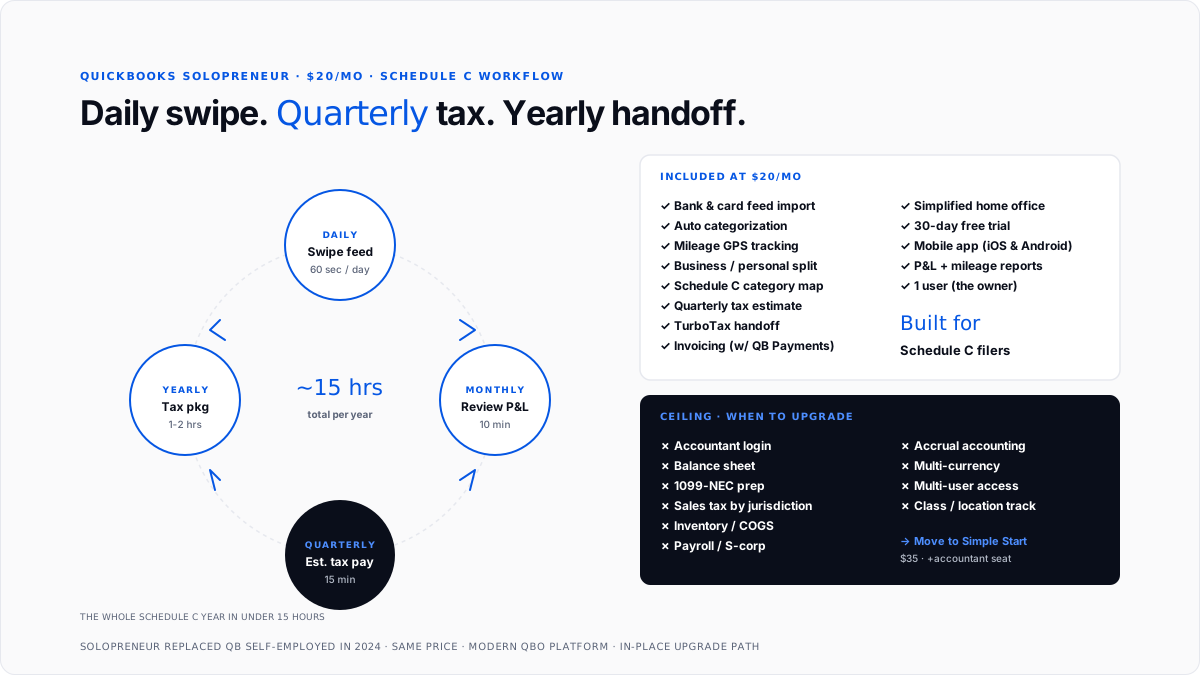
Automatic transaction import. Connect a business bank, credit card, and payment platform. A solo entrepreneur pulls transactions on a rolling basis and learns your categorization patterns.
Business and personal separation. Every imported transaction defaults to personal until you mark it business. Works for single-member LLCs running mixed personal-and-business accounts.
Mileage tracking. The mobile app runs background GPS mileage logging. Trips get classified business or personal, multiplied by the current IRS mileage rate.
Quarterly estimated tax snapshot. A solopreneur projects your quarterly federal tax liability from year-to-date income, self-employment tax, and a personal deduction assumption.
Schedule C-aligned categories. Every expense category maps directly to a Schedule C line. Year-end tax summary slots straight into TurboTax Self-Employed or into your CPA's tax software.
Invoicing with QuickBooks Payments. Unlimited invoices when QB Payments is active. Without payments, invoicing exists, but the tier is optimized around lower volume.
Single user plus basic reports. Profit and loss, mileage log, tax summary, and a transactions list.
What does a solopreneur deliberately leave out?
The absent features define who the tier isn't for.
No double-entry bookkeeping. No balance sheet, no general ledger, no journal entries. For loan tracking that a balance sheet handles properly, see how to record a business loan.
No accountant access. A solo entrepreneur does not have an accountant seat. If you hire a bookkeeper or CPA, you have to upgrade to Simple Start.
No sales tax module. A solo entrepreneur does not calculate, track, or file sales tax by jurisdiction.
No inventory. No SKU tracking, no cost-of-goods-sold at the item level, no reorder points.
No 1099 preparation. If you hire a subcontractor, a solopreneur will not help produce 1099-NECs. That workflow starts at Simple Start.
No payroll. Payroll is a separate Intuit add-on that stacks on Simple Start or higher.
Cash basis only. You can't switch to accrual accounting.
Solopreneur vs. Simple Start: Which one should you pick?
The dollar delta is $15 per month ($180/year). Three signals push the answer to Simple Start.
Stay at Solopreneur if you You file Schedule C, handle the books yourself, don't hire subcontractors, and don't need a balance sheet.
Move to Simple Start if you You want an accountant to log in, you need 1099 prep, you need a balance sheet for a loan or a landlord, you're movingan S-corp,orp, or you have inventory.
The accountant seat alone is usually the tipping point. Buying Solopreneur first and upgrading three months in when the accountant needs access forces an unnecessary migration moment.
Solopreneur vs. Self-Employed: How are they different?
QuickBooks Self-Employed was the predecessor. Intuit stopped taking new self-employed sign-ups in 2024. Existing subscribers can continue on their old plan, but new sign-ups go to Solopreneur.
The upgrade from self-employed to solopreneur is one-click. Linked accounts, categorization rules, mileage history, and transactions come with you. The solo entrepreneur adds a modernized dashboard and better invoicing that self-employed people didn't have. Both list at $20/month.
If you're self-employed today and happy, no urgency to migrate. If you're on Self-Employed and hitting friction, Solopreneur is a strict upgrade at the same price.
How does a solopreneur handle tax season?
Solopreneur is a tax-first product. Every screen has a variant of "your tax picture right now."
Year-end tax summary. Solopreneur produces a Schedule C-shaped tax package that maps line by line. One click pushes numbers into TurboTax Self-Employed.
Home office deduction. Simplified method supported ($5 per square foot, up to 300 sq ft, capped at $1,500). For both methods and when each wins, see home office deduction.
QBI deduction. A solopreneur doesn't calculate QBI directly, but the numbers feed a QBI calculation your CPA or TurboTax runs. See QBI deduction.
Estimated quarterly payments. Federal only. State estimated payments are on you.
Business expense write-offs. Every flagged business expense flows into the tax summary. For the deduction rules, see how to write off business expenses.
What does a typical solopreneur month look like?
Daily. Two or three new transactions from the bank feed. 60 seconds to swipe through, mark business or personal, and confirm categories.
Mid-month. A client pays a $2,400 invoice through QB Payments. It shows up in the feed automatically.
End of month. Open the dashboard, and look at profit and year-to-date estimated tax owed. Ten minutes.
Quarter-end. Solopreneur reminds you two weeks before the deadline. Click through, pay via IRS Direct Pay. Five minutes.
Year-end. Download the tax package, hand it to your CPA, or push through TurboTax.
Total year of bookkeeping in single-digit hours. If you're spending more, the tier is undersized.
When does a solo entrepreneur stop being enough?
Watch for these breaking points.
You hire your first subcontractor. The moment a real 1099-NEC is coming out at year-end, you need Simple Start. See 1099-NEC filing deadline.
Your accountant asks for login. A solo entrepreneur cannot invite an accountant. Simple Start adds the free accountant seat.
You elect S-corp status. Payroll, salary vs. distribution tracking, and a real chart of accounts start at Simple Start with payroll add-on.
You cross accrual-worthy invoice volume. Regular 30-60 day invoicing makes cash-basis Solopreneur look erratic month-to-month.
Product accounting shows up. Any real inventory or SKU-level COGS needs Plus.
For solo founders thinking about the broader stack, AI vs DIY accounting covers the trade-offs and common financial mistakes solo founders make covers the traps that show up when the tool is undersized. For AI-first alternatives that plug in alongside, see best AI bookkeeping apps for small businesses in 2026.
Conclusion
QuickBooks Solopreneur is $20 a month, aimed at Schedule C filers, optimized for tax outcomes over full bookkeeping, and capped at one user with no accountant access. It's the right tool for a first-year freelancer or gig worker who wants a defensible tax return without hiring a bookkeeper. It stops being right the moment you hire someone, elect S-corp, take on real inventory, or want a balance sheet. If any of those transitions are near, skip Solopreneur and start at Simple Start.
FAQs
Is QuickBooks Solopreneur the same as QuickBooks Self-Employed?
No. Solopreneur replaced Self-Employed as Intuit's one-person tier in 2024. Solopreneur runs on the modern QuickBooks Online platform, offers better invoicing, and provides a cleaner upgrade path to higher tiers. Existing Self-Employed users can keep their subscription; new sign-ups go to Solopreneur.
How much does a QuickBooks solo entrepreneur cost?
$20 per month at list price, with a 30-day free trial and no credit card required. Intuit frequently runs a 50% off promotional rate for the first three months, dropping the effective first-quarter cost to about $10 per month.
Can I upgrade from Solopreneur to a larger QuickBooks Online tier?
Yes. In-place upgrades preserve transaction history, categorization rules, mileage log, and connected accounts. Downgrading from a larger QBO tier back to Solopreneur is not directly supported and requires manual export.
Does Solopreneur include an accountant login?
No. Adding an accountant or bookkeeper login requires Simple Start ($35/mo) or higher. This is the most common reason solo owners upgrade after their first tax season.
Can a solo entrepreneur handle sales tax?
No. A solo entrepreneur does not calculate or file sales tax by jurisdiction. Sellers who cross economic nexus in multiple states need Simple Start, which includes Intuit's sales tax service.
Is QuickBooks Solopreneur good for LLCs?
Yes for single-member LLCs that file Schedule C by default. No for LLCs that elected S-corp taxation, because a sole proprietor can't handle payroll, distributions, or balance-sheet tracking an S-corp needs.
Can I use Solopreneur for a side hustle while I have a W-2 job?
Yes. That's one of the most common solopreneur use cases. The business-versus-personal separation is designed for exactly this scenario: a mixed bank account, a full-time job, and a side income stream reported on Schedule C.
Does Solopreneur support multiple businesses under one login?
No. One subscription equals one business. Owners running two Schedule C businesses need two subscriptions or an upgraded QBO tier that supports multiple company files.

