
Is QuickBooks Self-Employed Still Available in 2026?


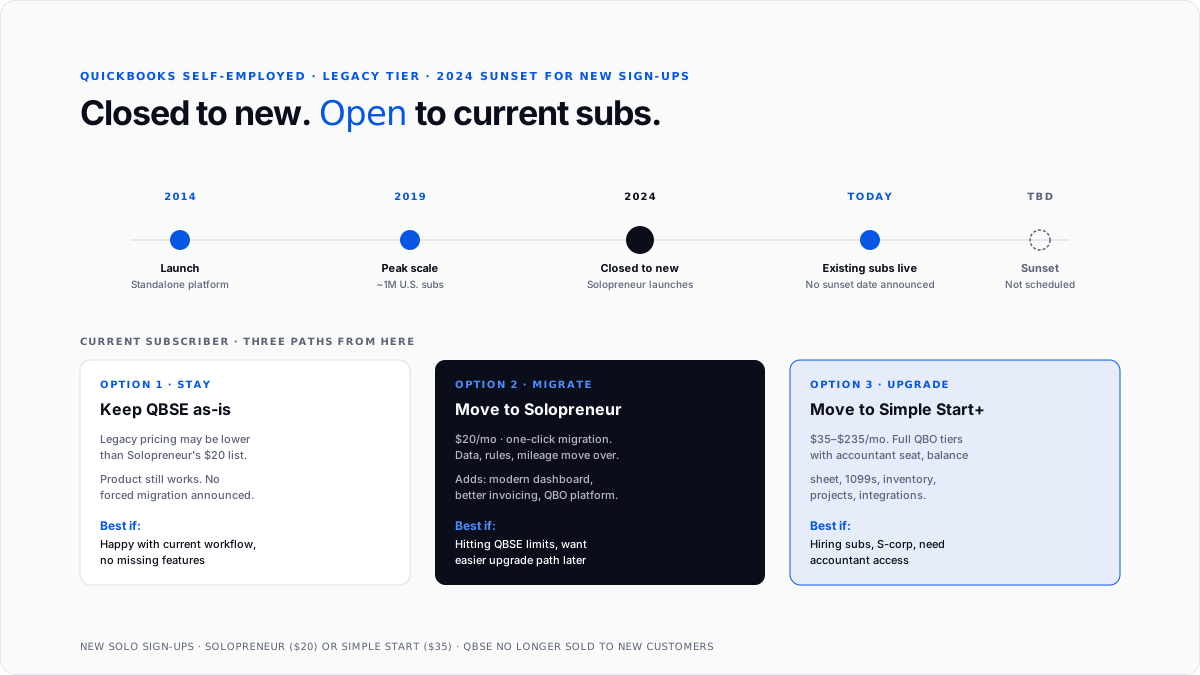
QuickBooks Self-Employed is Intuit's legacy tier for one-person businesses filing. Schedule C. Roughly a million U.S. subscribers ran their bookkeeping through it during its peak. Intuit stopped taking new self-employed sign-ups in 2024. Existing subscribers can keep their plans, but the product is no longer sold to new customers.
This guide is for two audiences: current QBSE subscribers deciding whether to stay or migrate and new solo owners wondering what to use instead.
What was QuickBooks Self-Employed built for?
QBSE served a Schedule C filer who didn't want to think about accounting. No chart of accounts to configure, no journal entries to post, no balance sheet to interpret. What the tier offered was a categorized transaction feed, mileage tracking, and a running estimate of quarterly federal tax liability.
The core loop was simple. You linked a bank account, QBSE imported transactions, you swiped each business or personal, and confirmed categories. At quarter-end you got a federal estimated tax number. At year-end you got a Schedule C-shaped tax package that flowed into TurboTax.
For the broader QuickBooks chart-of-accounts structure QBSE intentionally hid, see QuickBooks chart of accounts.
Who used QuickBooks Self-Employed?
The reader profile was consistent. Freelance designers, writers, and consultants. Ride-share and delivery gig workers. Etsy and eBay sellers below multi-state nexus thresholds. Coaches, tutors, and course creators. Real estate agents operating as sole proprietors. Handymen, cleaners, and single-vehicle contractors.
What they shared was a tax reality: income lands on Schedule C, self-employment tax kicks in at 15.3%, and estimated tax payments come due four times a year.
QBSE explicitly wasn't a fit for anyone with an employee on payroll, a co-owner, real inventory, multi-state sales tax, or an S-corp election.
What was inside the product?
Automatic transaction import. Bank, credit card, PayPal, and Stripe feeds imported nightly.
Categorization rules. QBSE learned from your swipes.
Mileage tracking. Native iOS and Android apps tracked GPS in the background. Trips multiplied by the current IRS mileage rate.
Business and personal separation. Every transaction defaulted to personal until marked business.
Schedule C-aligned categories. Categories mapped directly to Schedule C lines.
Quarterly estimated tax estimator. Federal only, based on year-to-date income and expenses.
Year-end tax summary and TurboTax integration. One-click push into TurboTax Self-Employed.
Invoicing. Added partway through the product life. Simpler than QBO invoicing.
Simplified home office deduction support. For both methods, see home office deduction.
What did QuickBooks Self-Employed deliberately not do?
No double-entry bookkeeping. No balance sheet, no general ledger, no journal entries.
No accountant login. QBSE had no separate seat for a bookkeeper or CPA.
No sales tax by jurisdiction. No calculation or filing.
No inventory. No SKU tracking or per-item COGS.
No 1099 preparation. For the year-end filing basics, see 1099-NEC filing deadline.
No payroll. Payroll is only stacked on Simple Start or higher, not QBSE.
Cash basis only. No accrual option.
No multi-currency. Cross-border freelancers with foreign clients ran into this constantly.
Why did Intuit stop selling QBSE to new customers?
The product hit a strategic dead end. Intuit maintained two separate accounting platforms-QBSE on its own codebase and QuickBooks Online covering everything above it. Maintaining two products for the same audience doubled the engineering surface and created friction when a QBSE user hit the tier ceiling.
Solopreneur is Intuit's consolidation move. It puts the solo tier on the QuickBooks Online platform, keeps the tax-focused workflow QBSE users depended on, and makes upgrades to larger QBO tiers a simple in-place switch instead of a full migration.
How does QBSE compare to a solo entrepreneur?
Same across both. Mileage tracking, Schedule C mapping, business-versus-personal separation, quarterly estimated tax, TurboTax integration, cash basis, one user, no accountant seat, no sales tax, no inventory, no 1099s, no balance sheet.
Solopreneur adds. Cleaner dashboard, better invoicing (unlimited with QuickBooks Payments), improved reports, native QBO mobile integration, and in-place upgrade path to Simple Start / Essentials / Plus / Advanced without data migration.
Pricing. Both list at $20/month. Grandfathered QBSE plans at lower prices do not carry over to Solopreneur.
If you're happy on QBSE and don't need better invoicing, no urgency to migrate. If you're bumping into QBSE limits, Solopreneur is a strict upgrade at the same price.
When should you skip both QBSE and Solopreneur?
You're incorporating. LLC with S-corp election or C-corp needs payroll, distributions vs. salary, and a real balance sheet. See how to incorporate.
You're hiring subcontractors. Any real 1099 volume needs Simple Start ($35) or higher. See difference between W2 and 1099.
Your accountant needs access. Accountant seat starts at Simple Start.
You're producing financials for a lender. Banks want balance sheets. See how to read a balance sheet.
You have real inventory. SKU-level tracking needs QBO Plus.
You've crossed economic nexus in a second state. Multi-state sales tax needs Simple Start's sales tax module.
What does a typical monthly workflow look like?
Daily. 30-60 seconds to swipe new transactions, accept auto-categories, GPS logs mileage.
Weekly. 5 minutes to review the inbox and send a few invoices.
Monthly. 10 minutes to look at profit and year-to-date estimated tax.
Quarterly. 15 minutes to review the estimated tax number and pay through IRS Direct Pay.
Yearly. 1-2 hours to download the tax package and hand it to a CPA or push through TurboTax.
Total year of bookkeeping in 10-15 hours. If you're spending more, the tier is undersized.
What should current QBSE subscribers do now?
Three paths.
Stay on QBSE. Intuit hasn't announced a sunset date. The product still works. If you're happy, keep going.
Migrate to solopreneur. One-click migration. Data, rules, mileage log, and connected accounts move over. Pricing stays the same. Visible change: better invoicing and modernized dashboard.
Move to a higher QBO tier. If you've been bumping into QBSE limits, use the moment to upgrade to Simple Start ($35), Essentials ($65), or Plus ($99). All three include an accountant seat and produce a real balance sheet. For deduction basics that flow through every category, see how to write off business expenses.
What should new solo owners use instead?
Default: QuickBooks Solopreneur ($20). Same reader profile, same price, better platform.
Alternative: Simple Start ($35). If any of the QBSE-ceiling triggers apply, skip Solopreneur and start at Simple Start.
Free options. Wave (ad-supported, cash-basis). Zoho Books (free tier under $50k revenue). Manager.io (free desktop).
AI-first accounting. Products like Finlens take a different structural approach: categorize automatically, keep books accrual-aware, and produce balance sheets and P&L without the owner touching a chart of accounts. See best AI bookkeeping apps for small businesses in 2026 and AI vs DIY accounting.
How does QBSE handle year-end tax filing?
What it produces. Gross receipts, category totals per Schedule C line, mileage deduction, home office simplified deduction, and net Schedule C profit.
Where it hands off. One-click push into TurboTax Self-Employed. Owners can also print the tax package as a PDF for a CPA.
What it doesn't do. State income tax, state estimated payments, self-employment tax calculation (that flows through Schedule SE), or QBI deduction calculation (that flows through Form 8995).
Conclusion
QuickBooks Self-Employed is the legacy one-person tier Intuit no longer sells to new customers. Current subscribers can keep the product. New solo owners are steered to Solopreneur ($20/mo, same workflow, better platform). Both list at $20 per month.
If you're on QBSE and happy, stay. If you're on QBSE and hitting limits, migrate to Solopreneur or move up to Simple Start. If you're new, skip QBSE and start on Solopreneur or Simple Start if any ceiling triggers already apply.
FAQs
Is QuickBooks Self-Employed being discontinued?
Intuit stopped taking new self-employed sign-ups in 2024. Existing subscriptions continue, and no sunset date has been announced. New solo owners are directed to QuickBooks Solopreneur, the replacement on the QuickBooks Online platform.
How much does QuickBooks Self-Employed cost?
$20 per month for the standard plan. Higher legacy bundles (Tax Bundle, Live Tax Bundle) included TurboTax at $30 and $40 per month. Grandfathered pricing may be lower for early subscribers.
Can I still buy QuickBooks Self-Employed?
No, direct sign-ups have been closed since 2024. New solo owners looking for the same workflow should sign up for QuickBooks Solopreneur.
What's the difference between QuickBooks Self-Employed and Solopreneur?
Same core workflow (mileage, categorization, quarterly estimated tax, Schedule C tax package, TurboTax handoff). Solopreneur adds a modernized dashboard, better invoicing, and a native in-place upgrade path to Simple Start and above. Both are $20 per month.
Can I move from QuickBooks Self-Employed to QuickBooks Online?
Yes. Migration to any QBO tier is supported. Current-year transactions transfer cleanly. Historical entries and custom rules may need reshuffling. Migrate at year-end for the smoothest cut.
Does QuickBooks Self-Employed do 1099s?
No. Solo owners paying subcontractors $600+ in a year need to upgrade to Simple Start or use a standalone 1099 service.
Can I use QuickBooks Self-Employed for an LLC?
Yes for single-member LLCs filing Schedule C by default. No for LLCs that elected S-corp taxation, because QBSE cannot handle payroll, distributions vs. salary, or S-corp balance sheet requirements.
Does QuickBooks Self-Employed integrate with TurboTax?
Yes. The year-end tax package flows directly into TurboTax Self-Employed with a one-click push, which remains in place for current subscribers.

