
The QuickBooks guide to inventory adjustments, shrinkage, and write-downs (2026)


This is a working reference for founders and controllers whose physical count does not agree with QuickBooks. Every technique is sourced to Intuit's own documentation, IRS guidance and FASB standards, or a real thread on the QuickBooks Community. Numbers cited from user reports are flagged as anecdotal rather than benchmarks.
The problem this guide addresses
An inventory adjustment is two decisions wearing one button. The first is the quantity, which is arithmetic. The second is the offset account, which is accounting. QuickBooks asks for both in the same dialog and defaults the second, and the default is what quietly moves through the profit and loss for the rest of the year.
Failure mode one: the adjustment lands on revenue. A QuickBooks Enterprise user on thread 83180 went through a warehouse move that required adjustments in both directions. Damaged stock was written out. Stock that had never been properly received or counted was written in.
They routed both through Cost of Goods Sold, and the found-inventory side appeared as a credit on sales, making profit look better than it actually was. Fifteen replies, 362 views, answered by an Intuit moderator and marked solved. The structural point is that a positive adjustment offset to a revenue-adjacent account does not just misstate cost, it manufactures margin.
Failure mode two: the default account nobody chose. QuickBooks Online creates an Inventory Shrinkage account automatically when the first adjustment is saved, and every subsequent adjustment defaults to it. A user asking whether that default can be changed in settings was told it cannot.
The account can be overridden on each individual adjustment, but there is no setting that changes what the next one proposes.
The consequence is a single account absorbing four economically different events: theft, physical damage, obsolescence, and count error. All four are legitimate charges. Only one of them says anything about the warehouse.
The adjustment identity
Every inventory adjustment obeys one equation, and the whole question is which account takes the other side.
Inventory Asset (Dr or Cr) = Offset account (Cr or Dr)
Quantity adjustment → value = units × current average cost
Value adjustment → quantity unchanged, carrying value moves
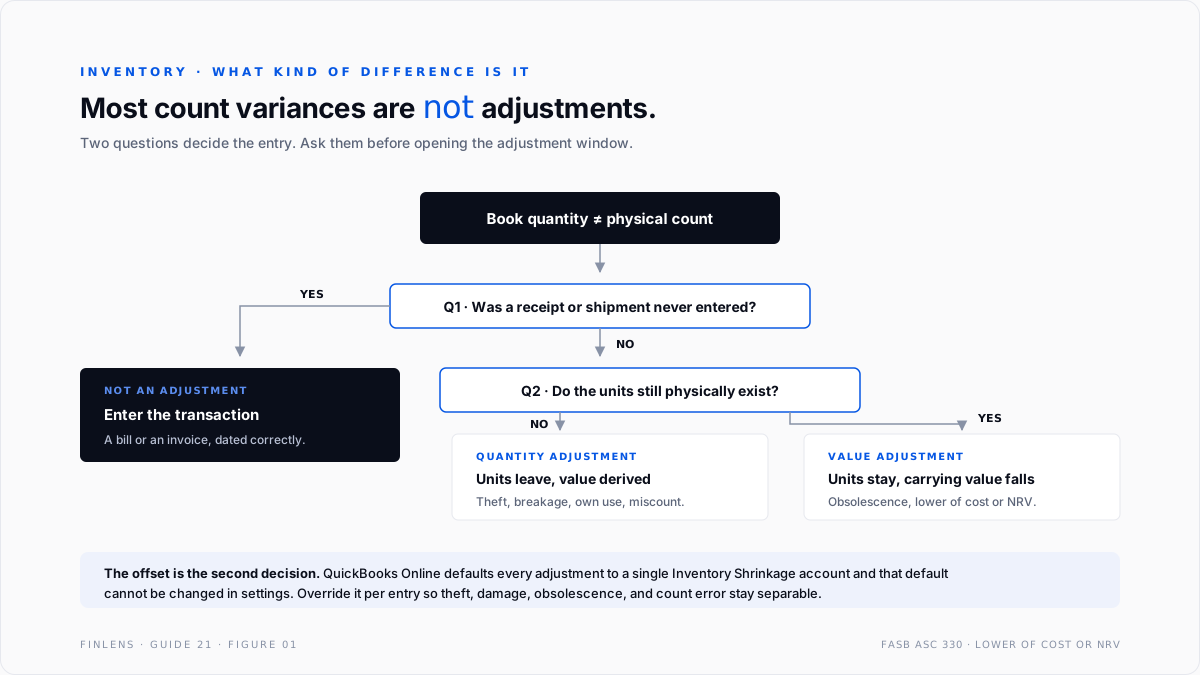
QuickBooks offers two distinct operations and conflating them is common.
A quantity adjustment changes units on hand. The dollar amount is derived, at the item's current average cost. Use it when the count is wrong: theft, breakage, miscount, goods consumed internally.
A value adjustment leaves units alone and changes what they are carried at. Use it when the units still exist but are worth less: obsolescence, market decline, damage that reduces saleability without removing the item.
The distinction matters because FASB ASC 330 requires inventory to be measured at the lower of cost and net realisable value. A write-down for obsolescence is a value adjustment, not a quantity adjustment, and treating it as a quantity adjustment removes units the business still physically holds.
The account setup
One offset account is not enough. Five accounts separate four economically different events, and the separation is what makes the numbers readable.
All four offsets are cost-of-sales accounts, so gross margin absorbs them correctly. None of them is a revenue account, and none is the ordinary Cost of Goods Sold account used at the point of sale. Keeping them out of ordinary COGS is what preserves a clean unit economic margin.
Inventory Count Correction earns its place. When stock is found rather than lost, the entry is a correction of a prior error, not a gain. Netting it into shrinkage hides both events. A month showing $4,000 of shrinkage and $3,800 of found stock is a counting problem. A month showing $200 of net shrinkage looks like a well-run warehouse.
The ordinary COGS mechanics that these accounts sit alongside are covered in the Cost of Goods Sold recognition guide, and the valuation method that sets the per-unit figure is covered in the FIFO versus average cost guide.
The count-to-adjustment workflow
Five steps, in order. Skipping the first two is what turns a count into an argument.
Step one, freeze the cutoff. Stop receiving and shipping, or record the exact cutoff document numbers. A count taken while goods move produces a variance that is really a timing difference.
Step two, run the Inventory Valuation Summary as of the cutoff. This is the book figure the count is being compared to. Taking the count first and looking up the book figure afterwards invites the book figure to be adjusted to fit.
Step three, count blind. Counters should not see expected quantities. A count sheet pre-populated with book quantities is a confirmation exercise.
Step four, investigate before adjusting. Every variance above a set threshold gets a cause before it gets an entry. The causes are finite: receiving not entered, shipment not invoiced, unit-of-measure mismatch, theft, damage, or a genuine miscount. Only the last three are adjustments. The first three are missing transactions and should be entered as transactions.
Step five, adjust with the correct offset and a memo. Each adjustment carries the account matching its cause and a memo stating that cause. Intuit's own guidance on adjusting inventory pairs the adjustment with a documenting note for exactly this reason.
The order is the control. Adjusting first and investigating later converts every variance into shrinkage by default, which is how a file ends up with a shrinkage account that means nothing.
The failure-mode catalog
Six diagnoses cover most adjustment work.
1. Adjustments credited to a sales account. Symptom: revenue rises in a month with no corresponding sales activity, and gross margin improves. Cause: the offset was pointed at a revenue or contra-revenue account. Fix: recode to a cost-of-sales offset. This is the thread 83180 case, and it is the most damaging version because it flatters the top line.
2. Everything in one Inventory Shrinkage account. Symptom: a single large balance with no narrative. Cause: the QuickBooks Online default, which cannot be changed in settings. Fix: override the account on each adjustment and split the history by cause where the memos permit.
3. A write-down booked as a quantity adjustment. Symptom: units on hand no longer match the physical shelf. Cause: obsolescence treated as disappearance. Fix: reverse the quantity change and book a value adjustment instead, so the units stay and the carrying value falls.
4. The variance was a missing transaction. Symptom: the same item shows a variance every count, in the same direction. Cause: receipts or shipments not entered, or a unit-of-measure mismatch where a case is received and singles are sold. Fix: enter the missing transactions and correct the unit definition. An adjustment here buries a process problem.
5. Adjustment dated after a negative quantity period. Symptom: adjusting quantity back to positive does not fix the margin history. Cause: each historical negative-quantity occurrence generated its own estimated cost and its own catch-up. Intuit's guidance on fixing negative inventory is explicit that every occurrence must be eliminated, not just the current balance.
Fix: work the occurrences chronologically rather than adjusting the endpoint.
6. Inventory adjusted for internal consumption. Symptom: goods used by the business itself vanish into shrinkage. Cause: no account exists for own-use. A thread on tracking damaged inventory and company-use items covers the split. Fix: route own-use to the operating expense it actually represents, such as marketing samples or repairs and maintenance, rather than to cost of sales.
Worked example
A distributor counts at 31 March. Book quantity on hand is 4,200 units at an average cost of $8.50, so the Inventory Asset balance is $35,700.
The physical count is 3,900 units. The gross variance is 300 units, $2,550 at average cost. Investigation resolves it into four causes.
The 120-unit receipt is not an adjustment. Entering the bill raises book quantity to 4,320 and the true variance becomes 420 units.
Of the remaining 420 units, 320 are genuine economic loss of $2,720 and 100 are a bookkeeping correction of $850. The count also reveals 260 units of a discontinued line still carried at $8.50 that will only clear at $3.00, requiring a value adjustment of $1,430 under lower of cost or net realisable value.
Closing Inventory Asset walks as follows. Opening $35,700 for 4,200 units. The missing receipt adds $1,020 and 120 units, giving $36,720 across 4,320 units. Quantity adjustments remove 420 units at $8.50, which is $3,570, leaving $33,150 across 3,900 units. The obsolescence write-down removes a further $1,430.
Closing Inventory Asset is $31,720. It proves out from the other direction too: 3,640 units still at $8.50 is $30,940, plus 260 discontinued units now carried at $3.00 for $780.
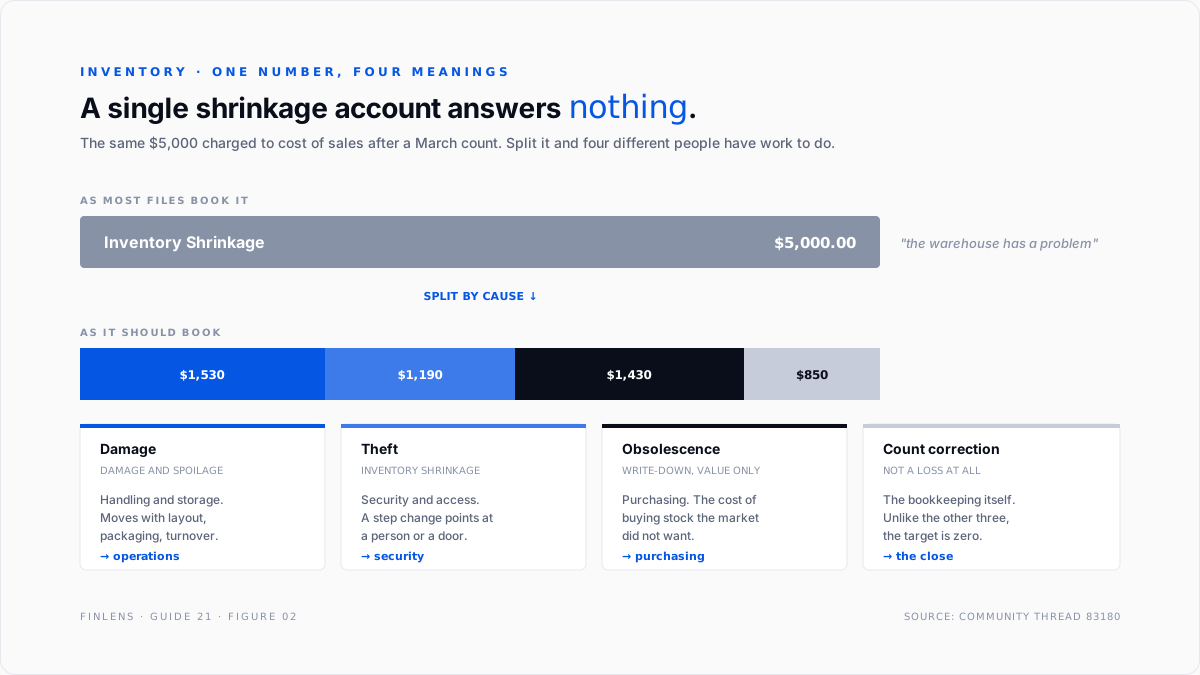
One number, four meanings. Booked as a single $5,000 shrinkage entry the period looks like a warehouse control problem. Split properly, $1,190 is a security question, $1,530 is a handling question, $1,430 is a purchasing question, and $850 is not a loss at all.
What the adjustment rate says
A single period's adjustment total means little on its own. The ratio that carries information is total adjustments as a percentage of cost of sales, tracked across periods and split by cause.
Shrinkage as a share of cost of sales is the security and access measure. It should be small and stable. A step change points at a person, a door, or a process that changed, and it is worth investigating before it is worth adjusting.
Damage as a share of cost of sales is a handling and storage measure. It moves with warehouse layout, packaging, and staff turnover rather than with theft, which is why merging it into shrinkage destroys the signal in both.
Obsolescence as a share of cost of sales is a purchasing measure. It is the cost of having bought stock the market did not want, and it belongs in conversations about order quantities rather than in conversations about warehouse discipline.
Count corrections as a share of cost of sales measures the bookkeeping itself. Unlike the other three, the correct target is zero, and a persistent balance means transactions are not being entered as they happen.
Tracking the four separately turns the count from an annual reconciliation chore into a diagnostic. Tracking them as one number turns four different questions into one shrug. That is the practical argument for the account structure above, and it is why the QuickBooks Online default of a single Inventory Shrinkage account should be overridden rather than accepted.
Where in-QBO adjustments stop scaling
Threshold one: cycle counting rather than annual counting. A single annual count can be worked by hand. Counting a rotating subset weekly means dozens of small adjustments a month, and QuickBooks offers no variance-threshold workflow that routes small differences automatically and escalates large ones.
Threshold two: obsolescence reserves rather than write-downs. A direct write-down hits the period it is taken. A reserve estimates future obsolescence and releases as it materialises. QuickBooks has no reserve mechanism for inventory, so reserve accounting has to be maintained as manual journal entries against a contra-asset account.
Threshold three: more than one location. Counting by location means the variance has to be attributable to a location before it can be investigated. QuickBooks Online tracks quantity by location only on Advanced, and the adjustment interface does not enforce location on the entry.
The Finlens approach
Finlens reads the inventory and adjustment history already in QuickBooks and treats an adjustment as an explained event rather than a plug.
1. Offset-account auditing. Every inventory adjustment is checked against its offset. Any adjustment whose other side lands in a revenue account, a contra-revenue account, or ordinary Cost of Goods Sold is raised immediately, because those three produce a margin that reads better than the business performed.
2. Cause attribution and un-netting. Adjustments are grouped by direction and by memo pattern so that found stock and lost stock are reported separately rather than as a net figure. A month with large offsetting adjustments is surfaced as a counting problem even when the net is small.
3. Repeat-variance detection. Items that show a variance in the same direction across consecutive counts are flagged as probable process defects, since a recurring one-sided variance is almost never theft and almost always a missing transaction or a unit-of-measure mismatch.
Four supporting capabilities sit around those three.
- Quantity-versus-value classification, flagging an obsolescence write-down booked as a quantity change.
- Negative-quantity occurrence tracking, listing every historical occurrence rather than the current balance.
- Valuation-to-balance-sheet tie, including the active-versus-inactive item gap that Intuit documents as the usual cause of disagreement.
- A cross-file view for firms, ranking clients by adjustment volume as a share of cost of sales.
Verification checklist
Eight lines to run after any count and before closing the period.
- Every adjustment in the period has an offset account that is a cost-of-sales account, never revenue and never ordinary COGS.
- Every adjustment carries a memo stating the cause.
- Found stock and lost stock are reported separately, not netted.
- Variances traced to missing receipts or uninvoiced shipments were entered as transactions, not as adjustments.
- Obsolescence was booked as a value adjustment, leaving quantity intact.
- No item shows a same-direction variance across two consecutive counts without a documented process cause.
- The Inventory Valuation Summary ties to the Inventory Asset balance, with the active-versus-inactive item difference reconciled.
- Total adjustments for the period are stated as a percentage of cost of sales and compared to the prior period.
FAQ
Can the default inventory adjustment account be changed?
No. QuickBooks Online creates Inventory Shrinkage on the first adjustment and proposes it every time after. The account can be overridden on each individual adjustment, but there is no setting that changes the default.
Should inventory adjustments go to Cost of Goods Sold?
They should go to cost-of-sales accounts, but not to the ordinary COGS account used at the point of sale. Separate offsets keep unit economic margin readable and stop a warehouse event from looking like a cost-of-goods movement.
What is the difference between a quantity and a value adjustment?
A quantity adjustment changes units on hand and derives the dollar amount from average cost. A value adjustment leaves units alone and changes what they are carried at. Obsolescence is a value adjustment.
Why did an inventory adjustment increase revenue?
Because the offset was pointed at a revenue or contra-revenue account. This is the error on thread 83180, and it inflates both the top line and gross margin.
How should found inventory be recorded?
As a correction, offset to a count-correction account, not as a negative shrinkage and not as income. Finding stock means a prior entry was wrong, which is a different fact from not losing stock.
Does writing inventory down require a physical count?
No. A write-down under lower of cost or net realisable value is driven by saleable value, not by quantity. The units are still there and still counted. What changed is what they are worth.

