
The QuickBooks guide to Cost of Goods Sold recognition and matching (2026)


This is a working reference for founders and controllers whose gross margin in QuickBooks does not match the margin they actually earn. Every technique is sourced to Intuit's own documentation, IRS guidance and FASB standards, or a real thread on the QuickBooks Community. Numbers cited from user reports are flagged as anecdotal rather than benchmarks.
The problem this guide addresses
Cost of Goods Sold is a timing account, not a spending account. It does not record what was paid for inventory. It records the cost of the specific units that left the building, at the moment revenue for those units was recognized. Almost every wrong margin in QuickBooks traces to a break in that timing.
Failure mode one: COGS that never posts. Intuit's documentation on inventory assets and Cost of Goods Sold tracking is direct about the trigger. COGS moves only when an inventory item is sold on an invoice or a sales receipt.
An item created without a cost produces a COGS entry of zero on every sale, and the profit and loss shows full revenue against no cost. The margin reads as 100 percent and the balance sheet carries inventory that never depletes.
Failure mode two: COGS that posts on the wrong document. A QBO user on thread 83001 purchases inventory in bulk through purchase orders, then applies materials to a project by converting an estimate to an invoice with a 100 percent markdown, because the client is billed for installation rather than for each item.
After a QuickBooks update, project COGS stopped appearing as an actual cost and appeared as an estimated cost instead, and prior project data was removed retroactively. The thread carries three Intuit support case numbers and nine replies, and is marked solved.
It documents the more general point: the document that moves inventory is the document that moves COGS, and changing the document changes the accounting.
The COGS identity
Two equations govern the account, and every misstatement violates one of them.
PERIOD IDENTITY
COGS = Opening inventory + Purchases - Closing inventory
TRANSACTION IDENTITY
On each sale of an inventory item:
Dr Cost of Goods Sold (units sold x current average cost)
Cr Inventory Asset (same amount)
The transaction identity is the one QuickBooks enforces automatically and the one most often broken by configuration. QuickBooks values inventory on a weighted average, so the amount debited to COGS on a sale is units sold multiplied by the average cost of everything on hand at that moment.
Buying at a new price changes the average for every future sale, not for past ones.
Three consequences follow.
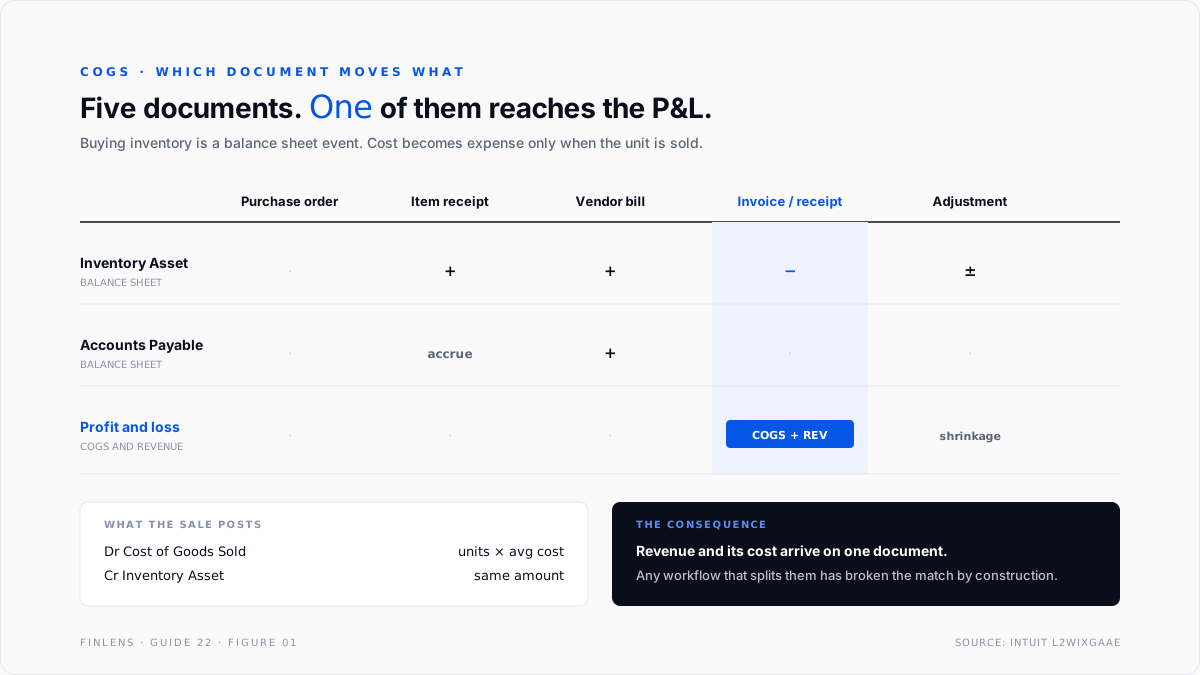
Purchasing does not create COGS. A bill for inventory debits the Inventory Asset account. Nothing reaches the profit and loss until a unit is sold. An owner who sees a large inventory purchase and no expense is seeing correct accounting.
Service costs are not COGS by default. Labour, subcontractors, and hosting are operating expenses in QuickBooks unless they are deliberately mapped to a cost-of-sales account. The choice is a presentation decision about what belongs above the gross margin line.
The test worth applying is whether the cost would disappear if the sale did not happen. Hosting for a delivered SaaS subscription, a subcontractor on a billed engagement, and card processing on a completed order all pass that test. Salaried engineering, rent, and company-wide software licences do not.
Consistency matters more than where the boundary is drawn, because a mid-year reclassification makes gross margin uncomparable across periods.
Freight-in is inventory, freight-out is expense. Costs of getting goods in are part of the inventory basis under FASB ASC 330. Costs of getting goods to the customer are selling expense.
Booking both to a single Shipping account understates inventory, overstates current-period cost, and makes the error grow with the size of the inbound shipment rather than with sales.
The account setup
Seven chart of accounts entries carry a clean gross margin.
Purchase Price Variance deserves its own line rather than being absorbed into COGS. It is the account that makes the negative-inventory problem visible, and a balance in it is a signal rather than a cost.
Inventory Clearing matters wherever goods arrive before the vendor bill does. Receiving without a bill creates an accrued liability that should not sit in accounts payable, and the workflow around it is covered in the accounts payable, vendor bills and 1099 guide.
Which document moves which account
Five documents touch inventory in QuickBooks, and only one of them touches the profit and loss. Knowing which is which resolves most arguments about where a cost went.
A purchase order is a commitment, not a transaction. Nothing posts until goods are received or a bill is entered, which is why an open purchase order never explains a margin movement.
The single row that matters is the fourth. Revenue and its matched cost arrive together on the same document, which is the matching principle expressed as software behaviour. Any workflow that recognizes revenue on one document and moves inventory on another has broken the match by construction.
That is the general form of the project-costing problem on thread 83001. Using an invoice with a full markdown to move materials onto a project means the document carrying the cost is not the document carrying the revenue, and the product's behaviour on that pattern is not guaranteed across releases.
The practical rule. If a business needs cost to land on a project rather than on a customer sale, the mechanism is a billable expense or a job-costed item on the original bill, not a zero-value invoice used as a transfer device.
Negative inventory, the expensive failure
The single most damaging COGS defect in QuickBooks comes from selling a quantity the file does not have.
When an inventory item is sold into a negative quantity on hand, QuickBooks has no actual cost to post, so it estimates one from the item's cost history and debits COGS with the estimate. When the corresponding purchase is later entered at a different price, QuickBooks posts a catch-up adjustment to reconcile the estimate to the real cost.
Two properties make this hard to find.
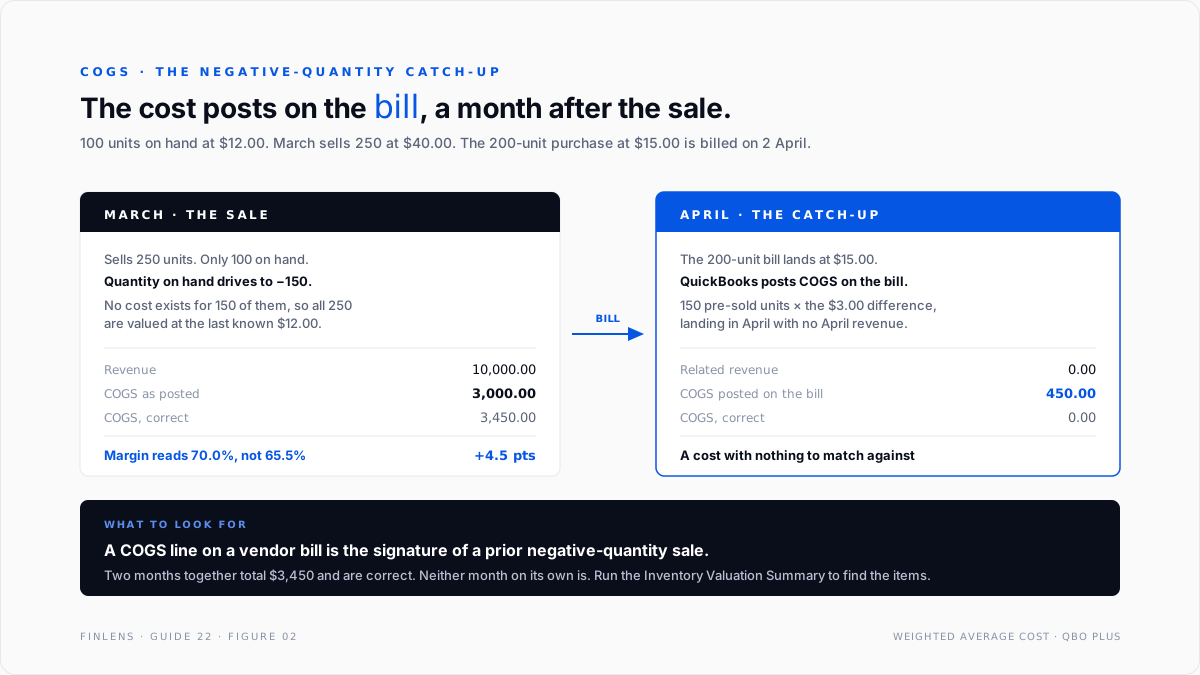
The catch-up posts on the bill, not on the sale. COGS appears on a purchase document, which is the one place nobody looks for it. A vendor bill carrying a COGS line is the signature of a prior negative-quantity sale.
The adjustment lands in the period the bill was entered. The sale was last month, the correction is this month, and neither period shows correct margin. Closing the earlier period does not prevent the later entry.
The diagnostic is the Inventory Valuation Summary, which reports quantity and average cost per item and supports the Inventory Asset balance on the balance sheet. One caveat is documented by Intuit directly: the valuation report shows only active items while the balance sheet includes inactive ones, which is the usual explanation when the two disagree.
Intuit's guidance on fixing negative inventory carries the constraint that matters most for cleanup. The cause is entering sales before the corresponding purchases, and the remedy is to date the bills before the invoices for each affected item.
Adjusting the current quantity on hand back to positive is not sufficient. Every historical occurrence of a negative quantity has to be eliminated, because each one generated its own estimate and its own catch-up. A file that looks clean today can still carry a year of distorted monthly margins.
Any item showing a negative quantity, or an average cost that does not resemble recent purchase prices, is a candidate.
Threads on COGS issues in the profit and loss statement and on COGS amounts being wrong both resolve to this mechanism.
The failure-mode catalog
Six diagnoses cover most COGS work.
1. COGS is zero on a product line. Cause: the item was created without a cost, or was created as a non-inventory item. Fix: set the cost and confirm the item type. Non-inventory items never touch Inventory Asset or COGS regardless of what is entered.
2. COGS appears on a vendor bill. Cause: a catch-up adjustment from a prior negative-quantity sale. Fix: correct the quantity history, then decide whether the variance belongs in the original period.
3. Margin swings violently month to month on stable pricing. Cause: average cost drifting because purchases at very different prices are averaging together, or because negative quantities are forcing estimates. Fix: run the Inventory Valuation Summary and compare average cost to the trailing purchase-weighted cost per item.
4. COGS booked at purchase. Cause: inventory purchases coded directly to the COGS account on the bill instead of to Inventory Asset. Fix: recode to Inventory Asset. This is the most common error in a file that tracks inventory in a spreadsheet and treats QuickBooks as a cash record.
5. Inventory rises while sales rise. Cause: sales recorded against non-inventory items, so units never deplete. Fix: convert the items and restate quantities as of a chosen date.
6. COGS is wrong after a migration. Symptom: the account is materially off immediately following a data move. A user reported exactly this on a migration thread. Cause: opening quantities and opening average costs did not carry across, so the first sales in the new file valued against a wrong basis. Fix: restate opening inventory by item, not in total.
Worked example
A retailer sells one product. Opening inventory is 100 units at $12.00, so $1,200.
During March: buys 200 units at $15.00 for $3,000, and sells 250 units at $40.00 for $10,000 of revenue.
Weighted average. Total cost available is $1,200 plus $3,000, which is $4,200 across 300 units, so the average cost is $14.00.
The period identity checks: $1,200 opening plus $3,000 purchases minus $700 closing equals $3,500 of COGS.
Now break it. Move the 200-unit purchase so the bill is entered on 2 April rather than in March, while the March sales stay where they are. On-hand quantity in March is 100, the sale is 250, and quantity on hand drives to negative 150.
QuickBooks has no cost for those 150 units, so it values all 250 at the last known cost of $12.00. March COGS posts at $3,000. When the April bill lands at $15.00 per unit, QuickBooks posts a catch-up for the 150 pre-sold units at the $3.00 difference, which is $450 into April COGS against no April revenue.
The correct March figure is 100 units at $12.00 plus 150 units at the $15.00 actually paid, which is $3,450. Neither month is right, the two months together are, and no single period's margin can be relied on.
Where in-QBO COGS stops scaling
Threshold one: FIFO is required. QuickBooks Online supports weighted average on Plus and FIFO on Advanced. A business whose cost basis moves sharply, or one with a tax position that depends on flow assumption, outgrows average cost. The method comparison sits in the FIFO versus average cost guide.
Threshold two: standard costing or a bill of materials. Manufacturers need a cost per assembly that decomposes into components with their own variances. QuickBooks assemblies carry a single rolled cost and no variance accounts.
Threshold three: landed cost across a shipment. Freight, duty, brokerage, and insurance arrive on separate vendor bills days or weeks after the goods. QuickBooks offers no native mechanism to allocate those bills back across the units in the shipment, so the inventory basis is understated and the costs land as period expense unless allocated by hand.
Threshold four: more than one fulfilment channel. Selling the same SKU through a website, a marketplace, and wholesale means three revenue recognition paths into one average cost pool. Channel margin stops being computable inside the file. The marketplace side of that is covered in the Amazon FBA reconciliation guide and the Shopify integration guide.
The Finlens approach
Finlens reads the inventory and sales data already in QuickBooks and treats COGS as a continuously tested relationship rather than a month-end surprise.
1. Negative-quantity detection at the point of sale. Sales that would drive quantity on hand below zero are flagged when they post, with the item and the estimated cost QuickBooks will use, so the purchase can be entered before the estimate hardens into a period's margin.
2. Catch-up variance isolation. COGS lines appearing on purchase documents are separated from COGS posted at sale and attributed to the originating sale, so the variance is visible as a variance rather than absorbed into cost.
3. Average cost drift monitoring. Each item's carrying average cost is compared to its trailing purchase-weighted cost. A drift beyond a set threshold is raised for review, which is the earliest reliable signal that quantities or costs have gone wrong.
Four supporting capabilities sit around those three.
- A period-identity check, confirming opening inventory plus purchases minus closing inventory agrees to COGS for the period.
- Item-type auditing, flagging items sold at volume that are configured as non-inventory and therefore never move COGS.
- Freight classification review, separating inbound freight from outbound shipping so gross margin is not diluted by delivery cost.
- Channel margin decomposition, reporting gross margin per sales channel against one shared cost pool.
Verification checklist
Eight lines to run before closing a period.
- No item on the Inventory Valuation Summary shows a negative quantity on hand.
- No vendor bill in the period carries a line coded to Cost of Goods Sold.
- Opening inventory plus purchases minus closing inventory equals COGS for the period.
- Every item sold during the period has a non-zero cost configured.
- Each item's average cost is within a defined tolerance of its trailing purchase-weighted cost.
- Inbound freight sits in the inventory basis or in a cost-of-sales account, and outbound shipping sits below gross margin.
- The Inventory Asset balance on the balance sheet agrees to the Inventory Valuation Summary total.
- Purchase Price Variance has been reviewed and its balance explained, not merely absorbed.
FAQ
Why is COGS zero when inventory is clearly selling?
Either the items are configured as non-inventory, which never touches COGS, or they were created without a cost. COGS moves only when an inventory item is sold on an invoice or a sales receipt.
Why is there a COGS line on a vendor bill?
It is a catch-up adjustment. A prior sale drove quantity negative, QuickBooks estimated the cost, and the bill reconciled the estimate to the real price.
Does buying inventory create an expense?
No. It debits Inventory Asset. The expense arrives when the unit is sold. This is the matching principle, and it is why a large purchase month can show no margin impact.
Should labour be in COGS?
Only if the presentation is meant to show it above the gross margin line, and only consistently. QuickBooks defaults service costs to operating expense. Moving them is a deliberate decision that changes reported gross margin without changing profit.
How does the average cost actually update?
Each purchase recomputes the average across total cost and total units on hand. Sales are then valued at that average until the next purchase. Past sales are never revalued.
Which report proves the balance?
The Inventory Valuation Summary. It reports quantity and average cost per item and should tie to the Inventory Asset balance on the balance sheet.

