
The Shopify to QuickBooks integration guide: A2X, Webgility, and the native connector (2026)


This is a working reference for Shopify sellers and firm bookkeepers connecting a Shopify store to QuickBooks Online. Every integration option, payout mechanic, and reconciliation failure mode is sourced to Intuit's own documentation, integration vendor pricing pages, or a real thread on the QuickBooks Community. Numbers cited from third-party pricing trackers are flagged as external and shift with promotions.
The problem this guide addresses
Two failure modes account for most Shopify-QBO integration incidents.
The first is the net-vs-gross deposit. Every Shopify Payments payout arrives net of processing fees, refunds, chargebacks, and adjustments. Books that categorise the net deposit as revenue understate gross sales and skip the Merchant Fees expense line entirely - margin math on the P&L stops working, and reconciling any single payout back to its underlying orders becomes hours of Excel work. The Community thread on QuickBooks' native Shopify integration recording sales as NET documents the pattern firsthand.
The second is integration tool selection. Intuit's native Shopify Connector is free and order-level. A2X is summary-level and starts at $29/month. Webgility handles multi-channel + Shopify at a similar price band. The three tools solve different problems and none of them is universally best - picking the wrong one produces either bloated QBO files (order-level at 500+ orders/month) or lost audit trail (summary-level when per-order records were actually needed).
The sections below cover Shopify Payments payout mechanics, the three integration paths in detail, per-order vs summary-level trade-offs, the sales-tax handling gaps, the eight recurring failure modes, and how to pick the right integration for the store's volume and audit requirements.
Shopify Payments payout mechanics
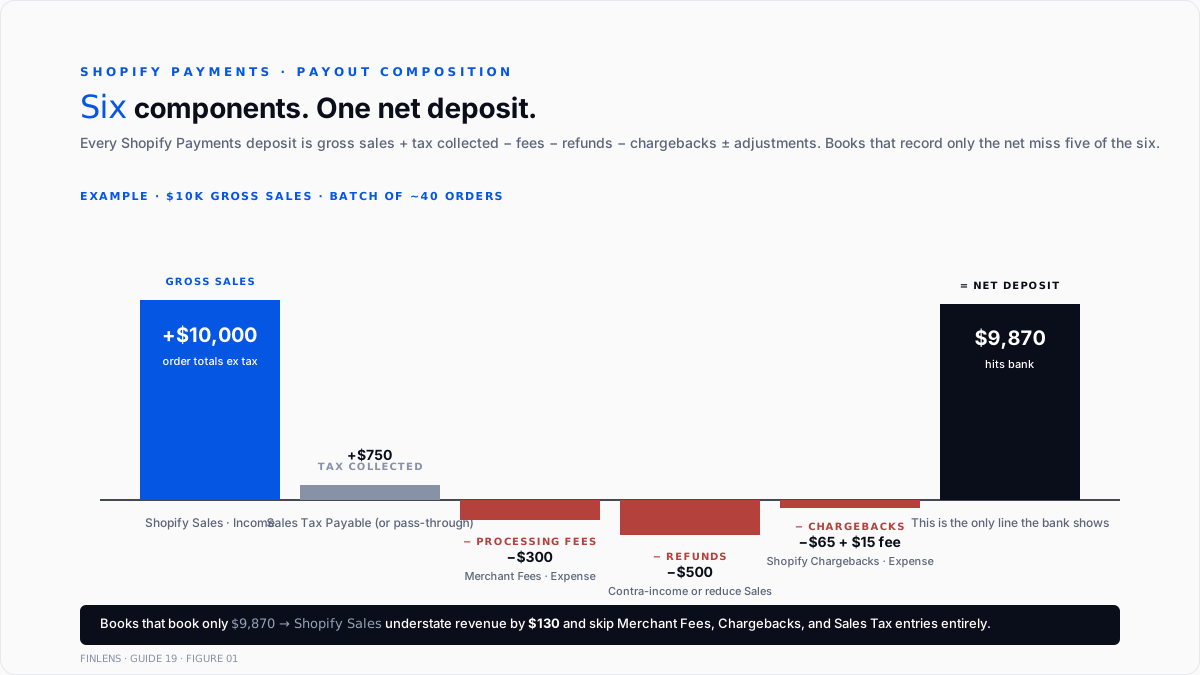
Every Shopify Payments deposit that arrives in the bank is the net of five components applied to a batch of orders since the last payout:
Gross sales. Sum of order totals for the payout period. Excludes tax collected (tax is a separate line).
Sales tax collected. Held by Shopify and either remitted by Shopify (in marketplace-facilitator states) or passed to the merchant (in non-facilitator states). Either way, this is not merchant revenue - it's a pass-through.
Processing fees. Shopify Payments charges 2.4–2.9% + $0.30 per transaction depending on the merchant's plan. Deducted from the payout before it lands.
Refunds. Any refunds issued during the payout period reduce the payout. If refund amount exceeds new sales, the payout can be zero (or Shopify pulls from the next payout).
Chargebacks + adjustments. Chargebacks pull the disputed amount plus a $15 dispute fee, per Webgility's Shopify chargeback reference. Wins refund the $15. Losses forfeit the disputed amount plus the fee.
The payout equation:
Net deposit = Gross sales + Tax collected − Processing fees − Refunds − Chargebacks − Dispute fees ± Adjustments
Books that record only the net deposit as revenue skip four of the components. Books that record only the gross sales without the fee split skip two. Correct treatment requires splitting the payout into every component.
The three integration paths
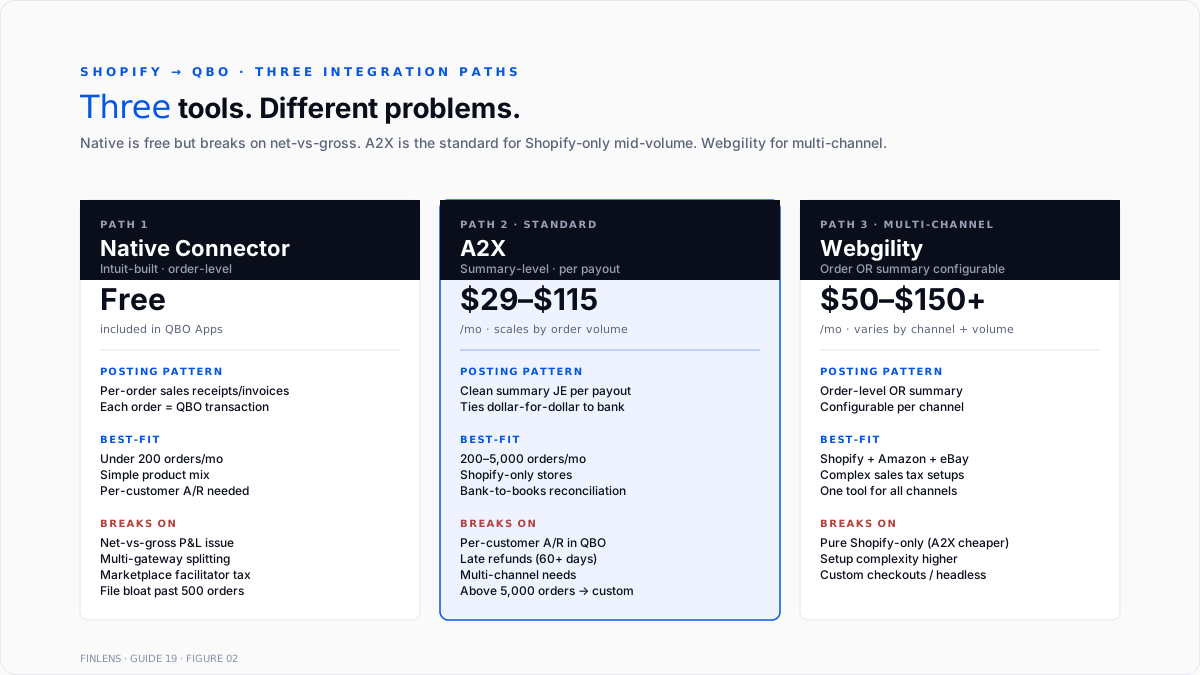
Three tools dominate the Shopify-to-QBO integration market. Each solves the sync differently.
Path 1 - Intuit's native Shopify Connector (free)
Intuit's Shopify Connector help article covers the free Intuit-built connector. Free, installed inside QBO's Apps marketplace.
How it works. Syncs orders, refunds, and payouts from Shopify to QBO as sales receipts or invoices at the order level. Every Shopify order creates a QBO transaction.
Where it works. Small-volume stores (<200 orders/month). Merchants who need per-customer records inside QBO for A/R follow-up. Stores using non-Shopify Payments processors (Stripe, PayPal, external card processors) where the payout side is handled separately.
Where it breaks. The recurring failure: P&L records sales as NET (post-fees) instead of GROSS, so the Merchant Fees expense line stays empty and revenue is understated. Chargeback handling is thin. Multi-gateway splitting fails. Marketplace Facilitator Tax split is inconsistent. QBO file bloats past ~500 orders/month - each order is a full transaction record.
Path 2 - A2X (summary-level, $29–$115/mo)
A2X is the standard for summary-level e-commerceecommerce accounting. Per A2X's pricing page:
Custom pricing above 10,000 orders/month.
How it works. A2X pulls each Shopify payout, breaks it into its components (gross sales, fees, refunds, taxes, gift cards, adjustments), and posts one clean summary journal entry per payout that ties dollar-for-dollar to the bank deposit. Per-order data lives in Shopify; QBO gets the aggregate.
Where it works. Mid-to-high volume Shopify stores (500+ orders/month). Merchants who don't need per-customer A/R records inside QBO. Books where reconciliation-to-the-cent between Shopify payouts and QBO deposits is the primary requirement.
Where it breaks. Per-customer records live only in Shopify. If QBO customer-level reporting is required for tax filings, credit decisions, or audit purposes, A2X's summary approach doesn't populate that. Refunds beyond 90 days can create timing mismatches.
Path 3 - Webgility (order-level or summary, multi-channel)
Webgility is built for merchants selling across multiple channels (Shopify + Amazon + eBay + Walmart) who need one integration handling all of them. Pricing tiers vary; entry starts around $50–$70/month.
How it works. Configurable between order-level posting (each Shopify order → QBO transaction) and batched/summary posting (like A2X). Handles sales tax compliance across channels. Bank-to-books matching layer.
Where it works. Multi-channel sellers. Merchants needing Amazon FBA reconciliation alongside Shopify. Books with complex sales-tax setups spanning multiple marketplaces. Full multi-processor pattern in the multi-processor reconciliation write-up.
Where it breaks. More expensive at pure-Shopify volume than A2X. Setup complexity higher than either A2X or native. Multi-channel coverage isn't worth the price for Shopify-only stores.
The other players
Several additional integrations exist for specific use cases:
- MyWorks - real-time bi-directional sync, $19–$149/mo, popular for merchants who want live inventory sync
- Link My Books - summary-level competitor to A2X, similar pricing
- Bookkeep - automation platform serving Shopify + other channels
Full multi-tool comparison in the MyWorks best-integrations-for-2026 comparison.
Choosing between the three paths
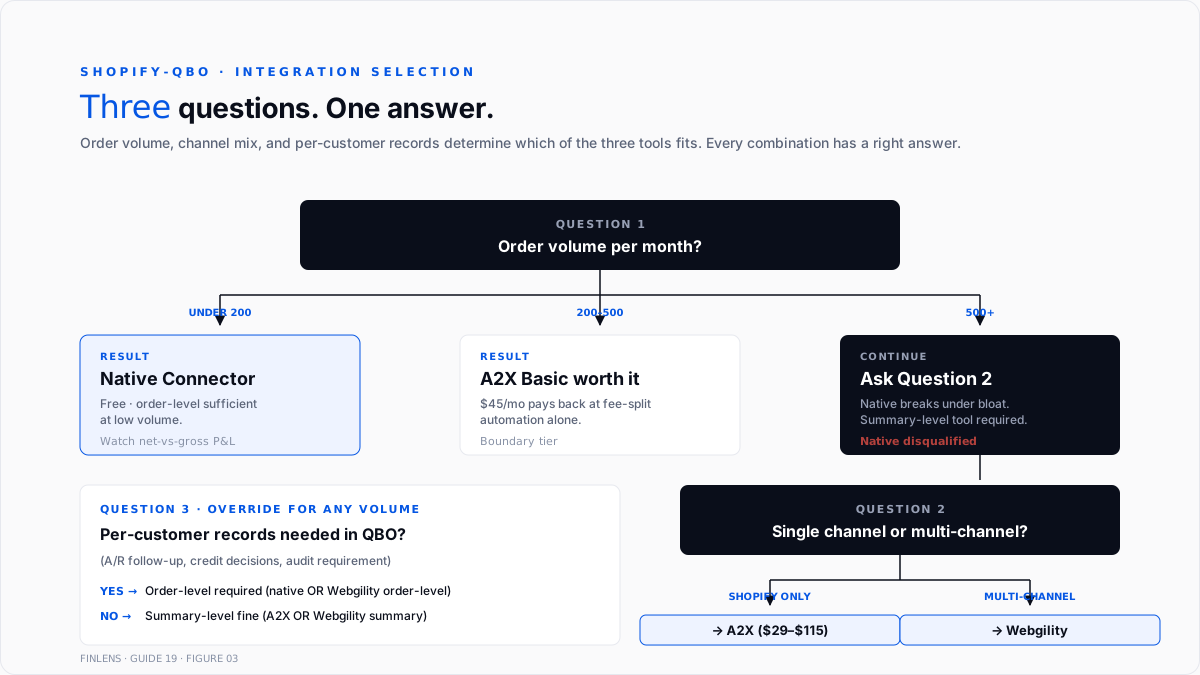
Three questions in order:
Question 1: Order volume per month?
- Under 200 → native connector often sufficient
- 200–500 → native marginal; A2X Basic ($45) starts being worth it
- 500+ → A2X or Webgility summary-level; native breaks under bloat
Question 2: Single channel or multi-channel?
- Shopify only → A2X
- Shopify + Amazon + others → Webgility
Question 3: Per-customer records needed in QBO?
- Yes (A/R follow-up, credit decisions, audit) → order-level (native or Webgility order-level)
- No (bank-to-books reconciliation is the primary need) → summary-level (A2X or Webgility summary)
The most common answer for growing DTC brands (500+ orders/month, Shopify-only, no A/R inside QBO) is A2X Basic or Professional. The most common answer for multi-channel sellers is Webgility.
The chart-of-accounts setup
Six chart-of-accounts entries carry the Shopify workflow. The full close-cycle setup sits in the QuickBooks month-end and year-end close guide.
- Shopify Sales (Income). Gross sales revenue from Shopify orders.
- Shopify Payments Clearing (Other Current Asset). Interim account for payments in transit between order and payout. Cleared to zero as payouts land.
- Merchant Fees - Shopify (Expense, sub of Merchant Fees or Bank Charges). Processing fees deducted from payouts.
- Shopify Chargebacks (Expense, sub of Merchant Fees). Chargeback fees and lost disputes.
- Sales Tax Payable - Shopify (Other Current Liability). Tax collected on merchant-remitted sales (non-facilitator states). For marketplace-facilitator states, tax bypasses this account - the facilitator remits.
- Refunds Given (Contra-income) or reduce Shopify Sales directly. Depends on how the reporting is structured.
Store-inventory-tracking books add:
- Cost of Goods Sold - Shopify (Cost of Sales). Product cost recognized on sale.
- Inventory Asset (Other Current Asset). Standing inventory value.
The eight recurring failure modes
1. Net deposit categorized as revenue. The most common. Books using the native connector see the P&L record sales at net-of-fees. Fix: switch to a summary tool (A2X or Webgility summary) or manually split every deposit into gross sales + Merchant Fees.
2. Sales tax booked as revenue. Tax collected on merchant-remitted sales lands in the payout but is not revenue - it's a Sales Tax Payable liability. Books that don't split it inflate revenue by 5–10% and miss the remittance obligation. Full treatment in the sales tax setup, nexus, and remittance guide.
3. Marketplace Facilitator Tax mishandled. For states where Shopify (or Shop Pay in specific configurations) is the marketplace facilitator, Shopify collects and remits the sales tax. The merchant records the gross sale but no sales tax liability. Books that don't split this way double-count the tax obligation - Shopify remits it, and the merchant's Sales Tax Payable also carries it.
4. Chargebacks absorbed into generic Bank Service Charges. Chargeback fees + lost disputes need their own tracking. Fix: use Shopify Chargebacks expense sub-account.
5. Refund timing mismatch. Refunds processed late (60–90 days after original sale) may hit a payout in a different accounting period than the original sale. Fix: use a Shopify Payments Clearing account so refunds route through it correctly regardless of timing.
6. Payout batch straddles month-end. Payout period includes orders from both June 30 and July 1. Booking the entire payout to July revenue understates June. Fix: use per-order or per-day granularity for month-end payouts, or set up accrual entries that split the payout by the period the underlying orders belong to.
7. Multi-currency conversion issues. International orders converted to USD at Shopify's rate, then to QBO's home currency at Intuit's rate - small conversion differences accumulate. Fix: use a summary tool that handles multi-currency at the payout level, or reconcile per-currency in a dedicated workpaper.
8. Gift card + store credit accounting. Gift card sales are Deferred Revenue (liability) at issuance; redeemed against sales later. Native connector often records gift card sales as revenue. Fix: A2X handles gift cards natively; native connector requires manual JE reclassification.
The month-end Shopify close
The Shopify-specific close steps that layer on top of the standard month-end and year-end close guide:
- Reconcile Shopify Payments Clearing account to zero (or to the value of orders shipped but not yet paid out).
- Confirm every payout for the month is booked with gross sales + fees + tax splits.
- Reconcile Sales Tax Payable - Shopify to Shopify's tax report for the same period.
- Confirm marketplace-facilitator sales are booked without sales tax liability (Shopify remits directly).
- Reconcile Merchant Fees - Shopify to Shopify's fee report for the period.
- Confirm refunds and chargebacks are booked to the correct expense sub-accounts.
- If tracking COGS + inventory in QBO, confirm ending inventory value against Shopify's inventory report.
- Book any month-end accrual for a payout batch that straddles month-end.
Where Shopify-QBO integrations stop scaling
Three failure modes compound past a certain volume.
Above 5,000 orders/month. A2X's Advanced plan tops out at 5,000; above that requires custom pricing. Webgility handles higher volume but the setup complexity climbs. Books at this scale typically pair a summary integration (A2X custom) with a dedicated ecommerce analytics layer (Glew, Peel, Lifetimely) that lives outside QBO.
Above 3+ international currencies. Multi-currency handling in QBO is functional but shallow. High-currency-mix stores often supplement with an FX-aware layer or move to a mid-market GL.
Custom checkout or headless commerce. Shopify's standard Payments flow assumes the standard checkout. Custom checkouts, subscription-managers (Recharge, Bold Subscriptions), and headless setups often break integration assumptions. Manual JE reconciliation becomes necessary.
The Finlens approach
Finlens is an AI accounting platform for QBO firms and founder-led businesses. Shopify integration runs through the tools above; Finlens sits above at the reconciliation and audit layer:
- Payout auto-audit. Every summary JE (A2X or Webgility) or per-order batch (native) auto-audited against the underlying Shopify data. Discrepancies flagged before month-end.
- Sales tax split verification. Marketplace-facilitator states auto-detected against the merchant's Shopify tax report; sales tax liability correctly zeroed for facilitator states, correctly booked for merchant-remitted states.
- Refund + chargeback aging. Every Shopify Chargebacks expense entry cross-checked against the original sale to confirm the invoice or sales receipt was properly reversed.
The features that keep Shopify accounting accurate - beyond the integration layer - are the ones surrounding the payouts:
- Human-in-the-loop review on every audit flag before adjustment.
- Multi-client dashboard aggregates Shopify payout status across every ecommerce client on the firm's book.
- Audit log tracks every payout adjustment, refund reclassification, and chargeback entry.
For a firm managing multiple Shopify clients on QBO, the firm platform automates the cross-client Shopify audit. For a founder running a single Shopify store on QBO, the founder-facing product handles the payout audit at store scale.
The verification checklist - Shopify integration health
- Integration tool selected matches order volume (native under 200, A2X/Webgility above 500).
- Every payout for the current month is booked as gross sales + fees + tax + refunds + chargebacks (never net-only).
- Sales Tax Payable - Shopify balance reconciles to Shopify's tax report per state.
- Marketplace-facilitator states not double-counted in Sales Tax Payable.
- Shopify Payments Clearing account clears to zero (or to shipped-not-paid-out balance) at month-end.
- Merchant Fees - Shopify total for the month reconciles to Shopify's fee report.
- Chargebacks tracked in their own expense sub-account, not lost in Bank Service Charges.
- Refunds route through Clearing account so timing mismatches don't misstate periods.
- Gift card revenue sits in Deferred Revenue until redemption (not booked to Shopify Sales at issue).
For a firm managing Shopify-QBO integrations across multiple ecommerce clients, the firm platform handles the payout audit at scale. For a founder running a single store, the founder-facing product handles the same audit at store scale.
Conclusion
No universal-best Shopify-QBO integration exists. Native is free and works at low volume but loses on the net-vs-gross P&L issue. A2X is the standard for mid-to-high volume Shopify-only stores at $29–$115/month. Webgility handles multi-channel at a similar price point. Picking the right tool for the volume and channel mix is a bigger deal than the monthly cost of any of them.
The failure mode isn't tool selection. It's assuming the integration handles everything correctly and skipping the payout audit. Every Shopify Payments payout is a batch of components – gross sales, fees, refunds, chargebacks, taxes, and adjustments – and every component needs to land in the right QBO account. Books that verify the split monthly reconcile cleanly. Books that trust the integration blindly discover misclassifications at year-end when the P&L margin doesn't tie to the actual gross margin.
.png)
FAQ
Is Intuit's Shopify Connector enough?
Enough for stores under 200 orders/month with simple product mixes and no per-customer A/R requirements. Beyond that, the net-vs-gross P&L issue and file-size bloat push most stores to A2X or Webgility.
The primary difference between A2X and Webgility?
A2X is Shopify-focused (and Amazon-focused for FBA) with summary-only posting. Webgility handles multi-channel (Shopify + Amazon + eBay + Walmart) with configurable order-level or summary posting. Pick A2X for Shopify-only; Webgility for multi-channel.
How to fix a book that recorded net Shopify deposits as revenue?
Two paths. Path 1: reclassify the affected periods via journal entries that add the fee back to revenue and post fees to Merchant Fees expense – labour-intensive per payout. Path 2: switch integration tools (native → A2X summary), zero out the affected P&L accounts, and re-import from the switchover date forward. Firms typically do Path 2 for the current + prior open period and leave older periods as-is if immaterial.
Whether the marketplace-facilitator tax is booked in Sales Tax Payable?
No. In facilitator states, Shopify (or Shop Pay in specific configurations) collects and remits the tax. The merchant records the gross sale but no sales tax liability. Books that book the tax liability double-count the obligation.
Does A2X handle gift cards correctly?
Yes. A2X splits gift card sales into deferred revenue (liability) at issuance and recognises them as revenue on redemption. Native connectors often record gift card sales as revenue immediately, requiring manual reclassification.
Realistic Shopify-QBO integration timeline?
1–3 hours to install and configure the native connector. 2–5 hours for A2X (includes mapping accounts). 5–10 hours for Webgility (multi-channel setup). Ongoing monthly audit: 15–30 minutes with A2X, 1–2 hours with native. Time saved by summary-level posting scales with order volume.

