
The QuickBooks guide to multi-currency setup and per-transaction FX (2026)


This is a working reference for founders and controllers invoicing or paying in a currency other than their home currency. Every technique is sourced to Intuit's own documentation, FASB standards, or a real thread on the QuickBooks Community. Numbers cited from user reports are flagged as anecdotal rather than benchmarks.
Read the next section before switching the feature on. It is one of the very few decisions in QuickBooks that cannot be undone.
The problem this guide addresses
Multi-currency is a one-way door. Switching it on is a single toggle, takes a second, and permanently changes how the file behaves. There is no corresponding toggle to switch it off, and the home currency chosen at that moment is fixed for the life of the company file.
Failure mode one: switched on by accident. A Level 7 community member on thread 63316 wrote that they had accidentally turned multi-currency on when it should not have been, had since read that it cannot be turned off, and were now unable to create transactions given the currencies assigned to their bank accounts and chart of accounts.
Seven replies, marked solved. A Level 7 member is an experienced user. If the irreversibility were obvious at the point of the click, that post would not exist.
Failure mode two: discovering it at renewal. Several users report finding out only when trying to downgrade their subscription, because a file with multi-currency enabled cannot move to a tier that does not support it. The feature then holds the subscription at its current level indefinitely.
The two available remedies are both severe. Purge the company file, which erases all data and is only possible inside the limited purge window after setup. Or open a new QuickBooks account and pay for a third-party migration.
What the switch actually does
BEFORE AFTER, PERMANENTLY
one currency, implicit every account carries a currency
no exchange rates rates on every foreign transaction
no FX accounts realized and unrealized FX gain/loss
home currency changeable home currency FIXED FOREVER
feature can be avoided feature cannot be removed
Three consequences follow, and the first is the one that catches people.
Accounts are stamped with a currency and cannot be restamped. A bank account created in USD stays USD. A customer created in EUR is a EUR customer. Changing a customer's currency means creating a new customer record, and the history does not follow.
The home currency is the reporting currency forever. A US company that later redomiciles, or a founder who set the file up in the wrong currency on day one, cannot correct it. Intuit's documentation on setting up and using Multicurrency in QuickBooks Online states the restriction directly.
You may not need it. A business that receives occasional foreign payments into a home-currency bank account, already converted by the bank, has no multi-currency requirement at all. The converted amount is simply the transaction. Multi-currency is for holding balances in another currency, not for occasionally touching one.

The FX identity
Two kinds of foreign exchange difference, and they behave differently.
REALIZED → on settlement
An invoice raised at one rate, collected at another.
The difference is real cash and posts to FX gain or loss.
UNREALIZED → on revaluation at a reporting date
Foreign-currency balances still outstanding, restated
at the closing rate. No cash has moved.
Reverses and re-computes each period.
Only realized differences represent money. An unrealized loss on an open receivable becomes a realized gain if the rate moves back before collection. Treating unrealized movement as a trading result is how a board pack reports volatility that never happened.
The exposure itself is the third quantity, and it is the one QuickBooks does not report.
FX exposure = foreign-currency assets - foreign-currency liabilities
A business with EUR receivables and EUR payables of similar size is naturally hedged and will show small net FX movement. One with EUR receivables and no EUR costs carries the full exposure. Same revenue, entirely different risk, and neither is visible from the FX gain or loss line alone.
Rates, and which one applies
Four rate decisions, and getting them wrong is the most common source of small persistent differences.
The transaction rate. QuickBooks applies a downloaded rate by default and allows a per-transaction override. Override it to the rate actually used where the bank or processor applied a different one, because the difference otherwise appears as an FX gain or loss that is really a bank fee.
The settlement rate. The rate when cash moves, which drives the realized difference against the transaction rate.
The closing rate. Used to revalue open foreign balances at a reporting date. This is the unrealized calculation.
The rate for non-monetary items. Fixed assets and prepayments bought in a foreign currency stay at the historical rate under FASB ASC 830. They are not revalued. Revaluing them is a common error that produces FX movement on things that cannot move.
Intuit's multi-currency FAQ covers how downloaded rates are sourced and refreshed, which matters because a rate that has not updated is a quiet cause of a revaluation that looks wrong.
The rate source matters more at month end than at transaction time. A transaction a few basis points off is noise. A closing rate a few basis points off applies to every open balance at once.
The account structure
Six accounts, and two of them appear automatically.
Realized and unrealized belong in separate accounts. Combined, there is no way to tell a cash result from a mark-to-market, and the combined line tells a reader nothing.
Cumulative Translation Adjustment is a different problem. Translating a foreign subsidiary for consolidation is ASC 830 translation, not transaction accounting, and it is an equity movement rather than a profit and loss one. That sits with the multi-entity accounting guide rather than here.
Before you switch it on
Five questions. If the answer to the first is no, stop.
1. Do you hold balances in another currency? A foreign-currency bank account, or receivables and payables denominated in one. If payments simply arrive converted into your home account, you do not need the feature.
2. Is the home currency definitely right? It cannot be changed afterwards. For a company that may redomicile, this is a strategic question rather than a bookkeeping one.
3. Does your subscription tier support it, and will it still? Enabling it blocks downgrading. If budget pressure might force a tier change, the feature forecloses that.
4. Have you tested in a sandbox? A trial company costs nothing and makes the irreversibility a discovery rather than a surprise.
5. Is there a simpler answer? Recording the home-currency amount the bank actually credited is often complete, correct, and reversible.
The asymmetry is what makes this worth five minutes. Switching on unnecessarily is permanent. Delaying by a month costs nothing, because the feature can always be enabled later and foreign transactions before then can be recorded at their converted amounts.
Running the revaluation each period
Four steps, and the second is the one that gets skipped.
Step one, identify monetary balances. Foreign bank accounts, foreign receivables, foreign payables, and foreign loans. Not fixed assets, not prepayments, not inventory. The test is whether the item is a fixed number of currency units owed or held.
Step two, reverse last period's unrealized entry. Before computing anything new. This is the step that prevents accumulation, and skipping it is invisible for a month or two and then produces an FX balance nobody can reconcile.
Step three, revalue at the closing rate. QuickBooks calls this a home currency adjustment. Intuit's article on entering home currency adjustments puts it under Settings, Currencies, then the Actions arrow and Revalue Currency.
You choose either the market rate or a rate you specify, and select which accounts it applies to.
Two constraints are worth knowing before you get there. The feature is available on Essentials, Plus and Advanced but not Simple Start.
And QuickBooks saves only one exchange rate per day per account, which is the rate it then uses to compute unrealized gains and losses. A second rate entered the same day replaces the first rather than sitting alongside it.
Step four, post to the unrealized account. Never to the realized account, and never to the operating expense accounts the underlying transactions sit in.
On the practical cadence. Revaluation is worth doing monthly where foreign balances are material and quarterly where they are small. The cost of doing it monthly is one journal entry and one reversal. The cost of doing it annually is that eleven months of statements carried balances at stale rates.
One cash-side point worth separating. A foreign bank account reconciles in its own currency, not in the home currency. The statement is in EUR and the ledger balance in EUR must agree to it.
The USD translation is a reporting layer on top. Reconciling the translated figure against a EUR statement is a category error that generates differences which are purely rate movement. The discipline itself is covered in the bank reconciliation guide.
The failure-mode catalog
Six diagnoses cover most multi-currency work.
1. Enabled by accident, now blocked. Symptom: transactions that will not save because of currency assignments on accounts. Cause: the toggle, clicked without the consequence being visible. Fix: purge within the window, or migrate. There is no third option. This is thread 63316.
2. Home currency wrong. Symptom: reporting in a currency the business does not operate in. Fix: a new company file. The home currency is fixed at setup.
3. FX gain or loss that is really a bank fee. Symptom: small persistent losses on every settlement. Cause: the system rate used while the bank applied a worse one. Fix: override the transaction rate to the rate actually received, and post the spread as a bank charge where it is separable.
4. Realized and unrealized combined. Symptom: an FX line nobody can explain. Fix: separate accounts, and reverse the unrealized entry at the start of the next period so it recomputes rather than accumulates.
5. Non-monetary items revalued. Symptom: FX movement on fixed assets or prepayments. Cause: a blanket revaluation. Fix: ASC 830 holds non-monetary items at historical rate. Only monetary balances revalue.
6. Duplicate customers across currencies. Symptom: one customer appearing twice with split history. Cause: a currency cannot be changed on an existing record. Fix: unavoidable, but naming conventions make the aging readable.
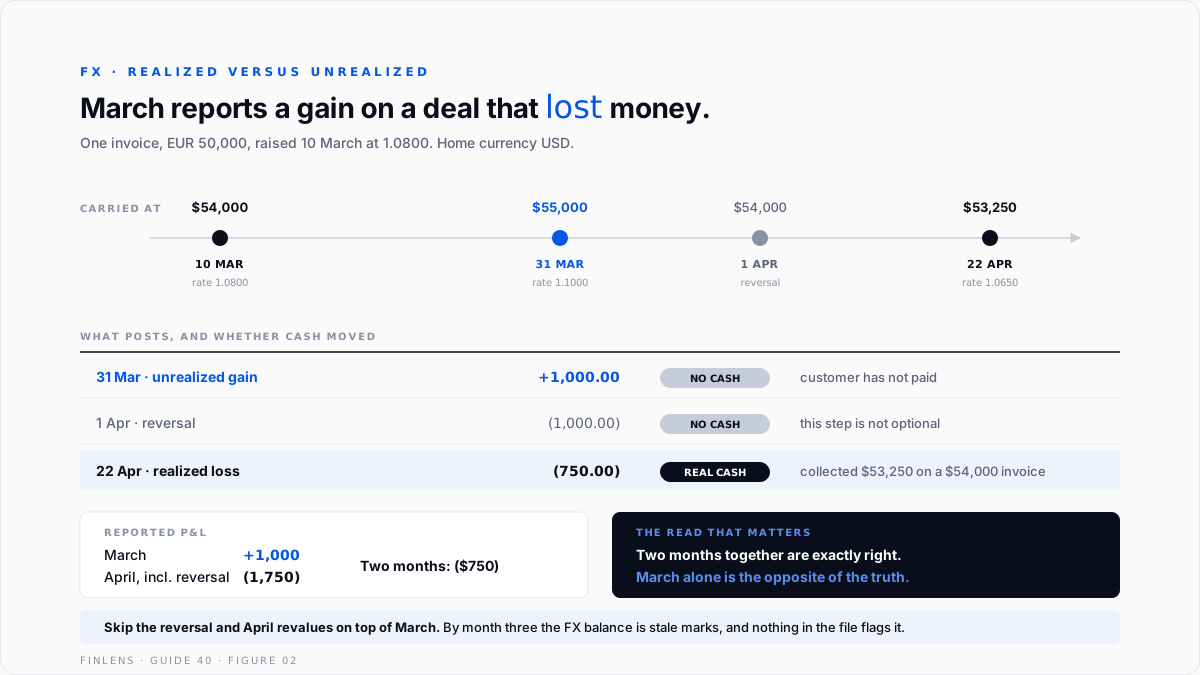
Worked example
A US company, home currency USD, invoices a European customer EUR 50,000 on 10 March, when the rate is 1.0800.
At 31 March, the receivable is restated from $54,000 to $55,000 and an unrealized gain of $1,000 posts. No cash has moved and the customer has not paid.
On 1 April that entry reverses, returning the receivable to its transaction value, which is why unrealized amounts never accumulate across periods.
On 22 April the collection comes in at 1.0650, producing $53,250 against an invoice carried at $54,000. The realized loss is $750, and it is real cash.
The two months together are exactly right at a $750 loss. March alone reports a $1,000 gain on a transaction that lost money. That is correct accounting and a misleading single-month read, which is exactly why the two have to sit in separate accounts and why the reversal is not optional.
And the error that compounds. Leaving the March unrealized entry unreversed means April revalues on top of it. By month three the FX balance is an accumulation of stale marks rather than a position, and nothing in the file will flag it.
Where in-QBO multi-currency stops scaling
Threshold one: a foreign subsidiary. Transaction accounting is not translation. Consolidating a foreign entity needs ASC 830 translation with a CTA in equity, which QuickBooks does not perform.
Threshold two: hedging. Forward contracts and hedge accounting under ASC 815 have no representation. A business hedging its exposure cannot show the hedge against the exposure.
Threshold three: more than a few currencies. Each adds bank accounts, revaluation entries and a rate to maintain. The monthly close grows with the number of currencies, not with volume.
Threshold four: reporting in a second currency. Investors or a parent wanting statements in another currency cannot be served from the file, because there is one home currency and it is fixed.
The Finlens approach
Finlens reads the QuickBooks ledger and treats currency exposure as a measured position rather than a residual line.
1. Realized and unrealized separation. The two are reported distinctly with the cash effect marked, so a month that reports a gain on a position that is losing money is legible rather than reassuring.
2. Revaluation hygiene. Unrealized entries are checked for reversal in the following period, which catches the accumulation error before it compounds into a balance nobody can explain.
3. Net exposure reporting. Foreign-currency assets less foreign-currency liabilities is computed per currency, so the business can see whether it is naturally hedged or carrying the full position.
Four supporting capabilities sit around those three.
- Rate variance detection, flagging settlements where the realized difference looks more like a bank spread than a market move.
- Non-monetary protection, identifying fixed assets or prepayments caught in a revaluation.
- Pre-enablement review, answering whether the feature is needed at all before the irreversible step.
- A cross-file view for firms, listing clients with multi-currency enabled and no FX revaluation posted.
Verification checklist
Eight lines to run at each close.
- Realized and unrealized FX sit in separate accounts.
- The prior period's unrealized entry was reversed before this period's revaluation.
- Only monetary balances were revalued. Fixed assets and prepayments remain at historical rate.
- The closing rate used agrees to a documented source and is the same across all balances.
- Realized differences on settlement reconcile to the rate the bank actually applied.
- Net exposure per currency is stated, not only the gain or loss.
- No customer or vendor exists twice because of a currency change.
- Foreign bank balances per the ledger agree to the statements in their own currency, before translation.

FAQ
Can multi-currency be turned off once enabled?
No. There is no toggle. The only routes are purging the company file within the limited window after setup, which erases everything, or migrating to a new account.
Can the home currency be changed?
No. It is fixed when the feature is enabled and applies for the life of the file.
Does enabling it affect my subscription?
Yes. A file with multi-currency enabled cannot be downgraded to a tier that does not support it, which is how several users discover the restriction.
Do I need it if I occasionally receive foreign payments?
Usually not. If the bank converts before crediting your home-currency account, record the converted amount. Multi-currency is for holding balances in another currency.
What is the difference between realized and unrealized?
Realized happens on settlement and is real cash. Unrealized is a revaluation of open balances at a reporting date, reverses in the next period, and represents no cash movement.
Should fixed assets bought in a foreign currency be revalued?
No. Non-monetary items stay at the historical rate under ASC 830. Only monetary balances revalue.

