
The QuickBooks guide to 401(k), HSA, and FSA deductions in payroll (2026)


This is a working reference for founders and controllers configuring benefit deductions in QuickBooks Payroll. Every technique is sourced to Intuit's own documentation, IRS guidance, or a real thread on the QuickBooks Community. Numbers cited from user reports are flagged as anecdotal rather than benchmarks.
The problem this guide addresses
A benefit deduction is three decisions wearing one payroll item: whose money it is, which taxes it escapes, and which W-2 box it lands in. QuickBooks asks for the item name and the amount. It does not ask the three questions, and a wrong answer to any of them is invisible until January.
Failure mode one: the plan is not what it is called. A QuickBooks Desktop user on thread 11218 described an HSA where the deducted funds never leave the company bank account, and if the employee does not use them by year end the employer keeps them.
The prior bookkeeper had been writing cheques from the liability account to the HSA vendor for money that never moved, which destroyed every bank reconciliation.
Four replies. The accounting was broken because the plan was mislabelled. What is described is not an HSA. An HSA is employee-owned, portable, and never reverts to the employer. Use-it-or-lose-it with employer-held funds is a flexible spending account. No QuickBooks configuration could make the HSA setup work, because the setup was correct for a plan the company does not have.
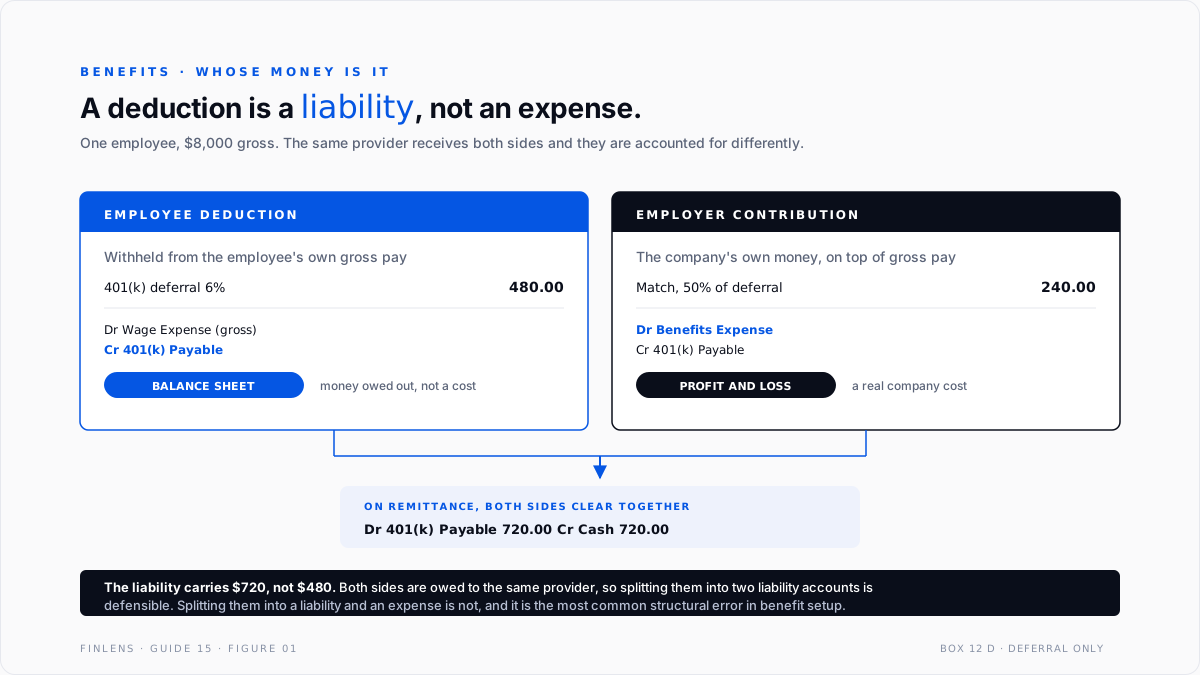
Failure mode two: the deduction that is an expense. The single most common structural error is treating an employee deduction as a payroll expense. It is not. It is money withheld from the employee and owed to a third party, which makes it a liability until it is remitted. The employer contribution is the expense.
The three identities
Every benefit item resolves to one of two accounting treatments.
EMPLOYEE DEDUCTION EMPLOYER CONTRIBUTION
Dr Wage Expense (gross) Dr Benefits Expense
Cr Benefit Liability Cr Benefit Liability
money withheld, owed out company cost, owed out
→ BALANCE SHEET → PROFIT AND LOSS
On remittance, both: Dr Benefit Liability Cr Cash
The second identity is the tax treatment, and it is not the same for every plan.
401(k) traditional reduces Box 1 only FICA still applies
Section 125 reduces Box 1, 3 and 5 health, dental, FSA, HSA via cafeteria
401(k) Roth reduces nothing after-tax
HSA employer no wage effect reports in Box 12 W
That middle row is why a $200 health premium and a $200 401(k) deferral produce different W-2s. The cafeteria-plan deduction escapes Social Security and Medicare as well as income tax. The retirement deferral escapes income tax only.
The third identity is the reporting one.
Box 12 D 401(k) elective deferral
Box 12 AA Roth 401(k)
Box 12 W HSA, employer and employee-via-cafeteria combined
Box 12 DD employer-sponsored health coverage, informational only
Box 12 code W combines both sides. Employer HSA contributions and employee contributions made through a cafeteria plan report together, which surprises people reconciling the figure to one side or the other. The rest of the W-2 reconciliation sits in the W-2 year-end payroll close guide.
HSA versus FSA, because the difference drives everything
These are confused constantly, and thread 11218 shows what the confusion costs.
The accounting consequence of each. An HSA deduction creates a liability that is extinguished when the money reaches the custodian, usually within days. An FSA deduction creates a liability the employer may hold all year, and forfeitures at year end are a gain that has to be recognized rather than left sitting in the liability.
The diagnostic question. Where does the money physically go, and what happens to it if the employee never spends it.
If the answer is that the company keeps it, the plan is an FSA whatever the payroll item is called, and the liability is real until the forfeiture is recognized.
Thread 11218's bookkeeper was writing cheques to a vendor to clear a liability for money sitting in the company's own account. There was nothing to pay. The liability was correct, the remittance was fictional, and the bank reconciliation paid the price.
Setting the items up
Intuit's documentation on setting up or changing a retirement plan covers the flow. Three fields carry the outcome.
The plan type. Traditional 401(k), Roth 401(k), SIMPLE IRA, SEP and 403(b) all behave differently for tax and for W-2 reporting. Selecting the wrong one produces correct-looking paychecks and a wrong W-2, which is only discovered at filing.
The liability account. The field asks which account tracks the deduction or contribution to be paid. This is the field that makes the deduction a liability rather than a plug, and leaving it on a default can route a deduction into an expense account where it quietly reduces profit.
The provider and account number. Administrative, but it is what makes the remittance traceable.
The health items have their own flows. Intuit documents setting up an HSA item and setting up an FSA payroll item separately, and QuickBooks Online supports three FSA types: dependent care, medical expense and limited-purpose. Choosing between them is a tax-treatment decision, not a naming one, since dependent care has its own annual limit and its own reporting.
Medical, vision and dental premiums run through a further flow again, covered under payroll items for an insurance benefit plan.
One scheduling trap worth knowing. On a bi-weekly payroll there are two months a year with three paychecks. A premium entered as a flat amount per paycheck then collects thirteen months of premium in a twelve-month year. Either the deduction is set per month, or those two periods are excluded deliberately.
On third-party providers. Where a plan administrator such as Guideline integrates with QuickBooks, the integration generally creates the payroll items but not the chart-of-accounts mapping. That linkage remains a QuickBooks-side configuration, so an integration that appears to have set everything up can still be posting to the wrong accounts.
Where payroll runs entirely outside QuickBooks, none of this applies and the benefit splits arrive on the monthly journal entry instead, covered in the third-party payroll journal entry guide.
The monthly reconciliation that catches everything
One check, run per plan, per month.
Opening liability
+ employee deductions withheld this period
+ employer contributions accrued this period
- remittances paid to the provider
= Closing liability
The closing balance should be small and should be explicable. For a 401(k) remitted each pay period it should be close to zero. For an FSA where the employer holds the funds it will be large and growing, which is correct.
A balance that grows on a plan that should remit promptly is the signal. It means deductions are being withheld and not sent, which is a fiduciary problem well before it is an accounting one. Retirement plan deferrals in particular carry deposit timing requirements, and a liability that builds for months is evidence of a late deposit.
The provider statement is the other side. The provider's record of contributions received for the period should agree to deductions plus employer contributions for the same period. Reconciling to it monthly is the only way to catch a per-employee allocation error, because the total can be right while an individual's split is wrong.
The failure-mode catalog
Six diagnoses cover most benefit deduction work.
1. Employee deduction posted to an expense account. Symptom: payroll expense higher than gross wages plus employer taxes. Cause: the liability account field was left on a default. Fix: repoint the item and restate. The deduction was never a company cost.
2. The plan is mislabelled. Symptom: remittances that do not correspond to money movement, or a liability that never clears. Cause: an FSA configured as an HSA, or the reverse. Fix: identify who owns the funds and what happens to unused amounts, then configure to that.
3. Wrong plan type selected. Symptom: a W-2 with the wrong Box 12 code, or Box 1 reduced when it should not be. Cause: Roth configured as traditional, or the reverse. Fix: a payroll liability adjustment correcting year-to-date wages, taxes and deduction items across both payroll items.
4. Employer match booked to wage expense. Symptom: wage expense overstated and benefits expense near zero. Cause: the match was added to the wage item rather than its own contribution item. Fix: separate it. The match is a benefit cost and belongs where it can be seen.
5. HSA deducted post-tax. Symptom: Box 1, 3 and 5 all higher than expected, and no Box 12 code W. Cause: the HSA was set up outside the cafeteria plan. Fix: correct the item. An HSA contributed through a cafeteria plan escapes FICA as well as income tax, and post-tax treatment costs both the employee and the employer money.
6. Employer contribution that is not a match. Symptom: a non-elective or profit-sharing contribution with nowhere obvious to go. Cause: the setup assumes contributions are matches. Fix: these are separate contribution items with their own treatment, and folding them into the match distorts both.

Worked example
One employee. Monthly gross $8,000. Three benefit items.
The wage bases.
Box 1 is $480 below Box 3, which is exactly the retirement deferral. That gap is the check from the W-2 guide, visible here at the point the deduction is configured rather than in January.
What posts.
401(k) Payable is $720, not $480. It carries the employee's $480 and the employer's $240, because both are owed to the same provider. Splitting them into two liability accounts is defensible and splitting them into a liability and an expense is not.
Now get the match wrong. Adding the $240 to wage expense instead of benefits expense leaves total expense identical and makes wage expense $8,240 against a gross payroll of $8,000. Every per-head wage metric is then overstated by 3%, benefits cost reads as zero, and nothing fails to balance.
Where in-QBO benefit handling stops scaling
Threshold one: more than one plan type. A 401(k) alone is manageable. Add an FSA, an HSA and dependent care and the per-item tax treatment matrix stops being memorable, which is when configuration errors enter.
Threshold two: mid-year plan changes. A contribution rate change, a plan switch or a provider migration mid-year requires year-to-date correction across both the old and new items, not just a forward change.
Threshold three: contribution limits. Annual deferral limits and catch-up contributions for employees over 50 are not enforced across providers if an employee contributed at a prior employer in the same year. QuickBooks knows only what it has processed.
Threshold four: non-discrimination testing. Plans must be tested for whether highly compensated employees benefit disproportionately. Nothing in QuickBooks performs or supports it.
The Finlens approach
Finlens reads payroll and ledger data from QuickBooks and treats benefit items as a reconciliation rather than a setup step.
1. Liability roll-forward per plan. Opening balance plus deductions plus employer contributions minus remittances is tested every period, so a liability that is building rather than clearing is reported in the month it starts, not at the audit.
2. Account-routing audit. Every benefit item is checked for whether the employee side lands in a liability and the employer side in an expense. A deduction routed to an expense account is raised immediately, since it is invisible on the face of the financial statements.
3. Wage-base consistency. Box 1, Box 3 and Box 5 bases are computed from the configured items each period and compared to what payroll produced, so a plan-type error surfaces in the first pay run rather than on the W-2.
Four supporting capabilities sit around those three.
- Provider statement matching, reconciling remittances to the administrator's record of contributions received.
- Plan-type classification, flagging items whose cash behaviour does not match their label, which is the thread 11218 pattern.
- Deposit-timing monitoring, reporting retirement deferrals withheld and not yet remitted.
- A cross-file view for firms, listing clients with benefit liabilities that are not clearing.
Verification checklist
Eight lines to run each period.
- Every employee deduction posts to a liability account, never to an expense account.
- Every employer contribution posts to a benefits expense account, never to wage expense.
- Each benefit liability rolls forward and the closing balance is explicable.
- Retirement deferrals withheld have been remitted within the plan's deposit window.
- The provider statement agrees to deductions plus employer contributions for the period.
- Box 1 is below Box 3 by exactly the retirement deferrals.
- Section 125 items reduce Box 1, 3 and 5, and retirement items reduce Box 1 only.
- Each plan's label matches its actual cash behaviour and forfeiture rules.
FAQ
Is an employee deduction an expense?
No. It is money withheld from the employee and owed to a provider, which makes it a liability until remitted. The employer contribution is the expense.
What is the difference between an HSA and an FSA for accounting?
An HSA is employee-owned and leaves the company quickly, so the liability clears fast. An FSA may be employer-held all year, and unused amounts are forfeited to the employer, which is a gain to recognize rather than a balance to carry.
Why do a health premium and a 401(k) deferral affect the W-2 differently?
A Section 125 cafeteria deduction reduces Box 1, 3 and 5. A traditional retirement deferral reduces Box 1 only, because FICA still applies to deferred compensation.
Where do employer HSA contributions report?
Box 12 code W, combined with employee contributions made through a cafeteria plan. The code reports both sides together.
My provider integration set everything up. Is the mapping right?
Not necessarily. Integrations commonly create the payroll items without creating the chart-of-accounts linkage, which remains a QuickBooks-side setting.
How do I fix a wrong plan type found mid-year?
A payroll liability adjustment correcting year-to-date wages, taxes and deduction items across both the incorrect and correct payroll items. A forward-only change leaves the year-to-date figures wrong.

