
Best Collaborative Accounting Software for CPA Firms in 2026: Finlens, Karbon, Canopy, Client Hub, Financial Cents Compared


Key takeaways
- The category has three jobs, and no single tool covers all three; picking wrong job is where most tool-buying mistakes start.
- Karbon, Canopy, and Financial Cents are practice-management platforms with strong internal team collaboration; client-side is a secondary surface.
- Client Hub, TaxDome, and Liscio are portal-first they win on document exchange and client visibility, but books stay separate.
- QuickBooks Online has a built-in accountant-invite that is already “collaborative” at ledger level; most firms already use it and still need help with transactional cleanup on top.
- Finlens sits upstream of QBO: it decomposes Stripe payouts into individual charges, separates fees, categorizes transactions with a human-in-the-loop review, and writes clean entries to QBO so workflow and portal tools finally have a clean trial balance to collaborate around. For full walkthrough see Finlens platform overview for accountants.
Comparison table collaborative accounting software (as of 2026-07-17)
Feature availability based on each vendor’s public documentation and pricing pages as of 2026-07-17. Product capabilities change frequently verify current capabilities directly with each vendor before purchasing.
What collaborative accounting software actually means in 2026
The phrase has been used loosely for a decade. What has shifted since 2024 is that buyer is no longer looking for one tool that does everything buyer wants three tools that stop stepping on each other. The three real jobs are:
- Practice-workflow collaboration. Team A owns client, Team B owns review, both need to see status, deadlines, comments, and last email client sent without forwarding threads. Karbon, Canopy, Financial Cents are mature options here. Karbon’s own product page describes its Triage inbox as “fully embedded email, @mention and comments, and shared client communication timeline”
- Client-facing document exchange and communication. The client uploads receipts, statements, signed engagement letters; firm requests missing items; both sides see status. Client Hub, TaxDome, Liscio own this layer. Some of PM tools have a bolt-on portal, but a dedicated portal usually wins on client UX.
- Ledger-level collaboration. Both sides need to look at actual QuickBooks Online file and agree on what a transaction is, where it goes, and whether deferred-revenue schedule is right. QuickBooks Online has an accountant-invite feature that gives firms shared ledger access but cleanup work on top (Stripe payouts, refunds, fees, categorization) is still manual for most firms. That gap is where a lot of six-hours-a-client-per-month cost lives, and it’s what Finlens is built to close.
If you’re evaluating tools, first question is which of three jobs is current bottleneck. Buying a Karbon license to solve a Stripe categorization problem is a common and expensive mismatch. The reverse is also true: buying a categorization layer when real problem is that emails keep getting lost between tax reviewer and manager is also a mismatch.
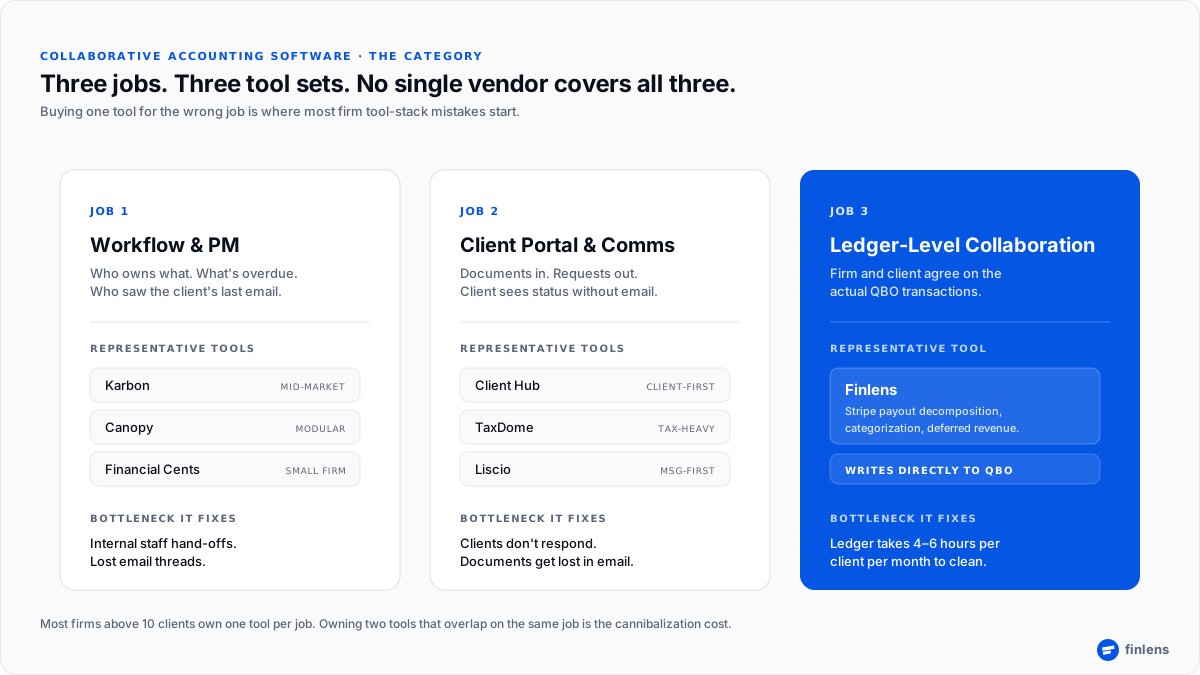
Figure 1. The category splits into three jobs, and each job has a different top-three vendor set.
Best collaborative accounting software for CPA firms by job-to-be-done
This section covers each vendor at same depth. Where vendor’s own product page describes a feature, we cite it inline; where behavior is a matter of user opinion we skip claim rather than repeat it.
Finlens ledger-collaboration layer for QBO firms
Overview: Finlens is upstream layer between transactional data (Stripe, banks, expense systems) and accounting firm’s QuickBooks Online file. It decomposes Stripe payouts into individual charges, separates processing fees, runs categorization with a human-in-the-loop review queue, and writes clean journal entries directly to QBO.
Best for: firms running SaaS or e-commerce clients where ledger monthly cleanup is bottleneck Stripe volume, subscription changes, refunds, disputes, and deferred revenue.
Key features: per-client learning history and rules; confidence-scored categorization with a bulk-approve queue and a flagged queue for review; automated deferred-revenue schedules; duplicate detection before writing to QBO.
Pricing: per client, per month model is designed to match how firms bill.
Where it fits alongside PM tools: Finlens is not a replacement for Karbon, Canopy, or Financial Cents. It sits below them. The firm uses PM tool to run engagement, and Finlens to make sure ledger PM tool tracks work against is actually clean.
Karbon
Overview: Karbon is a full practice-management platform with a strong internal-collaboration surface built around a shared “Triage” inbox and Kanban engagement boards. Team members can @mention each other on any email, task, or client, and shared timeline shows every client-facing message across firm.
Best for: mid-market firms where inbound client email volume is high and information gets lost between staff, managers, and partners.
Key features: Triage shared inbox, @mentions and comments on emails and tasks, Kanban engagement view, embedded email, workflow automations released every 2–4 weeks per Karbon’s own release cadence.
Pricing: per user, on Team / Business / Enterprise tiers, annual or monthly (karbonhq.com/pricing).
Where it fits: Karbon is choice when firm has grown past 8–10 people and collaboration problem is internal who owns what, who saw client’s latest email, what deadline is.
Canopy
Overview: Canopy positions itself as a modular practice-management platform for mid-sized accounting, tax, and bookkeeping firms. Firms buy modules they need workflow, time and billing, client portal, document management rather than a bundled seat license.
Best for: firms that want to start with one module and grow into platform without paying for capabilities they aren’t using.
Key features: task templates with recurring cadence, built-in time tracking with a timer, customizable invoices, client portal as an add-on module.
Pricing: modular. The per-module structure changes effective cost by firm, so verify pricing on Canopy’s own site.
Where it fits: firms that want practice-management workflow now and a portal later, on same vendor, rather than integrating two separate tools.
Client Hub
Overview: Client Hub is a client-first practice-management surface. The distinguishing bet is that client sees a large share of workflow task status, requests, messages from beginning rather than only through a portal add-on.
Best for: firms whose primary friction is client responsiveness. If biggest bottleneck is chasing clients for documents and approvals, Client Hub’s client-side visibility can compress that cycle.
Key features: task management with client visibility, in-tool chat between firm and client, file sharing, automated request lists
Pricing: per user.
Where it fits: portal-first firms with a high mix of bookkeeping and advisory clients who need to be nudged consistently.
Financial Cents
Overview: Financial Cents is a practice-management platform aimed at smaller firms value bet is that it delivers essentials (workflow, task tracking, time, portal, QBO integration) at a per-user price under Karbon and Canopy.
Best for: firms of 2–10 people where buyer is cost-sensitive and needs one platform to run engagements without a heavy configuration lift.
Key features: workflow templates, manual time tracking, chat and file sharing, notifications, QuickBooks Online integration (financial-cents.com).
Pricing: per user.
Where it fits: small firms that value speed-to-value and lower per-seat cost over deeper automation surface Karbon offers at top end.
TaxDome
Overview: TaxDome is an all-in-one CRM + portal + document-management platform, historically strongest in tax-focused firms. The bet is a single vendor for CRM, client portal, e-signature, secure messaging, and workflow.
Best for: tax-heavy firms that want one platform to own entire client relationship, not just engagement.
Key features: task automation, client portal, e-signature, secure messaging, document management (taxdome.com).
Pricing: per user.
Where it fits: firms that don’t want to run a separate CRM and portal, and are willing to trade some depth in workflow for one contract.
Two of the newer entrants here deserve a closer look on their own, with Double HQ and Kick reviewed head to head for firm workflows.
Where each tool doesn’t fit honest scoping
No tool listed above is universally right answer. Naming fit is more useful than declaring a winner.
- Karbon is optimized for firms above ~8 people where internal-communication surface is constraint. Below that size, most of Karbon’s power sits unused.
- Canopy’s modular pricing can grow past a Karbon or Financial Cents bundle once a firm buys three or four modules model total on your own module set before committing.
- Client Hub is portal-first; if firm’s core bottleneck is not client responsiveness but internal task hand-off, a workflow-first tool will fit better.
- Financial Cents is a small-firm platform; firms with 20+ people typically find automation ceiling too low.
- TaxDome is strongest in tax-heavy firms; CAS-first firms often prefer a specialist workflow tool paired with a specialist portal.
Which collaborative accounting software should you pick
Use this decision framework it maps three real jobs to tools that fit each.
- If bottleneck is “internal staff hand-offs and lost email threads” → tool is a workflow-first PM: Karbon (mid-market), Financial Cents (small firm), Canopy (modular growth).
- If bottleneck is “clients don’t respond, documents get lost, portal UX is embarrassing” → tool is a portal-first surface: Client Hub, TaxDome, Liscio. Related reading: best client collaboration software for advisory services.
- If bottleneck is “QBO ledger takes 4–6 hours per client per month to clean before we can even close”→ tool is a ledger-layer platform: Finlens for Stripe-heavy books.
- If bottleneck is “clients still send workpapers by email or spreadsheet” → tool is either a portal (Client Hub, TaxDome) or a portal-replacement motion, depending on client size. Related reading: portal vs email and spreadsheets when to switch.
Most firms buying at 10–30 client scale end up owning two: a PM tool (Karbon or Financial Cents) plus a ledger layer (Finlens). The PM tool routes work; ledger layer makes sure work being routed is against a clean book.
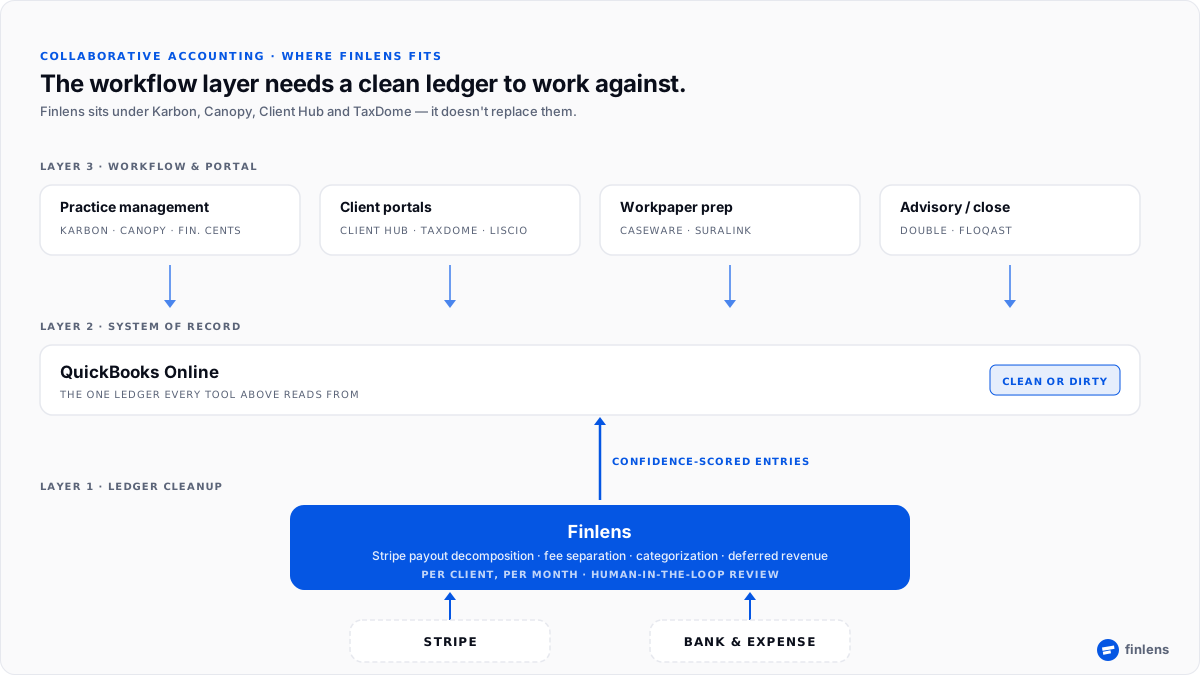
Figure 2. Finlens sits below PM and portal layer, cleaning ledger collaboration tools work against.
The three jobs collaborative accounting tools don’t do on their own
Every tool above wins its own layer. None of them, on their own, does following which is where firms often assume tool “isn’t working.”
- Decompose Stripe payouts into individual charges and separate fees before writing to QBO. PM tools and portals surface work; they don’t do categorization or fee-split. If Stripe is in client stack, ledger cleanup happens somewhere usually in a bookkeeper’s head, once a month, at cost of hours per client.
- Run a deferred-revenue schedule on a subscription book. Even QBO-integrated PM platforms leave revenue recognition to underlying ledger. Firms often run this in a spreadsheet and paste journal entry back which is exactly where errors enter close.
- Learn per-client categorization patterns. Every firm has a repeat pattern per client (this vendor always goes here; this refund always maps to that revenue account). PM tools don’t learn it. Bookkeepers re-key same decisions monthly. A ledger-layer tool can hold memory. See workpaper preparation guide for how this compounds when workpaper prep is downstream.
Conclusion
Bring firm’s current PM tool and one Stripe-heavy client’s last three months of QBO we’ll route that client through Finlens live so you see ledger workflow tool would then work against.
Frequently asked questions
What is collaborative accounting software?
Software that lets a firm, its clients, and depending on tool underlying ledger operate on same surface. The category covers workflow/PM tools, client portals, and ledger-layer tools. Most firms buy one of each rather than a single tool that does all three.
Is QuickBooks Online collaborative accounting software?
Partially. QuickBooks Online has an “Invite Accountant” feature that gives a firm shared ledger access, which is real ledger-level collaboration. It does not include a workflow or portal surface, and it doesn’t automate transactional cleanup categorization, payout decomposition, deferred revenue that most Stripe-heavy books need before ledger is usable.
Do I need both a practice-management tool and a ledger tool?
Most firms above five clients end up with both. The PM tool (Karbon, Financial Cents, Canopy) routes work and holds client relationship. The ledger tool (Finlens for QBO + Stripe) does transactional cleanup so work being routed is against a book that is actually clean.
How is Finlens different from Karbon or Canopy?
Finlens is not a practice-management platform. It operates at ledger layer categorizing transactions, decomposing payouts, separating fees, running deferred-revenue schedules, and writing entries directly to QuickBooks Online. Karbon and Canopy operate at workflow layer above ledger. Firms typically use both.
What’s difference between a client portal and collaborative accounting software?
A client portal is one of three jobs document exchange and messaging between firm and client. Collaborative accounting software is broader category that includes portal, workflow, and ledger collaboration. Client Hub and TaxDome are portal-strong; Karbon and Financial Cents lean workflow; Finlens covers ledger layer.
How much does collaborative accounting software cost?
Pricing varies by category. Practice-management tools (Karbon, Financial Cents, Canopy) charge per user, usually $50–$100 per user per month depending on tier see each vendor’s pricing page for current numbers. Portal-focused tools (Client Hub, TaxDome) are also per user. Finlens is priced per client per month, so cost scales with client count rather than seat count. Verify pricing directly with each vendor before purchasing.
Which collaborative accounting software is best for a firm running Stripe-heavy SaaS clients?
The Stripe part is key constraint. A PM tool (Karbon, Financial Cents) will route work but not clean ledger. A portal will move documents but not clean ledger. Firms with Stripe-heavy books typically pair a PM tool with a ledger layer built for Stripe-to-QBO Finlens is designed for this stack.
How do I stop paying for two tools that do same thing?
This is cannibalization problem buying a PM tool and a portal that overlap on task management, or a workflow tool and a ledger tool that both promise “categorization.” Map three jobs (workflow, portal, ledger) against your team’s actual bottleneck, buy one tool per job, and cancel anything that is trying to be all three. Two focused tools nearly always beat one platform that overlaps 60% with each of them.
Trademarks referenced in this article (including Karbon®, Canopy®, Client Hub™, Financial Cents®, TaxDome®, Liscio®, QuickBooks®) are property of their respective owners. Finlens is not affiliated with, endorsed by, or sponsored by any of third-party products discussed. Product capabilities and pricing are based on each vendor’s publicly available documentation as of 2026-07-17 and may have changed. Readers should verify current capabilities directly with each vendor before purchasing.

