
IRS Power of Attorney (Form 2848): The CPA Firm Practitioner Guide


Key takeaways
- Form 2848 = full representation. Form 8821 = information access only. Never confuse them.
- Every tax type + tax form number + tax year has to be listed explicitly. “All years” gets form rejected.
- Four submission routes: IRS online portal (fastest, minutes to CAF acceptance), individual IRS online account authorization, fax to geographic CAF Unit, or mail.
- Common rejection reasons are all preventable: wrong tax periods, wrong form numbers, missing CAF number, missing signature, catch-all authorization language.
- Form 2848 is step 1 of a multi-week tax resolution engagement. The bottleneck is compliance cleanup that comes AFTER form is on file where Finlens compresses calendar.
What Form 2848 authorizes and what it does not
A signed and accepted Form 2848 lets your representative do all of following on your behalf:
- Speak directly with IRS call Practitioner Priority Service, contact revenue officers, respond to notices.
- Pull confidential transcripts Account Transcript, Return Transcript, Wage and Income Transcript via IRS e-Services.
- Negotiate resolution installment agreements, Offer in Compromise, Currently Not Collectible status, penalty abatement.
- Represent through appeals administrative appeals, IRS Independent Office of Appeals.
- Receive all IRS notices directly routes correspondence to representative’s firm address.
- Sign specific documents closing agreements, waivers, and consents when explicitly authorized on form.
What it does NOT do:
- It does not transfer or reduce taxpayer’s ultimate tax liability. The taxpayer remains legally responsible for tax.
- It does not authorize representative to sign a tax return unless a very specific set of IRS conditions is met (Circular 230 §10.3(f)).
- It does not cover tax matters, tax forms, or tax years that are not explicitly listed on form.
Form 2848 vs Form 8821 critical distinction
Every CPA firm handling representation work makes this call regularly. The wrong choice creates wrong authority.
Feature comparison based on IRS Publication 947 (Practice Before IRS and Power of Attorney) and Form 2848 / 8821 instructions as of 2026-07-17. Verify current IRS guidance at irs.gov.
When to use which: Any engagement where firm will speak with IRS, negotiate, or represent use Form 2848. Any engagement where firm only needs to view transcripts or receive information copies (e.g., a lender requesting tax data) use Form 8821. Never file Form 2848 when Form 8821 would do; and never file Form 8821 when representation is coming.
Related reading: tax resolution CPA firm process and fees covers where Form 2848 fits in full engagement lifecycle.
Form 2848 anatomy line by line for CPA firms
Every mature firm’s Form 2848 checklist follows same shape. Get these four Parts right and rejections drop to near zero.
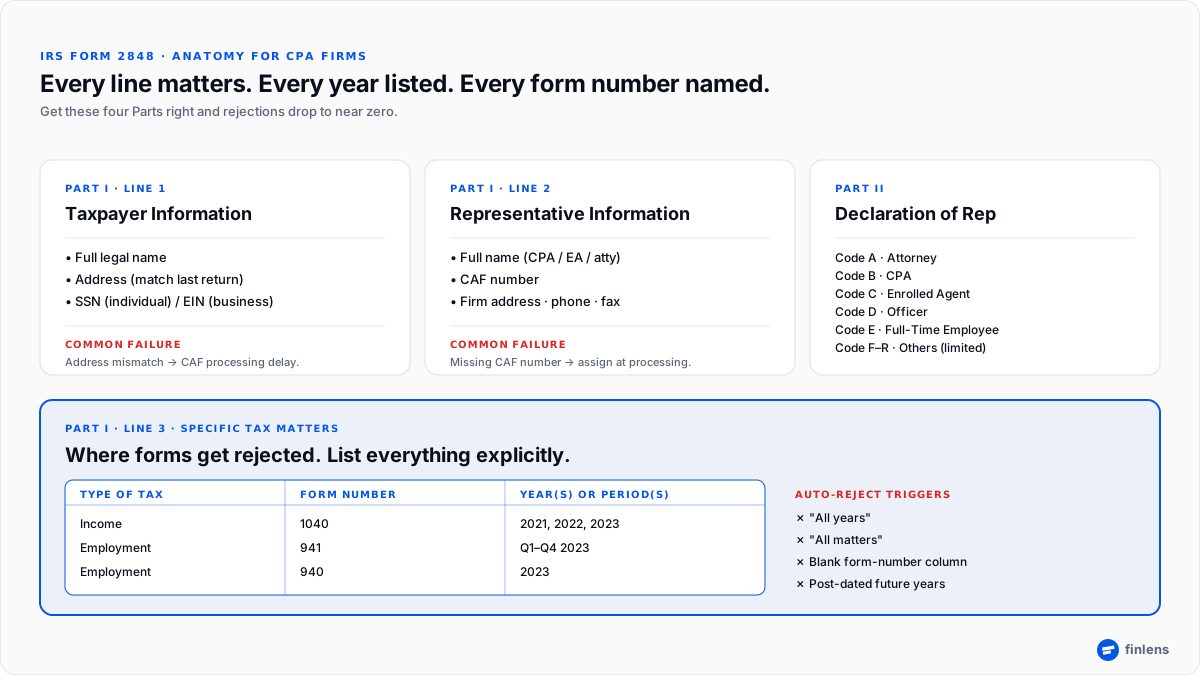
Figure 1. The four Parts on Form 2848 that every submission has to get right. Part I Line 3 (Specific Tax Matters) is where most rejections happen.
Part I, Line 1 Taxpayer information
- Full legal name exactly as it appears on tax return being represented.
- Address matching most recent tax filing.
- Taxpayer Identification Number SSN for individuals; EIN for businesses.
- Common failure: address mismatch between form and last-filed return. The IRS matches this on entry; small differences (Apt vs #, PO Box vs Street) trigger CAF processing delays.
Part I, Line 2 Representative information
- Full name of CPA, EA, or attorney representing taxpayer.
- CAF number Centralized Authorization File number IRS previously assigned to representative. First-time reps request one when initial 2848 is processed.
- Firm address, phone, fax this becomes address to which IRS notices are routed.
- Common failure: missing CAF number. If representative is new to Circular 230 practice, submit anyway; IRS will assign CAF at processing.
Part I, Line 3 Specific tax matters
This is where forms get rejected. The IRS requires three columns filled out explicitly:
- Type of Tax Income, Employment, Excise, Estate, Gift, Civil Penalty. Be specific.
- Tax Form Number 1040, 1120, 1120-S, 1065, 941, 940, 706, 709. Every form has to be listed.
- Year(s) or Period(s) 2022, 2023, 2024 or quarters (e.g., “Quarter ending Mar 31 2024”). Every year has to be listed explicitly.
Rejection triggers to avoid:
- “All years” auto-reject.
- “All matters” auto-reject.
- “Any and all tax issues” auto-reject.
- Leaving form-number column blank auto-reject.
- Post-dated years (future years not yet filed) reject.
Correct example:
Part II Declaration of Representative
The representative signs, dates, and enters a designation code identifying credential:
- Code A Attorney
- Code B Certified Public Accountant
- Code C Enrolled Agent
- Code D Officer
- Code E Full-Time Employee
- Code F Family Member
- Code G Enrolled Actuary
- Code H Unenrolled Return Preparer (very limited authority)
- Code R Enrolled Retirement Plan Agent
The representative also lists jurisdiction in which they are licensed (state of CPA license for Code B, bar admission for Code A, IRS enrollment for Code C).
Who can be a representative under Circular 230
The IRS restricts representation to individuals with specific credentials or standing. Under Circular 230, eligible representatives include:
- Attorneys licensed and in good standing with a state bar.
- Certified Public Accountants (CPAs) licensed and in good standing with a state board of accountancy.
- Enrolled Agents (EAs) licensed directly by IRS after passing Special Enrollment Examination.
- Enrolled Retirement Plan Agents (ERPAs) limited to retirement-plan matters.
- Enrolled Actuaries limited to actuarial issues.
- Officers of taxpayer for corporate matters.
- Full-time employees for employer matters, with limits.
- Family members for individuals, with limits.
All of above have unlimited representation rights for tax matters within their credential scope. See enrolled agent vs CPA for how EA and CPA authority compare in practice.
Where to submit Form 2848 four routes
Submission method drives how fast form gets into Centralized Authorization File. In 2026, online should be default for any firm doing meaningful representation volume.
Route 1 IRS Submit Forms 2848 and 8821 Online portal (fastest)
- URL: irs.gov/tax-professionals/submit-forms-2848-and-8821-online
- Requires representative to have an IRS Tax Pro Account.
- Client signs form electronically or with an ink signature (scanned).
- Processing time: typically minutes to hours to CAF acceptance.
- The right default for any firm running more than 5–10 representation engagements a year.
Route 2 Client authorization via IRS Online Account (client-initiated, fast)
- Taxpayers can authorize a specific representative digitally through their individual IRS Online Account at irs.gov/businesses/small-businesses-self-employed/power-of-attorney-and-other-authorizations.
- Best for clients who are already IRS-verified online.
- Skips wet-signature and scanning step entirely.
Route 3 Fax to CAF Unit (traditional, still valid)
- The CAF Unit fax number depends on taxpayer’s geographic location. The current fax numbers are listed in IRS Instructions for Form 2848.
- Processing time: typically several business days to weeks depending on CAF Unit backlog.
Route 4 Mail to CAF processing center (slowest, use only if needed)
- Mail address is listed in current IRS Instructions.
- Processing time: 4–6 weeks common; longer during peak periods.
Whichever route is used, keep a signed original in client file. Related: tax resolution covers where in engagement calendar Form 2848 submission sits.
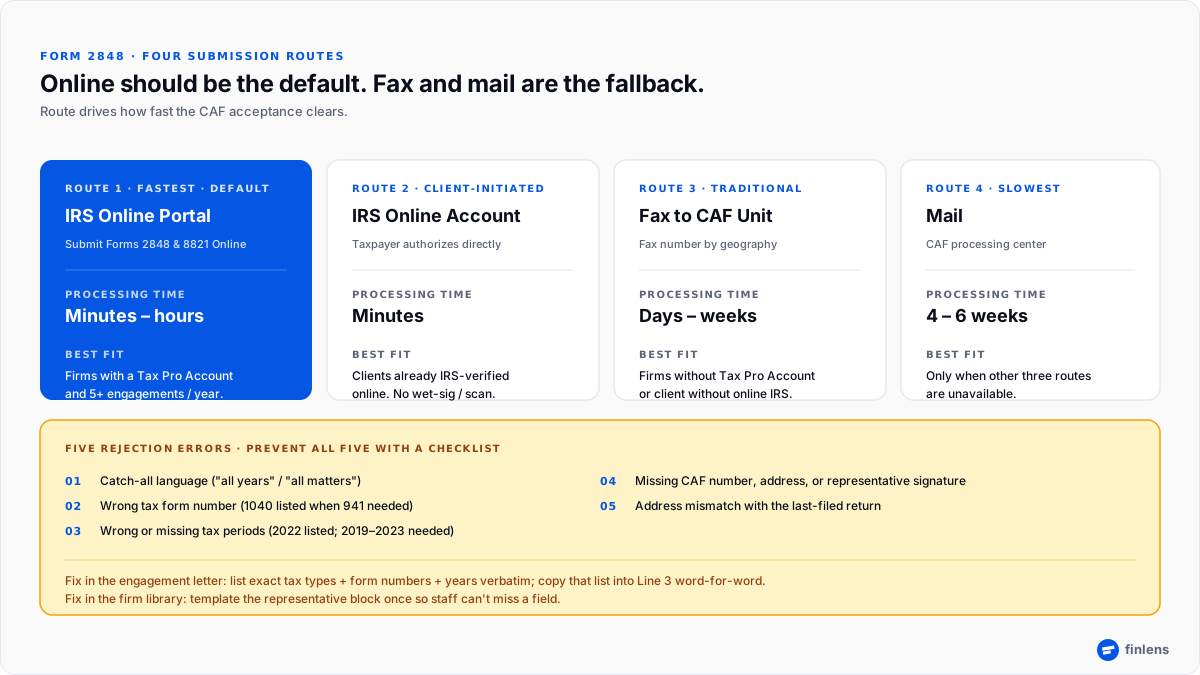
Figure 2. Route drives processing speed online in minutes, mail in weeks. The five preventable rejection errors sit below.
The five errors that get Form 2848 rejected (and how to prevent each)
Rejection restarts CAF processing clock. Every mature firm builds a checklist against these five.
Error 1 Catch-all authorization language
“All years,” “all matters,” “all tax types” auto-reject.
- Prevention: every engagement letter includes exact list of tax types, form numbers, and years firm will represent. Copy that list into Part I, Line 3 verbatim.
Error 2 Wrong tax form number
Client owes payroll tax; form lists 1040 only. CPA cannot discuss 941 matter.
- Prevention: cross-check form-number column against notices in client file. If notice is CP-501 (income) and CP-137 (payroll), both form numbers go on 2848.
Error 3 Wrong or missing tax periods
Client needs 2019–2023 addressed; form lists 2022 only.
- Prevention: pull transcripts BEFORE drafting 2848 to see which tax years actually have balances or open matters. Add every impacted year.
Error 4 Missing CAF number, address, or signature
The representative fields on Part I, Line 2 or Part II are incomplete.
- Prevention: template representative’s block into a firm-wide Form 2848 stub. Staff pull stub and only fill in taxpayer-specific fields.
Error 5 Address mismatch with last-filed return
Taxpayer moved; address on 2848 is new one but last return had old one.
- Prevention: file Form 8822 (Change of Address) BEFORE 2848 if taxpayer address has changed, or use address that matches last-filed return and update after.
Where Form 2848 fits in a CPA firm’s tax resolution engagement
Signing Form 2848 is step 1 of a multi-week engagement. Below is standard sequence used by mature firms:
- Engagement letter signed scope, fees, responsibilities, limitations spelled out.
- Form 2848 executed client signs; representative signs; both keep copies.
- Submission via fastest applicable route (see above).
- CAF acceptance representative confirmed in IRS Centralized Authorization File.
- Transcript pull Account, Return, and Wage and Income transcripts via IRS e-Services.
- Diagnostic memo liability by year, CSED map, SFR check, preliminary path recommendation.
- Compliance cleanup file back-year returns; prepare Form 433-A / 433-B financials. This is where calendar time gets lost.
- Phase 3 resolution filing Installment Agreement, Offer in Compromise, Currently Not Collectible, or Penalty Abatement.
- IRS evaluation and negotiation.
- Resolution accepted; ongoing compliance monitoring begins.
The gap between steps 6 and 8 is single biggest calendar-eater in tax resolution work. On Stripe-heavy or subscription-heavy clients, compliance cleanup can take weeks because underlying QBO books are messy, deferred revenue schedules need reconstruction, and per-client categorization decisions have to be made month-by-month for every back-year filing.
Finlens is AI-native ledger layer built for this step. It decomposes Stripe payouts, categorizes transactions with a human-in-the-loop review queue, builds deferred-revenue schedules automatically, and writes clean entries directly to QuickBooks Online. On a resolution engagement, that compresses compliance-cleanup calendar from weeks to days so Phase 3 can start sooner and firm can carry more resolution engagements in parallel without linear hiring.
Ethical duties when representing under Form 2848
Once accepted, representative owes Circular 230 obligations that are non-negotiable:
- Competence represent only in matters where credential and knowledge match. Refer out where they don’t.
- Due diligence verify client statements, source documents, and financial disclosures before submitting to IRS.
- Confidentiality protect all tax records, notices, and communications.
- No misrepresentation a representative cannot knowingly submit false or misleading information to IRS. Circular 230 sanctions include suspension of practice.
The state board of accountancy layer sits on top for CPAs, and state bar rules on top for attorneys. Both boards can impose independent discipline for representation misconduct.
Frequently asked questions
What is IRS Form 2848?
Form 2848, Power of Attorney and Declaration of Representative, is IRS document a taxpayer signs to legally authorize a licensed representative a CPA, enrolled agent, or attorney to represent them before IRS on specific tax matters, tax forms, and tax years listed on form.
What’s difference between Form 2848 and Form 8821?
Form 2848 grants full representation rights (speak with IRS, negotiate, defend taxpayer’s position). Form 8821 grants information access only (view transcripts and notices; cannot represent, cannot negotiate). Never file 2848 when 8821 would suffice, and never file 8821 when representation is what’s needed.
Who can be a representative on Form 2848?
Under IRS Circular 230, eligible representatives include attorneys, Certified Public Accountants, enrolled agents, enrolled retirement plan agents, enrolled actuaries, officers and full-time employees of taxpayer, and (with limits) family members. Each has a designation code entered in Part II of form.
How do I submit Form 2848 to IRS?
Four routes: IRS Submit Forms 2848 and 8821 Online portal (fastest, minutes to CAF acceptance), authorization via taxpayer’s IRS Online Account, fax to CAF Unit that maps to taxpayer’s geographic location, or mail to CAF processing center. Online should be default for any firm running more than a handful of representation engagements a year.
How long does IRS take to process Form 2848?
Online submissions typically process to CAF acceptance within minutes to hours. Fax typically takes several business days to a few weeks depending on CAF Unit backlog. Mail can take 4–6 weeks. Peak filing periods extend all three routes.
Can Form 2848 authorize “all years” or “all tax matters”?
No. The IRS auto-rejects any Form 2848 that uses catch-all language. Every tax type, every tax form number, and every year has to be listed explicitly in Part I, Line 3.
What is CAF number on Form 2848?
CAF stands for Centralized Authorization File IRS database of taxpayer-representative authorizations. The CAF number is a unique identifier assigned to each representative first time an authorization is filed. On every subsequent Form 2848, representative enters same CAF number so IRS employees can verify their standing.
Does Form 2848 relieve me of tax liability?
No. Granting Power of Attorney authorizes representation, not liability transfer. The taxpayer remains legally responsible for tax, penalties, and interest owed to IRS. What Form 2848 does is redirect IRS communication and negotiation authority to representative.
How do I revoke a Form 2848?
Two options. (1) File a new Form 2848 with same taxpayer information and “Revoke” language on form itself, listing prior authorization being revoked. (2) File a separate signed statement of revocation identifying taxpayer, tax matters and years, and representative being revoked. Send to CAF Unit that processed original.
Where can I download current version of Form 2848?
The current PDF is at irs.gov/pub/irs-pdf/f2848.pdf. The instructions are at irs.gov/instructions/i2848. The IRS updates form periodically always use latest version.
Conclusion
Pick one open resolution engagement (or one you know is coming) where Form 2848 is next step bring client’s last IRS notice + three months of their QBO and we’ll show you compliance-cleanup step, live, before resolution filing goes out.
Form 2848 requirements, submission addresses, and instructions change periodically. This guide reflects IRS guidance publicly available as of 2026-07-17; verify current instructions at irs.gov/instructions/i2848 and current form at irs.gov/pub/irs-pdf/f2848.pdf before filing. Nothing in this article is legal or tax advice engage a licensed CPA, EA, or attorney for actual representation. Third-party trademarks referenced (QuickBooks®) belong to their respective owners.

