
Karbon vs Jetpack Workflow (2026): How to Pick Practice Management Software for Your Accounting Firm


Key takeaways
- Karbon wins on collaboration surface for firms above ~8 people. Jetpack wins on price and onboarding speed for firms under 5 people.
- Both integrate with QuickBooks Online. Neither cleans ledger underneath that stays a manual task unless a ledger-layer tool sits under PM.
- Karbon’s per-user cost is higher than Jetpack’s on comparable tiers; total contract cost depends on team size, not client count.
- Firms grow through a common path: Jetpack at 1–5 staff, migrate to Karbon or a peer between 6–15 staff, add a ledger layer once Stripe or subscription clients dominate book.
- Whichever PM you pick, Finlens sits below it categorizes Stripe transactions, decomposes payouts, and writes clean entries to QBO so PM tool schedules work against a book that’s actually ready.
Comparison table Karbon vs Jetpack Workflow (as of 2026-07-17)
Feature availability based on each vendor’s public documentation and pricing pages as of 2026-07-17. Product capabilities change frequently verify current capabilities directly with each vendor before purchasing.
What each tool is actually optimized for
Karbon optimized for internal collaboration
Karbon’s product page leads with “collaborative practice management.” The centerpiece is Triage a firm-wide shared inbox where any client email lands and any team member can be @mentioned, tasks can be created from a message, and timeline of every client-facing communication stays in one thread (karbonhq.com). The rest of Karbon (Kanban engagements, workflow automations, client tasks, comments) is built to keep that collaboration surface consistent from partner to reviewer to associate.
The reason this matters: at ~8+ staff, cost of an email getting lost or a hand-off falling through cracks is not “an inconvenience” it becomes biggest source of missed deadlines and re-work in firm. Karbon is designed for that firm.
Jetpack Workflow optimized for recurring-task visibility
Jetpack Workflow’s product page leads with “organize your services, automate recurring tasks, and easily view and plan for future work” (jetpackworkflow.com). The differentiators are template builder with 70+ pre-built templates covering monthly bookkeeping, tax returns, and payroll cadences, and Planning tab that lets a firm compare clients, staff, and time periods to see who is overburdened and who has capacity (jetpackworkflow.com/how-it-works).
The reason this matters: at 1–5 staff, biggest firm risk is not “we can’t collaborate on this email” it’s “we forgot March quarterly for client X because there are 40 other things going on.” Jetpack is designed to make forgetting hard.
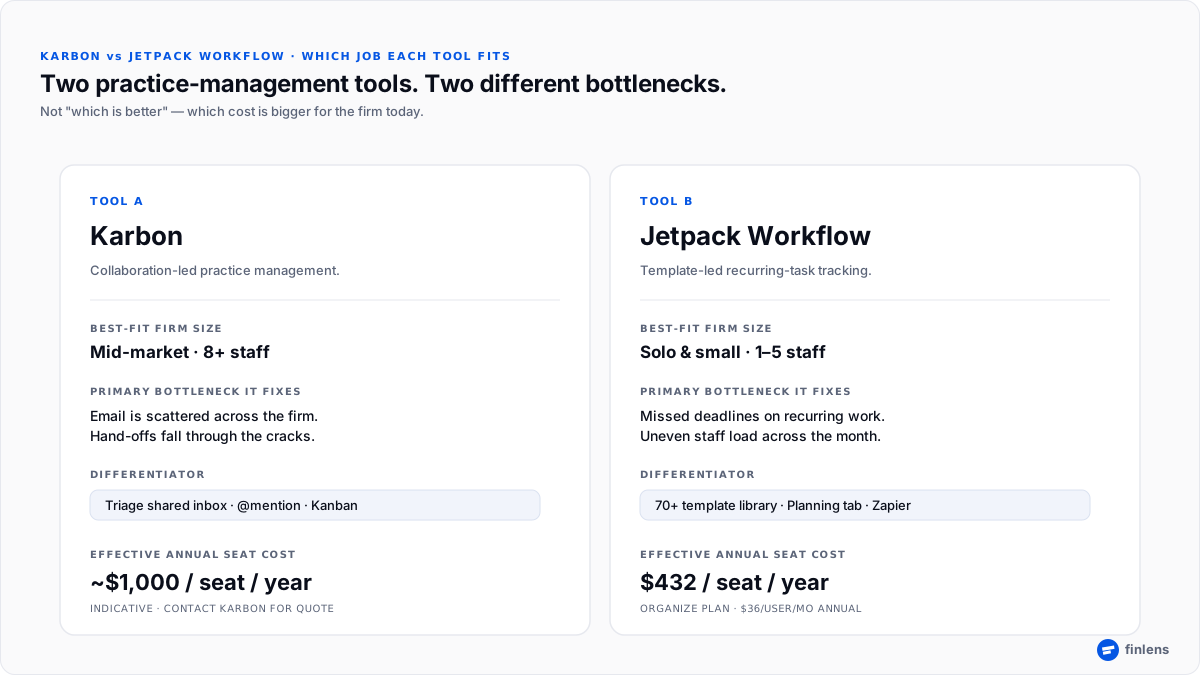
Figure 1. Karbon and Jetpack are optimized for different bottlenecks internal collaboration vs recurring-task visibility.
Karbon vs Jetpack Workflow pricing what firms actually pay
Pricing is where two tools separate most cleanly, and where firm size drives most of decision.
Jetpack Workflow from its own pricing page (jetpackworkflow.com/pricing):
- Organize plan: $45/user/month (monthly), $36/user/month (annual)
- Scale plan: $50/user/month (monthly), $39/user/month (annual)
- 14-day free trial
- 5 × 30-minute complimentary training sessions included
Karbon per its pricing page (karbonhq.com/pricing):
- Team / Business / Enterprise tiers, all per user, all with annual and monthly options
- Karbon does not publish flat per-seat numbers on tier list; contact for firm-specific pricing
- A 5-user firm on an annual Karbon contract, per Karbon’s own comparison materials, has landed around $5,000/year total verify current pricing directly
Effective seat cost comparison for a 5-person firm on annual billing:
- Jetpack Organize: 5 × $36 × 12 = ~$2,160/year
- Karbon (indicative from vendor comparison material): ~$5,000/year
Roughly 2× annual cost per seat. For a firm where “we don’t have an internal-collaboration problem yet” is a true statement, Jetpack’s lower cost is fit; for a firm where email is already scattering, Karbon’s higher cost is what buys collaboration surface. Confirm exact prices with each vendor before signing.
practice management software should your firm pick
Use following decision framework it maps firm-shape to tool that fits, without declaring a universal winner.
- If firm is solo or 2–5 staff and biggest cost is “we missed a deadline” → Jetpack Workflow. The 70+ template library and Planning tab hit that job. Onboarding is fast (5 × 30-min included), 14-day trial de-risks decision, and per-seat cost stays low while firm is small.
- If firm is 8–15 staff and biggest cost is “email is scattered and we forwarded wrong version to client” → Karbon. Triage plus @mention across firm compresses hand-off cost more than any workflow template can.
- If firm is 5–8 staff and neither problem yet dominates → run Jetpack for six months, watch which cost grows first. Migrating out of Jetpack to Karbon later is a template-and-tag re-mapping exercise, not a data-loss event.
- If either firm shape is Stripe- or subscription-heavy on client books → PM decision is only half stack. Pair chosen PM with a ledger-layer tool that keeps QBO book actually clean.
- If workpaper prep is downstream of engagement → PM tool schedules work but doesn’t build workpaper. See best workpaper preparation software for accounting firms.
- If current client-communication motion is still email + spreadsheets → PM alone will not fix it. See accounting client portal vs email and spreadsheets when to switch.
Where each tool doesn’t fit honest scoping
Both tools have gaps. Naming them is more useful than avoiding them.
- Karbon is heavier than a 1–3 person firm needs. Firms below that size often use ~30% of Karbon’s surface and pay for rest. If internal-collaboration cost has not shown up yet, Karbon is early.
- Jetpack Workflow does not center email triage way Karbon does. Firms whose primary bottleneck is “who saw client’s last email” will find workflow-first design a mismatch even with email-to-task feature.
- Neither tool cleans ledger. Both integrate with QuickBooks Online, but integration is about status and read/write of task-linked artifacts, not categorization or payout decomposition. If firm’s books need transactional cleanup before close, ledger layer is a separate purchase.
- Neither tool replaces a client portal if portal UX is real bottleneck. Karbon has a client-facing task surface; Jetpack’s client-facing surface is lighter. Firms whose problem is “clients ignore our portal” should evaluate a portal-first tool alongside PM.
- Neither is a workpaper prep tool. Downstream, workpaper still needs Caseware, Suralink, TaxDome, Canopy, or Liscio, depending on engagement type.
The gap both tools leave and where Finlens fits
Both Karbon and Jetpack Workflow assume underlying QuickBooks Online book is in a state where workflow can be scheduled against it. In practice, on Stripe-heavy client books, book takes 4–6 hours per client per month to get to that state and neither PM tool touches that work.
Finlens is layer that lives under whichever PM tool firm picks. Specifically:
- Stripe payout decomposition. Payouts arrive as one deposit; underlying charges, refunds, disputes, and fees are separate line items. Finlens decomposes each payout into individual entries before writing to QBO.
- Fee separation. Processing fees are broken out from gross revenue so ASC 606 revenue recognition holds and P&L is right at close.
- Categorization with a human-in-the-loop review queue. Finlens categorizes with confidence scores; a bulk-approve queue clears routine transactions and a flagged queue surfaces ambiguous ones for review. Rules and Learning history hold per-client memory so same categorization decision does not get made twice.
- Deferred revenue schedules. Subscription books get an automated schedule so revenue recognition on close is not a spreadsheet paste-back.
The PM tool then schedules review, sign-off, and client communication around a book that is actually ready. This is “job 3” that neither Karbon nor Jetpack touches.
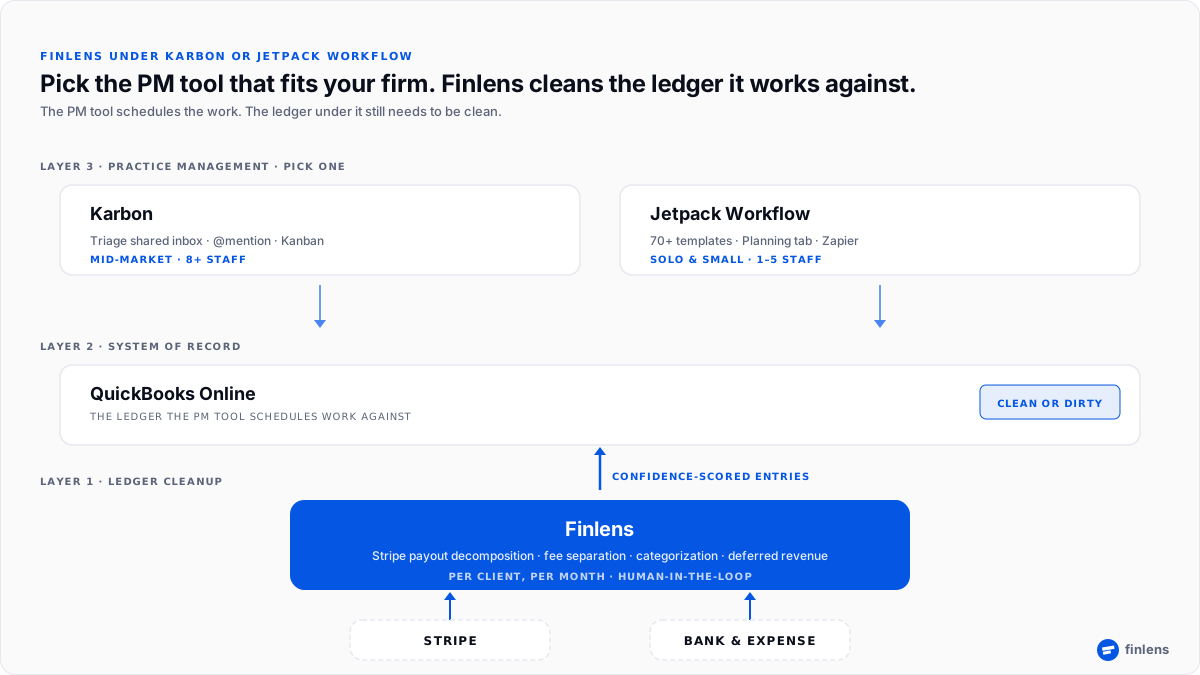
Figure 2. Whichever PM you pick, Finlens cleans ledger PM tool schedules work against.
Conclusion
Pick one client on firm’s books where last close ran two days late bring that engagement and we’ll walk it through both a Karbon-style hand-off view and a clean ledger in twenty minutes.
Frequently asked questions
Is Karbon better than Jetpack Workflow?
Neither is universally better. Karbon fits mid-market firms (~8+ staff) where internal collaboration is bottleneck. Jetpack Workflow fits solo and small firms (1–5 staff) where recurring-task visibility is bottleneck. The right choice depends on which cost is bigger for firm today.
How much does Karbon cost compared to Jetpack Workflow?
Jetpack Workflow’s Organize plan is $36/user/month on annual billing and $45/user/month monthly (jetpackworkflow.com/pricing). Karbon is per-user across Team, Business, and Enterprise tiers; firms should contact Karbon for a firm-specific quote. Karbon’s effective seat cost is generally higher than Jetpack’s on a comparable tier.
Do Karbon and Jetpack Workflow both integrate with QuickBooks Online?
Yes. Both vendors document a direct QuickBooks Online integration. Neither integration includes ledger-level cleanup such as Stripe payout decomposition, fee separation, or deferred revenue schedules those need a separate ledger-layer tool.
Can I migrate from Jetpack Workflow to Karbon?
Yes. Firms commonly migrate as they grow past 6–8 staff. The migration is primarily a template and tag re-mapping exercise rather than a data-loss event. Plan for a 2–4 week overlap so both tools run in parallel while firm rebuilds recurring templates in new tool.
What does Karbon do that Jetpack Workflow doesn’t?
Karbon centers on a shared inbox (Triage) with @mention and comment functionality on emails, tasks, and clients core collaboration surface for mid-market firms. Jetpack Workflow’s email surface is email-to-task via forwarding, which is a lighter design suited to smaller teams that don’t share an inbox.
What does Jetpack Workflow do that Karbon doesn’t focus on?
Jetpack Workflow leads with a 70+ pre-built template library and a Planning tab that compares client, staff, and time-period workload primary surface small firms use to protect against missed deadlines. Karbon has recurring templates but is not template-library-led in same way.
Is there a free trial for Karbon or Jetpack Workflow?
Jetpack Workflow offers a 14-day free trial per its pricing page. Karbon does not advertise a self-serve free trial standard flow is a scheduled demo.
Do I still need Finlens if I use Karbon or Jetpack Workflow?
The tools solve different jobs. Karbon and Jetpack schedule work and route hand-offs. Finlens categorizes underlying transactions, decomposes Stripe payouts, and writes clean entries to QuickBooks Online. Firms with Stripe- or subscription-heavy client books typically run both a PM tool for workflow, Finlens for ledger.
Trademarks referenced in this article (including Karbon®, Jetpack Workflow®, QuickBooks®, Zapier®) are property of their respective owners. Finlens is not affiliated with, endorsed by, or sponsored by any of third-party products discussed. Product capabilities and pricing are based on each vendor’s publicly available documentation as of 2026-07-17 and may have changed. Readers should verify current capabilities directly with each vendor before purchasing.

