
How Much Does QuickBooks Payroll Actually Cost?


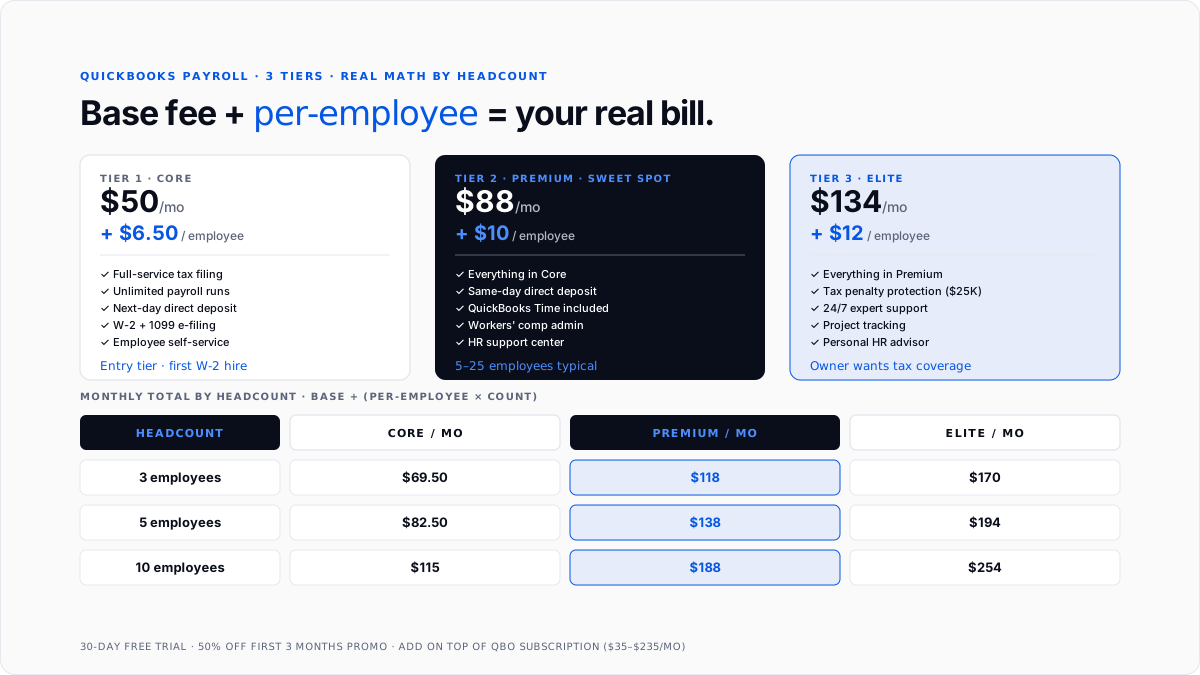
QuickBooks Payroll pricing in 2026 starts at $50 per month plus $6.50 per employee for the Core tier, $88/month plus $10/employee for Premium, and $134/month plus $12/employee for Elite. QuickBooks Desktop Payroll runs separately at $70/month or $700/year for the base subscription. Intuit runs a 50% off promotion for the first three months, and every tier includes a 30-day free trial with no credit card required.
This guide walks through the exact pricing per tier, what each tier actually includes, real math for businesses at different employee counts, and when a different payroll provider (Gusto, ADP) makes more sense than QuickBooks Payroll.
What are the QuickBooks Payroll pricing tiers?
Three tiers of QuickBooks Online Payroll (the current active version), each stacking on top of a QuickBooks Online subscription.
Payroll Core: $50/month base fee + $6.50 per employee per month. Covers full-service payroll (Intuit calculates, files, and pays your federal and state payroll taxes), 1099 e-filing, next-day direct deposit, and health benefits access via SimplyInsured. The entry tier for a small business with W-2 employees.
Payroll Premium: $88/month base fee + $10 per employee per month. Adds same-day direct deposit, QuickBooks Time (formerly TSheets) mobile time tracking included, HR support center, expert setup review, workers' comp administration. The tier most 5-25 employee businesses land on.
Payroll Elite: $134/month base fee + $12 per employee per month. Adds tax penalty protection (Intuit covers up to $25,000 in penalties if their calculation is wrong), 24/7 expert support, project tracking with QuickBooks Time, personal HR advisor. Fit for businesses that want the tax-penalty protection or need dedicated HR guidance.
Some Intuit marketing pages still show the legacy pricing ($45/$6, $80/$8, $125/$10). Confirm the current pricing at signup because Intuit ships promotional and tier-price adjustments periodically.
What does each tier actually include?
Everything at every tier:
- Full-service payroll (calculate, file, and pay federal + state payroll taxes)
- Unlimited payroll runs per month
- W-2 e-filing at year-end
- 1099 preparation and filing for contractors
- Direct deposit (next-day at Core, same-day at Premium and Elite)
- Employee self-service portal (payslips, W-2 access, tax settings)
- Automatic payroll runs (set once, runs each period)
- Reports (payroll summary, tax liability, employee earnings)
Core adds nothing beyond the above baseline.
Premium adds: Same-day direct deposit, QuickBooks Time integration for hourly employees, workers' comp administration through AP Intego, expert setup review, HR support center access, and health benefits marketplace.
Elite adds: Tax penalty protection up to $25,000 per case, 24/7 phone and chat support with expert callback, project tracking, and a personal HR advisor for one-on-one guidance.
For the mechanics of what payroll actually files on your behalf, see payroll tax. For the broader payroll software landscape, see payroll management software and payroll services pricing.
What does QuickBooks Payroll actually cost for 3, 5, or 10 employees?
Total monthly cost = base fee + (per-employee fee × employee count).
3-employee business:
- Core: $50 + ($6.50 × 3) = $69.50/month
- Premium: $88 + ($10 × 3) = $118/month
- Elite: $134 + ($12 × 3) = $170/month
5-employee business:
- Core: $50 + ($6.50 × 5) = $82.50/month
- Premium: $88 + ($10 × 5) = $138/month
- Elite: $134 + ($12 × 5) = $194/month
10-employee business:
- Core: $50 + ($6.50 × 10) = $115/month
- Premium: $88 + ($10 × 10) = $188/month
- Elite: $134 + ($12 × 10) = $254/month
Annual math is 12x the monthly. A 5-employee business on Premium runs $1,656/year in payroll subscription cost, which is roughly the range of hiring an outside payroll service for the same headcount.
Add the QuickBooks Online subscription on top: Simple Start $35, Essentials $65, Plus $99, Advanced $235. Total stack for a 5-employee business on Essentials + Premium Payroll: $65 + $138 = $203/month.
What does QuickBooks Desktop Payroll cost?
QuickBooks Desktop Payroll is a separate product with different pricing. The base subscription is $70/month or $700/year (with a small annual discount). Additional per-employee fees may apply depending on the tier. Desktop Payroll is available in Basic, Enhanced, and Assisted flavors, with Assisted being the full-service option comparable to Online Payroll Elite.
For most new small businesses, QuickBooks Online Payroll is the honest choice - cloud-based, actively developed, and with cleaner integration with QuickBooks Online. Desktop Payroll fits legacy businesses that already run QuickBooks Desktop for specific vertical reasons.
Are there promotions or discounts?
50% off the first three months is Intuit's standard promotion, active most of the time. Applies to both the base fee and per-employee fees for the first three months.
30-day free trial for every tier, no credit card required. Long enough to set up employees, run one full payroll cycle, and evaluate the tier before committing.
Bundle savings if you subscribe to QuickBooks Online + Payroll together at signup, versus adding Payroll later. Bundle discount typically 20-30% off the first-year total.
Annual billing is not standard for QuickBooks Payroll (Intuit bills monthly by default). Desktop payroll can be annual.
Multi-employee discounts do not apply - the per-employee fee is flat across headcount tiers, not tiered like some competitors.
When is QuickBooks Payroll the right choice?
Three specific signals push the answer to yes.
You already run QuickBooks Online. Native integration eliminates the OAuth-refresh dance most third-party payroll integrations require. Payroll expense, tax withholding, and employer taxes post directly to the general ledger without an intermediate sync layer.
Your headcount is 1-50 employees. QuickBooks Payroll pricing scales cleanly through this range. Above 50, the per-employee cost stops being competitive versus enterprise providers.
Your tax needs are US-only. QuickBooks Payroll handles federal, state, and local US payroll taxes. It does not handle Canadian, UK, or other international payroll. Cross-border employers should look elsewhere.
When should you skip QuickBooks Payroll?
International payroll: Cross-border employers need Deel, Rippling, or specialized international payroll providers.
Enterprise scale (50+ employees): Per-employee pricing stops being competitive above the mid-market band. ADP, Paychex, or Rippling are typically better.
Contractor-heavy workforces without W-2 employees: If you're paying only 1099 contractors, you don't need full payroll infrastructure. QuickBooks Bill Pay or a standalone 1099 tool covers it. See the 1099-NEC filing deadline and difference between W2 and 1099.
Complex benefits administration: If you offer 401(k) matching, HSA contributions, commuter benefits, and other benefits at scale, Gusto or Rippling handle these more cleanly with deeper carrier integrations.
Modern-fintech UX preference: Gusto has a more modern interface and often wins on employee-experience quality. Pricing is roughly comparable ($40-$180/month base + $6-$12/employee).
How do you set up QuickBooks Payroll?
Path via QuickBooks Online.
Step 1: In QBO, click Payroll in the left menu. Choose the tier and click Subscribe.
Step 2: Configure company payroll settings: pay schedules (weekly, biweekly, semi-monthly, monthly), federal EIN, state tax IDs, and workers' comp policy details.
Step 3: Add employees: legal name, address, W-4 elections (federal and state), direct deposit bank info, pay rate, and benefits deductions. For W-4 basics, see Form W-4.
Step 4: Run the first payroll cycle. QuickBooks calculates gross pay, tax withholdings, and net pay and processes direct deposit or check printing.
Step 5: Ongoing runs: automatic based on your pay schedule, with owner review before each processing date.
Setup takes 2-4 hours for a small business hiring its first employee, primarily because of the state tax registration and initial employee data entry.
What are the common QuickBooks Payroll pricing mistakes?
Underestimating true monthly cost. The base fee gets quoted, but the per-employee fee adds up fast. A 10-employee premium business is $188/month, not $88.
Skipping the tier that includes what you need. Companies that need same-day direct deposit or time tracking pay more in workarounds and add-ons than they'd pay upgrading to Premium.
Assuming Elite's tax penalty protection is broad. The protection covers up to $25,000 per case and applies to Intuit's calculation errors, not owner-provided incorrect data. Read the terms.
Not accounting for state-specific filing fees. Some states charge additional filing fees for withholding, unemployment insurance, and workers' comp registration. Not included in the QuickBooks base fee.
Missing the promotion signup. New subscribers get 50% off the first three months if they sign up during the promo window. Skipping the promo means paying full retail from month one.
Bundling incorrectly. QBO + Payroll bundle at signup often saves 20-30% versus adding Payroll later. Owners who buy QBO first and then payroll separately miss the bundle discount.
How does Finlens fit alongside QuickBooks Payroll?
Finlens is a QuickBooks-compatible AI accounting layer built for CPA firms managing many client books and for small businesses running QuickBooks without an in-house bookkeeper. Finlens does not process payroll - payroll runs through QuickBooks Payroll (or Gusto, ADP, whichever provider you use). Finlens categorizes the payroll expense that hits QuickBooks after each payroll run.
For a business running QuickBooks Payroll, every payroll cycle generates a set of journal entries: wage expense per department, tax withholding liabilities, employer tax expense, benefits deductions, and cash out. Finlens categorizes each entry correctly against the chart of accounts, catches any misalignment between the QuickBooks Payroll post and the actual bank debit, and closes the payroll cycle at month-end without a human touching it.
For CPA firms managing payroll for many clients, Finlens handles this reconciliation and close automation across every client file, so the firm can add payroll clients without adding staff.
Conclusion
QuickBooks Payroll costs $50/month + $6.50/employee (Core), $88/month + $10/employee (Premium), or $134/month + $12/employee (Elite). Real monthly totals: $70-$170 for 3 employees, $83-$194 for 5 employees, and $115-$254 for 10 employees. Every tier includes full-service tax filing, unlimited runs, direct deposit, and employee self-service. Premium adds same-day deposit and time tracking; Elite adds tax penalty protection and 24/7 support. Best fit for US-only businesses with 1-50 employees already running QuickBooks Online. Skip in favor of Gusto for modern UX, ADP for enterprise scale, or Deel for international. Always sign up during the 50% off first-three-months promo and take the 30-day free trial before committing.
FAQs
How much does QuickBooks Payroll cost per month?
Three tiers. Core: $50/month + $6.50 per employee. Premium: $88/month + $10 per employee. Elite: $134/month + $12 per employee. QuickBooks Desktop Payroll runs separately at $70/month base or $700/year.
What's the cheapest QuickBooks Payroll plan?
Payroll Core at $50/month + $6.50 per employee is the entry tier. For a 3-employee business, that's $69.50/month total. Includes full-service tax filing, unlimited runs, next-day direct deposit, and 1099 e-filing.
What does QuickBooks Payroll include at each tier?
Every tier: full-service payroll, unlimited runs, W-2 and 1099 filing, direct deposit, and employee self-service. Premium adds: same-day direct deposit, QuickBooks Time, HR support, and workers' comp admin. Elite adds: tax penalty protection up to $25,000, 24/7 support, project tracking, and a personal HR advisor.
How much does QuickBooks Payroll cost for 5 employees?
Core: $50 + ($6.50 × 5) = $82.50/month. Premium: $88 + ($10 × 5) = $138/month. Elite: $134 + ($12 × 5) = $194/month. Annual math is 12x monthly.
Does QuickBooks Payroll include tax filing?
Yes. All three tiers include full-service tax filing - Intuit calculates, files, and pays your federal and state payroll taxes automatically. Elite adds tax penalty protection covering up to $25,000 per case if Intuit's calculation is wrong.
Is there a free trial for QuickBooks Payroll?
Yes. 30-day free trial for every tier, no credit card required. Intuit also runs a 50% off first-three-months promotion most of the time, dropping the effective first-quarter cost significantly.
How does QuickBooks Payroll compare to Gusto or ADP?
QuickBooks Payroll wins on native QuickBooks. Online integration and simpler pricing. Gusto wins on modern UX and broader benefits of carrier integrations at roughly comparable pricing. ADP wins at enterprise scale (50+ employees) and complex compliance needs. Match the provider to your headcount, benefits complexity, and existing accounting stack.
Do I need QuickBooks Online to use QuickBooks Payroll?
Yes for QuickBooks Online Payroll. It's designed to stack on top of QuickBooks Online (Simple Start $35 through Advanced $235). QuickBooks Desktop Payroll works with QuickBooks Desktop but is a separate product line.

