
Receipt Tracker: How Business Owners Actually Compare and Choose One (2026)


A receipt tracker is a tool that scans, organizes, and stores receipts so businesses can defend tax deductions, keep books clean, and stop losing thermal-paper documents to fading ink and cluttered drawers.
At surface level, every receipt tracker does roughly same thing. You point a phone camera at a piece of paper, OCR pulls out fields, and record lands in a searchable database.
Underneath that surface, though, options differ dramatically in how well they integrate with accounting software, how much they cost per user, and how much manual review they still require.
This guide walks through what a receipt tracker actually does for a business, six criteria that matter when picking one, five categories of trackers available in 2026, common integration paths, mistakes that make even a good tracker useless, and a decision framework for narrowing down choice.
What a receipt tracker actually does
At core, a receipt tracker performs four jobs on every business receipt. It captures a digital image of original document. It extracts merchant, date, amount, and tax details as structured data.
It stores record in a searchable archive with a retention window that meets IRS requirements. And it pushes data to accounting software so transaction can flow to general ledger.
Different trackers handle four jobs at different levels of automation. Some cover only image capture and expect user to categorize manually. Others handle full sequence end to end, including auto-matching to card transactions and auto-suggesting categories from chart of accounts.
The difference between two extremes is meaningful. A tracker that stops at image storage still leaves hours of manual work per month. A tracker that runs full sequence collapses that work into minutes.
The payoff, when a tracker is set up well, shows up in three places. Books close faster because manual entry is gone. Tax deductions hold up in audit because every receipt is attached to its transaction. And audit trail stays intact because thermal-paper decay stops being a problem.
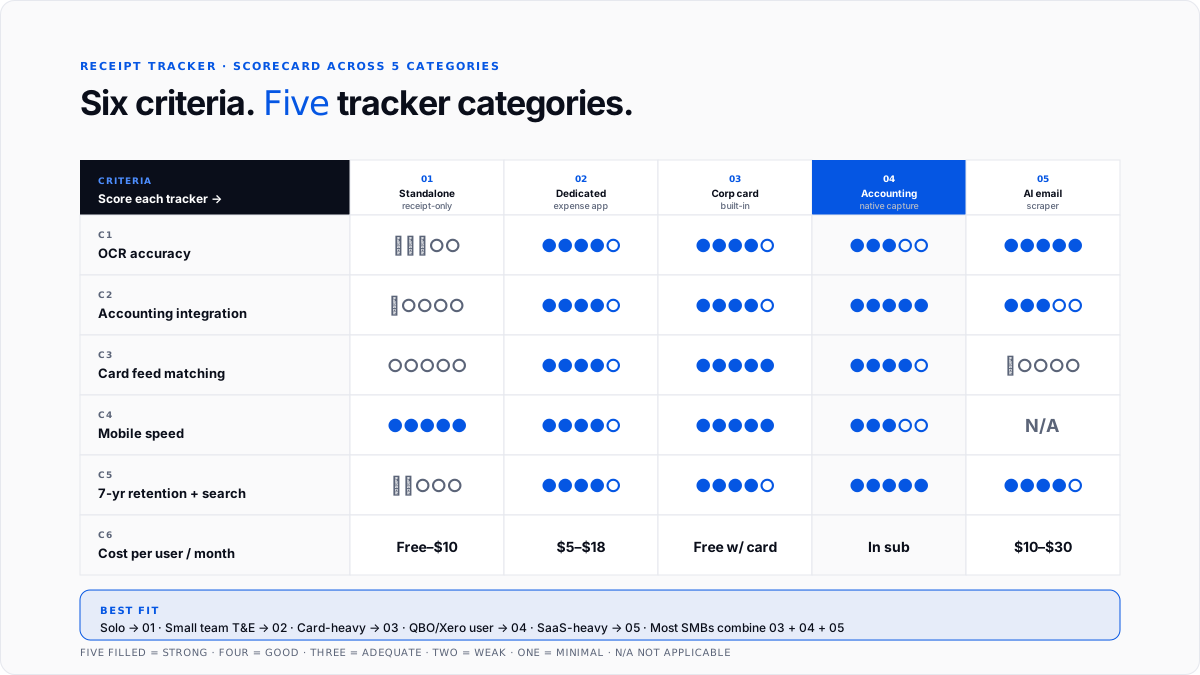
The six criteria that actually matter when picking a tracker
Almost every tracker on market lists same features on its landing page. The differences worth caring about are much narrower than marketing suggests.
Criterion 1: OCR accuracy on real receipts- How well extraction handles faded thermal paper, receipts with hand-written notes, foreign currency conversions, and multi-page invoices. This is where biggest differences between tools show up, and it's hardest thing to test without actually processing your own receipts through a trial.
Criterion 2: Integration with accounting software you already use- Two-way sync with QuickBooks, Xero, NetSuite, or Sage is table stakes for a business tracker. One-way push integrations create reconciliation problems that eat up whatever time tracker saved on data entry.
Criterion 3: Card feed matching- The tracker should pull card transactions directly from Ramp, Brex, Amex, or business credit card, and match receipts to charges automatically. Manual matching is where most tracker workflows break down at scale.
Criterion 4: Mobile-first design and speed- Employees capture receipts on phones. If app takes fifteen seconds to open and another twenty to accept a photo, adoption drops fast. Sub-five-second capture speed is what separates tools people actually use from ones they abandon.
Criterion 5: Storage retention and search- Records should be stored in cloud with at least seven years of retention, and searchable by vendor, date, amount, or category. Tools that force periodic export to keep records long-term create audit trail gaps.
Criterion 6: Cost per user per month at real usage- Marketing often quotes base tier price, which usually excludes OCR runs, integrations, or user seats a business actually needs. Effective cost per user per month, including OCR volume and integration fees, is what should drive comparison.
The five categories of receipt trackers in 2026
Almost every tracker on market falls into one of five categories, and understanding categories makes choice much simpler.
Category 1: Standalone receipt-only apps- Smart Receipts, Receipt Bank predecessors, and Wave's mobile receipt feature focus narrowly on capture and export. They're inexpensive or free, they work well for solo freelancers, and they usually still require integration with a separate accounting platform to close loop.
The upside is simplicity. The downside is that anyone processing more than about fifty receipts a month will outgrow standalone app within a year.
Category 2: Dedicated expense management apps- Expensify, Zoho Expense, Fyle, and Dext go further by adding approval workflow, corporate card integration, and reimbursement management on top of receipt tracking. They fit small teams with formal expense reporting, especially travel-heavy businesses.
Dext is currently strong in Forbes 2026 receipt-scanner list for larger companies, with automated card feed matching and QuickBooks and Xero integration.
Category 3: Corporate card programs with built-in tracking- Ramp, Brex, and Mercury combine card issuance with automated receipt capture. The app prompts cardholders to snap receipts as charges post, and OCR matches receipt to transaction automatically.
This is highest-friction-remover for card-heavy businesses, and it's increasingly default for early-stage companies that don't want to run separate cards and expense tools.
Category 4: Accounting-software-native receipt capture- QuickBooks Online, Xero, and NetSuite include receipt capture inside their mobile apps. Photos taken through accounting app attach directly to connected bank feed, and categorization happens against chart of accounts already loaded.
For businesses running formal bookkeeping, this is sensible default because there's no separate system to reconcile.
Category 5: AI email inbox scrapers- SparkReceipt and similar tools connect to business email inbox and automatically ingest every receipt or invoice that arrives via email, without user needing to forward anything.
This is highest-return category for SaaS-heavy businesses whose spend is almost entirely digital. It eliminates forwarding step that even good email-based workflows still require.
Comparison at a glance across five categories
Most small businesses combine two or three of these categories in practice. Corporate card with tracking for card spend. Accounting-native capture for out-of-pocket. An AI email scraper layered on top for SaaS invoices. The exact mix depends on where spend actually happens.
The integration paths that actually work
The most important design decision behind a receipt tracker choice is how extracted data flows into accounting software.
Direct API integration: The tracker connects natively to QuickBooks Online, Xero, or NetSuite, and pushes categorized transactions with attached receipts through API. This is cleanest path, and it's what businesses running formal bookkeeping should insist on.
Bank feed matching: The tracker pulls card transactions from a connected bank or card feed and matches receipts to charges as they clear. This works well when combined with API integration, since matched record can flow straight to ledger.
CSV export or manual upload: The tracker exports periodic files that bookkeeper imports into accounting software. This is fallback path, and it introduces enough manual work that it's really only useful for very small businesses at very low volume.
Email forwarding: The tracker accepts forwarded emails as receipts, ingests them automatically, and either pushes to accounting software or holds them for review. This works for digital receipts and complements mobile-capture path for physical receipts.
Businesses that spend time to pick an integration path that matches their existing accounting workflow tend to see full ROI from receipt tracking. Those that don't often end up with two separate systems and manual reconciliation between them, which is worse than either system alone.
Where receipts should end up in tax return
Every captured receipt eventually supports a deduction on a tax return, which is why categorization tracker applies matters so much.
For sole proprietors and single-member LLCs, categorized receipt-backed transactions flow into Schedule C Lines 8 through 27. The how to write off business expenses guide covers which categories move deduction needle most, and home office deduction guide covers special case where utility receipts get split across business and personal use.
For partnerships and S-corps, same categorized transactions flow onto Form 1065 or 1120-S at entity level.
Retention matters equally. IRS Publication 583 and Rev. Proc. 97-22 accept digital records as valid documentation. The how long to keep business tax records guide covers retention windows that trackers should be configured to meet.
The mistakes that break receipt tracker workflows
Even best tool produces bad output if underlying habits and setup aren't right. Five failure modes show up over and over.
Picking a consumer app instead of a business app: Fetch, Receipt Hog, Ibotta, and CoinOut pay small cashback rewards but produce no audit-ready records and don't integrate with accounting software. Businesses that pick these wonder for months why their bookkeeper can't use data.
Skipping integration step: Trackers that only capture and store, without pushing to QuickBooks or Xero, leave accounting side untouched. The receipts become another silo instead of a workflow that closes loop.
Not enforcing capture at moment of purchase: Receipts photographed a week later have often already been lost or faded, and business purpose is harder to remember. Real-time capture is single highest-impact habit for whole workflow.
Ignoring OCR confidence scores: Modern trackers show confidence scores on each extracted field, and low scores flag likely errors. Skipping review of low-confidence extractions means categorized transactions with wrong amounts flow into books.
Migrating tools without preserving archive: Businesses that switch trackers often lose access to receipts stored in old tool. Any migration needs to include exporting complete image archive to stable long-term storage, ideally cloud drive accounting software already uses.
Where a tracker fits in cleanup workflow
For businesses with months of unclassified transactions and missing receipts, a receipt tracker is one part of fix rather than whole solution.
The automated bookkeeping cleanup guide covers broader catch-up process. Tools that process bulk historical data are covered in best AI tools for bulk transaction categorization piece, and QuickBooks-specific historical categorization sits in historical transaction categorization tools for QuickBooks guide.
The typical cleanup sequence is: bulk-categorize historical transactions, chase down and attach receipts that support deductions worth defending, and set up receipt tracker going forward so same backlog never accumulates again.
Conclusion
A receipt tracker is tool that converts paper receipts into structured, deduction-ready data that flows straight into books.
The right choice depends less on which app has flashiest landing page and more on which one integrates cleanly with accounting software already in use, matches receipts to card transactions automatically, and stores archive for retention window IRS rules require.
For small businesses building process from scratch, highest-return moves are picking a tracker native to or well-integrated with accounting platform, layering a corporate card program on top for automated card capture, using email forwarding or ingestion for SaaS invoices, and enforcing moment-of-purchase capture as a company-wide habit.
For CPA firms managing many client books, standardizing on one receipt tracker across whole book is one of biggest operational levers available, because every hour saved per client per month compounds fast into a meaningful margin lift over year.
Frequently asked questions
What is best receipt tracker for small business?
For most businesses already using QuickBooks or Xero, accounting software's built-in mobile receipt capture is best default. For card-heavy businesses, Ramp or Brex with built-in tracking is stronger. For teams with formal expense reporting, Expensify, Zoho Expense, or Dext all work well.
Do I need a receipt tracker if I have QuickBooks?
QuickBooks Online has built-in mobile receipt capture that handles basics. Adding a dedicated tracker only helps if business needs approval workflow, corporate card matching, or handling volumes that overwhelm built-in tool.
Are free receipt trackers good enough for business use?
For solo freelancers with low volume, tools like free tier of Zoho Expense, Wave, or Smart Receipts can work. Above about fifty receipts a month, workflow limits of free tiers usually make paid tiers worth upgrade.
How does a receipt tracker help at tax time?
Every receipt attached to a categorized transaction feeds directly into deduction categories on tax return. Tax prep is dramatically faster because CPA doesn't have to reconstruct categorization from bank statements, and every deduction has documentation attached in case of audit.
Can a receipt tracker replace my expense reports?
For businesses with employees submitting reimbursements, receipt tracking is one piece of expense reporting workflow. The full workflow also needs policy setting, manager approval, and reimbursement routing, which is where dedicated expense management platforms add value.
Do I need a business bank account to use a receipt tracker?
Not technically, but yes in practice. Separate business and personal accounts are single biggest lever for clean books, and receipt trackers work far better when connected to accounts that only carry business transactions.
How long do receipt trackers store my receipts?
Modern cloud-based trackers store receipts indefinitely as long as subscription is active. The IRS requires business records to be kept for three to seven years depending on situation, and best practice is to configure tracker for seven-year retention minimum.
Do receipt trackers work with Excel or Google Sheets?
Most business trackers can export extracted data to CSV or Excel format. This is fallback path when direct API integration to accounting software isn't available, and it works but requires more manual reconciliation.
How much does a receipt tracker cost?
Standalone apps range from free to $10 per month. Dedicated expense management apps run $5 to $18 per user per month. Accounting-native capture is included in QuickBooks or Xero subscriptions. Corporate card programs typically bundle tracking free with card use.
Can I forward email receipts to my tracker?
Almost every business-grade tracker supports email forwarding, and some (like SparkReceipt) go further by automatically ingesting every receipt that arrives at connected inbox. This is highest-return move for SaaS-heavy businesses.

