
Audit-ready accrual schedules in QuickBooks Online


Quick answer: An accrual is audit-ready when six things sit on the entry: source document, service period start and end, calculation basis, account mapping, preparer and date, and reversal status. Correct and defensible are separate tests. The second needs a reviewer who was not there to rebuild the number eighteen months later without asking anyone.
This is a working reference for firms maintaining accrual and prepaid schedules across a client base. Every technique is sourced to Intuit's own documentation or a real thread on QuickBooks Community.
Infographics in this guide
Three infographics accompany this guide. Each placement point is marked inline below with a [ INFOGRAPHIC N OF 3 · PLACE IMAGE HERE ] block containing the file name, alt text and caption.
What is an audit-ready accrual schedule?
The prepaid and accrued expenses guide covers what an accrual is and the basic entries. The month-end close guide covers close sequencing generally.
This guide covers what has to be attached to an accrual for it to survive review, and how a firm checks that across forty client files before close. The reconciliation discipline this sits alongside is covered in the reconciliation in accounting explainer.
What does audit-ready mean for an accrual?
The phrase gets used loosely. A reviewer tests four things. A schedule is audit-ready when it answers all four without anyone remembering anything.
Existence and completeness. Does this obligation exist at the balance sheet date, and are there others like it that were missed? The second half is the harder one. A missing accrual leaves no trace in the file.
Cut-off. Does the expense belong to this period? This is where most accrual errors live, and they are rarely dramatic. A service period that straddles month end, split wrongly by a few days, repeated across twelve months and thirty clients.
Authorization and trail. Who created it, who reviewed it, what changed after it was posted. This is the part firms most often cannot produce.
The first three are accounting. The fourth is recordkeeping, and it is what decides whether a reviewer accepts the first three or starts testing them.
What documentation does an accrual schedule need?
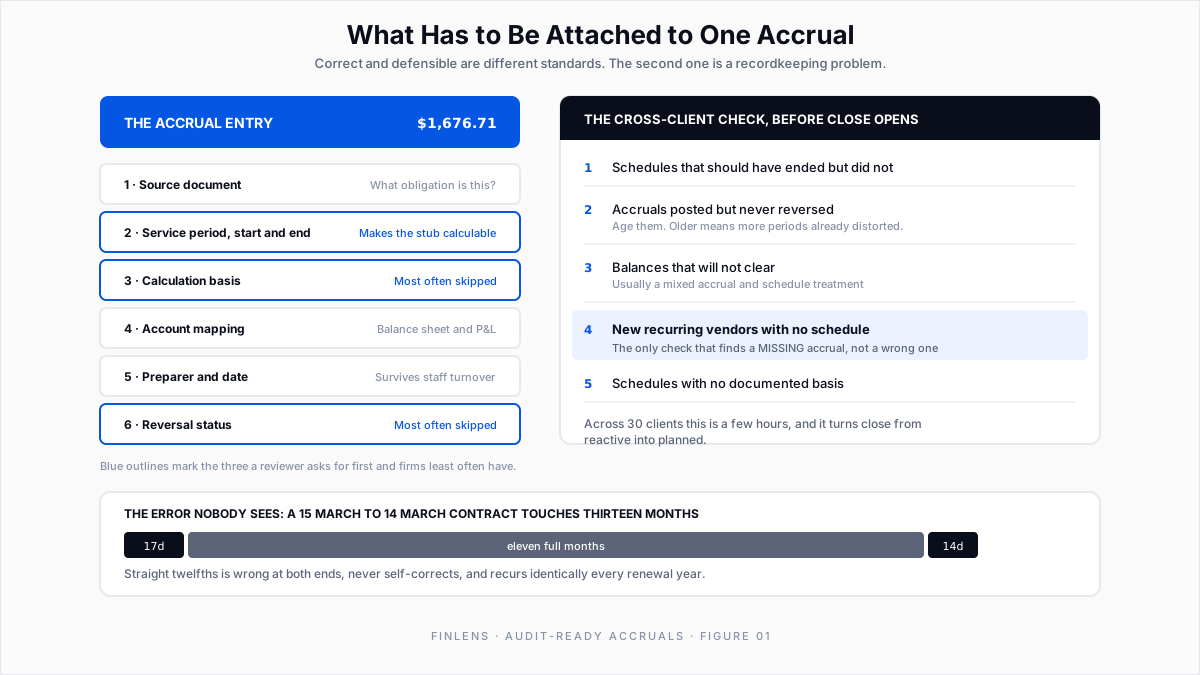
Every accrual on the schedule should carry six things. Not in a binder somewhere, attached to the entry. Intuit's create journal entries article covers the posting mechanics; the six elements below are what the posting does not capture.
The two that get skipped most often are calculation basis and reversal status.
Calculation basis matters because an accrual is usually an estimate, and an estimate is only defensible if the method is stated. "Two weeks of a 9,000 monthly contract, pro-rated by days" is defensible. "4,500" is a number that a reviewer has to either accept on faith or re-derive.
Reversal status matters because an unreversed accrual is the single most common cause of a duplicated expense, and it is invisible in the month it happens. The expense looks slightly high.
Here tooling changes the work, not the speed.
Finlens generates accrual, prepaid, deferred revenue and amortization schedules automatically with the journal entries attached. The schedule and the entry are one object. No spreadsheet to tie back.
Every accrual is tracked and timestamped as it is created, so the trail exists by default instead of being assembled when somebody asks for it.
How do you calculate accrual periods for a mid-month contract?
Most accrual errors are right amounts in the wrong period. They repeat every month until someone finds them.
A twelve-month service contract running 15 March to 14 March is the standard case. It touches thirteen calendar months. March gets seventeen days, the following March gets fourteen, and the ten months between get full months.
Three ways firms get this wrong:
Straight twelfths regardless of start date. Simple and wrong at both ends. The error is small per month and never self-corrects, and it recurs identically every year the contract renews.
Starting in the wrong month. Anchoring to the invoice date rather than the service start. A contract invoiced 28 February for a service beginning 15 March starts accruing two weeks early.
The schedule has to carry start and end dates explicitly, not just a period count, because the dates are what make the stub calculable.
A Finlens accrual entry records start date, end date and both account categories. It expands into a dated schedule showing recognition and remaining balance per period. The stub arithmetic comes from the contract terms.
Should accruals auto-reverse or run on a schedule?
Accruals exist to be reversed. The discipline around reversal is where otherwise good close processes quietly fail, and QBO does not help.
There is no auto-reversing journal entry in QuickBooks Online. In this thread the only method an Intuit team member offers is manual. Open the saved entry, click Reverse, and QBO creates an "R" entry dated the first of the next month.
Someone has to remember to do that, per accrual, per client, every month. Intuit's reverse or delete a journal entry article documents the button.
Two patterns, and firms should pick one per account and never mix them.
Auto-reversing accrual. Post the accrual in month one, reverse it on day one of month two, and record the actual invoice when it arrives. Clean, self-correcting, and the preferred pattern for estimated obligations. The risk is forgetting the reversal, which doubles the expense.
Schedule-driven recognition. The obligation is known and spread across known periods. Each period recognizes its portion and the balance declines. Correct for prepaid expenses and contracted services. The risk is the schedule continuing after the contract ends.
QBO has no schedule object to hold this. Asked directly whether the product has an amortization schedule, Intuit's own answer is that amortization will have to be done through manual transactions. The background on the treatment itself sits in prepaid expenses and amortization.
A recurring template is the usual workaround. Entries it has already posted are found through the Journal or Transaction Detail by Account report filtered to Journal Entry, with the templates themselves under Gear then Recurring Transactions, per this thread. A template fires on a date. It does not know the contract ended.
Mixing them is the real hazard. An accrual plus a schedule for the same obligation produces a double expense. It nets correctly on neither statement. It usually surfaces as a balance that will not clear.
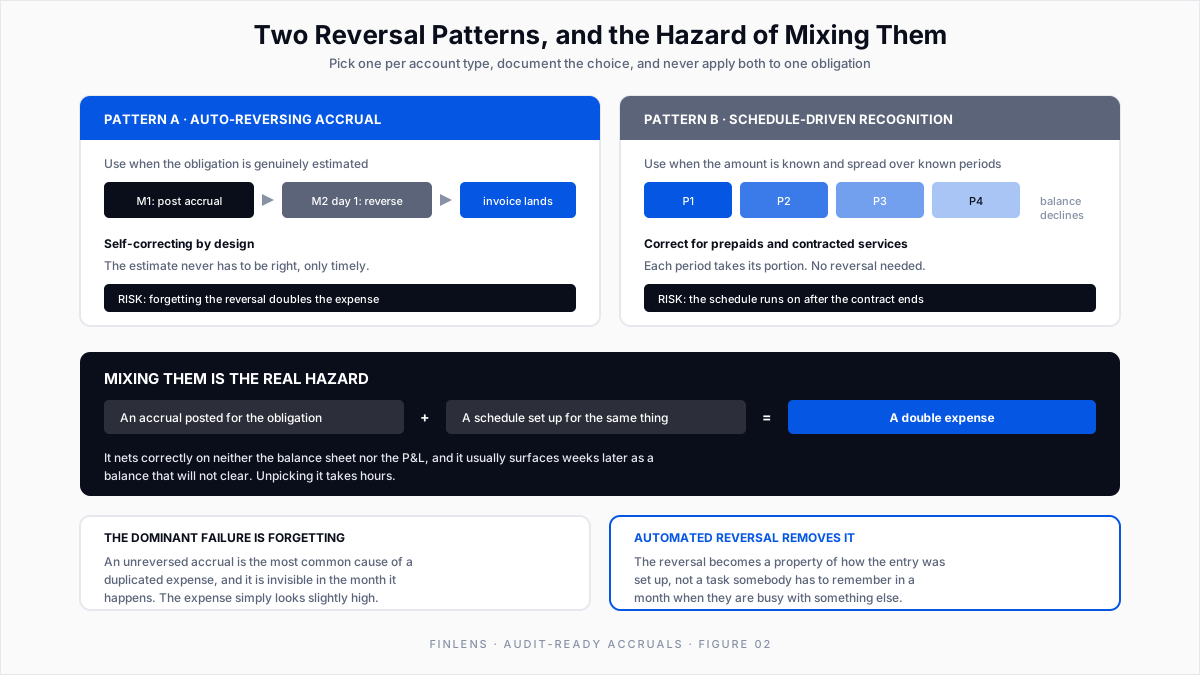
Automated reversal removes the forgetting problem.
Finlens calculates, posts and reverses accruals across every account. The reversal is set up once, not remembered monthly. Finlens puts the time saving at up to 80%, though the compliance benefit is what shows up in review.
How do you check accrual schedules across clients before close?
This is the part that distinguishes a firm process from a file process, and it is where the three questions this guide exists to answer live.
Checking accrual schedules during fieldwork or close is too late. The useful check runs before close opens, across every client at once, and it is a short list.
1. Schedules that should have ended but did not. Any schedule with an end date in the past still producing entries. This is the most common error and the easiest to find.
2. Accruals posted but never reversed. Any accrual from a prior period with no matching reversal. Age them, because the older the unreversed accrual, the more periods it has already distorted.
3. Balances that will not clear. Accrued liability accounts with a residual that does not tie to a known open obligation. Usually the signature of a mixed pattern.
4. New recurring vendors with no schedule. A vendor appearing monthly with a contract-shaped amount and no accrual or prepaid treatment. The other checks find wrong accruals. Only this one finds missing ones.
5. Schedules with no documented basis. Entries where the calculation method is absent. Cheap to fix at creation, expensive to reconstruct later.
The reconstruction route is worse than firms expect. QBO cannot restore a deleted transaction. An Intuit team member states in this thread that the only route is pulling details from the audit log and re-entering by hand.
The audit log itself retains two years, documented in Intuit's audit log article. An accrual question raised in year three has no trail to pull.
Run across thirty clients, this is a few hours and it converts close from reactive to planned. The firm learns on day minus three which files need an accrual conversation.
The practical obstacle is that in a QBO-only stack this check means opening thirty files and reading thirty schedules, which does not survive contact with a busy month.
Finlens holds every client's schedules in one place and syncs the entries back into QuickBooks. The cross-client check becomes a review, not an expedition. The same sequencing logic applies to multi-client reconciliation.
Audit-ready accrual schedule example: annual software contract
A client with a 15 March to 14 March annual software contract, $36,000, invoiced annually in advance.
The facts. $36,000 over 365 days is $98.63 per day. March has 17 covered days, so $1,676.71. April through February are full months at their actual day counts. The following March takes 14 days, $1,380.82.
Month one entry, March.
Dr Prepaid expenses 36,000.00
Cr Cash 36,000.00
Dr Software expense 1,676.71
Cr Prepaid expenses 1,676.71What has to be attached. The invoice, the contract term 15 Mar to 14 Mar, the basis "daily pro-rata, $36,000 / 365 days", the account mapping, the preparer and date, and a schedule showing the remaining balance at each period end running to zero on 14 March.
What a reviewer tests. That the balance at any month end equals the undelivered days times the daily rate.
At 30 June, 108 days have elapsed (17 + 30 + 31 + 30). That is 108 times $98.63, or 10,652.05recognized,leavingabalanceof**25,347.95**. A balance that does not tie to a day count is the signal that the schedule was built on twelfths.
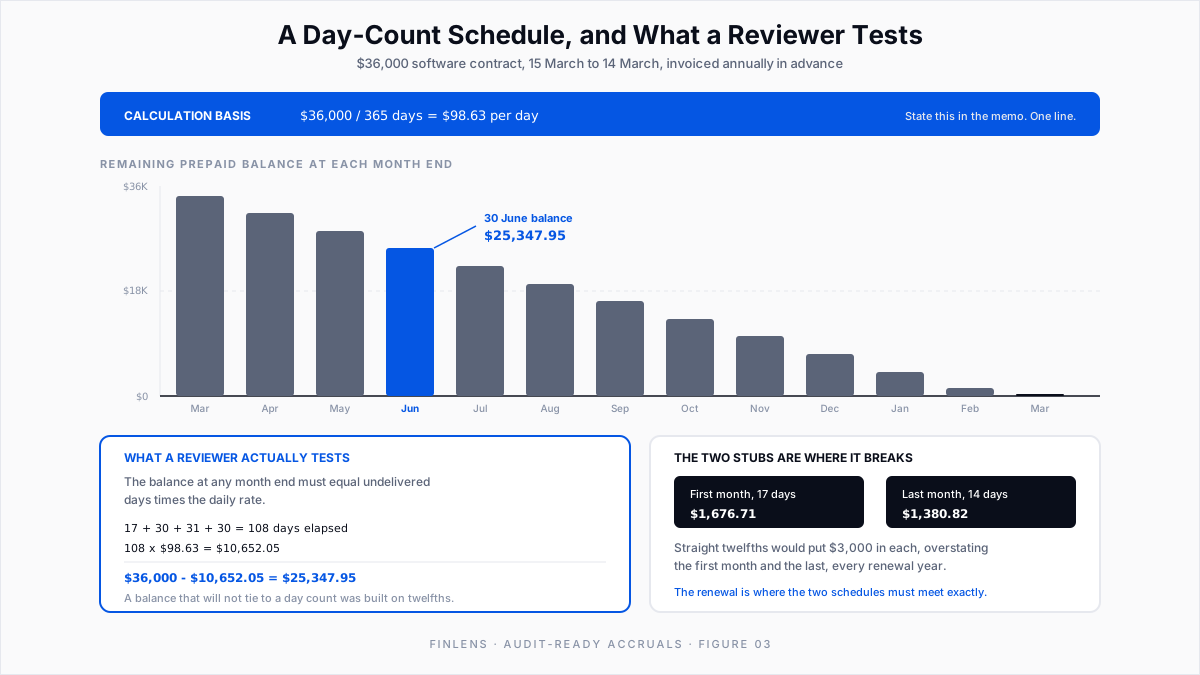
The thing that goes wrong. The contract renews on 15 March the following year at a new price, so the old schedule ends and a new one has to start, meeting exactly.
Firms miss this because the renewal looks like the same vendor doing the same thing. The cross-client schedule check is what catches it.
Do deferred revenue schedules follow the same rules?
Everything above is written for expense accruals, but the schedule object is identical on the revenue side and the review standard is higher, because revenue attracts more attention than any expense line.
A deferred revenue schedule carries the same six elements: the source contract, the service period, the recognition basis, the account mapping, the preparer, and the running balance. The mechanics are covered in the deferred revenue guide.
Run one discipline across accruals, prepaids, deferred revenue and amortization and the review becomes one process instead of four. Finlens generates all four schedule types through one mechanism, so the cross-client check is one sweep instead of four.
Accrual documentation standards for accounting firms
QBO's audit log stops at two years and holds actions, not reasoning. Finlens keeps the preparation, the review and any later change against the entry itself, so the basis is recoverable past the point where the audit log has rolled off.
Common accrual schedule mistakes to avoid
Straight twelfths on a mid-month contract. Systematic, recurring, and invisible on a P&L review.
Unreversed accruals. Doubles an expense in a way that looks like ordinary variance.
Mixing accrual and schedule treatment on one obligation. Produces a balance that will not clear and takes hours to unpick.
Amounts with no stated basis. Defensible numbers rendered indefensible by missing one line of memo.
Schedules without end dates. They outlive the contract and nobody notices until the balance is wrong.
Conclusion
Audit-readiness is not a quality you add to an accrual schedule at the end. It is a property of how each entry was created: with its period, its basis, its mapping, its preparer and its reversal all recorded at the moment the judgment was made, when they cost nothing.
The firm-level version is a short cross-client check run before close opens, looking for schedules that should have ended, accruals that never reversed, balances that will not clear, and recurring vendors with no treatment at all. Four questions, a few hours, and the difference between a planned close and a reactive one.
Finlens builds the schedules and their journal entries together, posts and reverses accruals automatically across every account, timestamps each one as it is created, and keeps every client's schedules in a single view that syncs back into QuickBooks Online. The evidence chain becomes a by-product of the work.
FAQ: audit-ready accrual schedules
Can QuickBooks produce an audit-ready accrual schedule on its own?
It holds the entries, and recurring transactions can post repeating accruals. What it does not do is maintain the schedule as an object with a start, an end, a basis and a declining balance, or show you that view across a client base. That gap is why firms end up with spreadsheets, and why a schedule layer above QBO exists.
Who should review accrual schedules?
Someone other than the preparer, at a defined point before close. The cross-client check described above is a reviewer task, and running it before close is what makes it cheap.

