
The QuickBooks guide to categorizing transactions and fixing Undeposited Funds (2026)


This is a working reference for founders and controllers who categorize transactions in QuickBooks Online and need the Undeposited Funds account to stop growing. Every technique is sourced to Intuit's own documentation, IRS guidance on the cash and accrual methods, or a real thread on the QuickBooks Community. Numbers cited from user reports are flagged as anecdotal rather than benchmarks.
The problem this guide addresses
Undeposited Funds is the single most common source of overstated income in QuickBooks Online. It is not a bug. It is a holding account doing exactly what it was designed to do, sitting between the moment a customer payment is recorded and the moment that payment is grouped into a bank deposit.
When the second half of that pair never happens, the balance accumulates quietly for months.
Failure mode one: the duplicate that never reconciled. A wine shop owner running Square as a point of sale, with transactions auto-importing into QBO, found the Undeposited Funds account off by roughly $1,600. The largest single cause was a duplicate sales receipt for $1,392.92 with a blank checkmark column in the register.
The month it landed in had already been reconciled. The resolution, confirmed by an Intuit Community Manager on thread 59746, was that the duplicate could be deleted safely precisely because it had never been swept into a bank deposit. It never picked up an R, so it was never part of that reconciliation.
The blank checkmark column is the diagnostic.
Failure mode two: add where match belonged. A designer posting on thread 66818 reported income showing at double the real figure, with the profit and loss already set to cash basis. The thread ran to 64 replies.
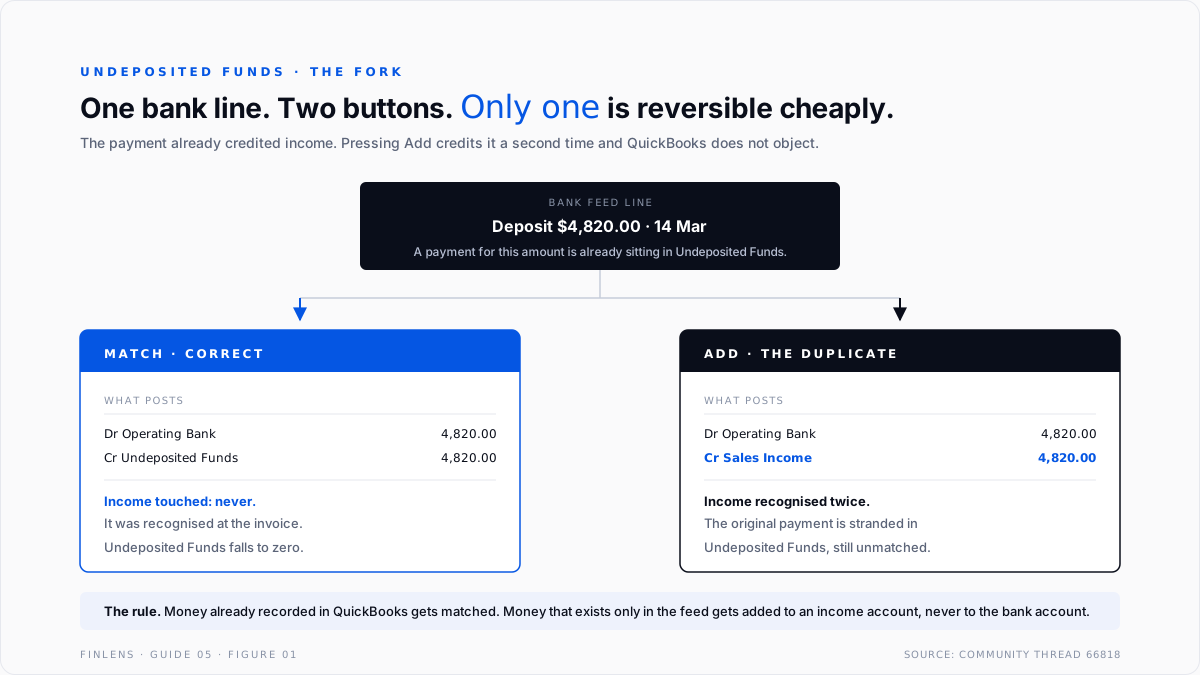
The mechanism is always the same: the invoice payment was recorded, it landed in Undeposited Funds, and then the matching bank line was pressed Add instead of Match. QuickBooks obliged and wrote a second income entry.
Intuit's own documentation on managing the Undeposited Funds account describes the intended flow, and the intended flow has no Add step in it.
Both failures produce the same financial statement symptom. Revenue is too high, Undeposited Funds is too high, and the bank reconciliation still ties, because the bank side was never wrong.
The Undeposited Funds identity
Every misstatement in this guide resolves to a violation of one equation.
Undeposited Funds balance
= sum of all recorded customer payments and sales receipts
that have NOT yet been included in a Bank Deposit
Stated operationally: the Undeposited Funds balance at any date must equal the money a business has taken in but not yet seen land in the bank as a grouped deposit. For a business whose processor settles daily, that number should be small and should be roughly one settlement cycle of revenue.
For a business that deposits weekly, it should be roughly one week.
If the balance is larger than one settlement cycle and is not falling, one of three things is true. Payments were recorded twice. Deposits were entered directly against an income account rather than built from the Undeposited Funds queue. Or historical entries are stranded because the real deposit was recorded through a different path.
The second identity governs the bank feed itself.
Every bank feed line resolves to exactly one of:
MATCH , a record already exists in QuickBooks
ADD , no record exists; create one against an income or expense account
EXCLUDE , not a company transaction at all
There is no fourth option. Most categorization damage is an Add used where Match was correct.
The account setup
Six chart of accounts entries carry the workflow. Getting these right removes most of the categorization ambiguity before it starts.
Merchant Clearing matters for anyone running Stripe, Square, or a similar processor. The processor deposits net, but the customer paid gross. Recording the net deposit against income understates both revenue and expense. The mechanics of that split are covered in the Stripe to QuickBooks guide.
Ask My Accountant should be a real account with a real owner, not a dumping ground. Its balance is a work queue. The month-end close guide treats a non-zero balance in it as a close blocker.
The three paths money takes into the ledger
QuickBooks has exactly three entry paths for incoming money, and mixing them is what creates the duplicates.
Path one, the receivable path. An invoice is created, which debits Accounts Receivable and credits income. A payment is received against that invoice, which credits Accounts Receivable and debits Undeposited Funds. A bank deposit groups one or more of those payments, which credits Undeposited Funds and debits the bank. Income was recognized once, at invoice.
Path two, the point-of-sale path. A sales receipt is created, which credits income and debits Undeposited Funds directly. No receivable is ever raised. The deposit step is identical to path one. Income was recognized once, at receipt.
Path three, the feed-only path. Money arrives that was never recorded as an invoice or a receipt. The bank feed line is pressed Add and categorized to an income account. Income is recognized once, at the feed.
The duplicate is created when a business runs path one or two and then treats the arriving bank line as path three. The payment already credited income. The Add credits it again.
The rule that prevents it: for money already recorded in QuickBooks, match. For money that exists only in the feed, add it to an income account, never to the bank account. Categorizing a deposit line to the bank account itself produces an offsetting entry rather than a clean deposit.
Bank rules and where they stop
Bank rules are the main lever for reducing categorization time, and their limits are poorly understood.
Intuit's documentation on setting up bank rules is explicit that rules apply to transactions sitting on the For Review tab only. They do not reach transactions already accepted into the register, and they do not touch manually entered transactions. A user on this thread asked how to apply newly written rules retroactively to the prior year.
The answer is that rules are forward-looking by design, and historical recategorization is a separate reclassification job.
Three practical constraints follow.
Rules match on text as the bank sends it. Description-based conditions depend on the bank's exact wording, including spelling and capitalization. A bank that changes its merchant descriptor string silently breaks the rule.
Auto-suggestions are not rules. Users on this thread reported QBO's own suggestions landing on the wrong account for the large majority of downloaded credit card transactions, with card charges auto-assigned to a different card account. A written rule overrides the suggestion. An unreviewed suggestion does not.
Rules cannot resolve a match-versus-add decision. A rule assigns a category. It cannot know whether a payment record already exists. That judgment stays manual, which is the reason the duplicate class of error survives heavy rule automation.
The failure-mode catalog
Six diagnoses cover most of what an accountant finds in a damaged file.
1. Undeposited Funds grows month over month. Symptom: balance rises and never falls. Cause: deposits are being entered directly into the bank register instead of built from the Undeposited Funds queue. Fix: delete the direct deposit entries, then rebuild them through Bank Deposit by selecting the queued payments, so the total ties to the bank line.
A user who had entered all deposits directly into the bank had to unwind an entire history this way.
2. Income is exactly double. Symptom: revenue is 2x, profit and loss is wrong on both cash and accrual basis. Cause: Add used where Match belonged. Fix: in the bank register, find the added deposit, undo it from the Reviewed tab, then re-process the feed line as a match against the existing deposit.
3. A stranded entry with a blank checkmark. Symptom: Undeposited Funds shows a balance on the balance sheet that does not appear in the Bank Deposit window. Cause: a duplicate or orphaned payment that never joined a deposit. Fix: open the Undeposited Funds register, confirm the checkmark column is blank rather than R or C, and delete.
This is the case Intuit resolved on thread 59746 even though the period was closed. A related thread documents the same balance-sheet-versus-deposit-window mismatch.
4. Payment applied to the wrong invoice. Symptom: Accounts Receivable aging shows an old open invoice alongside an unapplied credit for the same customer. Cause: the payment was received but applied to a different invoice or left unapplied. Fix: open the payment and re-apply. This belongs to the receivables workflow covered in the accounts receivable guide.
5. Processor fees netted into revenue. Symptom: revenue is understated by roughly the processor fee rate, and there is no merchant fee expense. Cause: the net settlement was recorded as income. Fix: record gross revenue, route the deposit through Merchant Clearing, and book the fee to Merchant Fees.
6. Transfers categorized as income. Symptom: revenue includes movements between the business's own accounts. Cause: an inter-account transfer pressed Add to an income category. Fix: recategorize as a transfer so both sides net to zero.
On a cash-basis book this directly overstates taxable receipts, and the IRS treatment of gross receipts under the cash method is set out in Publication 538.
Worked example
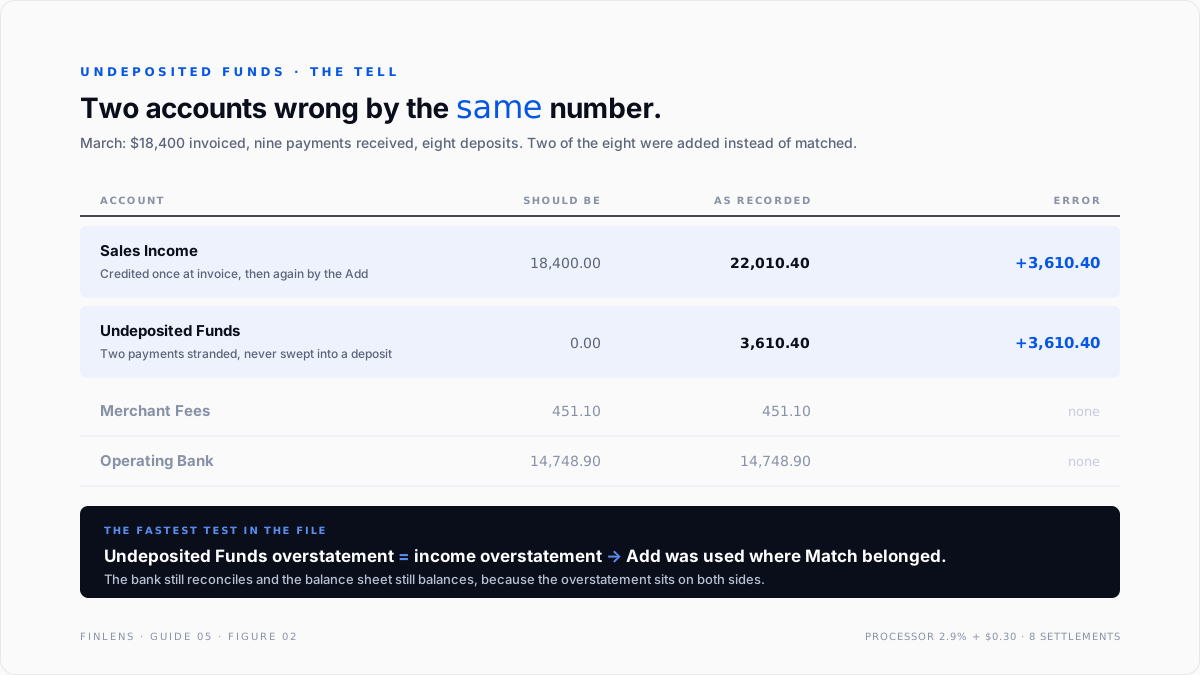
A services business invoices $18,400 in March across eleven invoices. Nine are paid inside the month. The processor settles twice a week and charges 2.9% plus $0.30 per transaction.
What should happen. Nine payments are received and land in Undeposited Funds, totalling $15,200. Eight bank deposits are built from that queue across the month, clearing $14,748.90 net after $451.10 of processor fees. Undeposited Funds ends March at $0 if the final settlement cleared before month end, or at one settlement cycle if it did not.
Income for March is $18,400 on accrual basis. Merchant Fees expense is $451.10.
What goes wrong. Six of the eight bank deposit lines are pressed Match correctly. Two are pressed Add and categorized to Sales Income at the net settled amount, $3,610.40 combined. The result:
The bank reconciles. The balance sheet is out of balance by nothing, because the overstatement sits on both sides. Only two accounts are wrong, and they are wrong by identical amounts. That equality is the fastest test in the file: when Undeposited Funds and the income overstatement match to the cent, the cause is Add where Match belonged.
Where in-QBO categorization stops scaling
Three thresholds mark the point where the native workflow stops absorbing volume.
Threshold one: roughly 500 feed lines per month per entity. Below this, a careful reviewer can hold the match-versus-add judgment in working memory. Above it, review becomes batch acceptance, and batch acceptance is where duplicates enter. This figure is drawn from practitioner reports rather than published benchmarks and should be treated as anecdotal.
Threshold two: more than one settlement processor. One processor produces one reconcilable settlement pattern. Two or more produce overlapping deposits of similar size on similar dates, and the Match suggestion starts proposing the wrong counterpart. The Undeposited Funds queue stops being readable by eye.
Threshold three: more than about 20 client files. For a firm, the constraint is not any single file but the absence of a cross-file exception view. QBO surfaces the Undeposited Funds balance one file at a time. Catching the file where the balance quietly tripled requires opening all of them.
The Finlens approach
Finlens sits on top of QuickBooks rather than replacing it, and treats categorization as a reviewable proposal rather than a silent write.
1. Duplicate-risk detection before the write. Every incoming feed line is checked against existing payment, sales receipt, and deposit records before a category is proposed. Where a probable counterpart exists, the line is surfaced as a match candidate with the counterpart attached, so the Add path is not offered by default on money already recorded.
2. Undeposited Funds ageing. The balance is decomposed by entry age against the file's own observed settlement cycle. An entry older than two cycles is flagged as stranded, with the reconciliation mark shown, which is the single field that determines whether it can be deleted safely.
3. Cross-file exception view for firms. Undeposited Funds balance, ageing, and month-over-month movement are reported across every connected client file in one table, so the outlier file surfaces without opening each one.
Four supporting capabilities sit around those three.
- Confidence scoring on every proposed category, with a review threshold the firm sets.
- Rule performance monitoring that flags a rule whose match rate collapses after a bank changes its descriptor text.
- Gross-and-fee decomposition for processor settlements, so revenue is never recorded net.
- A period-end audit that reports any balance remaining in Ask My Accountant.
Verification checklist
Run these nine lines before closing any period.
- Undeposited Funds balance equals no more than one settlement cycle of revenue.
- No entry in the Undeposited Funds register is older than two settlement cycles.
- Every Undeposited Funds entry older than the current cycle has its reconciliation mark inspected, blank versus C versus R.
- Bank Deposit window total agrees to the Undeposited Funds balance on the balance sheet.
- Revenue for the period agrees to the sum of invoices plus sales receipts, not to bank deposits.
- Merchant Fees expense is non-zero for any period with processor revenue.
- No transfer between company accounts appears in an income or expense category.
- Ask My Accountant is zero.
- The For Review tab is empty, and the Excluded tab has been read rather than ignored.
FAQ
Can Undeposited Funds be deleted or turned off?
No. It is a system account in QuickBooks Online and cannot be removed. It can be bypassed by depositing payments directly to the bank account on each transaction, which is appropriate only when deposits are never grouped.
Is it safe to delete an entry from Undeposited Funds in a closed period?
If the checkmark column is blank, the entry was never part of a reconciliation, and deleting it does not disturb the reconciled balance. An entry marked R is part of a reconciliation and must not be deleted without reopening it.
Why does income double even on cash basis?
Cash basis changes when income is recognized, not how many times. A payment plus a separately added deposit are two cash events in the ledger, so both appear on a cash-basis profit and loss.
Do bank rules fix historical miscategorization?
No. Rules act on the For Review tab only. Prior-period corrections require reclassification, either through the register or through the accountant tools reclassify utility.
Should processor fees be netted against revenue?
No. Gross revenue and fee expense are separate. Netting understates both and makes gross margin unreadable. It also breaks the tie between recorded revenue and the invoices that generated it.
What is the fastest test for the duplicate-income failure?
Compare the Undeposited Funds overstatement to the income overstatement. When they are equal, the cause is almost always Add used where Match belonged.

